
Restaurant Purchase Approvals: Control Spend Without Slowing the Kitchen
A restaurant purchasing approval workflow decides which orders go straight to the supplier, which a purchaser checks, and which need a manager’s sign-off. In Restaurant AI Manager you set rules by order value, venue, supplier and category, give each venue a weekly budget that counts what’s committed as well as what’s arrived, and every order waits in one purchaser queue — suppliers see nothing until someone sends it.
- Approval rules by value, venue, supplier and category — first match wins
- Weekly budgets per venue, with committed and projected spend
- One purchaser queue: approve, edit, merge, split, send back or send
- Orders to suppliers off the preferred list flagged for a check
Built on Open Pantry ordering — free, and used by 5,000+ venues
Recommended by:




Head office sees the big order when the invoice lands
Budgets get checked at month end, after the money is spent
A new chef orders from their old supplier at their old supplier’s prices
Every order needs the owner’s OK, so the owner becomes the bottleneck
Approvals happen by text message, with no record of who said yes
An order goes out the moment someone presses send, with no second look
Nobody knows a venue is over budget until Thursday’s deliveries have arrived
From a chef’s order to a supplier, with the right eyes on it
Set the rules once
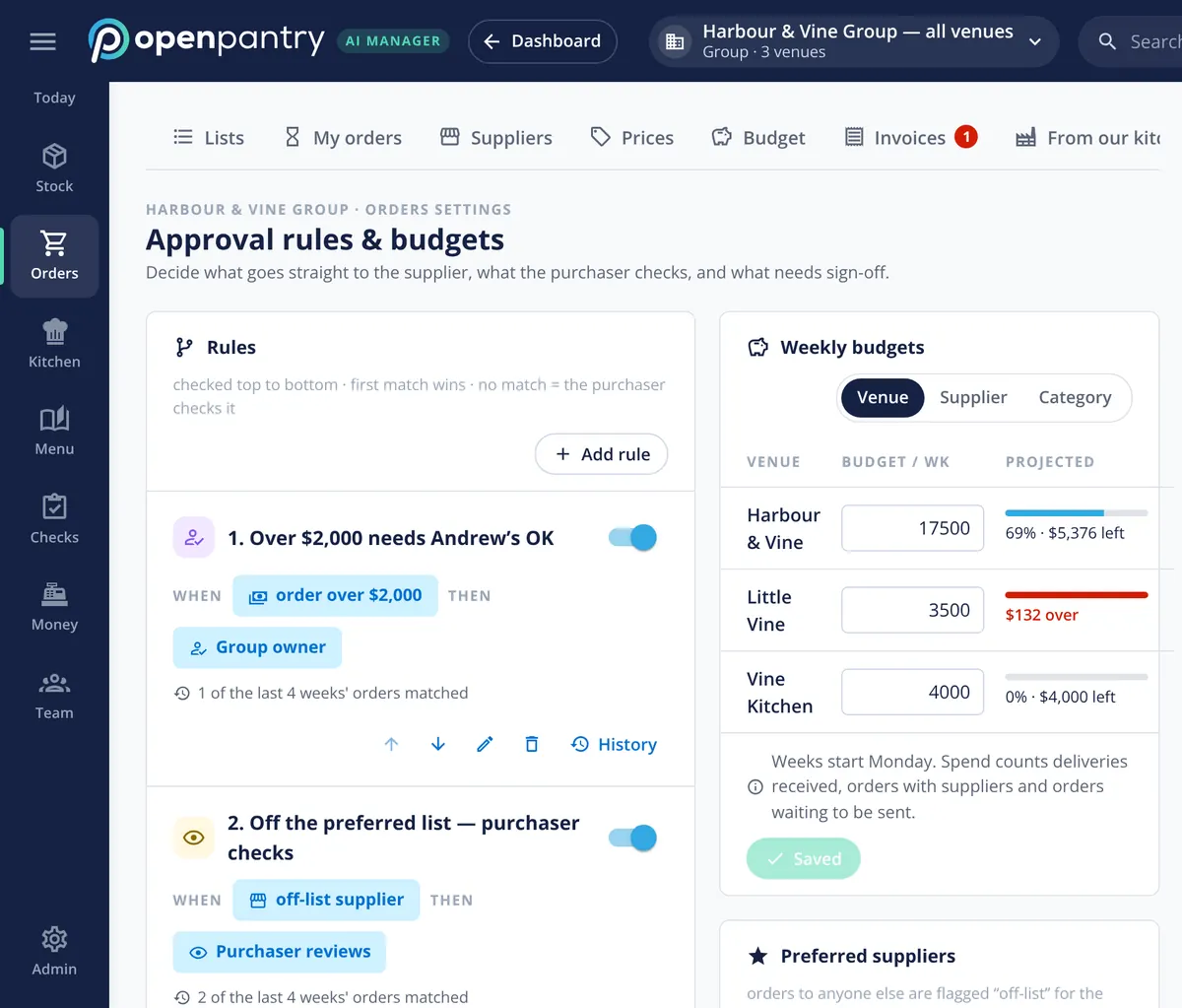
Rules are checked top to bottom and the first match wins: small orders from preferred suppliers can go straight through, off-list suppliers go to the purchaser, and big orders need a named person’s OK. Anything no rule covers goes to the purchaser.
Give each venue a weekly budget
Budgets can be set by venue, supplier or category. Spend counts deliveries received, orders already with suppliers and orders waiting to be sent, so the figure reflects what’s coming, not just what’s landed.
Orders wait in one queue
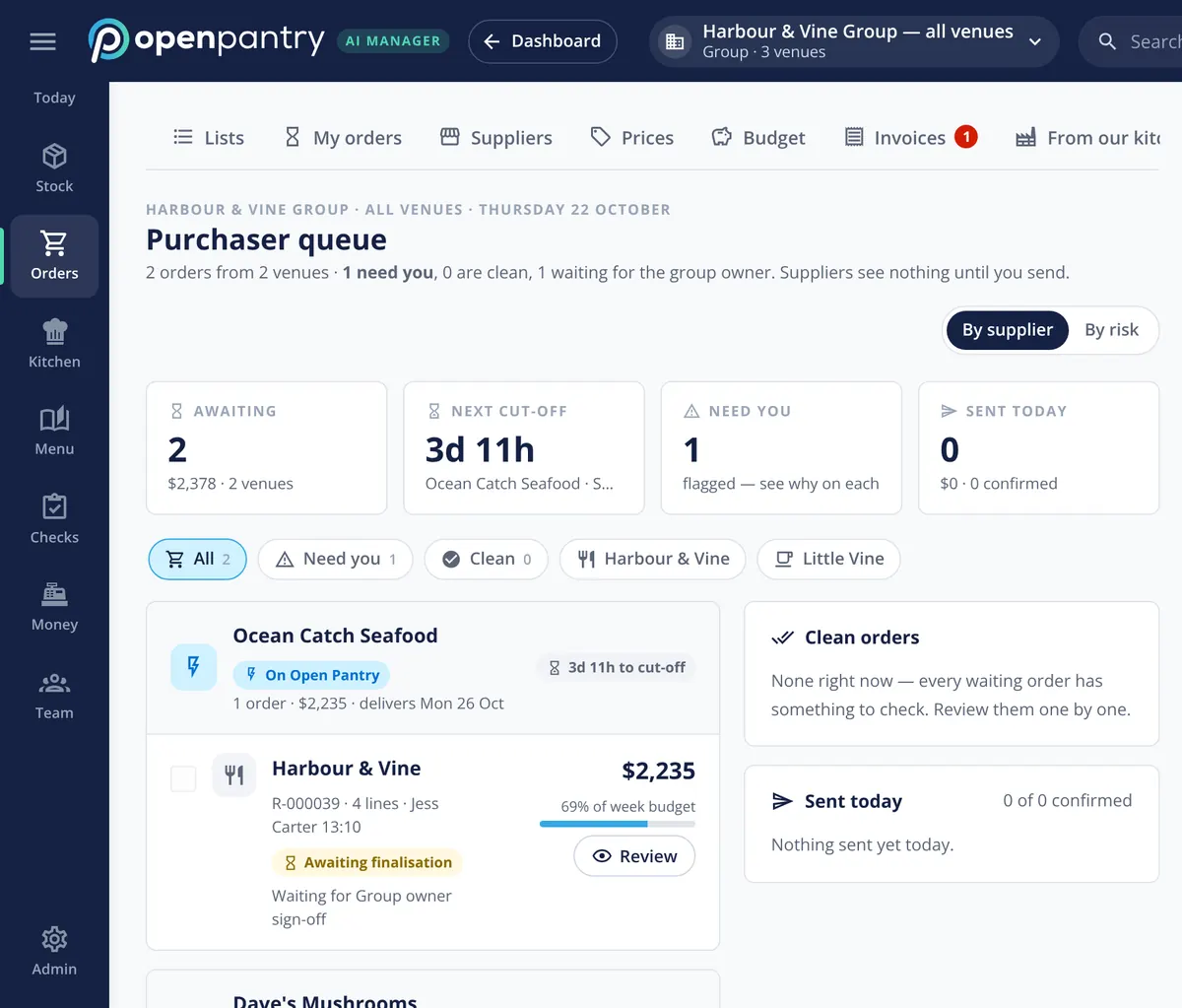
Orders from every venue — typed by a chef or drafted from the forecast — wait in the purchaser queue with the next cut-off, the share of the venue’s budget and anything flagged. Suppliers see nothing yet.
The purchaser sends
Approve, edit, merge, split, reject or send back with a note, then send. Suppliers on Open Pantry get it in the app; anyone else gets it by email.
No sign-up — a demo restaurant group with a guide that shows you around
Rules that read the way you’d say them
Each rule is a plain sentence: “Over $2,000 needs Andrew’s OK”, “Off the preferred list — purchaser checks”. A rule can look at order value, venue, supplier and category, and can auto-approve, send for review or need several sign-offs in turn. Every rule shows how many recent orders it caught and keeps a history of changes, so you can see whether it’s doing its job.
- Rules by value, venue, supplier and category
- Auto-approve, review, or multi-step sign-off
- How many recent orders each rule matched, and its history
Budgets that count what’s coming
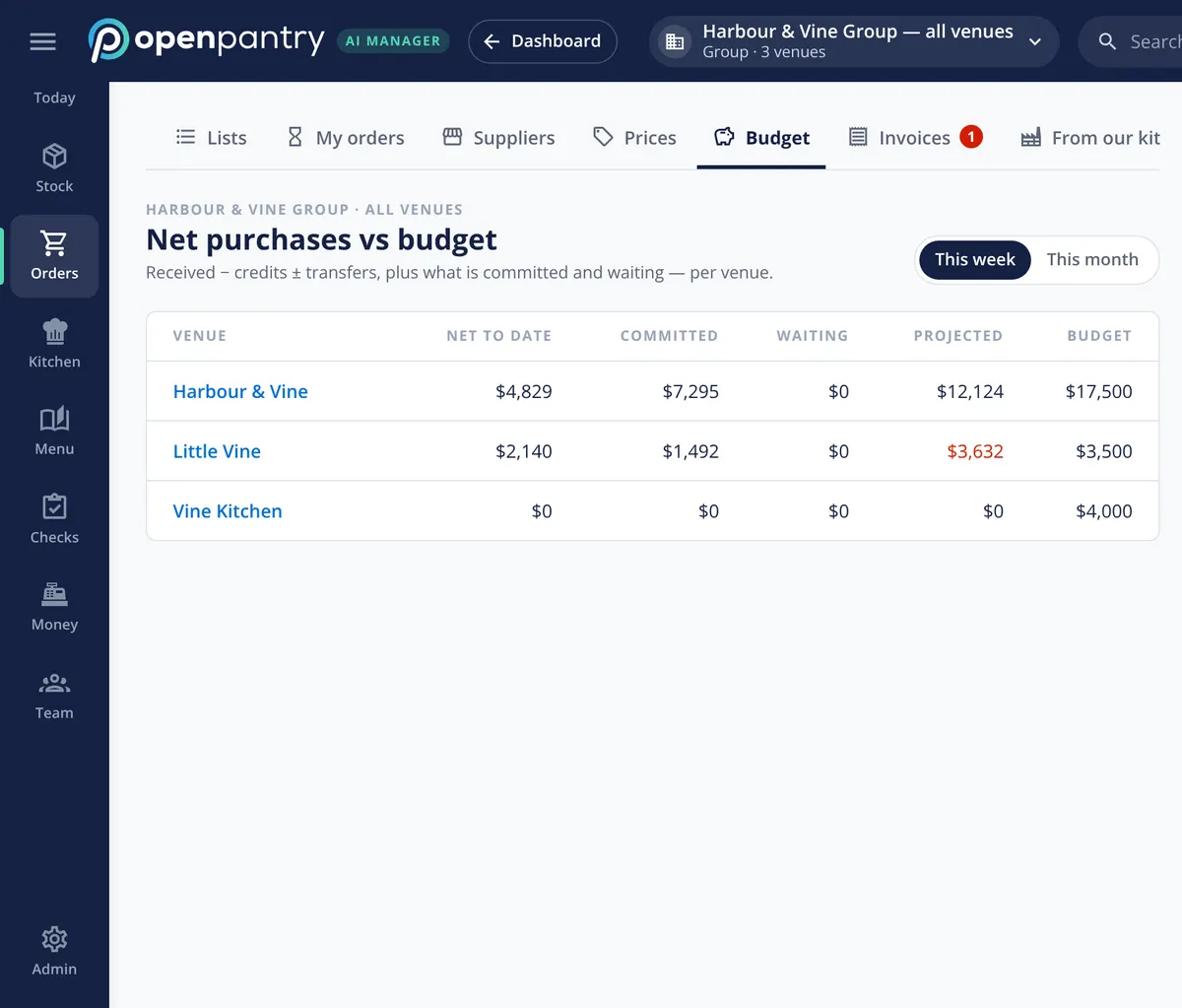
A budget that only counts paid invoices tells you you’re over after it’s too late. Net purchases per venue are deliveries received, less credits, plus or minus transfers — then what’s committed with suppliers and what’s waiting to be sent, giving a projected figure against budget for the week or the month. When a venue is heading over mid-week, it’s flagged while there’s still an order to change.
- Net to date, committed, waiting and projected against budget
- Credits and transfers between venues counted
- Mid-week warning when a venue is heading over
One queue for the purchaser
The purchaser sees every waiting order from every venue in one place, grouped by supplier or sorted by risk, with the next supplier cut-off counting down. Each order shows what share of its venue’s weekly budget it uses and why it’s waiting — flagged by a rule, or waiting for a named sign-off. Clean orders are kept apart from the ones that need a look, so the purchaser starts with what matters.
- Every venue’s orders, by supplier or by risk
- Next cut-off and budget share on each order
- Approve, edit, merge, split, reject, send back or send
Preferred suppliers and invoice limits
Keep a preferred supplier list, and any order to someone else is flagged off-list for the purchaser to check rather than going straight out. The same control carries through to invoices: approval limits let a venue manager approve bills up to a set amount, with finance above it. Each role sees only what it needs — a purchaser, a chef, finance and an area manager each get their own view.
- Off-list orders flagged and routed to the purchaser
- Invoice approval limits by role
- Role-based access across the group
What the approvals cover
Built by the team venues already order with
“Open Pantry has created exactly what the restaurant industry needs. Something very easy to use that doesn’t require any upkeep. Their menu costing feature is fantastic and simple enough that any chef or bar manager can use it. I think restaurants that are serious about growing their profit & managing their costs need to consider Open Pantry.”
Chefs Love Open Pantry

Thank you OPEN PANTRY, we used to have to use 6 apps to get access to ordering from our suppliers, the fact we can do it all in one has saved an incredible amount of time & effort! We love you!

We’ve been using Open Pantry for a few months now and it’s been an absolute lifesaver. We’re short staffed so being able to place all of our orders with all of our suppliers in the one spot is a massive help.

So glad this service exists. Has made it so easy for my manager & chefs to order & all payments are settled in one go. The recurring orders & pantry lists are amazing time savers!!
Why not just have the owner approve every order?
Because the owner becomes the reason the fish didn’t arrive. Approving everything treats a $90 bread order the same as a $4,000 wine order, so the important ones get the same quick glance as the rest. Rules let the routine orders through, send the unusual ones to a purchaser and keep the owner’s sign-off for the orders that need it — with the venue’s budget and committed spend on screen when they decide.
Restaurant purchase approvals — questions operators ask
How do I set up purchase approvals for a restaurant group?+
Can small orders go straight to the supplier without an approval?+
How do weekly purchasing budgets work for each restaurant venue?+
What happens when a venue is about to go over its purchasing budget?+
Can I stop chefs ordering from suppliers that aren’t on our list?+
Do suppliers see an order before it has been approved and sent?+
Can different staff have different approval limits for supplier invoices?+
Can I try the purchasing approval workflow before signing up?+
Works even better with
Multi-Venue Management
Every venue side by side, with settings that flow down from the group.
Explore →Demand Forecasting
Orders drafted from sales, bookings and functions, then sent to the queue.
Explore →Supplier Credit Requests
Shorts, swaps and price differences drafted as credit requests.
Explore →Restaurant Ordering Platform
Order from any supplier in one place, on any device.
Explore →Run the purchaser queue for a demo restaurant group
Open the demo as the operations manager of Harbour & Vine and approve this week’s orders — no sign-up.
AED 519.20/month per venue billed yearly (save 20%) · or AED 649 month to month, no contract · plus tax