
Multi-Venue Restaurant Management: Every Venue Side by Side, Every Morning
Multi-venue restaurant management software lets a restaurant group run several venues from one place without losing sight of any single one. Restaurant AI Manager sets the group up as group, region, venue and storage location, puts every venue side by side with a morning briefing, purchases against budget and stock moving between sites, and lets head office set recipes, rules and roles once while each venue changes only what it needs to.
- One briefing across the group, and one for each venue
- Purchases against each venue’s weekly budget, before the week is spent
- Stock moved between venues at cost, with anything short kept on the transfer
- Recipes, rules and roles set once at head office, overridden where a venue needs it
Built on Open Pantry ordering — free, and used by 5,000+ venues
Recommended by:




Three venues, three ways of doing things, and no one view
Each venue runs its own spreadsheets, so the group numbers are stitched together by hand
You find out a venue blew its purchasing budget after the week is over
Stock borrowed from the venue down the road is never costed back
A recipe change at head office reaches some kitchens and not others
Opening a new venue means setting everything up again from scratch
Everyone either sees all the money or none of it
Set the group up once, then run every venue from it
Lay the group out the way it runs
Group, region, venue and storage location. Settings made at the top flow down to every venue, and a venue can override the ones that are different for it. A new venue can be set up by copying an existing one.
Give each person the role they actually do
Owner, area manager, venue manager, head chef, bar manager, purchaser, receiver, stock counter, bookkeeper and more — 23 role templates. Chefs see food cost but not wages, and floor staff do not see prices.
Set the standards at head office
Recipes are written once and pushed to the venues, tested before they roll out. Preferred suppliers, approval rules and weekly budgets are set for the group or per venue.
Read every venue side by side each morning
The group view puts the venues next to each other — the briefing, purchases against budget, transfers and the close — and any figure drills down into the venue behind it.
No sign-up — a demo restaurant group with a guide that shows you around
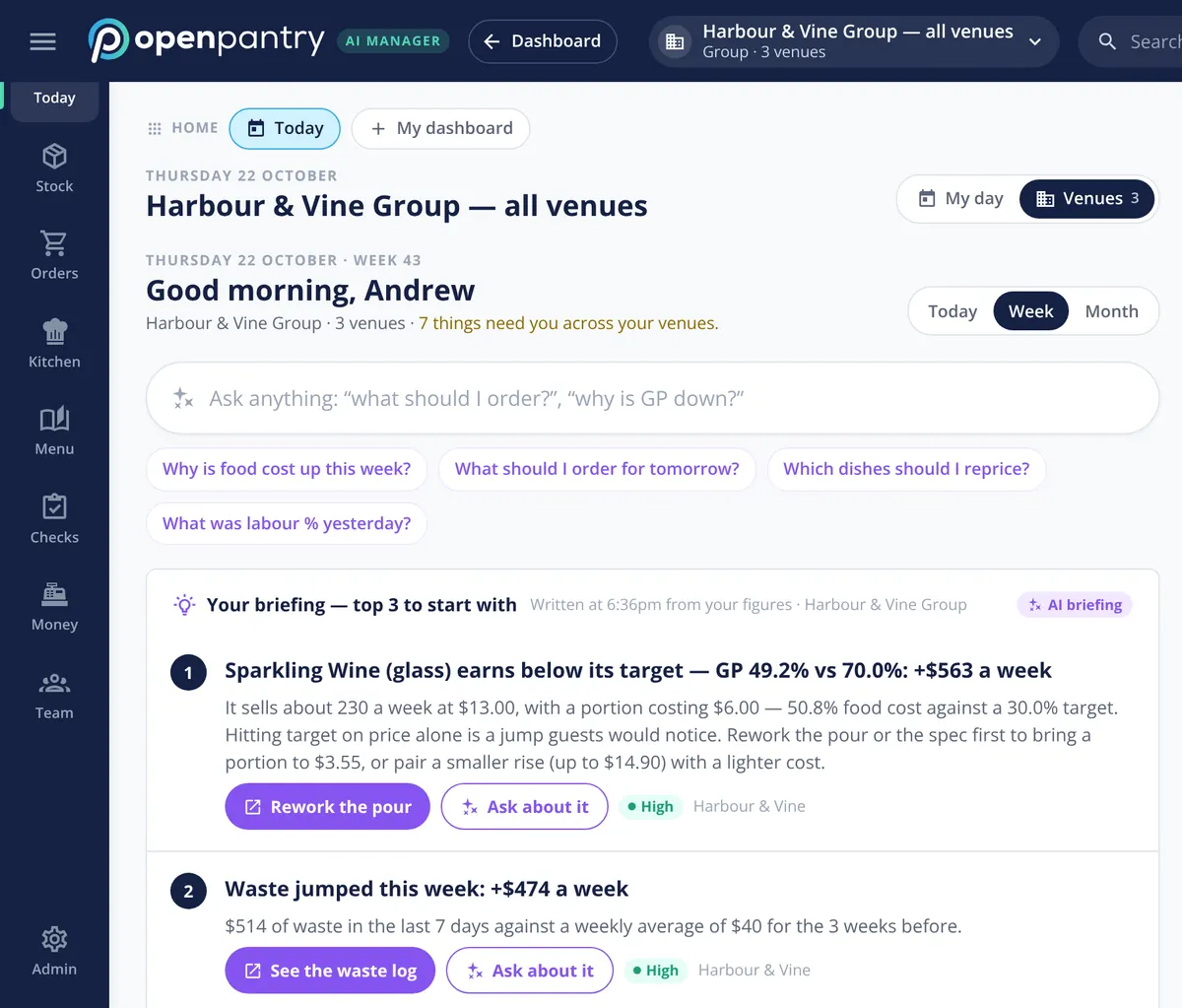
One briefing for the group, one for each venue
The group manager starts the day on one screen that covers every venue. The briefing ranks the few issues costing the group the most this week, each tagged with the venue it belongs to, and the Venues view puts the sites side by side. Switch to a single venue and you see exactly what its manager sees.
- Things needing you, counted across every venue
- Each issue tagged with its venue and a weekly dollar figure
- Switch between the group and any single venue
Purchases against budget, venue by venue
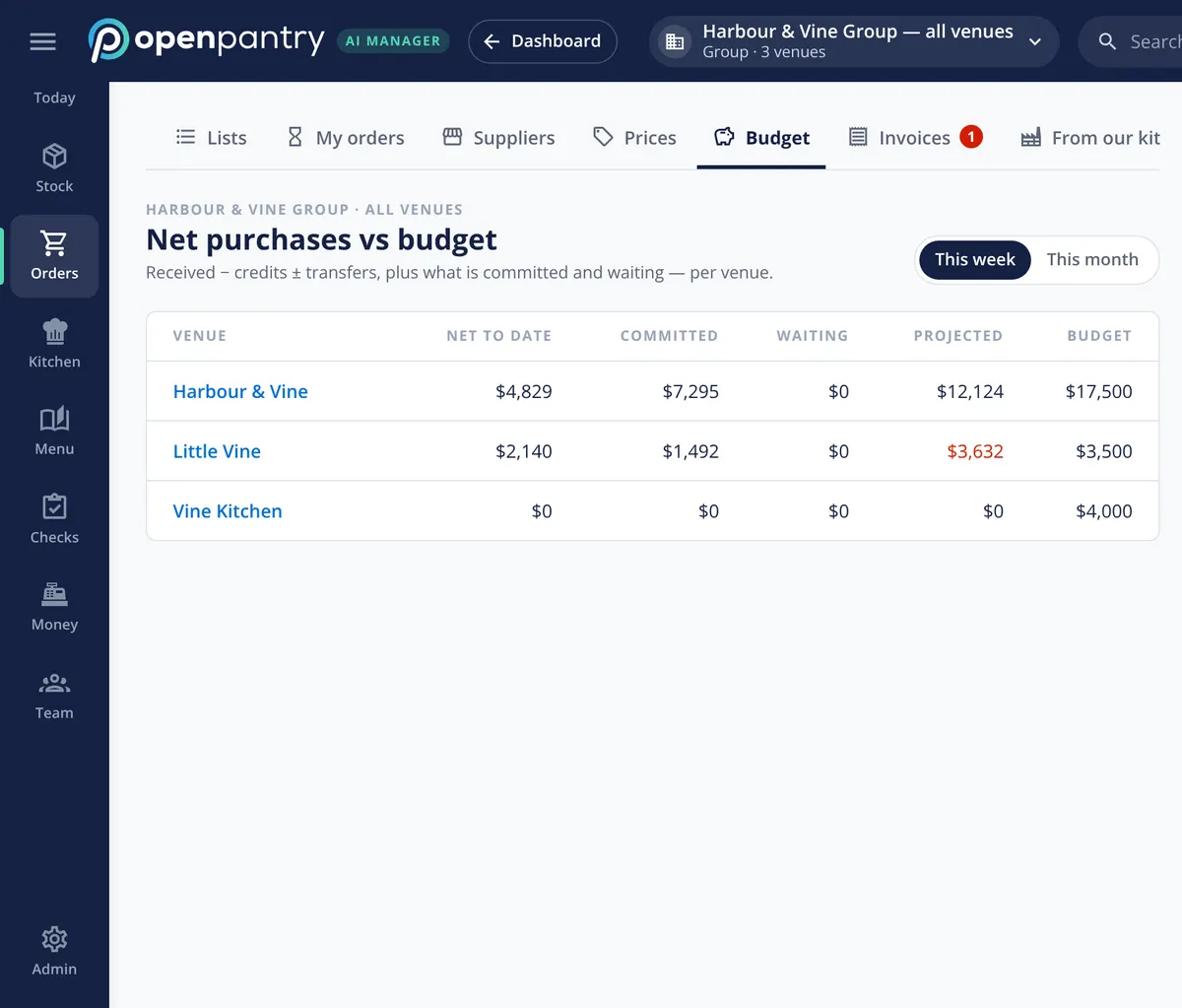
Each venue has a weekly budget, and the budget screen shows where it stands now: what has been received net of credits and transfers, what is committed on open orders, and what that projects to by the end of the week. A venue heading over budget shows in red while there is still time to act, and a mid-week warning goes to the people who can do something about it. Approval rules by value, venue, supplier and category sit behind it.
- Net to date, committed, waiting and projected against budget
- This week or this month, per venue
- Mid-week overspend warning, with approval rules behind it
Stock moves between venues at cost
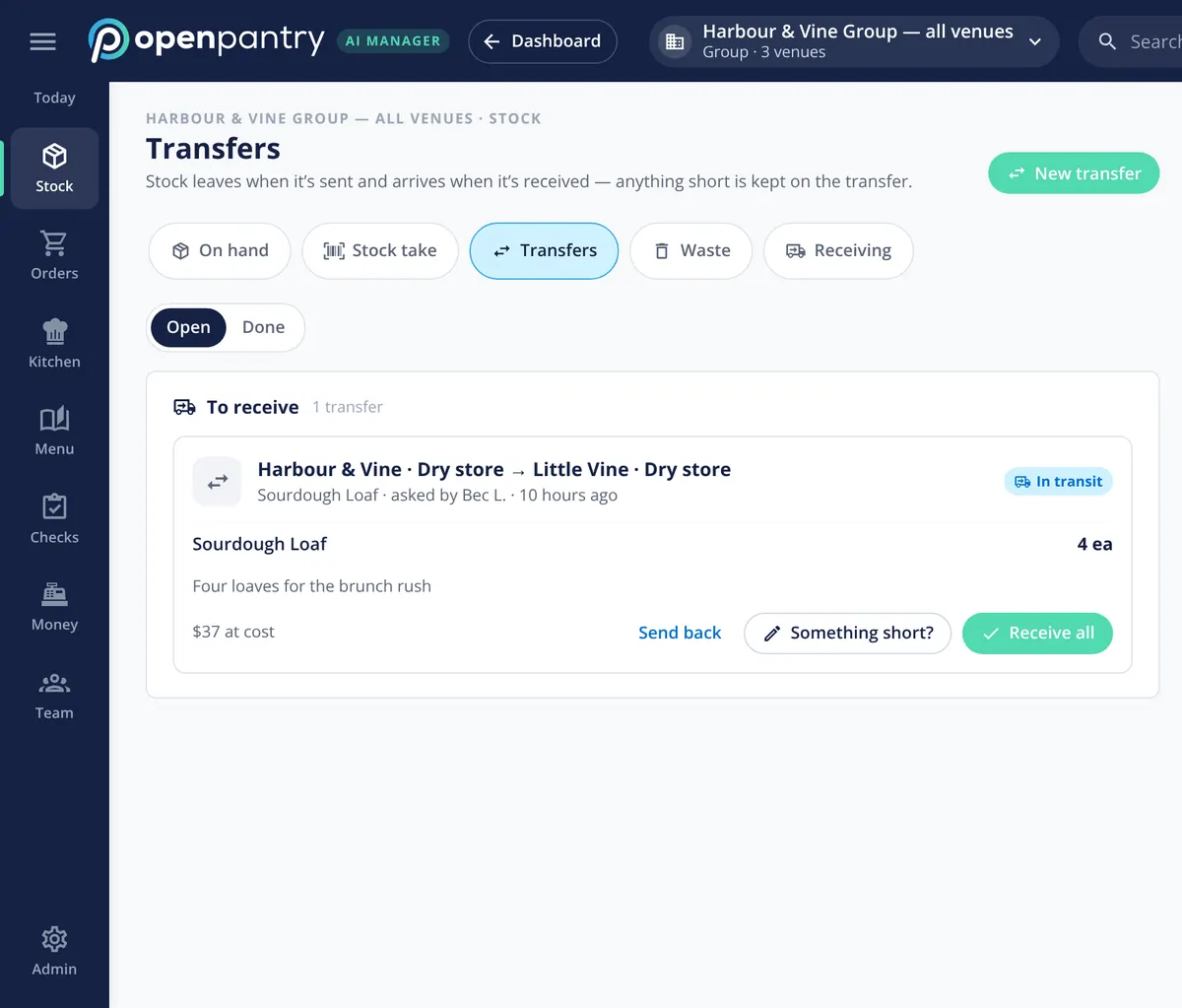
When one venue sends another four sourdough loaves for the brunch rush, it goes through as a transfer, not a favour. Stock leaves the sending venue when it is sent and arrives at the other when it is received, the cost goes with it, and anything short is kept on the transfer. Both venues’ food cost stays honest.
- Request, send and receive between venues and storage locations
- The cost carried with the stock
- Send back or mark something short on arrival
If the group has its own kitchen
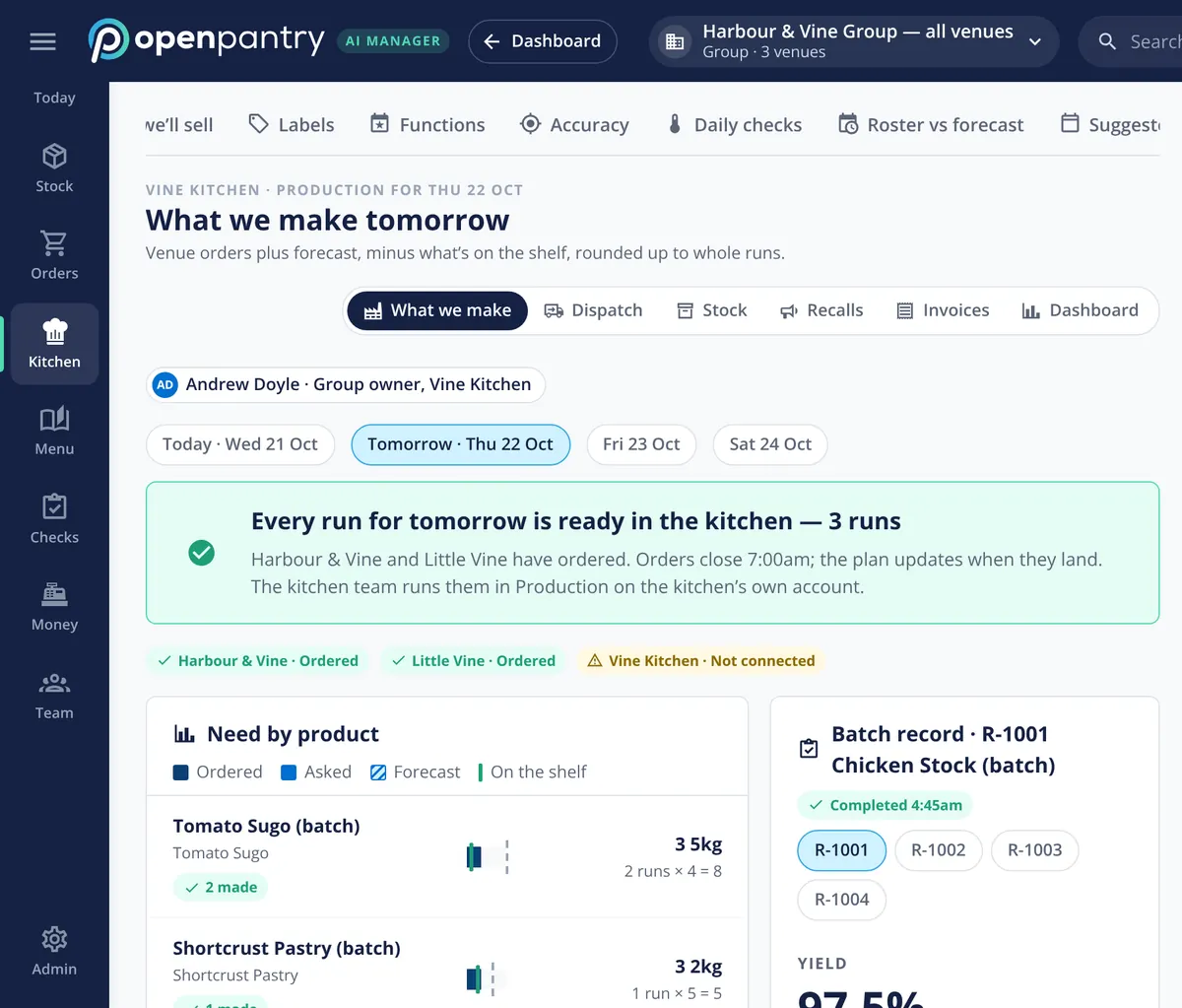
Many groups make sauces, stocks and pastry in one kitchen for every venue. In Restaurant AI Manager that kitchen sits inside the group, venues order from it in the same order screen they use for suppliers, and it plans tomorrow’s production from those orders. The central kitchen software page covers it in full.
- Venues order from their own kitchen like any supplier
- Production planned from venue orders plus forecast
- Covered in full on the central kitchen page
What it brings together
Built by the team venues already order with
“Open Pantry has created exactly what the restaurant industry needs. Something very easy to use that doesn’t require any upkeep. Their menu costing feature is fantastic and simple enough that any chef or bar manager can use it. I think restaurants that are serious about growing their profit & managing their costs need to consider Open Pantry.”
Chefs Love Open Pantry

Thank you OPEN PANTRY, we used to have to use 6 apps to get access to ordering from our suppliers, the fact we can do it all in one has saved an incredible amount of time & effort! We love you!

We’ve been using Open Pantry for a few months now and it’s been an absolute lifesaver. We’re short staffed so being able to place all of our orders with all of our suppliers in the one spot is a massive help.

So glad this service exists. Has made it so easy for my manager & chefs to order & all payments are settled in one go. The recurring orders & pantry lists are amazing time savers!!
Why not give each venue its own system and add it up at month end?
Because the group only ever sees the past. Separate systems mean separate recipes, separate supplier prices and separate ways of counting, so the month-end roll-up compares numbers that were never measured the same way. One group set-up means every venue counts, costs and closes the same way, head office can see a venue drifting while the week is still going, and stock moved between sites is costed instead of lost.
Open Pantry for restaurants in Canada
Canadian restaurants, cafés and pubs use Open Pantry to order from all their suppliers in one place and keep food costs in view.
- Plans priced in
- CAD — see Canada pricing
- Accounting sync
- QuickBooks Online and Xero
- Supplier directory
- 980+ Canadian wholesale food & beverage suppliers
Can restaurants in Canada use Open Pantry?
Yes. Restaurants, cafés and pubs in Canada use Open Pantry to order from all their suppliers in one place, track what they buy and keep food costs in view. Paid plans are priced in CAD.
Is ordering on Open Pantry free for restaurants?
Yes. The ordering package is free, with unlimited suppliers and orders. Paid plans add menu costing, inventory and reporting, and are priced in CAD.
Multi-venue restaurant management — questions operators ask
How do I manage several restaurant venues from one account?+
Can each venue keep its own settings while head office sets the rules?+
How do I stop one venue overspending on purchases each week?+
Can we move stock between our venues and keep the cost right?+
Can head office push the same recipes out to every venue?+
What can a head chef see compared with the owner or area manager?+
How long does it take to add a new venue to the group?+
How is multi-venue restaurant management software priced for a group?+
Works even better with
Purchase Approvals
Approval rules and weekly budgets by venue, supplier and value.
Explore →Central Kitchen Software
Venues order from the group’s own kitchen; it plans what to make.
Explore →Multi-Location Procurement
How ordering and suppliers work across a group of venues.
Explore →End of Day Reconciliation
Every venue’s close reviewed on one screen the next morning.
Explore →See a three-venue group from the group manager’s chair
Sign in to Harbour & Vine Group as its operations manager and look around — no sign-up.
Per venue, per month · No contract · Cancel anytime