
Restaurant Demand Forecasting: Order and Prep for the Covers You’ll Actually Do
Restaurant demand forecasting estimates how many covers each service will do, so you can order and prep to match instead of to habit. Restaurant AI Manager builds the forecast from your POS sales history, the bookings in the book, expected walk-ins and your functions, shows the drivers behind every number, then drafts the supplier orders and the prep list for a person to check and send.
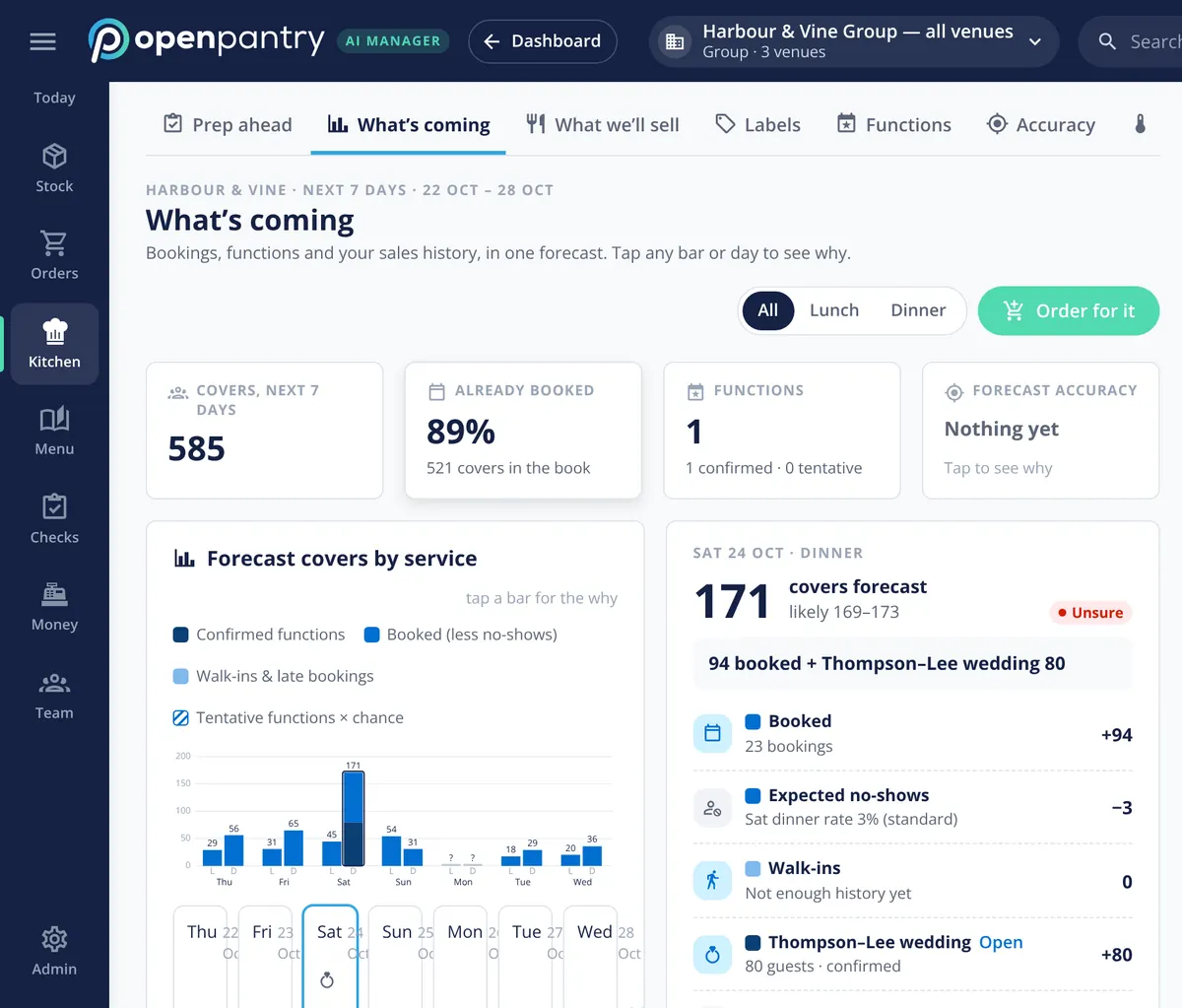
- Covers forecast by service, with the bookings, functions and walk-ins behind each one
- Orders drafted as forecast use, less on hand and on order, rounded up to packs
- Function stock timed to the function date, not bought to par
- Prep lists by station, rounded to your batch sizes
Built on Open Pantry ordering — free, and used by 5,000+ venues
Recommended by:




Par levels don’t know there’s a wedding on Saturday
Ordering to par buys the same for a quiet Tuesday as a booked-out Saturday
An 80-guest function goes in the diary, not in the order
The forecast lives in the head chef’s head, and leaves on their day off
Short on a big night means 86’d dishes; over on a quiet one means Monday’s bin
Prep is set by habit, so the walk-in fills with sauce nobody needs
Nobody can say why this week’s order was what it was
From the bookings diary to a drafted order
It reads what’s coming
Sales history from your POS, the bookings in the book and your functions — added by hand, by CSV, from a calendar feed or by forwarding the booking email. Confirmed functions count in full; tentative ones count by how likely they are.
It forecasts covers and shows why
Each service gets a forecast made of bookings less expected no-shows, walk-ins and functions. Tap any day or bar and the drivers are listed with their numbers, and a confidence label says how sure it is.
It drafts the order
Forecast use, less what’s on hand and what’s already on order, rounded up to pack sizes and set against each supplier’s delivery days and cut-off. The draft goes to your purchaser to finalise; suppliers see nothing until it’s sent.
It drafts the prep
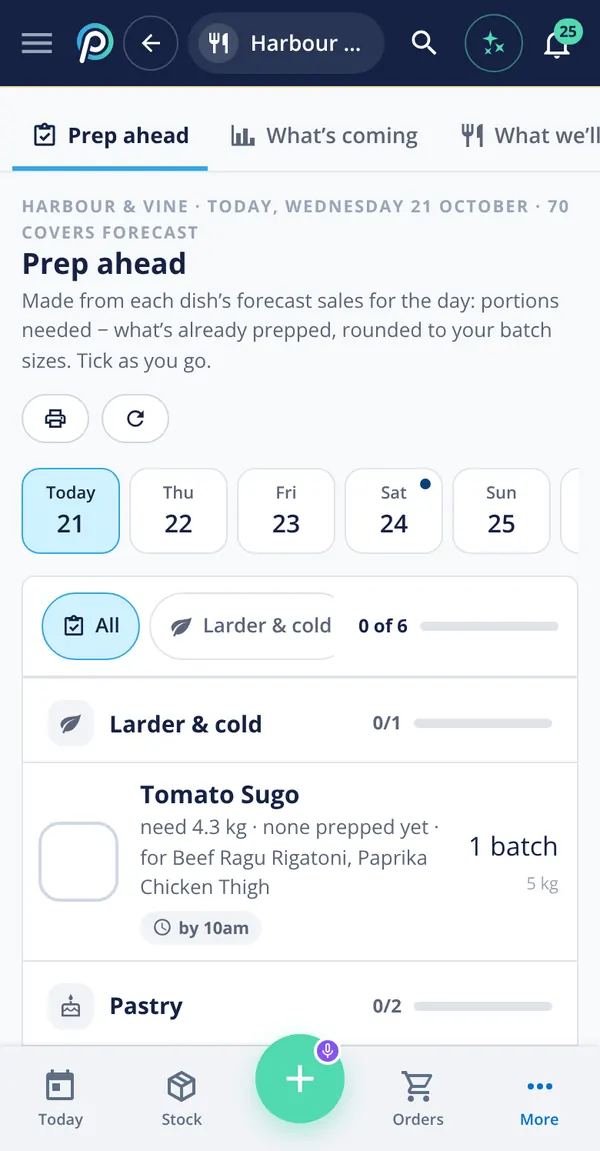
Each dish’s forecast sales become portions needed, less what’s already prepped, rounded to your batch sizes and split by station. The team ticks it off as they go.
No sign-up — a demo restaurant group with a guide that shows you around
Order to the forecast, not to par
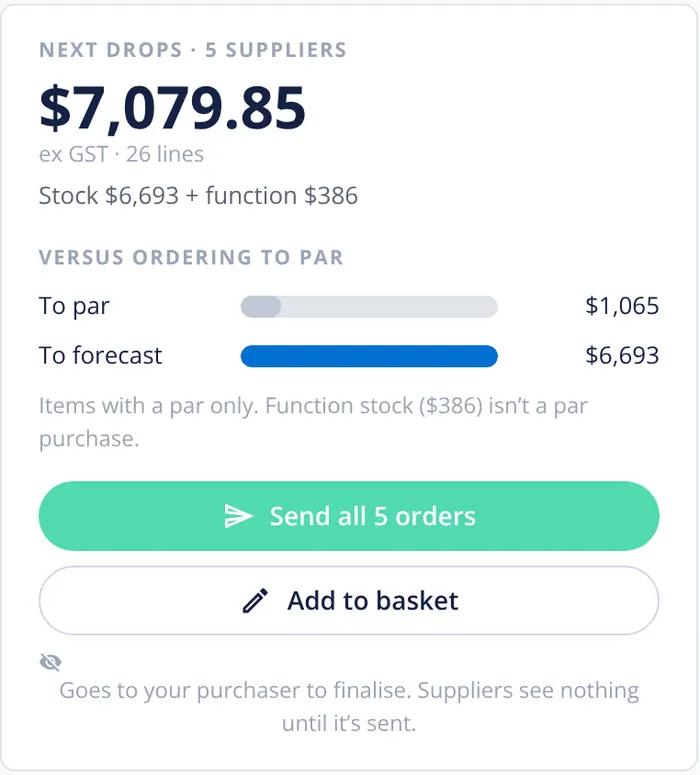
Par levels buy back to a fixed number whatever the week holds. The forecast order buys for the covers you’re expecting, and the order card puts the two side by side so you can see the difference before you send anything. In the demo group, the week’s forecast order is several times what ordering to par would have bought, because a wedding and a full Saturday are on the books. Function stock is kept separate, because it’s never a par purchase.
- Forecast order and to-par order side by side
- Function stock split out from everyday stock
- Pars still there as the floor and for low-stock alerts
Every line shows its working
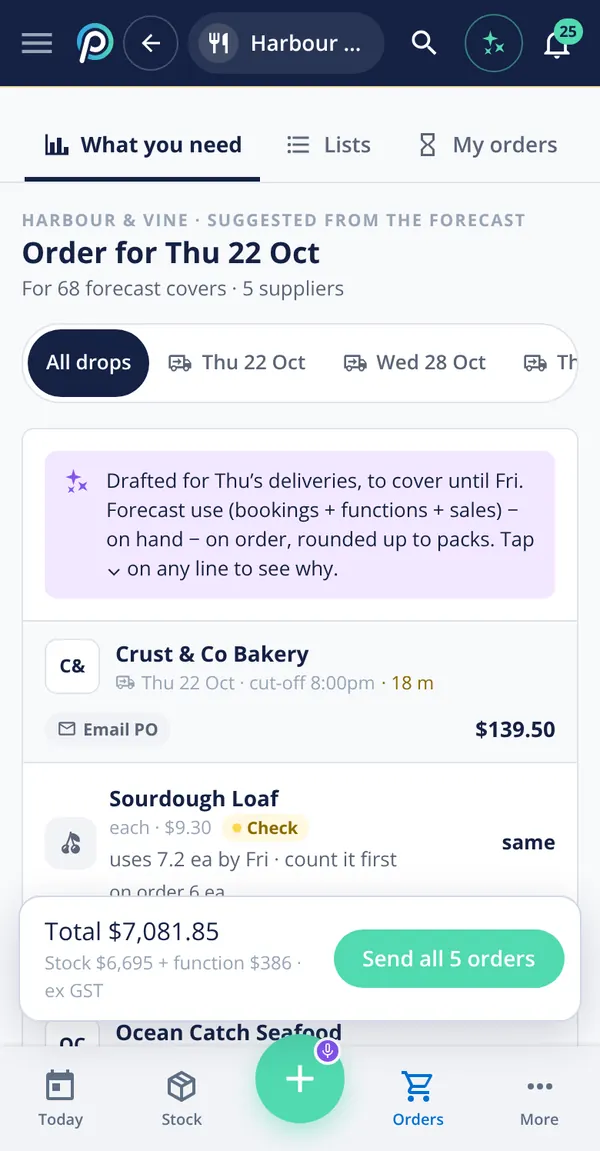
Each line on the drafted order says what it’s for: how much the forecast says you’ll use before the next delivery, what’s on hand, what’s on order, and the pack rounding. Where the stock figure looks doubtful it says so — “count it first” — with a Check label instead of guessing. Orders are grouped by delivery day and supplier with the cut-off showing, and suppliers that aren’t on Open Pantry get the order by email.
- Forecast use − on hand − on order, rounded up to packs
- Grouped by delivery day, with each supplier’s cut-off
- Any supplier, by email if they’re not on Open Pantry
Functions planned back from the date
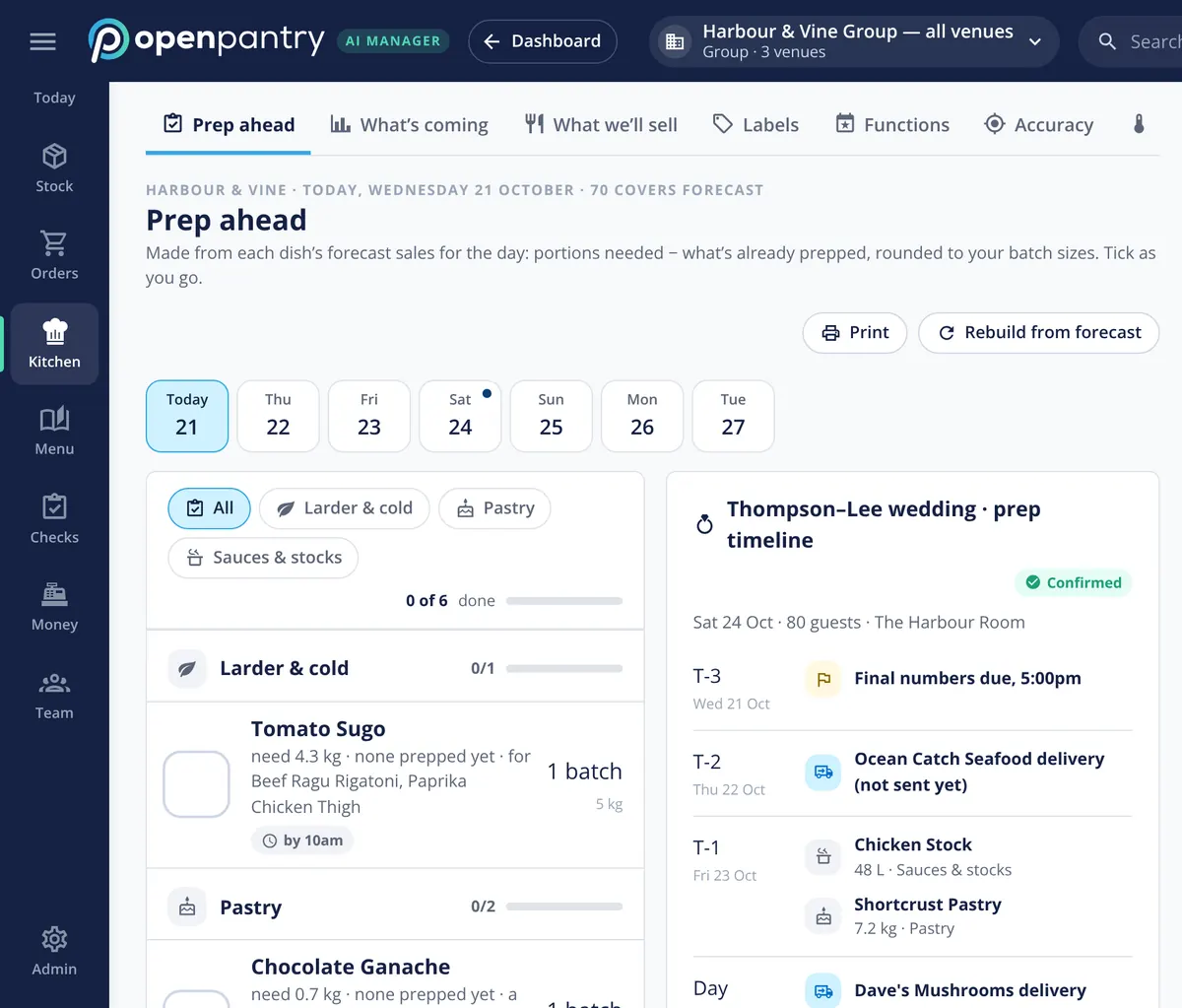
A function isn’t just extra covers; it has a menu, a guest count and a date that everything has to land before. The function’s menu is multiplied by its guests, the ingredients are timed to arrive before the day, and the prep timeline counts back from it: final numbers due, the seafood order still to send, stocks and pastry the day before. Change the guest count and the forecast changes with it.
- Function menu × guests, ordered for the function date
- A prep timeline counting back from the day
- Unsent orders for the function flagged on the timeline
A prep list by station, from tomorrow’s numbers
The prep list is built from each dish’s forecast sales, less what’s already prepped, and rounded to the batch sizes your kitchen actually makes. It’s split by station — larder, pastry, sauces and stocks — with a time each item is needed by. Print it for the pass or tick it off on a phone; if the bookings change, rebuild it from the forecast.
- Portions needed − already prepped, rounded to batches
- By station, with a needed-by time
- Print it, or tick it off on a phone
What the forecast reads from
Built by the team venues already order with
“Open Pantry has created exactly what the restaurant industry needs. Something very easy to use that doesn’t require any upkeep. Their menu costing feature is fantastic and simple enough that any chef or bar manager can use it. I think restaurants that are serious about growing their profit & managing their costs need to consider Open Pantry.”
Chefs Love Open Pantry

Thank you OPEN PANTRY, we used to have to use 6 apps to get access to ordering from our suppliers, the fact we can do it all in one has saved an incredible amount of time & effort! We love you!

We’ve been using Open Pantry for a few months now and it’s been an absolute lifesaver. We’re short staffed so being able to place all of our orders with all of our suppliers in the one spot is a massive help.

So glad this service exists. Has made it so easy for my manager & chefs to order & all payments are settled in one go. The recurring orders & pantry lists are amazing time savers!!
Why not just order to par?
Par is a good floor and a poor forecast. It assumes every week looks like an average week, so it under-buys for the busy ones and leaves stock sitting after the quiet ones — and it can’t see a function at all. A forecast built from your own sales history and the bookings already in the book orders for the week you’re actually going to have, and shows you why, so the chef can overrule it with one look rather than rebuild the order from scratch.
Restaurant demand forecasting — questions chefs ask
How does demand forecasting work for a single restaurant?+
Can the forecast include weddings and functions we have booked?+
How do I get our bookings into the forecast without an integration?+
Does it work with our POS system?+
Does the forecast order get sent to suppliers automatically?+
How is ordering from a forecast different from ordering to par levels?+
Can the head chef get prep lists by station from the forecast?+
Can I see the demand forecast working before I sign up?+
Works even better with
POS Sales Integration
The sales history the forecast is built on.
Explore →Purchase Approvals
Drafted orders checked against rules and venue budgets before they go.
Explore →Pantry & Preparation Lists
The saved lists and prep plans the kitchen works from.
Explore →Food Cost Variance
What the week should have used against what it did.
Explore →Order for Saturday’s wedding in a demo kitchen
Open the demo as the head chef of Harbour & Vine and see the forecast, the order and the prep — no sign-up.
CHF 135.20/month per venue billed yearly (save 20%) · or CHF 169 month to month, no contract · plus tax