
Central Kitchen Software: Your Venues Order, the Kitchen Knows What to Make
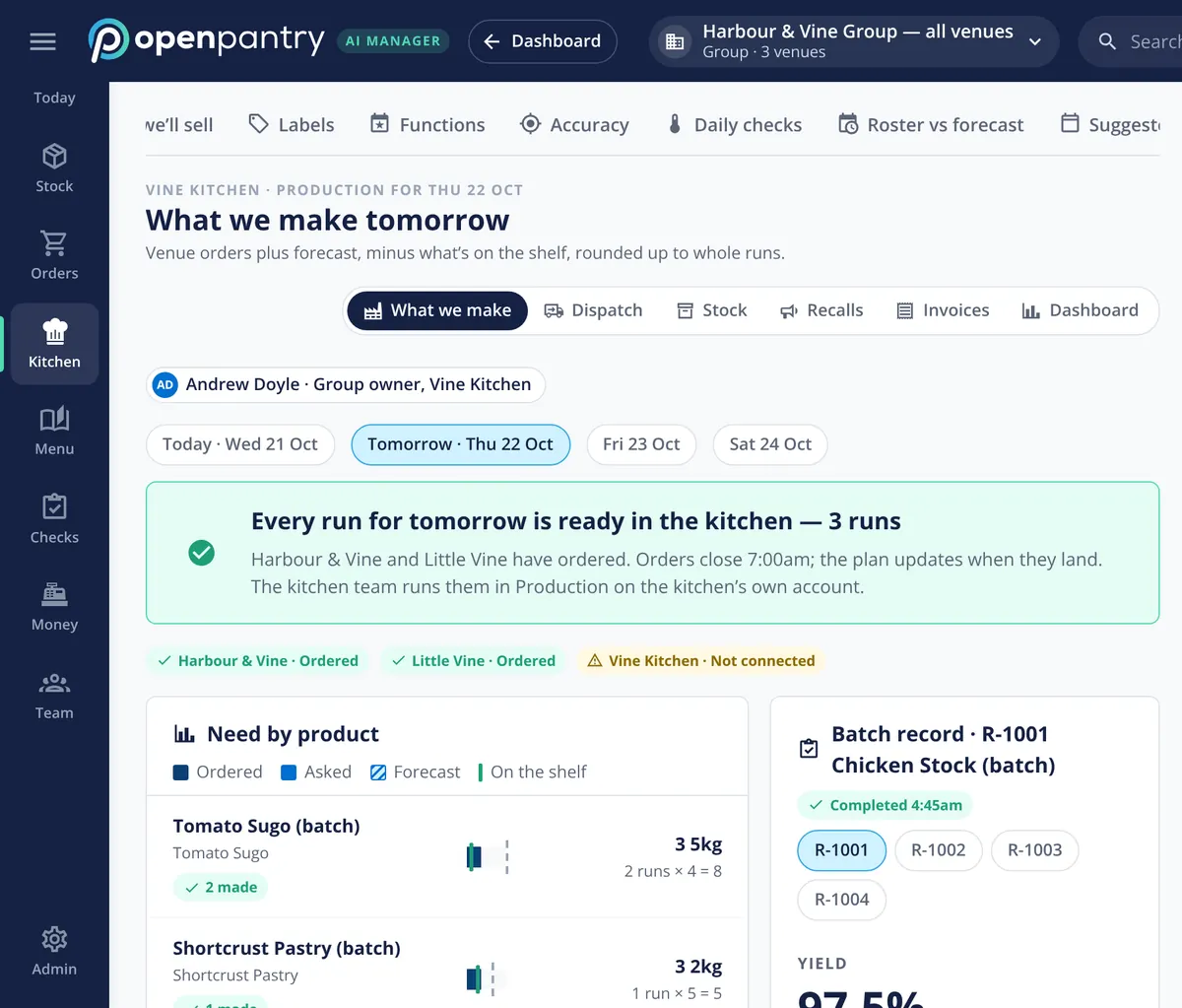
Central kitchen software runs the commissary kitchen that makes sauces, stocks, pastry and prepped items for a restaurant group’s venues: what to make, how much, and where it goes. In Restaurant AI Manager the kitchen is its own account linked to the group; venues order from “Our kitchen” in the same order screen they use for suppliers, and the kitchen gets tomorrow’s production plan from those orders plus each venue’s forecast, minus what is already on the shelf, rounded up to whole runs.
- Venues order from the group’s own kitchen like any other supplier
- Tomorrow’s production plan from venue orders plus forecast, in whole runs
- Batch records with yield, ingredients used and what was made
- Scannable labels, lot tracing and recalls, and internal invoices to each venue
Built on Open Pantry ordering — free, and used by 5,000+ venues
Recommended by:




The kitchen makes what it made last Tuesday
Venues text their orders to the kitchen at all hours
The kitchen guesses tomorrow’s batches from what it made last week
A wedding at one venue is news to the kitchen two days out
Tubs arrive at the venue with a handwritten label and no batch number
If a batch has to be pulled, nobody can say which venues got it
What each venue took from the kitchen never shows in its food cost
From venue orders to labelled batches at the door
Venues order from their own kitchen
The central kitchen is set up as its own account linked to the group. Venues order from “Our kitchen” in the same order screen they use for every other supplier, before the kitchen’s cut-off.
The kitchen gets tomorrow’s plan
Venue orders plus each venue’s forecast, minus what is already on the shelf, rounded up to whole runs. The plan updates as orders land, so the kitchen sees what it needs to make, product by product.
Each run gets a batch record and labels
The batch record holds the yield, the ingredients used and the finished goods made. Labels print on 58 or 62 mm rolls or A4, and they scan.
Venues scan it in and are invoiced
The venue receives the delivery through its normal check-off, scanning the labels, and the kitchen raises an internal invoice per delivery or monthly — so each venue’s food cost carries what it took.
No sign-up — a demo restaurant group with a guide that shows you around
A plan that already knows about Saturday’s wedding
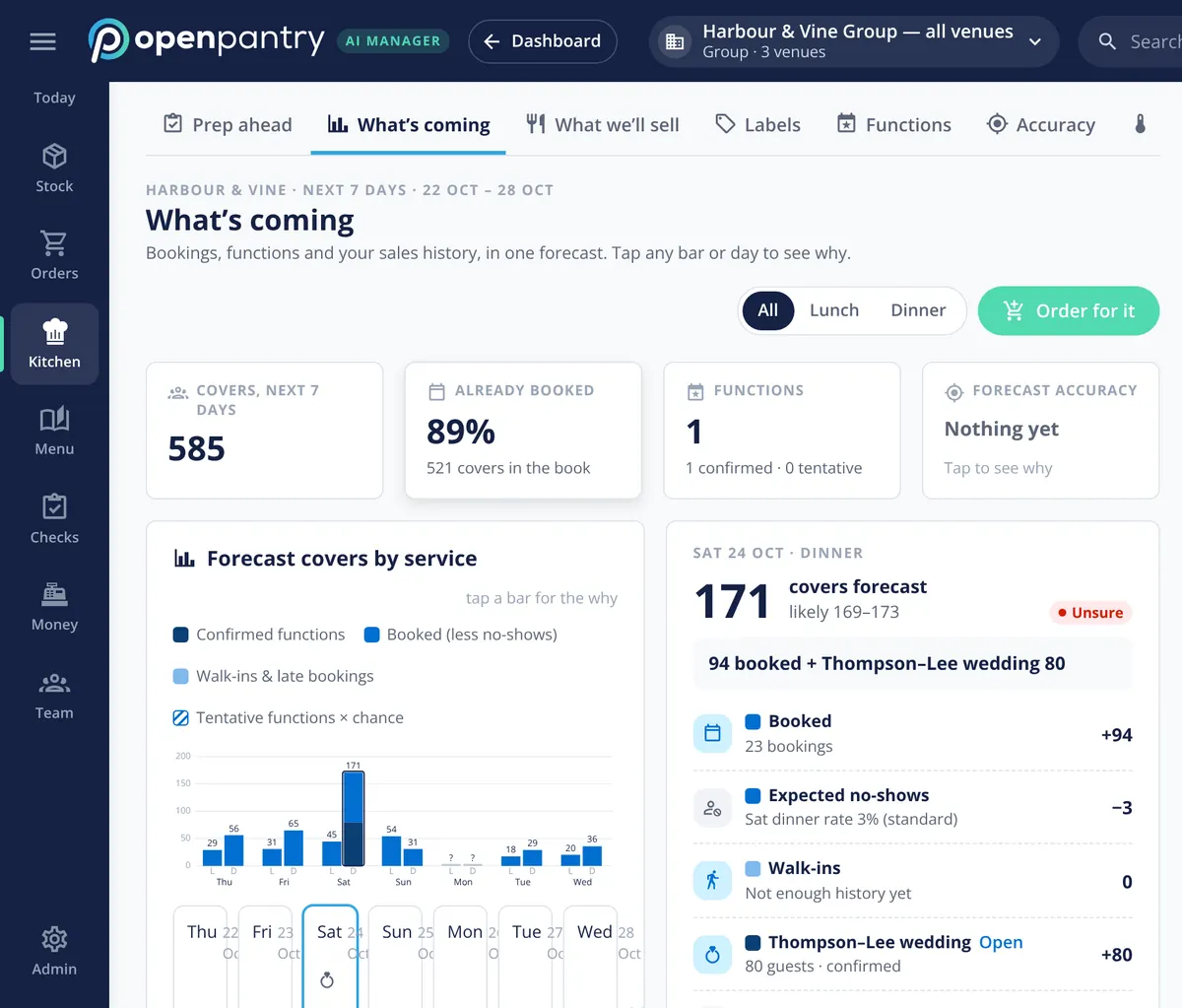
The kitchen’s plan does not just total up orders; it also reads each venue’s forecast. That forecast is built from POS sales history, booked covers, expected walk-ins and confirmed functions, with tentative functions weighted by how likely they are, and every figure shows what drove it. In the demo group, an 80-guest wedding on Saturday is already in the numbers days before the venue places its order.
- Forecast covers by service for each venue
- Confirmed functions counted, tentative ones weighted by chance
- Tap any day to see why the number is what it is
Batch records, labels and lots
Every production run gets a batch record: when it was made, the yield, the ingredients it used and the finished goods it produced. Labels print for each batch on 58 or 62 mm label rolls or A4 sheets, and the venue scans them when the delivery arrives. For products with batch tracking switched on, lots can be traced and recalled.
- Yield, ingredients consumed and finished goods per batch
- Scannable labels on 58/62 mm rolls or A4
- Lot tracing and recall for batch-tracked products
The venues still prep — from the same forecast
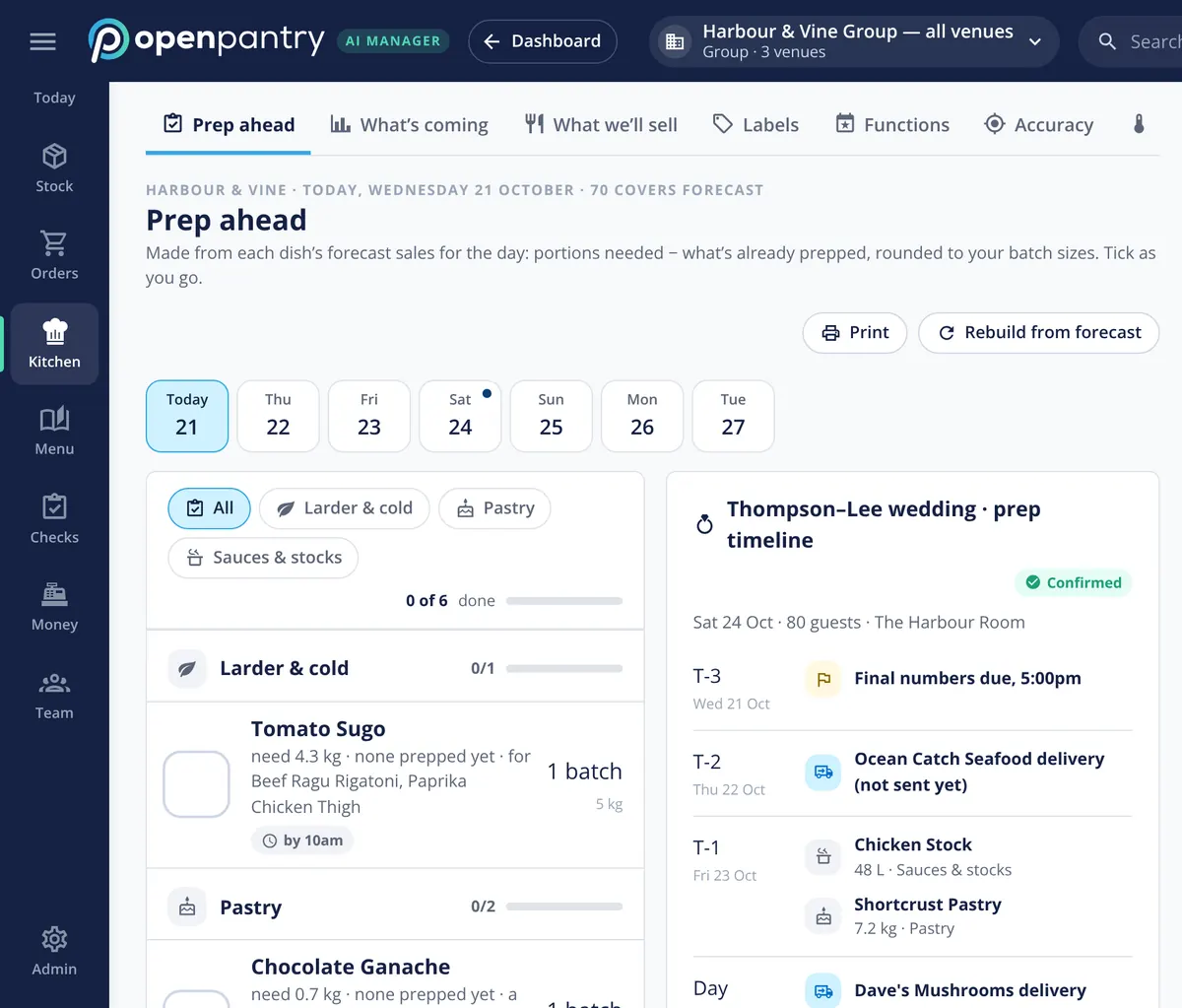
The central kitchen makes the bases; the venues finish them. Each venue’s prep list is built from the same forecast, by station, as portions needed minus what is already prepped, rounded to batch sizes. A large function gets its own timeline counting down to the day, so the kitchen order, the supplier delivery and the venue’s prep all line up.
- Venue prep lists by station from the day’s forecast
- Rounded to the venue’s own batch sizes
- Function timelines from final numbers to the day
Stock that moves outside a kitchen order
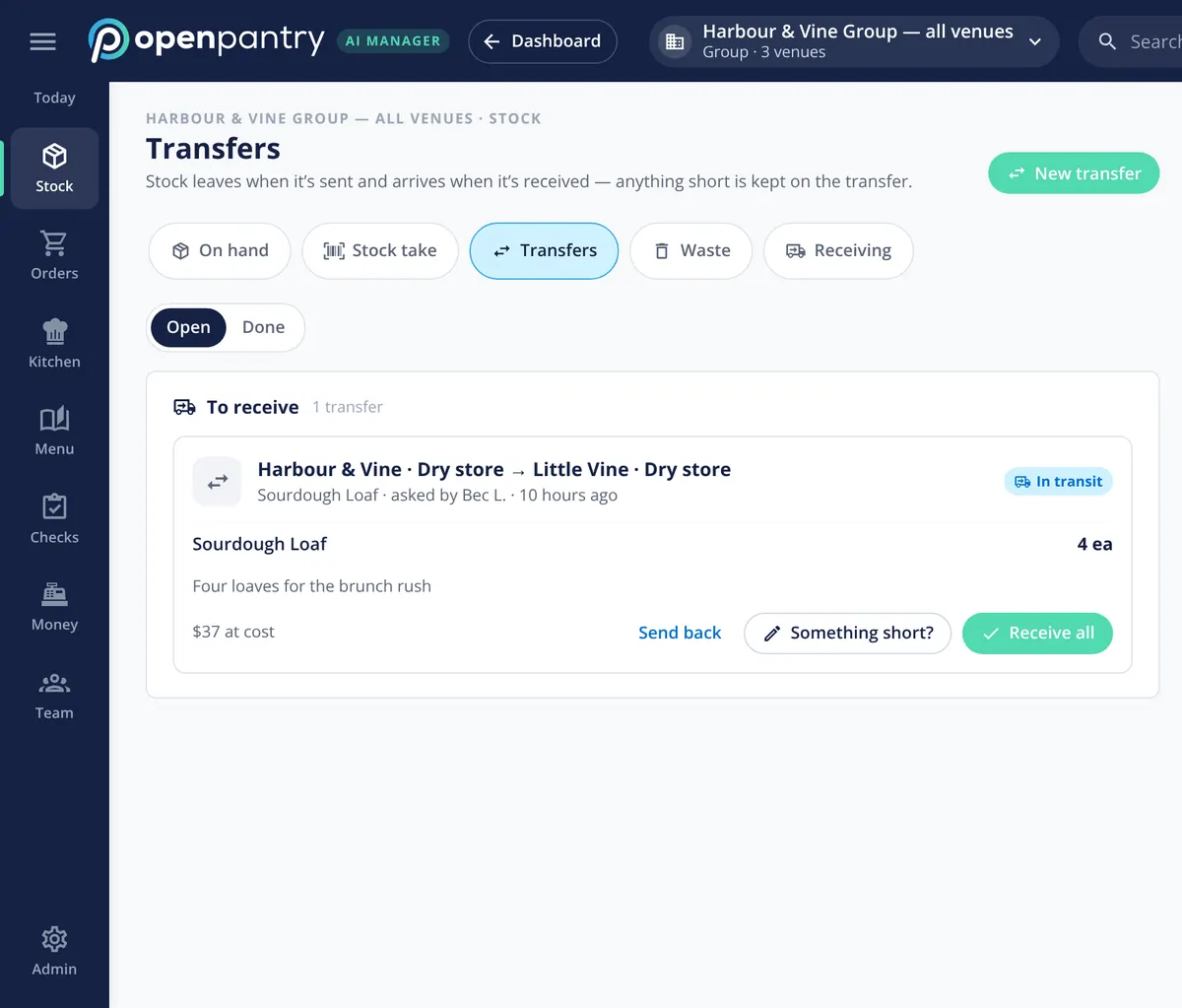
Not everything goes through the kitchen’s order screen. When a venue runs short mid-service and borrows from another, it goes through as a stock transfer between venues or storage locations, with the cost carried. Stock leaves when it is sent and arrives when it is received, and anything short is kept on the transfer.
- Transfers between venues and storage locations
- The cost moves with the stock
- Shorts kept on the transfer, not lost
What the central kitchen connects to
Built by the team venues already order with
“Open Pantry has created exactly what the restaurant industry needs. Something very easy to use that doesn’t require any upkeep. Their menu costing feature is fantastic and simple enough that any chef or bar manager can use it. I think restaurants that are serious about growing their profit & managing their costs need to consider Open Pantry.”
Chefs Love Open Pantry

Thank you OPEN PANTRY, we used to have to use 6 apps to get access to ordering from our suppliers, the fact we can do it all in one has saved an incredible amount of time & effort! We love you!

We’ve been using Open Pantry for a few months now and it’s been an absolute lifesaver. We’re short staffed so being able to place all of our orders with all of our suppliers in the one spot is a massive help.

So glad this service exists. Has made it so easy for my manager & chefs to order & all payments are settled in one go. The recurring orders & pantry lists are amazing time savers!!
Why not run the central kitchen on a spreadsheet and a group chat?
Because the kitchen ends up planning from memory. Orders scattered across messages miss the cut-off, a function at one venue is not in anyone’s numbers, and nothing that leaves the kitchen can be traced or charged back. Running the kitchen as part of the group means orders arrive in one place, tomorrow’s plan already allows for the forecast, every batch is recorded and labelled, and each venue pays for what it took. If your production kitchen is a business in its own right rather than part of a restaurant group, see the production kitchen page instead.
Central kitchen software — questions operators ask
What is central kitchen software for a restaurant group?+
How do our venues order from our own central kitchen?+
How does the central kitchen know how much to make tomorrow?+
How does the commissary kitchen plan for weddings and large functions?+
Can we trace a central kitchen batch if there is a recall?+
Does the central kitchen print labels for what it sends out?+
How are central kitchen deliveries charged back to each venue?+
How do venues receive and check what the central kitchen sends?+
Works even better with
Production Kitchen
Open Pantry for a production kitchen run as its own business.
Explore →Demand Forecasting
Orders and prep drafted from sales, bookings and functions.
Explore →Delivery Check-Off
Count deliveries in at the door and flag what came short.
Explore →Multi-Venue Management
Every venue side by side, with budgets and stock transfers.
Explore →See tomorrow’s production plan for a demo group’s kitchen
Sign in to Harbour & Vine Group as its operations manager and open Vine Kitchen — no sign-up.
kr 1,352/month per venue billed yearly (save 20%) · or kr 1,690 month to month, no contract · plus tax