
Menu Engineering Software: Know Which Dishes to Keep, Fix, Push or Cut
Menu engineering sorts every dish by two things — how well it sells and how much gross profit it makes — into stars, plowhorses, puzzles and dogs, so you know which to keep, rework, promote or take off. Restaurant AI Manager does it from live figures: each dish’s cost comes from what you paid this week and its sales come from your POS, so the picture moves when a supplier price or the mix moves, not once a year in a spreadsheet.
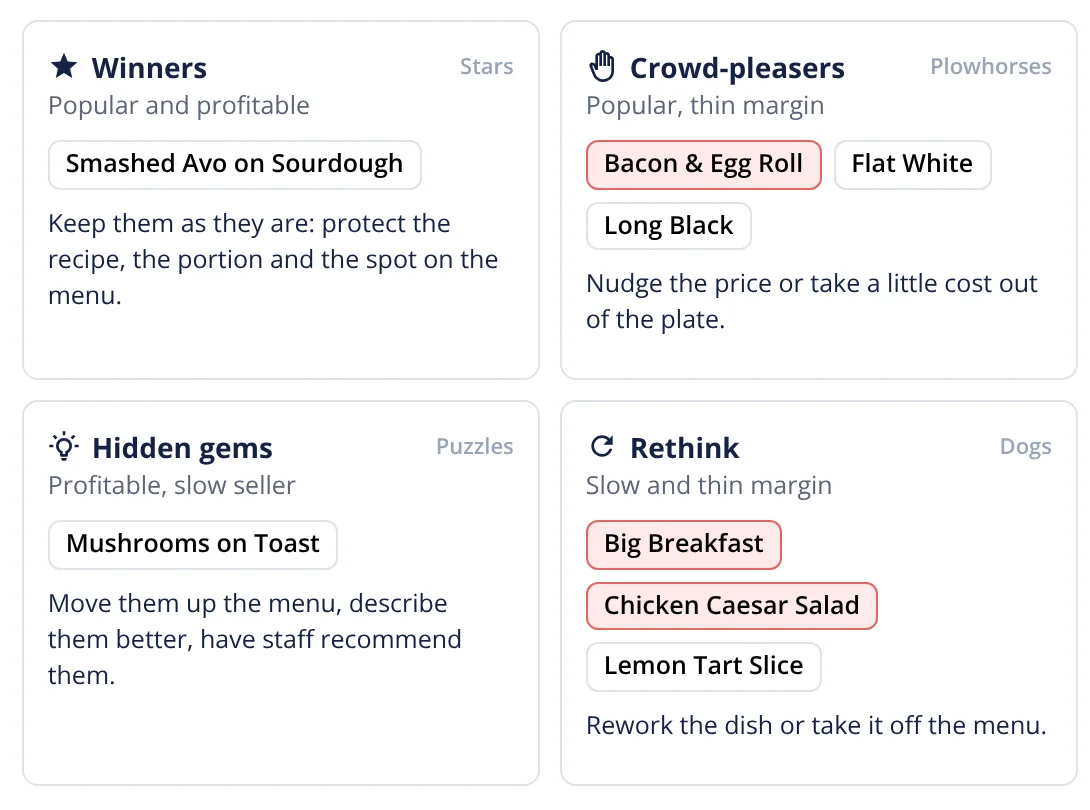
- Winners, Crowd-pleasers, Hidden gems and Rethink (stars, plowhorses, puzzles, dogs) from live GP and sales
- Dishes to look at, ranked by dollars per week
- Supplier price rises traced to the dishes they hit
- An allergen matrix built from the same recipes
Built on Open Pantry ordering — free, and used by 5,000+ venues
Recommended by:




The menu was engineered once. Then the prices moved.
The menu engineering spreadsheet was done at launch and never touched again
The best seller is assumed to be the best earner
A salmon price rise eats the margin on three dishes and nobody connects them
POS button names never quite match the recipe names
Repricing means guessing which dish guests will notice
The allergen sheet lives in a folder and is out of date the day a recipe changes
From what you paid and what you sold to what to change
Every dish is costed from what you pay
Dishes come from your costed recipes, costed at the prices on your supplier invoices and deliveries — so the cost of a dish is this week’s cost, not the one from when the menu was written.
POS sales are matched to dishes
Each POS menu item is matched to its recipe automatically, with a High, Check or Unsure label so you confirm the doubtful ones. Sales that do not match yet are held, not lost, and counted once they are matched.
Each dish lands in its quadrant
With cost and sales side by side, every dish is placed as a star, plowhorse, puzzle or dog, and the dishes worth a look are ranked by what they cost you in dollars per week.
You decide, and it drafts the change
Each suggestion has a one-tap next step that opens a draft — a price change, a recipe rework. Nothing changes until a person approves it.
No sign-up — a demo restaurant group with a guide that shows you around
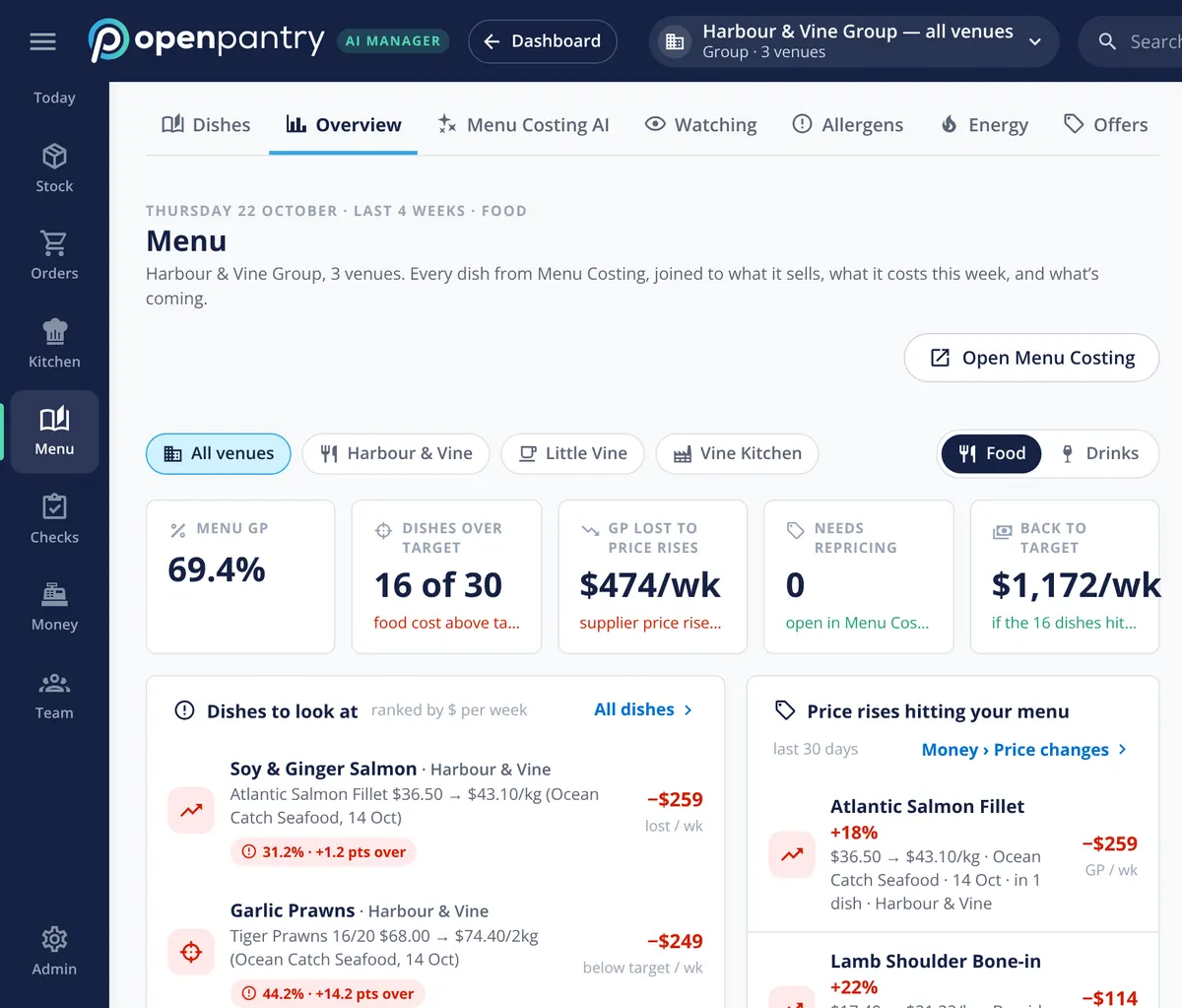
Dishes to look at, ranked in dollars
The menu overview leads with the figures an owner would ask for: menu GP, how many dishes are over their food-cost target, how much GP supplier price rises are costing each week, and what getting those dishes back to target would be worth. Below that, the dishes to look at are ranked by dollars per week, not alphabetically. In the demo group, a salmon dish tops the list after a salmon fillet price rise from the fish supplier.
- Menu GP and dishes over target, for one venue or all
- GP lost to price rises and the value of getting back to target
- Food and drinks shown separately
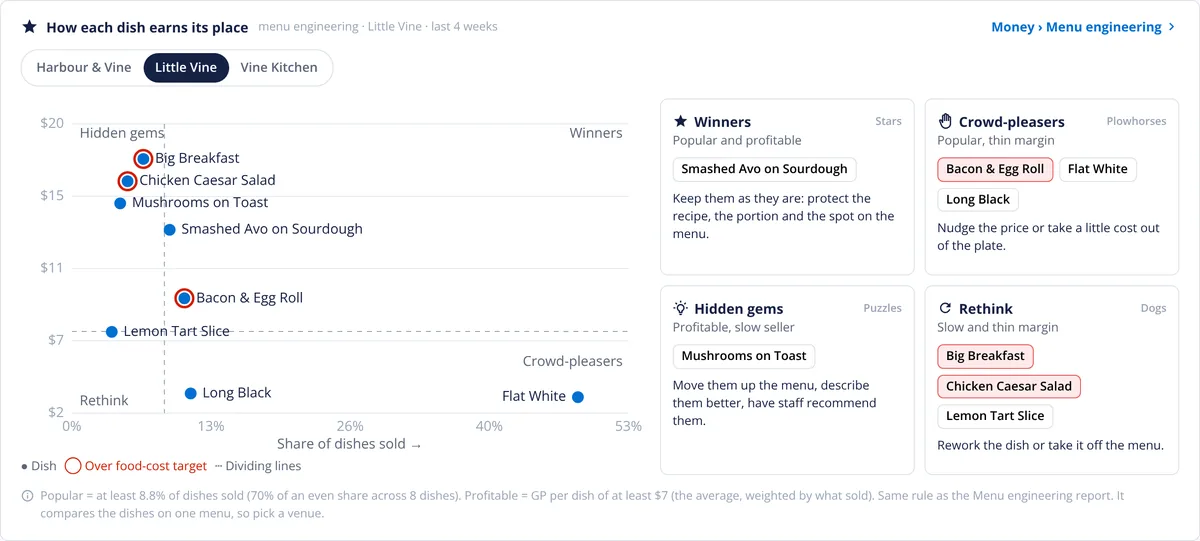
Stars, plowhorses, puzzles and dogs
Every dish carries its price, cost, food cost against target, how many sell a week and the GP it earns a week. From those, each one is placed in a quadrant: stars sell well and earn well, plowhorses sell well but earn too little, puzzles earn well but do not sell, and dogs do neither. A plowhorse usually wants a recipe or portion fix, a puzzle wants a better spot on the menu, and a dog is a candidate to come off. On screen they are called Winners, Crowd-pleasers, Hidden gems and Rethink, each with its next step, and dishes over their food-cost target are ringed in red.
- Every dish plotted by GP per dish and share of sales
- A plain name and a next step for each group
- Dishes over their food-cost target ringed in red
Price rises reach the menu before month end
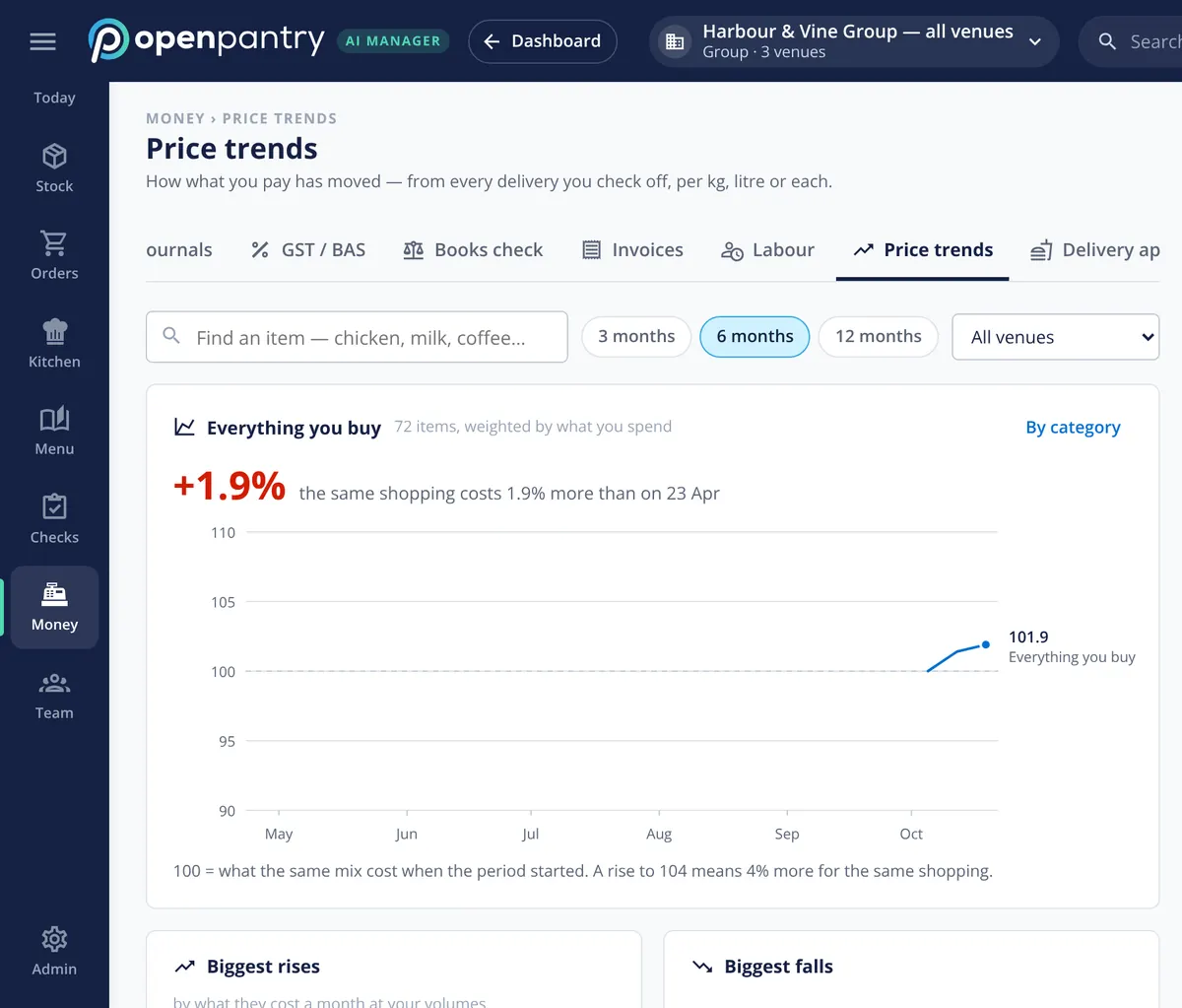
Price trends show how what you pay has moved, taken from every delivery you check off, per kilo, litre or each. The overall line is weighted by what you actually spend, and the biggest rises are listed. When one of them lands in a dish, the menu overview shows the dish, the ingredient and the weekly cost — so a supplier price rise becomes a menu decision this week, not a surprise in the accounts.
- What everything you buy costs over 3, 6 or 12 months
- Biggest rises and falls by what they cost you a month
- Price rises linked to the dishes they hit
An allergen matrix from the same recipes
Because every dish is built from its recipe, the allergen matrix comes from the same place: every dish against every allergen recorded in its recipe, with a printable sheet for guests. Where a recipe has no allergens set up, it shows “needs checking” rather than guessing, so the gaps are visible before service.
- Every dish against every allergen that must be declared
- Printable guest sheet for front of house
- “Needs checking” instead of a guess
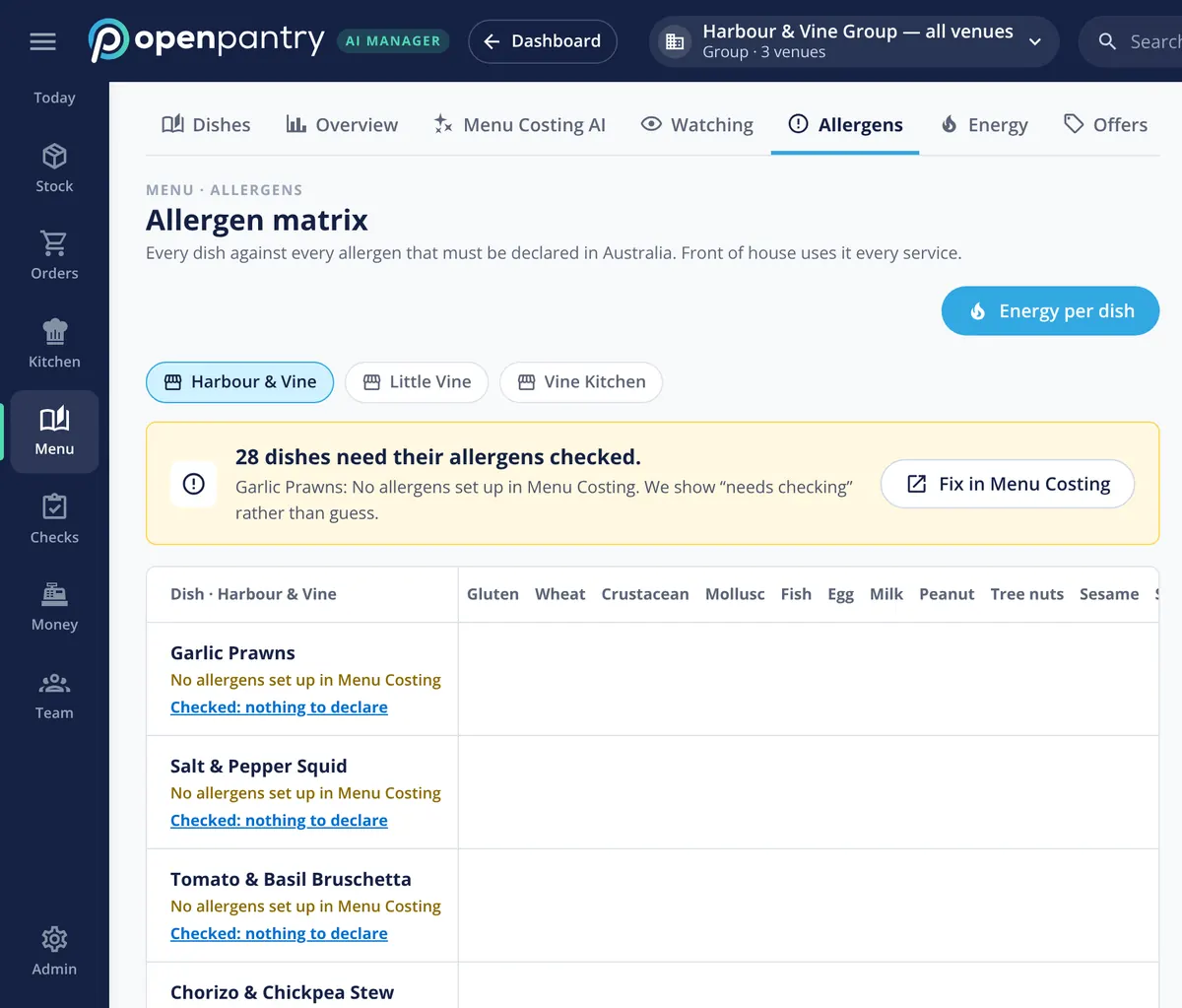
What the menu figures come from
Built by the team venues already order with
“Open Pantry has created exactly what the restaurant industry needs. Something very easy to use that doesn’t require any upkeep. Their menu costing feature is fantastic and simple enough that any chef or bar manager can use it. I think restaurants that are serious about growing their profit & managing their costs need to consider Open Pantry.”
Chefs Love Open Pantry

Thank you OPEN PANTRY, we used to have to use 6 apps to get access to ordering from our suppliers, the fact we can do it all in one has saved an incredible amount of time & effort! We love you!

We’ve been using Open Pantry for a few months now and it’s been an absolute lifesaver. We’re short staffed so being able to place all of our orders with all of our suppliers in the one spot is a massive help.

So glad this service exists. Has made it so easy for my manager & chefs to order & all payments are settled in one go. The recurring orders & pantry lists are amazing time savers!!
Why not do menu engineering in a spreadsheet?
A spreadsheet can do the maths, but only on the numbers someone typed in, on the day they typed them. By the next supplier price rise the costs are wrong, and by the next menu change the sales mix is wrong too. Menu engineering on live figures keeps every dish’s cost and sales current, ties each change to the ingredient that caused it, and turns the answer into a draft price or recipe change instead of another tab.
Menu engineering — questions operators ask
What is menu engineering and how does it work in a restaurant?+
What is the difference between a star, plowhorse, puzzle and dog?+
How often should a restaurant redo its menu engineering analysis?+
Where does the menu engineering software get my sales figures from?+
What happens to POS items that do not match a recipe?+
Will the software change my menu prices automatically?+
Can I compare the same dish across all of our venues?+
Does the menu engineering tool include an allergen matrix for front of house?+
Works even better with
Food Costing Software
Every recipe costed off the supplier prices you actually pay.
Explore →POS Sales Integration
How the day’s sales come in from your POS.
Explore →Food Cost Variance
Why GP moved, split into price rises, waste, yield and count error.
Explore →Reporting & Profit Insights
Food and beverage cost against target, and dish margins ranked.
Explore →Find the crowd-pleasers losing you money on a demo menu
Open the demo as the owner of Harbour & Vine and see which dishes to fix first — no sign-up.
kr 1,352/month per venue billed yearly (save 20%) · or kr 1,690 month to month, no contract · plus tax