
Head Office for Restaurant Groups: One Set of Rules, Every Venue Running Its Own Kitchen
Restaurant AI Manager gives a restaurant group’s head office the controls it needs without taking the kitchen away from each venue. Head office owns the master recipes and rolls them out, costed at each venue’s own supplier prices. It shares order lists, sorts venues into regions and precincts, sets who can see money and who can spend how much, and approves orders by rule. Every change is recorded, and each venue still orders from its own suppliers.
- Master recipes rolled out to venues, tested first
- Shared order lists at each venue’s own suppliers and prices
- Regions, precincts and area managers
- Roles with venue, category and money limits
Built on Open Pantry ordering — free, and used by 5,000+ venues
Recommended by:




Every venue runs the same menu a slightly different way
The master recipe is a PDF that each kitchen has edited
A new venue takes weeks to set up from scratch
Head office finds out about an off-list supplier at month end
Everyone can see everything, or nobody can see anything
Area managers chase five venues for the same numbers
Nobody can say who changed the par on the salmon
How head office runs the group
Set up the structure
Venues are sorted into regions and precincts, with area managers who look after a few venues each. Reports, the briefing and the venue list all follow the structure.
Decide who can do what
Each person has a role, the venues they can see, the categories they can buy and the amount they can spend. Money visibility is part of the role, so a chef can run the kitchen without seeing wages.
Own the recipes and the lists
Head office keeps the master recipes and shared order lists. A recipe change is tested on one venue, then rolled out; each venue costs it at its own supplier prices.
Approve by rule, see it all
Orders go straight to the supplier, to the purchaser, or to a named person for sign-off, by value, venue, supplier and category. Every change anywhere in the group is in the change log.
No sign-up — a demo restaurant group with a guide that shows you around
Master recipes, rolled out and costed per venue
Head-office recipes are owned centrally, with versions. A change can be tested at one venue before it is published to the rest, and each venue costs the recipe at the prices its own suppliers charge, so the same dish shows its real GP in every kitchen. A rollout shows which venues have it. Recipes stay in your menu costing; head office decides which version each venue runs.
- Versions, a test venue, then publish
- Costed at each venue’s own supplier prices
- See which venues run which version
Shared lists, a preferred supplier list and rules that hold
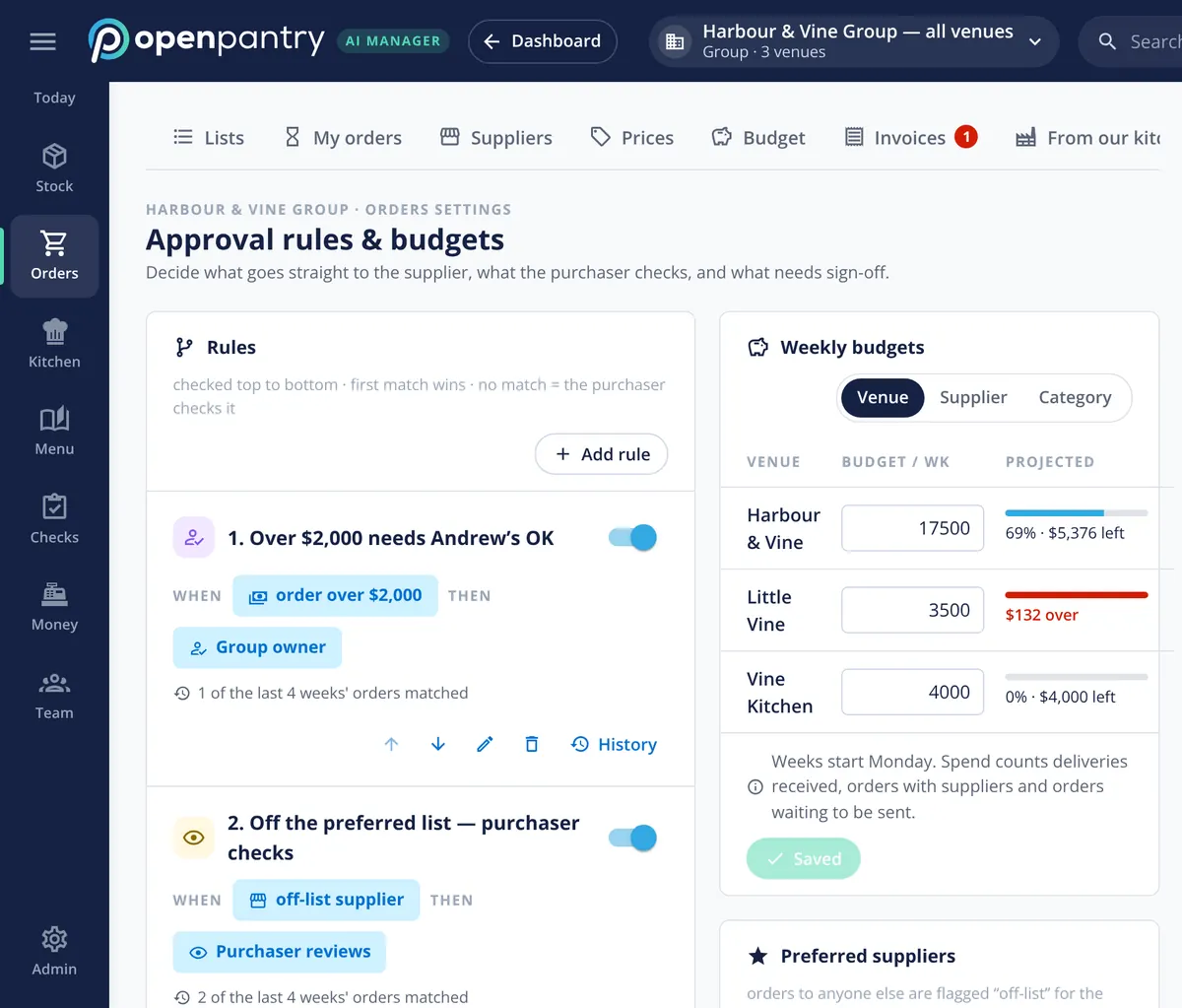
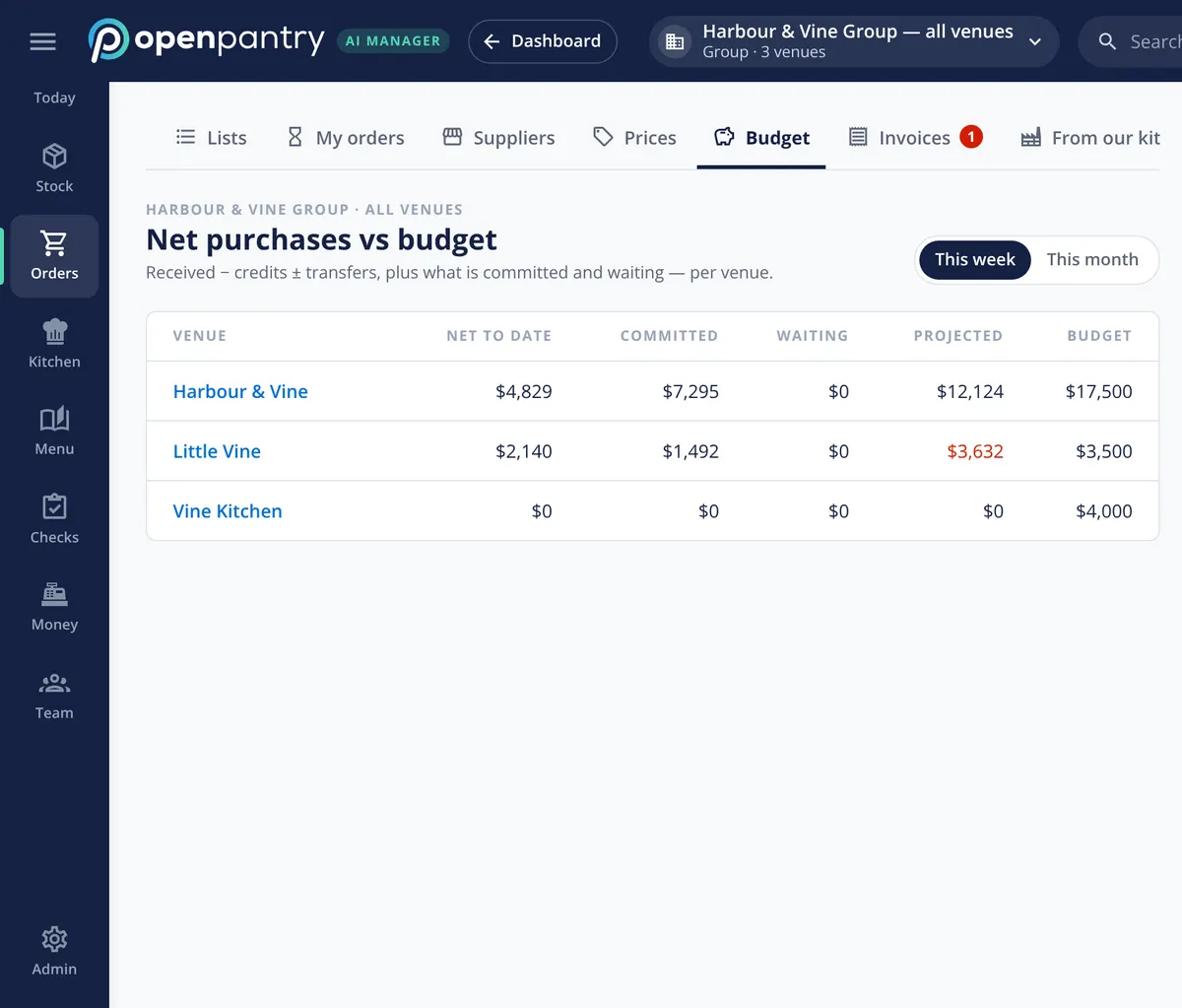
Head office keeps order lists and shares them with every venue, each ordering at its own suppliers and prices. A preferred supplier list flags or holds an order to anyone off the list. Approval rules decide what goes straight to the supplier, what the purchaser checks and what needs a named person’s OK — for example, anything over $2,000 — and weekly budgets show each venue’s projected spend before the week is out.
- Shared order lists at venue prices
- Preferred suppliers, with off-list orders held
- Approval rules and weekly budgets per venue
Roles that fit how a group actually works
Role templates cover the people a group really has — group owner, group chef, purchaser, area manager, venue manager, head chef, sous chef, bar manager, receiver, stock counter, finance, bookkeeper and an outside stocktaker. Each person can be limited to certain venues and categories and given a spending limit, and money is shown only to roles that should see it. Sessions can be signed out everywhere, two-step sign-in is available with an authenticator app, and a shared tablet can narrow to one person with a staff PIN.
- Venue, category and money limits per person
- Money visibility set by role
- Two-step sign-in, session policy and kiosk PIN
New venues in minutes, and a record of every change
A new venue can be set up from an existing one — its storage areas, where each item lives and its par levels — instead of starting from nothing. Your logo and colours can go on the app, the emails and the PDFs your team and suppliers see. Venues priced in another currency can be added to group totals at the exchange rates you enter each month. And every change, from a par level to a price, is in the change log with who made it and what it was before.
- A new venue from an existing one
- Your brand on the app, emails and PDFs
- Change log with before and after, exportable
What head office works with
Built by the team venues already order with
Chefs Love Open Pantry

Thank you OPEN PANTRY, we used to have to use 6 apps to get access to ordering from our suppliers, the fact we can do it all in one has saved an incredible amount of time & effort! We love you!

We’ve been using Open Pantry for a few months now and it’s been an absolute lifesaver. We’re short staffed so being able to place all of our orders with all of our suppliers in the one spot is a massive help.

So glad this service exists. Has made it so easy for my manager & chefs to order & all payments are settled in one go. The recurring orders & pantry lists are amazing time savers!!
Why not give every venue its own system and roll up the spreadsheets?
Because the roll-up is where the group loses control. When each venue runs its own copy of the recipes and the lists, the same dish costs three different amounts for reasons nobody can see, a new supplier appears on an invoice before anyone approves it, and head office spends Monday collecting numbers instead of acting on them. One system with venue-level kitchens and group-level rules keeps the cooking local and the control central.
Restaurant group head office — questions operators ask
Can head office push the same recipe to every venue in the group?+
Can each venue keep its own suppliers and prices?+
Can I limit what each manager can see and spend?+
Does Restaurant AI Manager support regions and area managers?+
How quickly can we set up a new venue?+
Can I see who changed a par level or a price?+
Does it support single sign-on for our whole group?+
Can I see the head-office tools before I sign up?+
Works even better with
Multi-Venue Management
Every venue side by side, with budgets and transfers.
Explore →Purchase Approvals & Budgets
The rules that decide what reaches a supplier.
Explore →Central Kitchen Software
A production kitchen your venues order from.
Explore →Restaurant Reporting
Group reports and the Monday summary email.
Explore →Run a demo restaurant group from head office
Sign in as the operations manager of Harbour & Vine and set an approval rule — no sign-up.
Kr 1,352/month per venue billed yearly (save 20%) · or Kr 1,690 month to month, no contract · plus tax