Restaurant AI Manager

See where your margin leaks — and get the fix drafted every morning.

Restaurant AI Manager watches every order, delivery, invoice, count and sale. Each morning it tells you, in dollars, what is costing you money — and drafts the fix for you to approve.

  • Short deliveries become credit requests at the door
  • Orders written from your pars, bookings and functions
  • GP per dish and per venue, explained in dollars
  • Works with the suppliers you already use

Your own copy of a demo restaurant group, with a guide you can talk to. Ready now? Get started — US$179/month per venue plus tax.

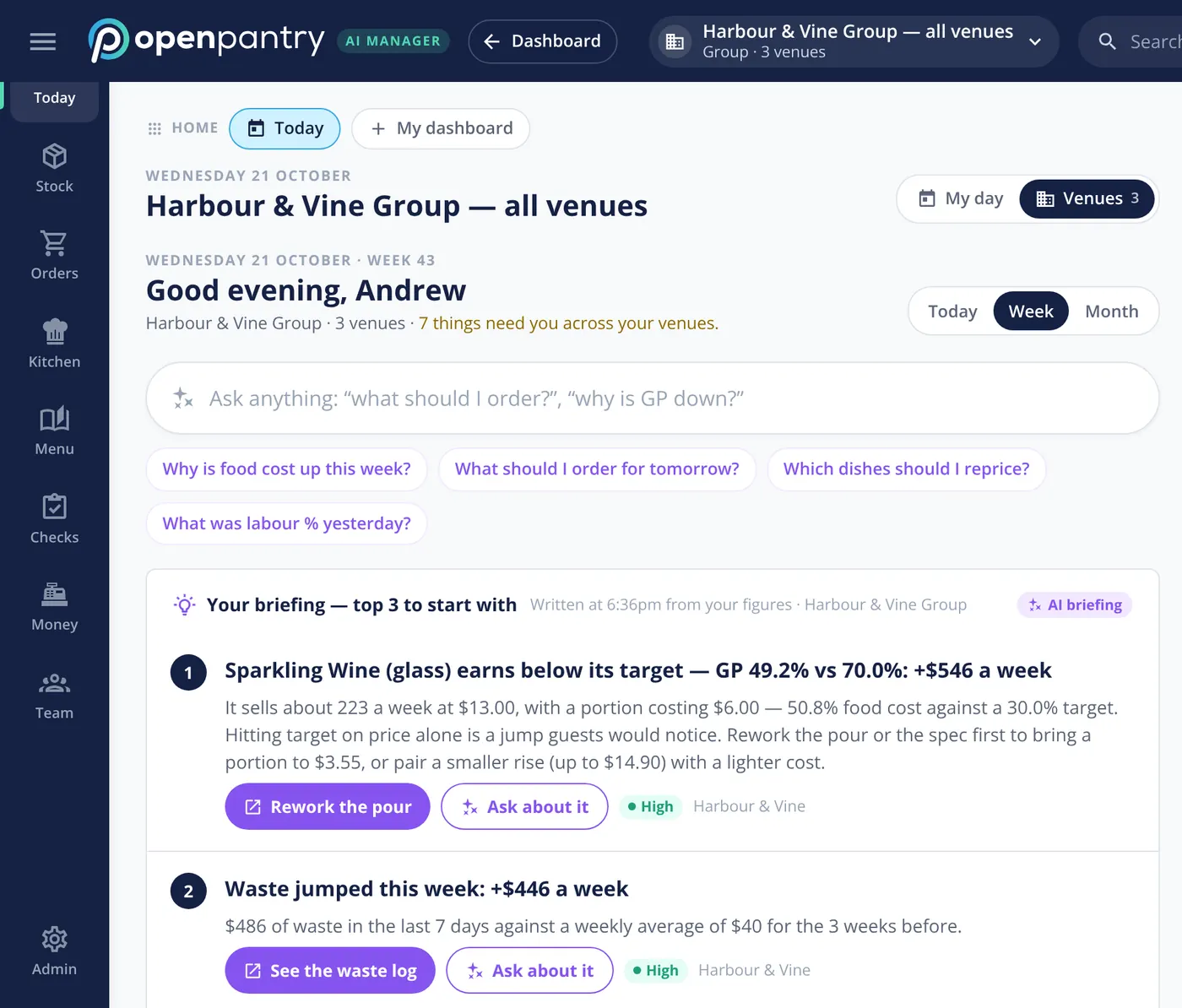
Restaurant AI Manager Today screen: a morning briefing ranking the top three things costing the group money, each with a dollar figure, a reason and a one-tap fix

From the team behind Open Pantry — ordering for 5,000+ venues

Margin rarely disappears in one go. It leaks.

Four leaks every kitchen knows — and the month-end food cost that arrives too late to fix any of them.

Shorts nobody chases
The invoice says ten, the cool room got eight. By month end nobody remembers, and the credit never comes.
Price rises that slip through
A supplier adds a few dollars a kilo and you find out at stocktake — after a month of selling the dish at the old margin.
Ordering by gut and group text
Over-order and it ends up as waste. Under-order and it is 86’d on a Saturday with a wedding in the function room.
A food cost % with no reason
One number, weeks late. Was it a price rise, waste, a heavy pour, or the count? No one can say.

The live demo

Don’t take our word for it. Run a restaurant group for ten minutes.

Pick your role and you are in — a private copy of Harbour & Vine, a demo bistro, café and production kitchen, with a guide that shows you around by voice or chat. No sign-up, nothing to install.

Orders, deliveries, prep and costing

What you’ll see:

  • An order drafted from your pars, bookings and functions
  • Deliveries ticked off on your phone — a short becomes a credit request
  • Prep lists by station, from what you expect to sell
How many venues do you run?
Try it as head chef

Works on a phone too. Nothing in the demo is real, and nothing is sent anywhere.

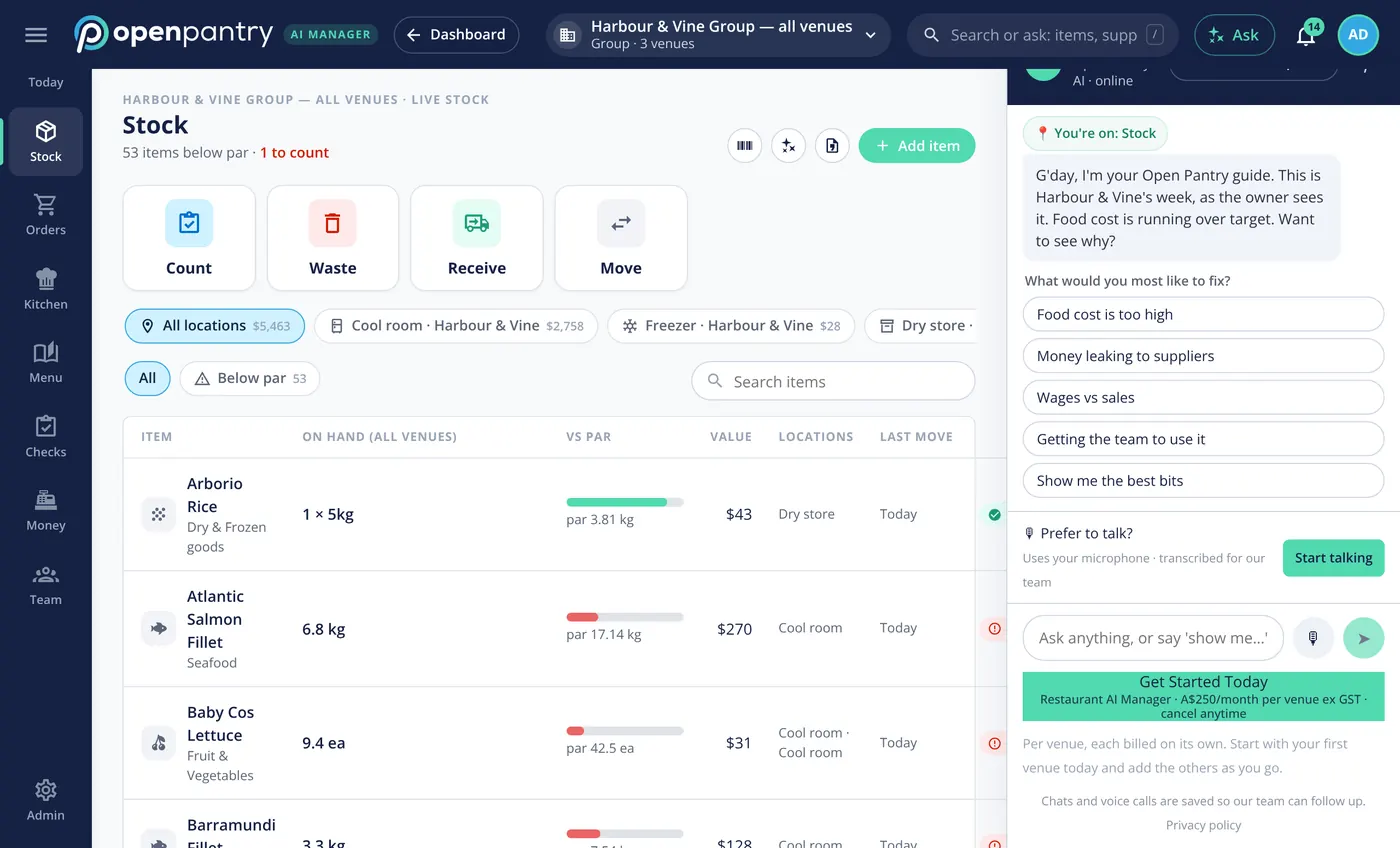
The live demo: the stock screen of a demo restaurant group, with the guide panel on the right asking what you would most like to fix
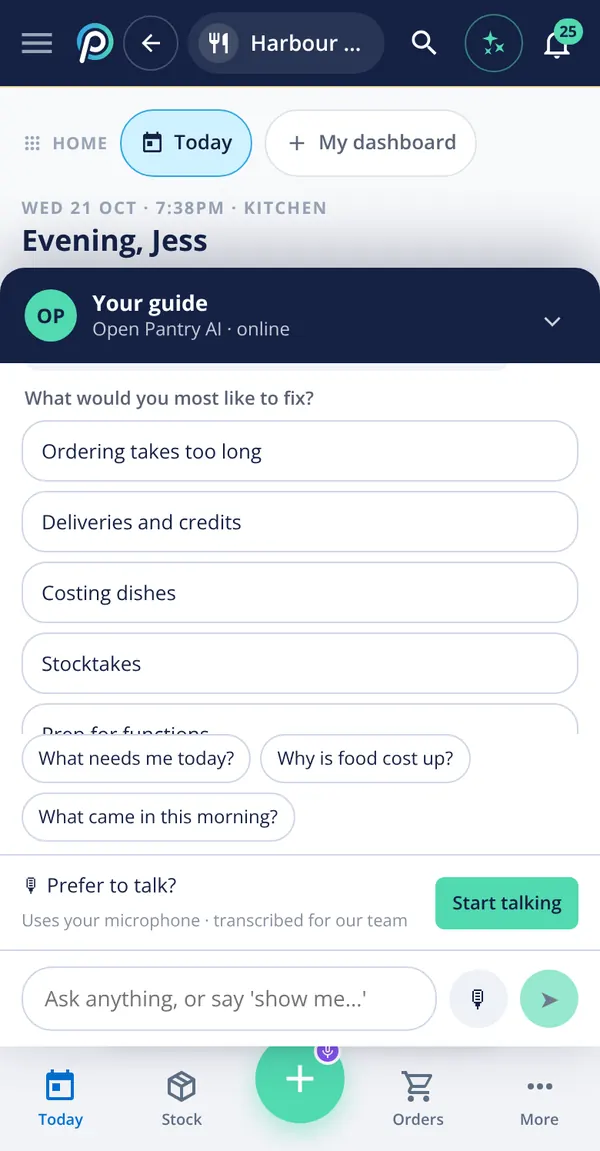
The demo guide on a phone, offering topics like ordering, deliveries and credits, costing and stocktakes

How it works

No new habits for your suppliers, and very few for your team.

  1. 1

    Connect what you already use

    Your POS, your accounting, and last month’s supplier invoices. Your suppliers, products and prices build themselves. Suppliers don’t need to join.

  2. 2

    It watches everything, venue by venue

    Orders, deliveries, invoices, counts, waste and POS sales are matched for you — ordered against received against invoiced, sold against used.

  3. 3

    You approve the fixes

    Each morning: what changed, what it costs you in dollars, and a drafted fix — an order, a credit request, a price change. Nothing goes out until you press Send.

The basics take an afternoon. Your first full food-cost breakdown comes after a full week and a stocktake.

A manager that checks every order, delivery and invoice

Everything below is in the live demo — go and press the buttons.

Every morning

A briefing that tells you what to fix first

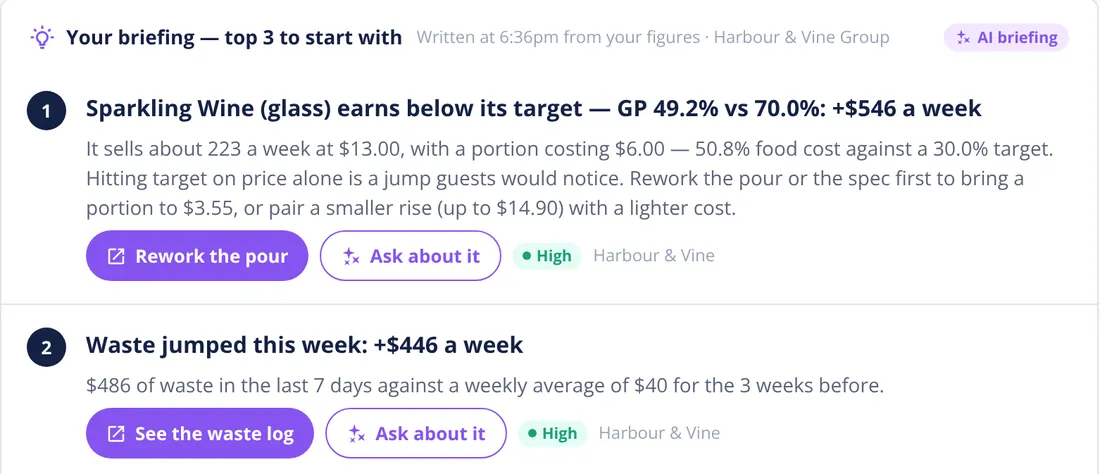
The few things costing you the most this week, ranked in dollars — a drink pouring under target, waste that jumped, a price that rose — each with the reason and a one-tap fix.

  • Ask in plain English: “why is GP down?”, “what should I order?”
  • Shows how sure it is: High, Check or Unsure
  • One task list for orders, counts, prep, invoices and checks
See the owner’s morning How the AI briefing works
Morning briefing: a drink earning below its GP target with the weekly dollar cost and a Rework the pour button, and a jump in waste with a See the waste log button

Ordering

Orders written from what you’ll actually sell

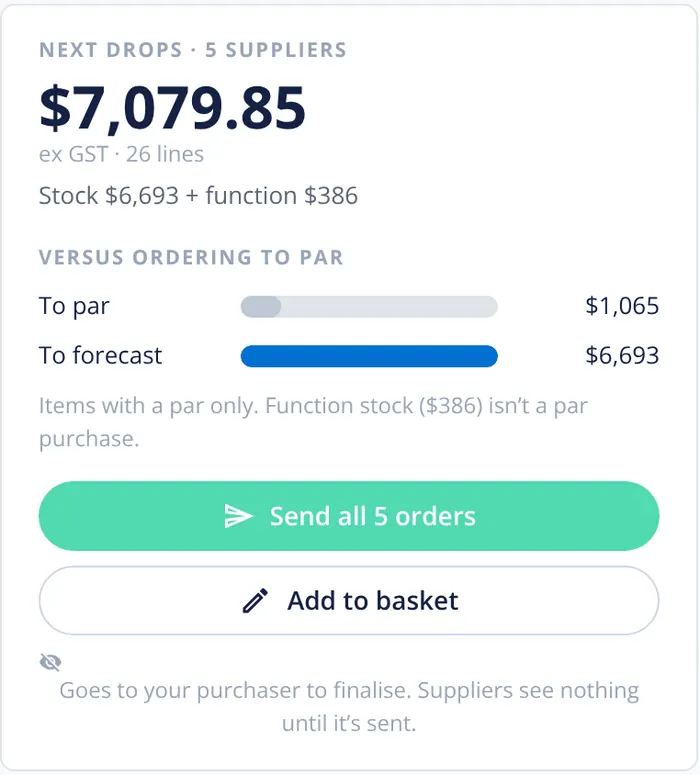
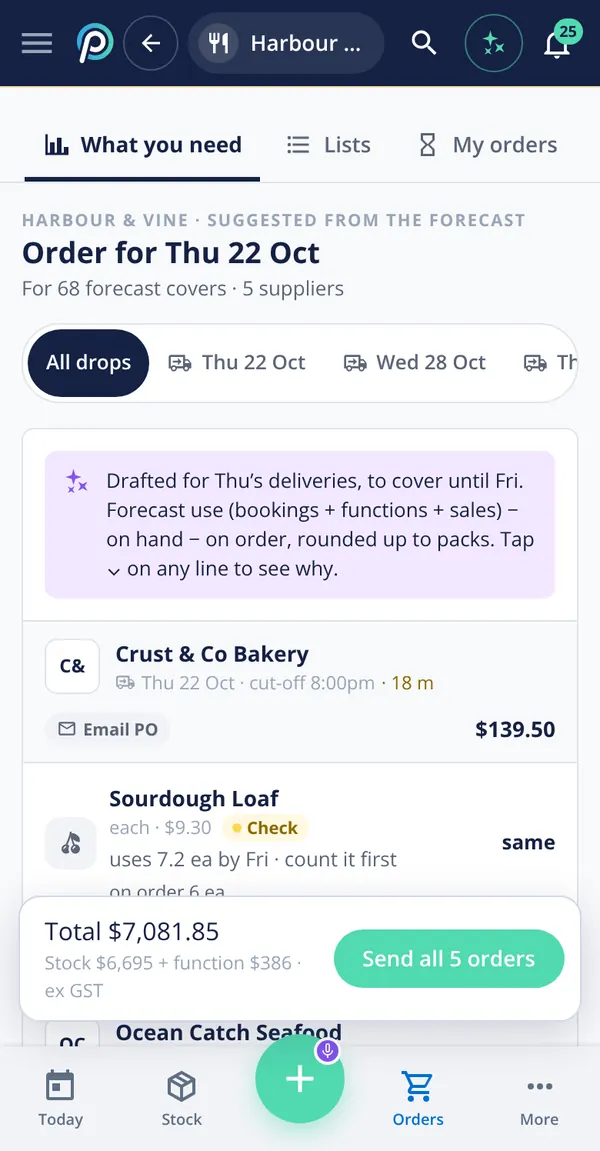
Forecast use from your sales, bookings and functions, minus what’s on hand and on order, rounded up to packs — for every supplier, timed to their delivery days.

  • Any supplier, by email — they don’t need Open Pantry
  • Tap any line to see why that quantity
  • Waits for your approval — suppliers see nothing until it’s sent
Build an order as head chef How demand forecasting works
Next drops from five suppliers drafted to the forecast, with a Send all 5 orders button
The forecast order on a phone: quantities per supplier with Send all 5 orders

Deliveries & invoices

Deliveries checked at the door. Shorts become credit requests.

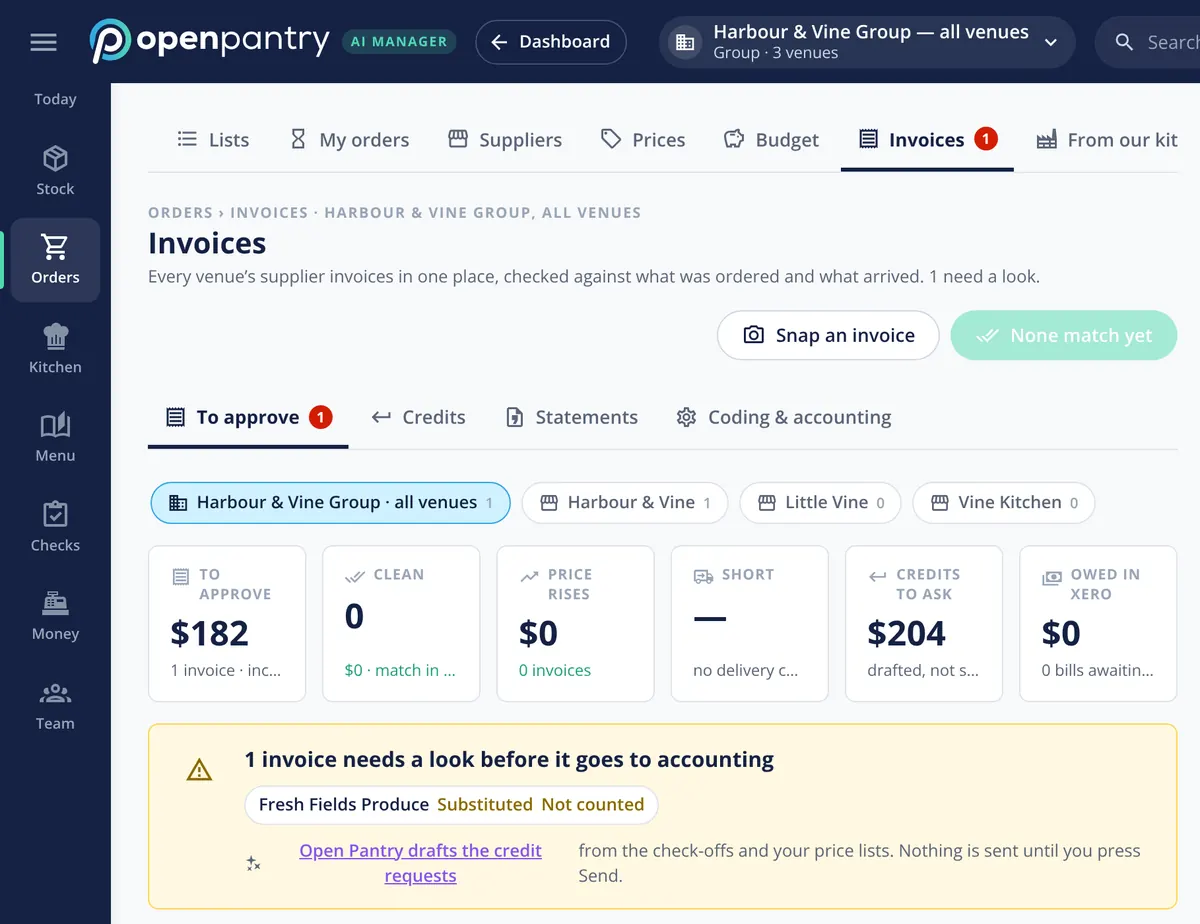
Tick deliveries off at the door on a phone. What you ordered, what arrived and what you were invoiced are matched line by line, and the gap is drafted as a credit request for you to send.

  • Forward invoices or snap a photo — no typing
  • Substitutions and price rises flagged before you pay
  • Approved bills go to Xero, MYOB or QuickBooks
Check off a delivery How credit requests work
Invoices across all venues: totals to approve, price rises, shorts and credits to ask for, with one invoice needing a look before it goes to accounting

Menu & GP

GP per dish — and why it moved

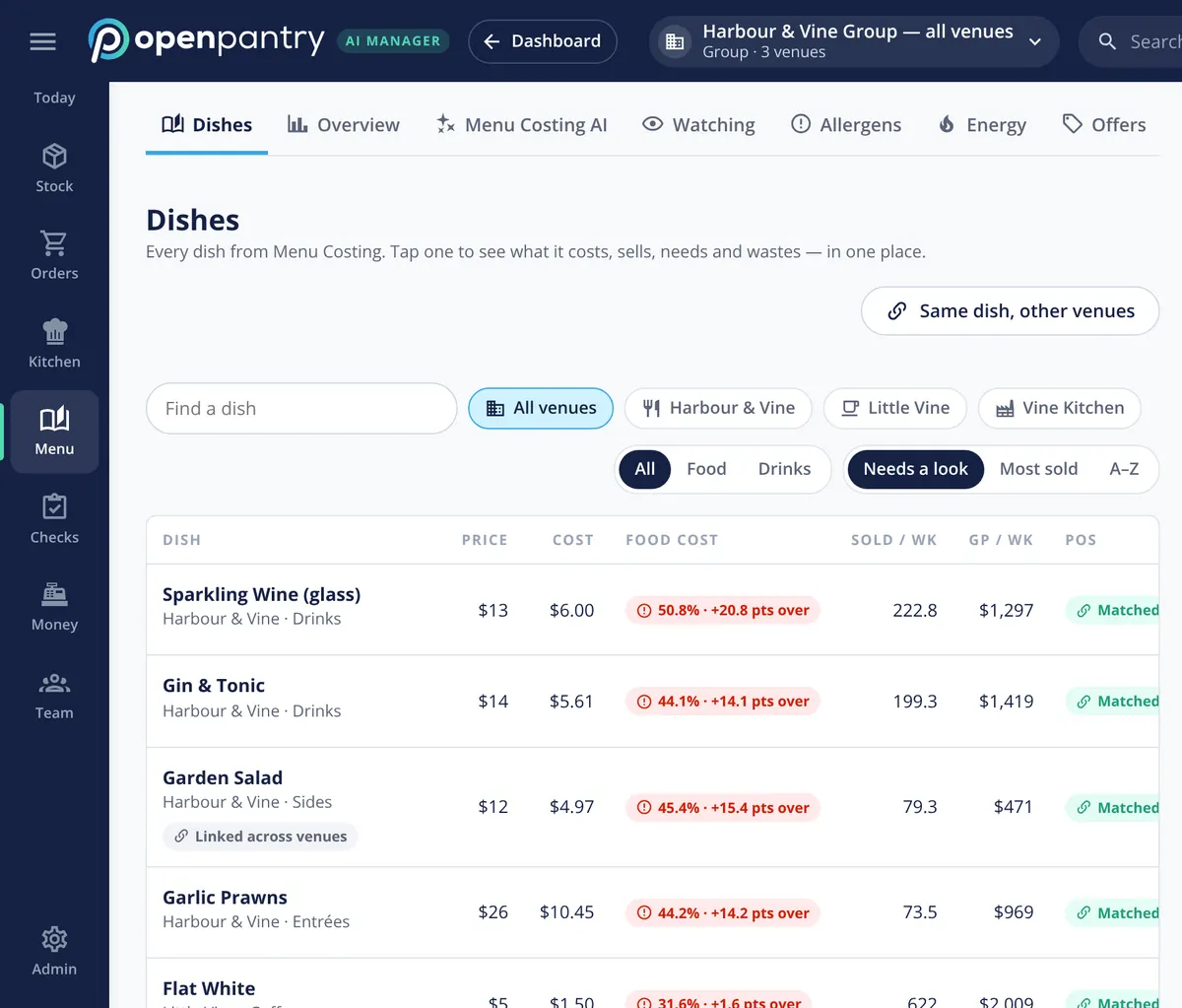
Every dish’s cost, food cost % and weekly GP, live from your invoices and POS sales. When GP slips, it’s split into price rises, waste, yield and count error — in dollars that add up.

  • Dishes over target float to the top
  • POS items matched to recipes for you
  • Same dish compared across venues
Find the dishes losing money How food cost variance is explained
Dishes list: price, cost, food cost percent against target, sold per week and GP per week for each dish

On the floor

Prep and counts your team will actually do

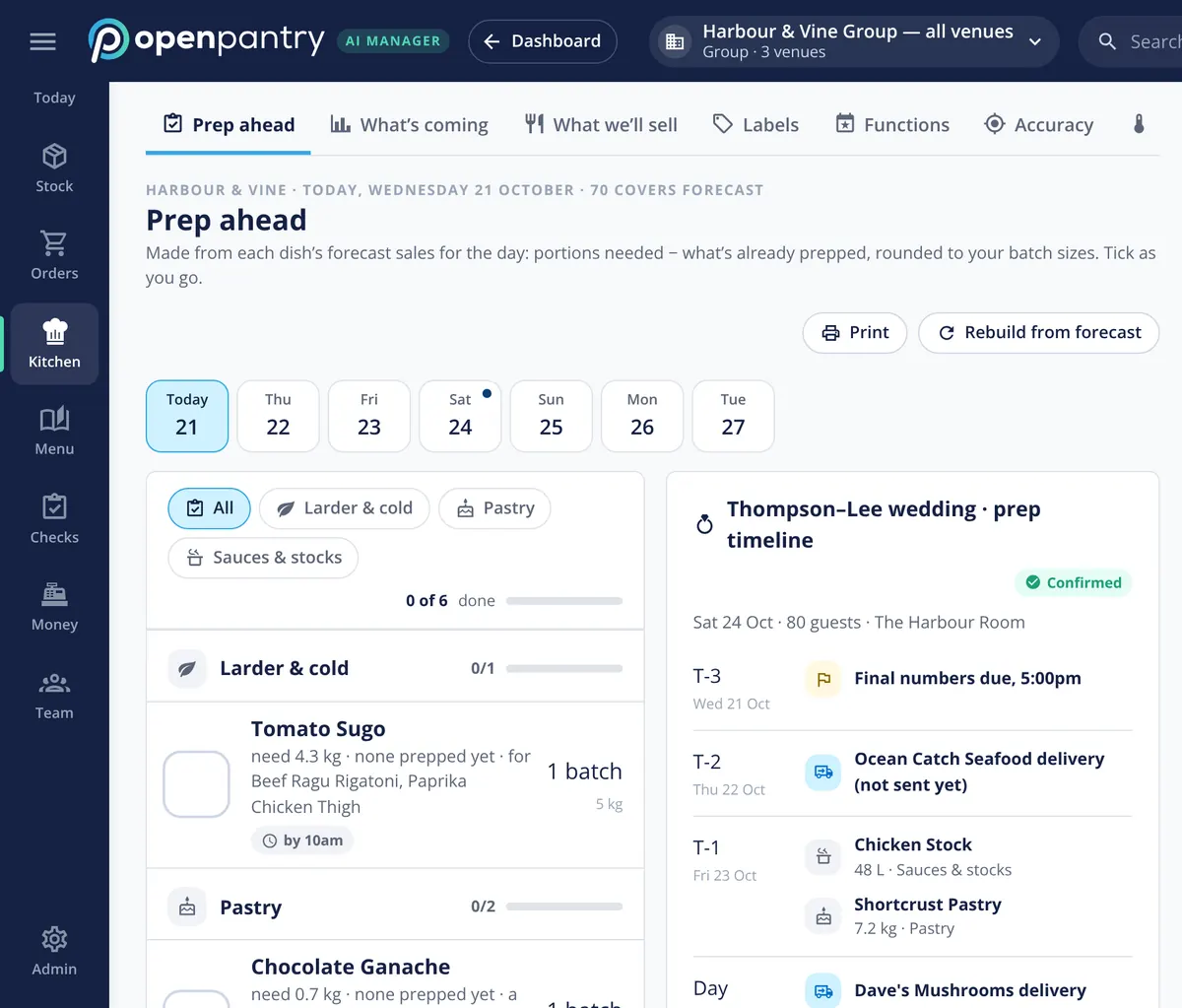
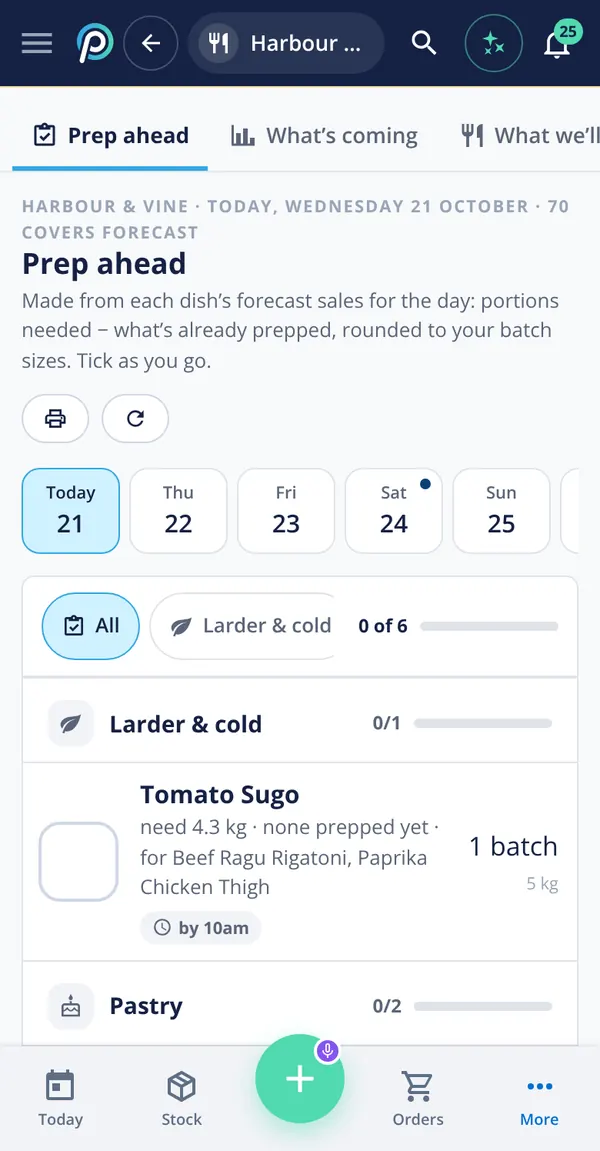
Prep lists by station from the day’s forecast and functions, rounded to your batch sizes. Stock counts on a phone in shelf order — cartons, inners, singles and open bottles on one line.

  • Scan barcodes with the phone camera
  • Blind counts and recount nudges keep numbers honest
  • Finish a count with no signal in the cool room
See today’s prep list How mobile stock counts work
Prep ahead: tasks by station from the forecast, next to the prep timeline for a confirmed 80-guest wedding
Prep list on a phone: larder and pastry tasks with batch sizes and due times

One venue or fifty

Venues side by side, transfers between them, approvals and budgets, and a production kitchen your venues order from like any other supplier. Each venue is billed on its own, so you add them as you go. Multi-venue management →

Try it as group manager

Everything in Restaurant AI Manager

One price per venue, every part included. Read how each one works.

AI that drafts. You decide.

Your name is on the orders and the books, so nothing happens without you.

  • Drafts, never sends

    Orders, credit requests and price changes wait for a person to press Send.

  • Shows how sure it is

    High, Check or Unsure on every suggestion, with the reason one tap away.

  • Logged and undoable

    Every change is logged — who, what and when — and what the AI did can be undone.

  • Right view for every role

    Chefs see food cost, not wages. Floor staff see stock, not prices. Unlimited staff logins.

What operators say about Open Pantry

Christian Abbot, Group Executive Chef, Australian Venue Company
“Open Pantry has created exactly what the restaurant industry needs. Something very easy to use that doesn’t require any upkeep. Their menu costing feature is fantastic and simple enough that any chef or bar manager can use it. I think restaurants that are serious about growing their profit & managing their costs need to consider Open Pantry.”
Christian AbbotGroup Executive Chef, Australian Venue Company210 venues
“Open Pantry has made it easy for our chefs and managers to stay on top of costs and ordering. Having only the products we use, all in one place, means fewer mistakes, better control, and real-time savings. It’s become an essential tool across the business.”
Joe PiasevoliChief Procurement Officer, Iris GroupIris Group — casinos, pubs and hotels
“I’ve been using Open Pantry for my restaurant’s ordering, menu costing, and stock management, and it has truly revolutionized the way we operate… Open Pantry’s stock management tools ensure we stay on top of inventory, minimizing waste and maximizing efficiency.”
Bowdy TolhopfPeach Hospitality Group

Works with what you already have

Suppliers
Any supplier that takes orders by email. Invoices by forwarding or a photo. Open Pantry suppliers keep prices live.
Point of sale
Connects to your POS, whichever one you use. The day’s sales come in and are matched to your recipes.
Accounting
Xero, MYOB AccountRight and QuickBooks Online — supplier bills and daily sales journals, as drafts.
Bookings & functions
Add them by hand, CSV, calendar feed or forwarded email — they feed the forecast, orders and prep.

One price per venue. Everything included.

No tiers to compare and no add-ons. Each venue is billed on its own, so a group starts with one venue and adds the rest as it goes.

  • Pay monthly with no contract — or yearly for less
  • Cancel anytime
  • Unlimited staff logins
  • Your ordering on Open Pantry stays free

Want to see it first? The live demo is the whole product, with nothing to sign up for. Open the live demo.

Restaurant AI Manager

US$179/month per venue

plus tax · cancel anytime

  • Morning briefing, Ask and alerts
  • Forecast orders from any supplier, approvals and budgets
  • Delivery check-off, invoice matching and credit requests
  • Stock, counts, waste and transfers
  • Live GP per dish and per venue
  • Prep lists, functions and daily checks
  • Close the day, with journals to your accounting
  • Group tools and production kitchen
Get started Or try the live demo first

Large group? info@theopenpantry.com

Open Pantry for restaurants in the United States

US restaurants, cafés and pubs use Open Pantry to order from all their suppliers in one place and keep food costs in view.

Plans priced in
USD — see US pricing
Accounting sync
QuickBooks Online and Xero
Can restaurants in the United States use Open Pantry?

Yes. Restaurants, cafés and pubs in the United States use Open Pantry to order from all their suppliers in one place, track what they buy and keep food costs in view. Paid plans are priced in USD.

Is ordering on Open Pantry free for restaurants?

Yes. The ordering package is free, with unlimited suppliers and orders. Paid plans add menu costing, inventory and reporting, and are priced in USD.

Questions operators ask

Do my suppliers need to be on Open Pantry?
No. Orders go to any supplier who takes orders by email, invoices come in by forwarding the email or taking a photo, and deliveries are checked off the same way. Suppliers who are already on Open Pantry keep your prices up to date for you.
Which POS systems does it work with?
It works with every POS. Whichever till you use, the day’s sales come in and are matched to your recipes, so food cost and GP reflect what actually sold.
Which accounting software does it work with?
Xero, MYOB AccountRight and QuickBooks Online. Approved supplier bills and the daily sales journal go across as drafts, coded to the right venue, for your bookkeeper to post.
How long does it take to set up?
The basics take an afternoon: connect your POS and accounting, forward last month’s supplier invoices so your suppliers, products and prices appear, and add each rep’s email for orders. Recipes go in as you go — your top dishes first. Your first full food-cost breakdown comes after a full week and a stocktake. For a group, each next venue is quicker.
Is there a free trial?
There is no free trial. Instead, the live demo lets you use the whole product on a demo restaurant group, with a guide, without signing up. When you start, it is monthly with no contract, and you can cancel any time.
How does pricing work for a group?
Restaurant AI Manager is priced per venue (US$179/month per venue, plus tax), and each venue is billed on its own. Start with your first venue and add the others as you go. Unlimited staff logins are included. Running a large group? Email info@theopenpantry.com.
Does the AI change things on its own?
No. It drafts — orders, credit requests, price changes — and shows how sure it is (High, Check or Unsure) and why. Nothing reaches a supplier or your accounts until a person presses Send, and every change is logged and can be undone.
Will my chefs and floor staff actually use it?
It is built for phones on the floor: counts in shelf order, deliveries ticked off line by line, prep lists by station. Each person sees only what their role needs — chefs see quantities and food cost, not wages, and floor staff do not see prices.
How is it different from Menu Profit Manager?
Menu Profit Manager costs your menu from your invoices and recipes. Restaurant AI Manager runs the whole operation around it: ordering from your forecast, delivery and invoice checks, stock and counts, prep, daily close, and why your GP moved — for one venue or a group.
What is in the live demo?
Your own copy of Harbour & Vine, a demo restaurant group with a bistro, a café and a production kitchen, and a guide you can talk to or type to. Pick your role and look around — nothing in it is real and nothing is sent anywhere. At very busy times you may be shown a shared copy you can look around but not change.

Watch it find the leaks in a demo restaurant group — right now.

Pick your role. A guide shows you around a demo restaurant group. No sign-up.