
Food Cost Variance: Why Your GP Moved, in Dollars That Add Up
Food cost variance is the gap between your theoretical food cost — what the dishes you sold should have used — and your actual food cost from deliveries and stock counts. Restaurant AI Manager works out both from your recipes, POS sales, deliveries and counts, then splits the movement into price rises, menu mix, waste, yield, count error and unrecorded transfers, in dollars that add up to the total. The sums are done in code, not guessed by the AI.
- Actual vs theoretical usage by item and storage location, in dollars
- GP movement split into price, mix, waste, yield, count error and transfers
- Dishes ranked by the dollars they lose you each week
- Supplier price rises traced to the dishes they hit
Built on Open Pantry ordering — free, and used by 5,000+ venues
Recommended by:




Food cost went up two points. Nobody can say why.
The food cost figure arrives a month late, as one line in the accounts
Price rises, waste and a bad count all look the same in the P&L
Theoretical food cost lives in a spreadsheet nobody has updated since the menu changed
Staff meals and stock sent to the other venue never get written down
The fix is a guess, so prices go up when the real problem was portioning
Half the POS buttons don’t match a recipe, so the sales side is never complete
From what you sold to why GP moved
It works out what you should have used
Your POS sales are matched to your recipes — automatically, with a High, Check or Unsure label on each match — and multiplied out into the ingredients every dish should have used. Sales that don’t match yet are held, not lost, and counted once you match them.
It works out what you did use
Opening stock, plus deliveries checked off at the door, less the closing count, with waste and transfers between venues taken into account. That gives actual usage by item and by storage location, in dollars.
It explains the gap
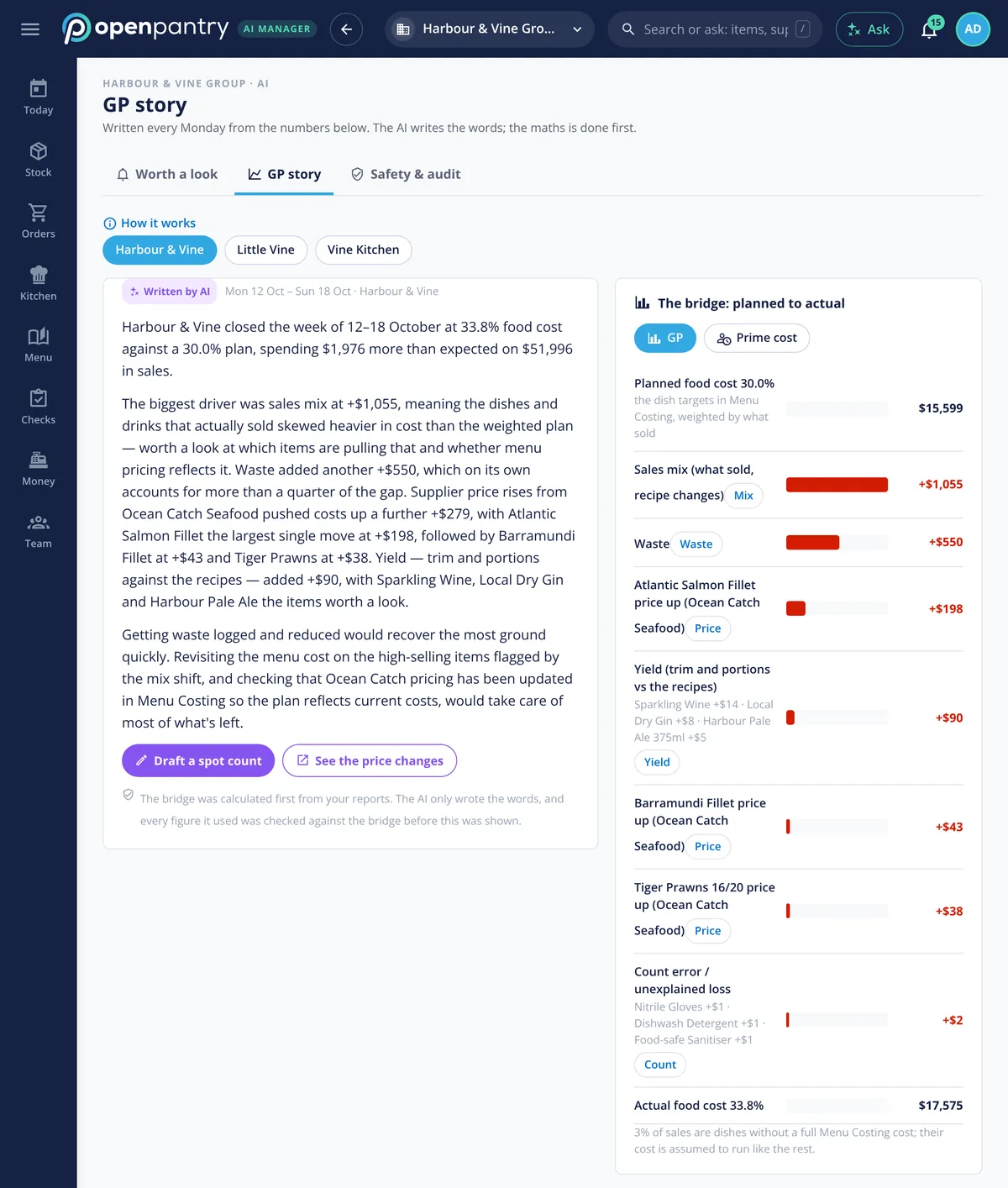
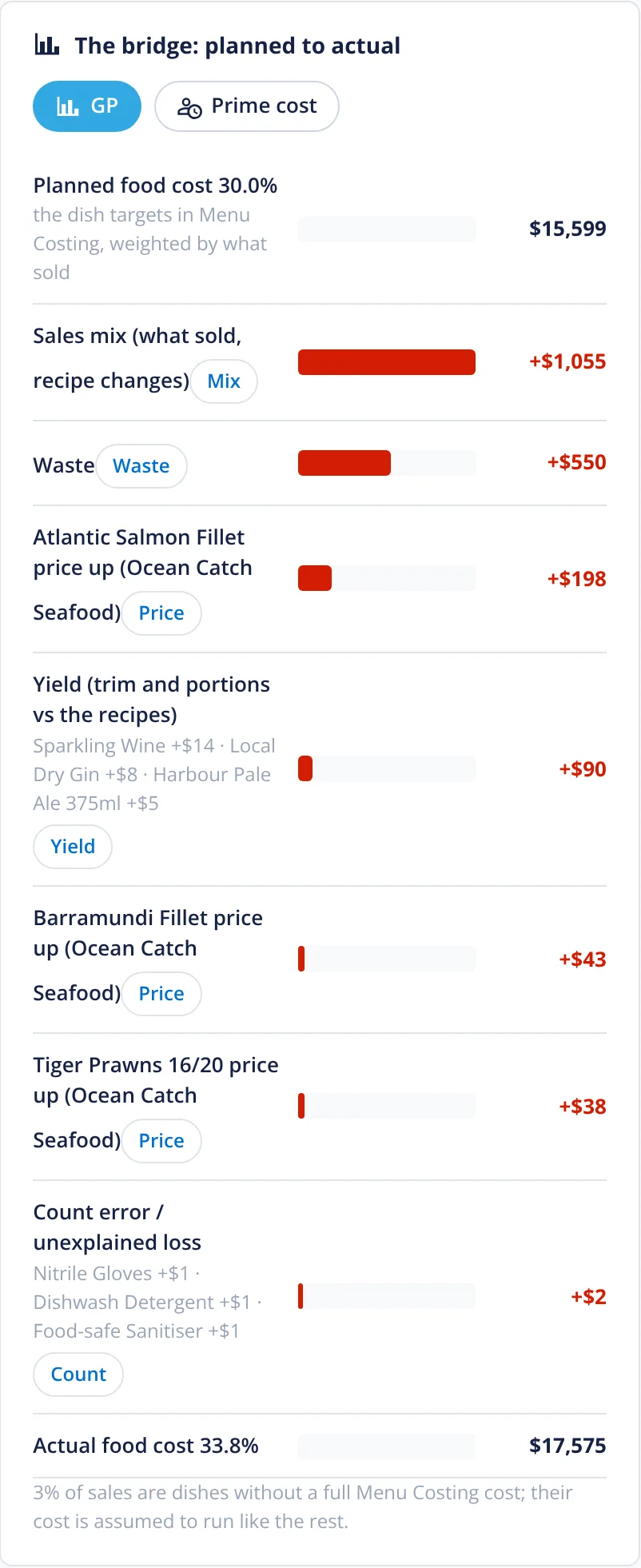
“Explain my GP” splits the movement into price rises, menu mix, waste, yield, count error and unrecorded transfers, each in dollars, and the parts add up to the total. The arithmetic is done in code; the AI only writes it up in plain English.
It points to the fix
Dishes are ranked by the dollars they lose a week, with a suggested next step on each. One tap opens a draft — a price change, a recipe to review — for a person to approve.
No sign-up — a demo restaurant group with a guide that shows you around
Six causes, one total
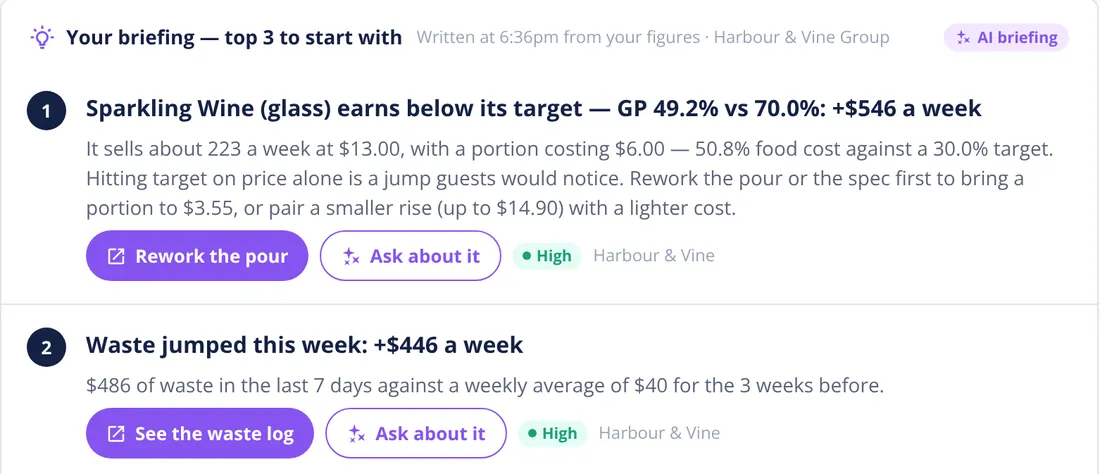
A food cost figure on its own can’t tell a supplier price rise from a heavy hand on the portions. “Explain my GP”, the GP story, builds a bridge from planned to actual food cost: price rises supplier by supplier, sales mix, waste, yield, count error and, when there were any, unrecorded transfers, in dollars that add up to the gap. The sums are done first; the AI only writes the summary, and every figure it uses is checked against the bridge. The same figures feed the morning briefing, so a jump in waste or a drink pouring below target turns up the day it starts costing money, not at month end.
- Price, mix, waste, yield, count error and transfers
- Dollars that reconcile to the total movement
- Calculated in code, explained in plain English
Theoretical cost, dish by dish
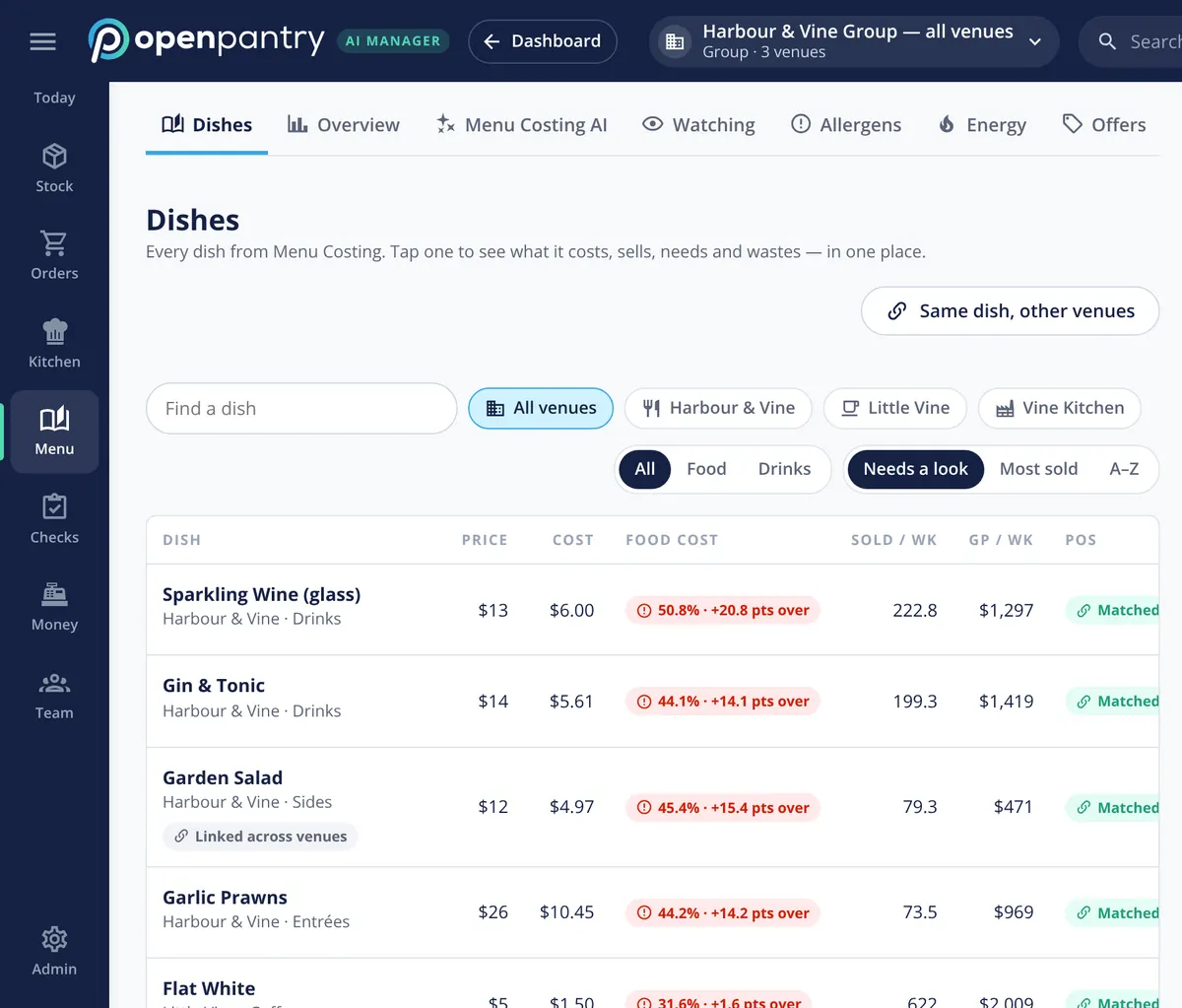
Every dish from your menu costing is joined to what it sells, so you see its price, its cost today, its food cost against target and the GP it earns a week. Each one shows whether its POS button is matched, and a dish linked across venues can be compared with the same dish elsewhere in the group. Used-versus-sold then compares what those sales should have taken from stock with what actually went, item by item and location by location.
- Price, cost, food cost against target, sold and GP per week
- POS buttons matched to recipes, with unmatched sales held
- Used vs sold in dollars, by item and storage location
Price rises traced to the plate
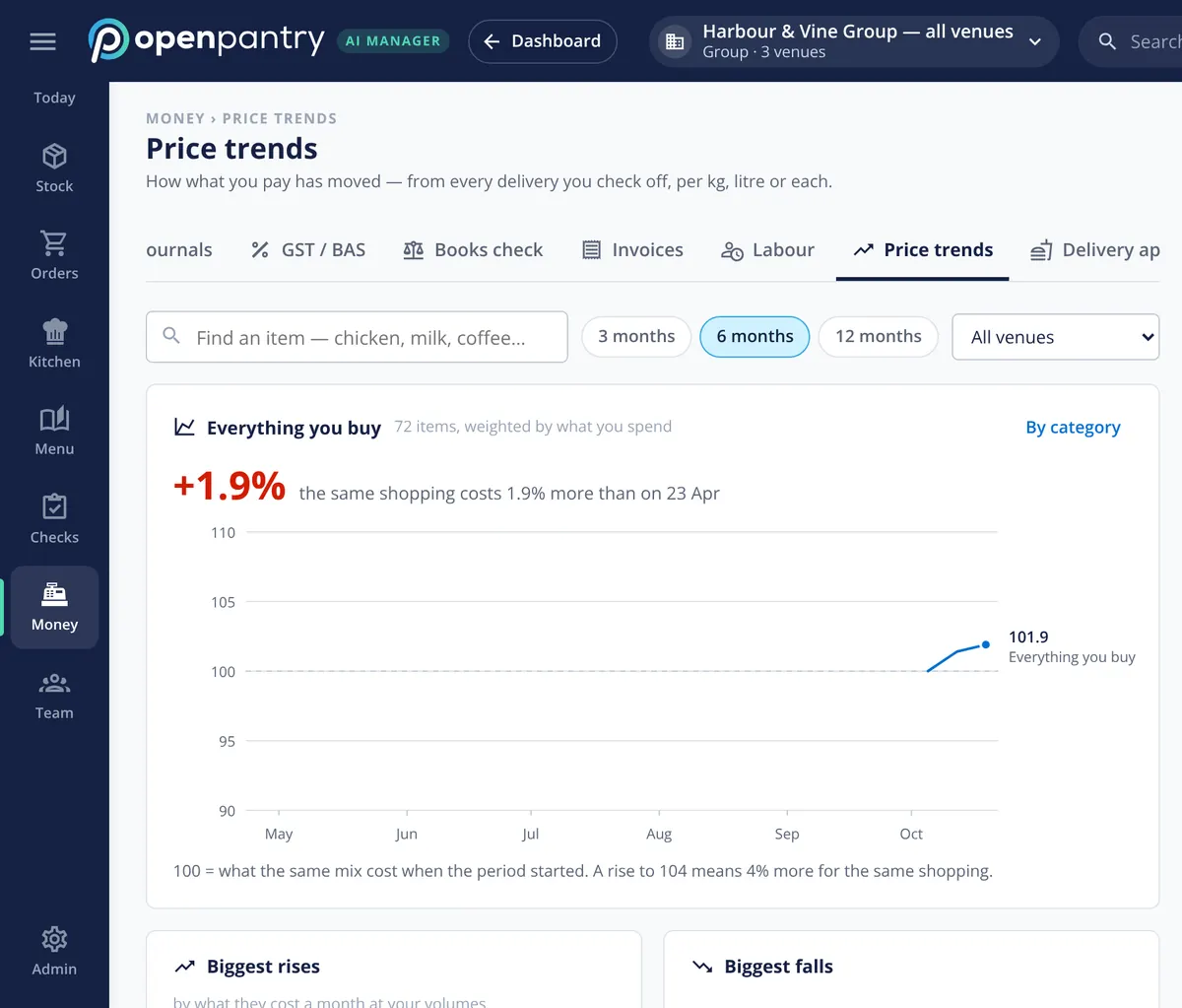
Every delivery you check off records what you actually paid, per kilo, litre or each. Price trends shows how the cost of everything you buy has moved, weighted by what you spend, with the biggest rises and falls listed. When an ingredient goes up, the dishes it sits in are named with the GP it’s costing you a week, so the conversation with the supplier and the menu price are both on the table.
- What you pay over 3, 6 or 12 months, from real deliveries
- Biggest rises and falls, by what they cost a month
- Each rise linked to the dishes it hits
Where to start, ranked in dollars
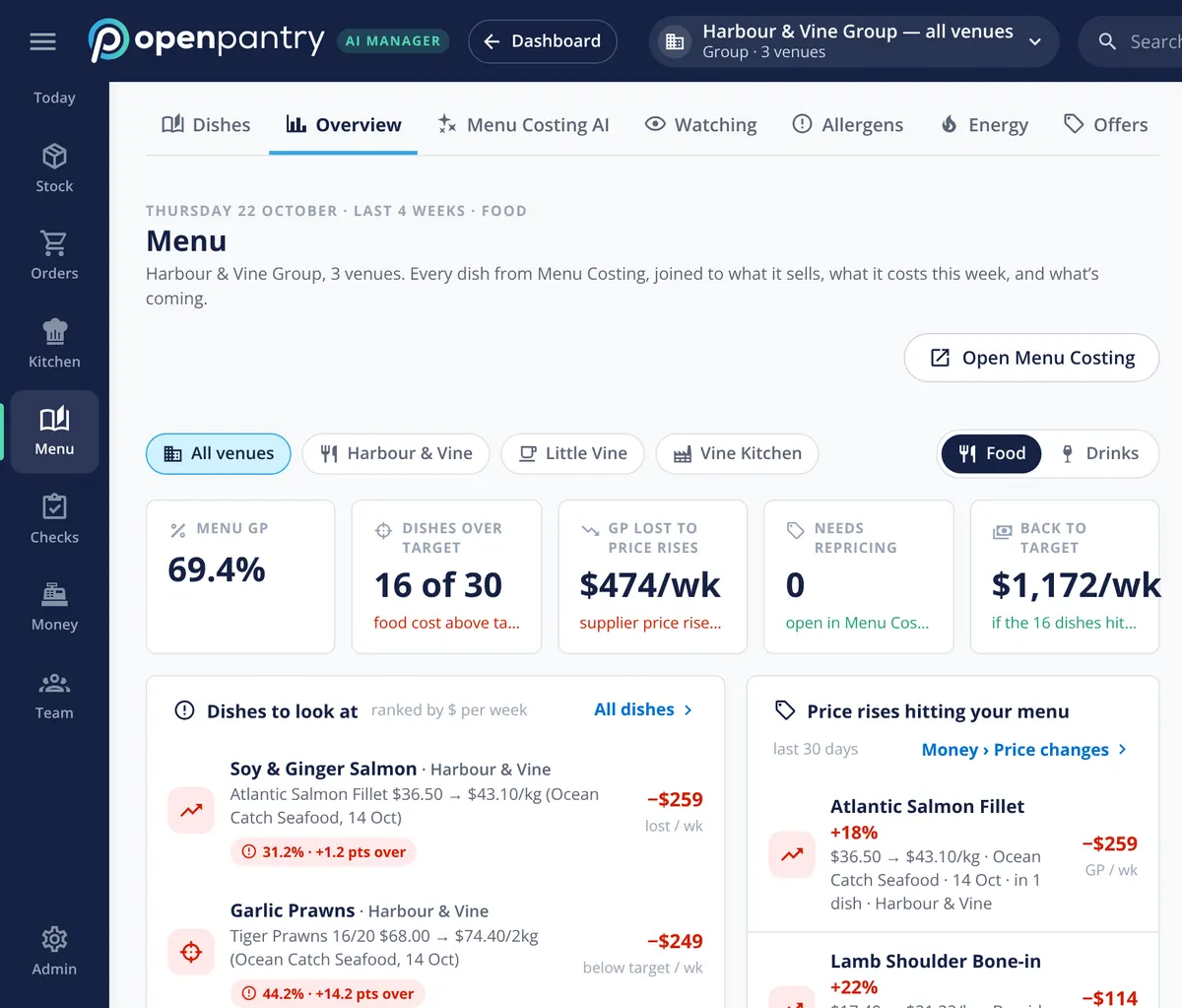
The menu overview leads with menu GP, how many dishes are over their food-cost target, what supplier price rises are costing a week, and what getting the over-target dishes back to target would be worth. Below that, the dishes to look at are ranked by dollars a week with the cause beside each. In the demo group, a salmon price rise from one supplier sits at the top. For which dishes to promote, rework or drop, see menu engineering.
- Menu GP and dishes over target, per venue or the whole group
- Dishes ranked by dollars lost a week, with the cause
- Food and drinks shown separately
What the variance is built from
Built by the team venues already order with
“Open Pantry has created exactly what the restaurant industry needs. Something very easy to use that doesn’t require any upkeep. Their menu costing feature is fantastic and simple enough that any chef or bar manager can use it. I think restaurants that are serious about growing their profit & managing their costs need to consider Open Pantry.”
Chefs Love Open Pantry

Thank you OPEN PANTRY, we used to have to use 6 apps to get access to ordering from our suppliers, the fact we can do it all in one has saved an incredible amount of time & effort! We love you!

We’ve been using Open Pantry for a few months now and it’s been an absolute lifesaver. We’re short staffed so being able to place all of our orders with all of our suppliers in the one spot is a massive help.

So glad this service exists. Has made it so easy for my manager & chefs to order & all payments are settled in one go. The recurring orders & pantry lists are amazing time savers!!
Why not just watch food cost percentage each month?
Because the percentage tells you that something went wrong, not what. A two-point rise could be a supplier putting salmon up, a busy week of low-GP dishes, a fryer of chips binned, a bad count or stock walked to the other venue — and each needs a different fix. Splitting the movement into its causes, in dollars, means the owner and the head chef argue about the right problem, while it’s still a small one.
Food cost variance — questions owners ask
What is the difference between actual and theoretical food cost?+
How do I find out why my restaurant food cost percentage went up?+
How does it tell supplier price rises apart from waste and portioning?+
Do I need to do a stocktake to measure food cost variance?+
Does food cost variance work with my POS?+
What happens to POS sales that don’t match one of my recipes?+
Is the AI making up the numbers in the GP explanation?+
Can I try the food cost variance report before paying for it?+
Works even better with
Menu Engineering
Stars, plowhorses, puzzles and dogs from live GP and sales.
Explore →Restaurant Stocktaking
The counts that turn theoretical cost into actual.
Explore →Sales & Waste Tracking
Waste logged with a reason and a cost, as it happens.
Explore →AI Restaurant Assistant
A morning briefing of what’s costing you most, in dollars.
Explore →See why GP moved at a demo restaurant group
Open the demo as the owner of Harbour & Vine and find the dishes losing money — no sign-up.
R 1,119.20/month per venue billed yearly (save 20%) · or R 1,399 month to month, no contract · plus tax