
Product Visibility: Decide Who Sees Which Products — and Which Prices
Open Pantry lets you run one catalogue and show a different version of it to every customer. A product can be shown or hidden for a single venue or a whole customer group; its price can be hidden while the product still shows; and a group can be given a line to look at, a line with a price, or a line they can actually order. You choose whether new products start visible or hidden, and a rule set on an individual customer always wins.
- Show or hide a product for one customer, or for a whole customer group
- Three levels of access: visible only, visible with a price, or fully orderable
- Hide a price without hiding the product — per customer or across a price list
★★★★★ Trusted by 600+ suppliers
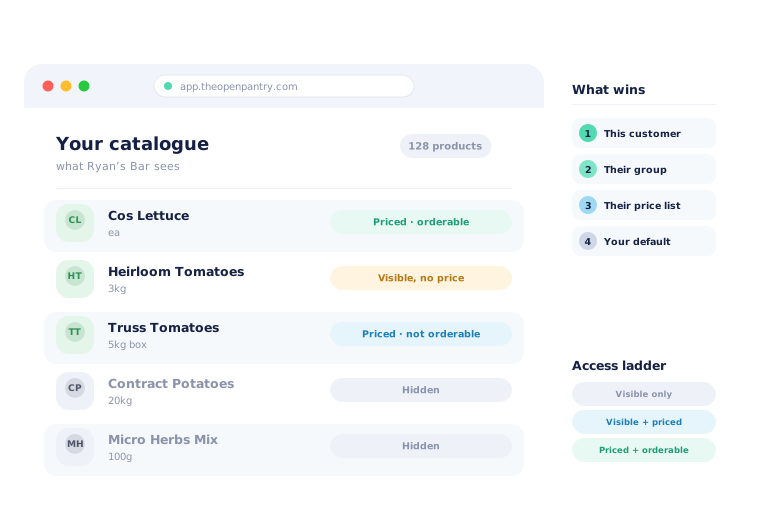



One catalogue, shown identically to everyone, is a commercial problem.

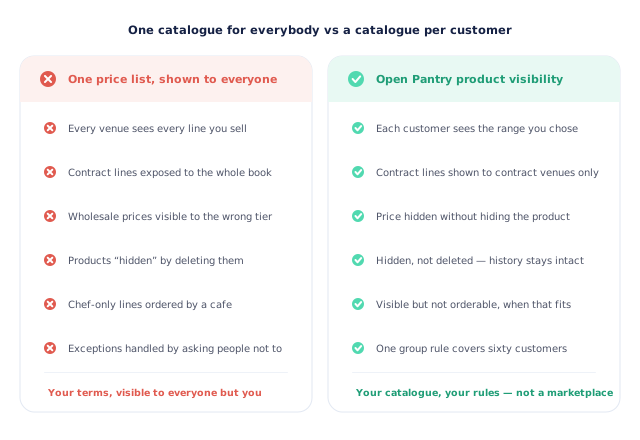
Every venue sees every line, including the ones they cannot buy

Contract lines and their pricing exposed to the whole customer book

Chef-only or allocation products ordered by accounts that should not have them

Products “hidden” by deleting them, taking their history with them
Set the Default, Then the Exceptions
Choose how new products behave
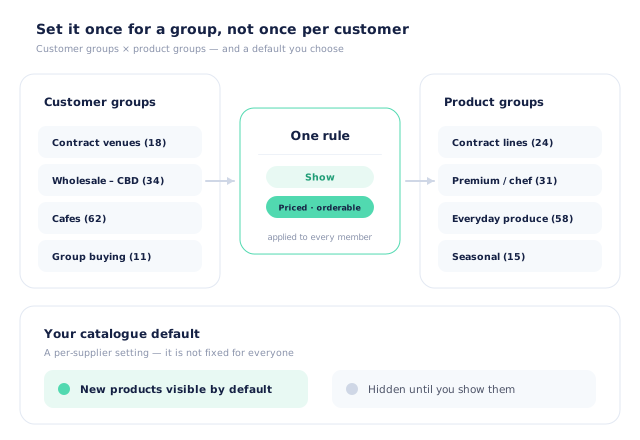
Decide once whether a product you add is visible to customers by default, or hidden until you deliberately show it. It is your setting, not a fixed rule — some suppliers open the catalogue and close exceptions, others do the reverse.
Set a rule for a customer group
Join a customer group to a product group and say what happens: show these products or hide them, and if shown, whether members can see them only, see them with a price, or order them.
Override for a single customer
One venue is always different. A rule set directly on a customer and a product wins outright, whatever the group and the price list say.
Control the price separately
Hiding a price is its own decision. You can hide the price for one customer while leaving the product visible, or hide it for everyone on a particular price list.
Free trial · Cancel anytime
Seeing the product and seeing the price are two different decisions
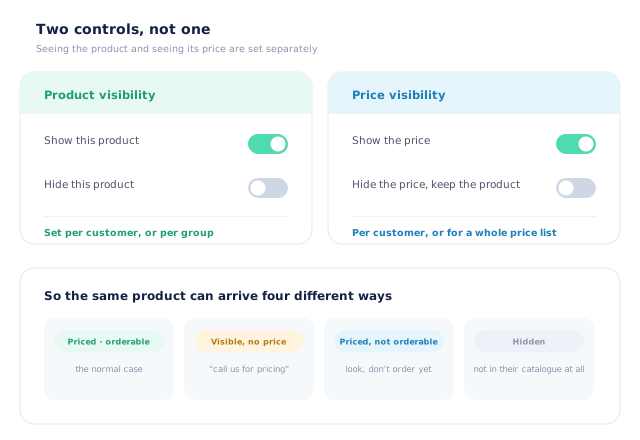
Most systems treat a catalogue as a single switch: the customer either has the product or they do not. Food wholesale needs more room than that. Sometimes you want a venue to know a line exists but to ring you about pricing. Sometimes a whole price list should show products without prices while an agreement is being settled. Open Pantry keeps the two controls apart, so the same product can arrive four different ways depending on who is looking.
- Show or hide the product itself, per customer or per group
- Hide the price while leaving the product visible
- Hide prices for everyone on a given price list
- Hidden is not deleted — the product, its history and its stock stay intact
Three levels of access, not just on and off
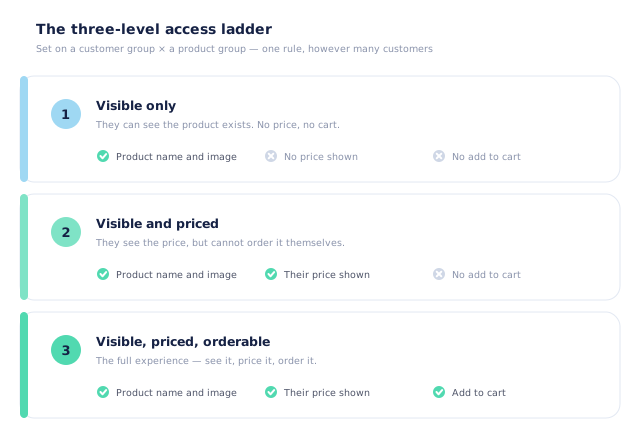
When you join a customer group to a product group you also choose how far that access goes. Visible only means they can see the product exists — no price, no cart. Visible and priced means they see their price but cannot put it in an order themselves. Visible, priced and orderable is the full experience. That middle rung is the one suppliers ask for and rarely get: it is how you show a new range to a customer tier before you open it, or keep an allocation line on-catalogue while ordering still goes through a rep.
- Visible only — the product exists, no price and no cart
- Visible and priced — they see their price, ordering stays with you
- Visible, priced and orderable — the full self-serve experience
- Set on the group, so it covers every member at once
When two rules disagree, one of them wins — and you can say which
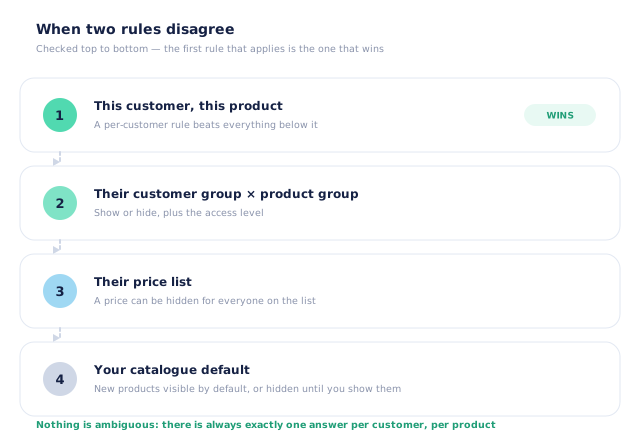
A customer is usually covered by more than one rule at once: their own overrides, their group’s rule, the price list they are on and your catalogue default. Open Pantry resolves that in a fixed order, top down, and stops at the first rule that applies. A rule set on that customer and that product beats everything below it. Then the group rule. Then the price list. Then your default. There is always exactly one answer for a given customer and a given product, which is what makes the system safe to use at scale.
- Per-customer rule wins outright
- Then the customer group × product group rule
- Then price visibility set on the price list
- Then your catalogue-wide default
Groups × groups, so a rule covers sixty customers
Setting visibility customer by customer works until you have two hundred customers and four hundred products, and then it never gets done. Customer groups and product groups exist so a rule is written once: contract venues see the contract lines, cafes do not see the chef range, the buying group sees its own allocation. New members inherit the rule the moment they join the group, and new products fall under your default until you decide otherwise.
- One rule joins a customer group to a product group
- New members inherit it automatically
- Your default decides what happens to products you have not ruled on
- Individual exceptions remain possible without breaking the group
- More product lines purchased
- 24%
- Your always-on branded store and app put your full range in front of customers, so baskets grow.
- Less order-processing cost
- 95%
- AI order capture and auto-invoicing remove the manual keying between order and books.
- Fewer picking errors
- 80%
- Tablet pick & pack with FEFO lot and expiry tracking catches shorts and wrong items before they ship.
Real gains suppliers report after moving ordering, fulfilment and invoicing onto Open Pantry.
The Same Catalogue Your Books Already Know
Trusted by M&J Chickens
- $175m+
- Annual turnover
M&J Chickens use Open Pantry to move ordering out of calls and messages and into one digital workflow — giving customers a smooth ordering experience and giving the team fewer errors and less admin.
“With Open Pantry, we launched our own fully branded ordering app — it’s helped us protect our customer base, move to digital ordering, and deliver a much better experience to our venues.”

One price list shown to everybody is not a catalogue — it is a disclosure.
Publish a single catalogue with a single price list and you have told every customer what every other customer pays, put your contract lines in front of accounts that were never meant to see them, and invited orders you will have to ring up and refuse. The usual workaround is to keep the sensitive lines out of the system altogether, which means they get ordered by phone and picked from memory. Controlling visibility per customer means the whole range can live in one catalogue — and each venue still only sees the business you actually do with them. It is your catalogue and your terms, not a marketplace where everyone is compared with everyone.
Questions Suppliers Ask About Product Visibility
What is product visibility management?+
Can different customers see different products?+
Can a customer see a product but not its price?+
Can a customer see a price but not be able to order it?+
What happens if two rules disagree?+
Are new products visible by default?+
How is visibility different from customer pricing?+
Does hiding a product delete it?+
Can I use this for seasonal or exclusive lines?+
Which plan includes product visibility?+
Works Even Better With
Customer Pricing & Promotions
The prices behind the products you have chosen to show each customer.
Explore →Branded Ordering App
The store where each customer sees their own version of your catalogue.
Explore →Buy in Units
Sell the same product by carton, tray or each — priced correctly for whoever can see it.
Explore →One Catalogue. A Different View for Every Customer.
Join 600+ Australian suppliers running their ordering, fulfilment and invoicing on Open Pantry.
Setup done for you · Cancel anytime · Your data stays yours