
Price List Management: One List, However Many Customers Are On It
Open Pantry holds your selling prices as real price lists rather than as files. A list can be a set of fixed prices or simply cost plus a margin, so a cost rise reprices the whole list in one move. Customers are assigned to a list, individual lines can be overridden for a single venue, and every change is live the moment you save it.
- Fixed prices, or cost plus a margin that reprices the whole list at once
- A list assigned per customer, with per-customer overrides on top
- Live the moment you save — no overnight job, no re-publishing
★★★★★ Trusted by 600+ suppliers
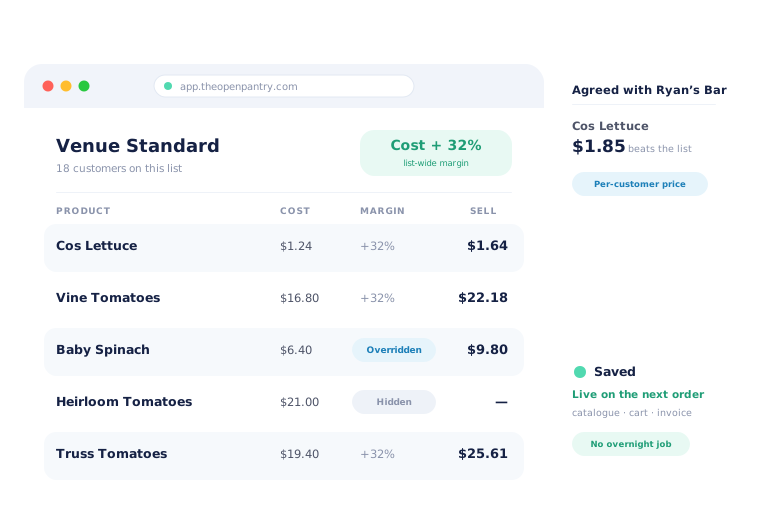



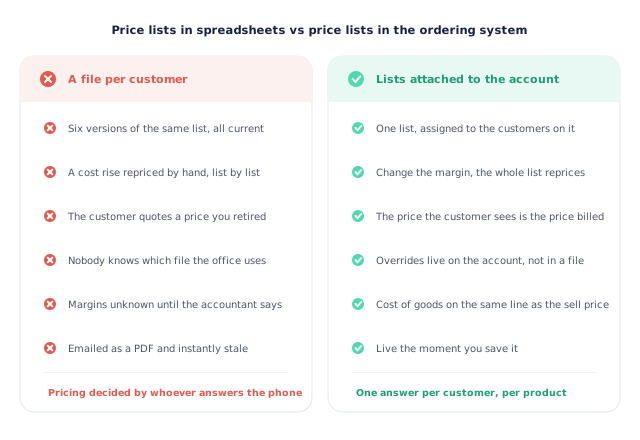
Six versions of the same price list, and all of them are current.

A cost rise repriced by hand, one list at a time

A customer quotes a price you retired three months ago

Nobody is sure which file the office is working from

Margin unknown until the accountant asks about it
Build the List, Attach the Customers
Create a list for a way of trading
Most suppliers do not have hundreds of pricing agreements — they have a handful applied to different sets of customers. Build one list per arrangement rather than one per customer.
Price it, or margin it
Either set a price on each line, or set the list to cost plus a margin so every product prices itself off its cost. You can mix the two: margin the list and override the lines that need it.
Assign customers to it
Each customer gets a price list, chosen when you accept them. That assignment is what every order, cart and invoice for that customer will use.
Override where an account is genuinely different
A price agreed with one venue is set on that customer and that product, and it beats the list underneath. Everything else keeps following the list.
Free trial · Cancel anytime
Three layers, and always exactly one answer
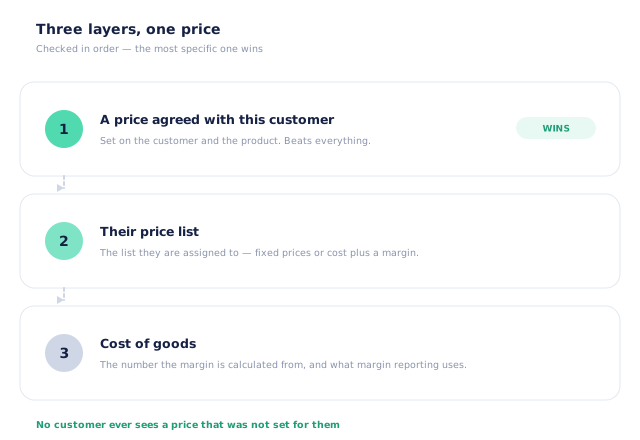
A wholesale price is rarely one number. Open Pantry resolves it in a fixed order: a price agreed with this specific customer for this specific product wins outright; failing that, the list they are assigned to applies; and underneath both sits the cost of goods, which is what a margin is calculated from and what margin reporting compares against. Because the order is fixed, there is exactly one answer for any customer and any product — no ambiguity for a rep to resolve on the phone.
- A per-customer price beats everything below it
- Their assigned price list is the default answer
- Cost of goods sits on the same line as the sell price
- A customer with no list assigned cannot be ordered for at all
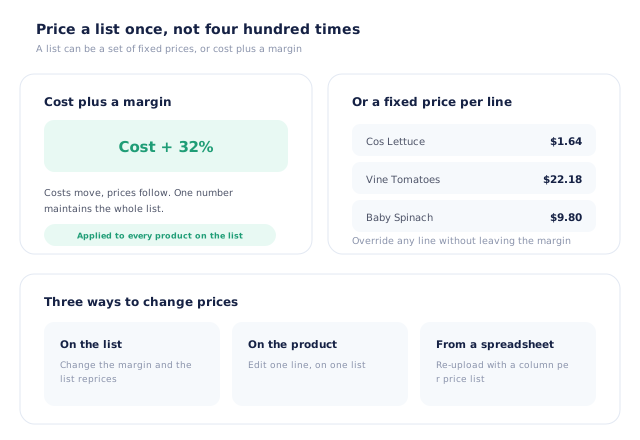
Cost plus a margin — so a cost rise is one edit, not four hundred
The expensive part of price list management is not building the list. It is the Tuesday when your costs move and every list needs redoing. A list that is defined as cost plus a margin does that itself: update the cost of goods and every un-overridden line on the list reprices. You can still set a fixed price wherever the margin does not suit — a competitive line, a contract commitment, a loss leader — and those lines simply stop following the margin.
- A whole list maintained by one number
- Fixed prices per line wherever you need them
- Overridden lines stay put when the margin changes
- The same margin syntax works in the spreadsheet import
Assigned to the customer, so the price follows them everywhere
A price list in Open Pantry is not a document you send — it is attached to the account. That means the same number appears in the customer’s catalogue, in their cart, on the order your team places for them, on the pick slip and on the invoice. There is no step where a price is transcribed from one place to another, which is the step where wholesale pricing usually goes wrong. You can also hide a price entirely — for a whole list, or for one customer — where a product should be seen but priced by conversation.
- One assignment drives catalogue, cart, order and invoice
- Per-customer overrides shown on the customer record
- A price can be hidden for a list, or for a single customer
- Per-customer prices can be imported in bulk from a CSV
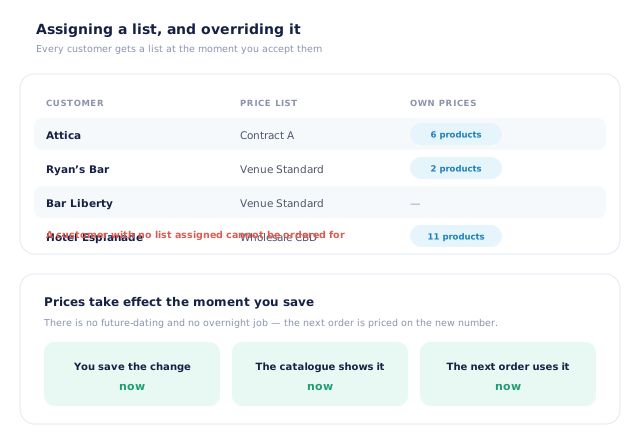
Effective immediately — deliberately
Open Pantry has no future-dated pricing, and we would rather say so plainly than imply otherwise. A price you save is the price on the next order. In practice most suppliers prefer this: a price change that lands on a schedule is a price change nobody double-checks, and produce moves too fast for a Monday decision to still be right on Thursday. If a rise must land on a particular morning, you upload it that morning and it is live in seconds.
- A saved price applies to the next order placed
- The catalogue, cart and invoice all move together
- The previous price is kept on the line for reference
- No scheduled pricing, and no overnight job to wait for
- More product lines purchased
- 24%
- Your always-on branded store and app put your full range in front of customers, so baskets grow.
- Less order-processing cost
- 95%
- AI order capture and auto-invoicing remove the manual keying between order and books.
- Fewer picking errors
- 80%
- Tablet pick & pack with FEFO lot and expiry tracking catches shorts and wrong items before they ship.
Real gains suppliers report after moving ordering, fulfilment and invoicing onto Open Pantry.
The Prices Your Invoices Are Raised From
Trusted by M&J Chickens
- $175m+
- Annual turnover
M&J Chickens use Open Pantry to move ordering out of calls and messages and into one digital workflow — giving customers a smooth ordering experience and giving the team fewer errors and less admin.
“With Open Pantry, we launched our own fully branded ordering app — it’s helped us protect our customer base, move to digital ordering, and deliver a much better experience to our venues.”

A price list emailed as a PDF is out of date before it is opened.
Spreadsheets do not manage prices; they record what somebody believed the price was on the day they saved the file. There is no link between the file and the invoice, so a customer can hold you to a number you retired, and no link between the price and the cost, so nobody knows the margin until the accounts are done. Holding lists in the system that raises the invoice closes both gaps: the price the customer sees is the price they are billed, and the cost is sitting on the same line.
Questions Suppliers Ask About Price Lists
How many price lists can I run?+
Can a price list be a margin rather than fixed prices?+
How do I set a price for just one customer?+
Which price wins if a customer has both?+
Can I schedule a price change for a future date?+
Can I hide a price from some customers?+
Can I update prices in bulk?+
Do different pack sizes get their own prices?+
What happens if a customer has no price list?+
Which plan includes price list management?+
Works Even Better With
One Price List. Every Customer On It, Priced Right.
Join 600+ Australian suppliers running their ordering, fulfilment and invoicing on Open Pantry.
Setup done for you · Cancel anytime · Your data stays yours