
Order on Behalf: Take the Order While You Are Still on the Call
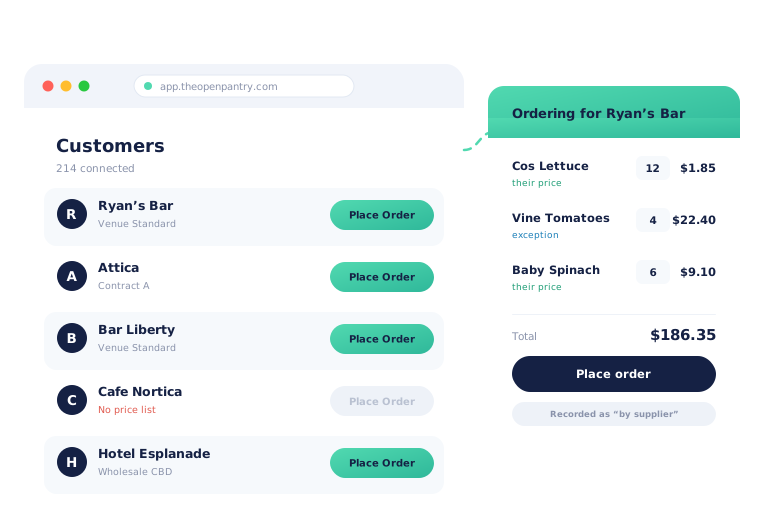
Open your customer in Open Pantry and press Place Order, and you are in their store — their catalogue, their price list, the prices you agreed with them. Build the order, place it, and it lands on their account as their order, flagged as placed by your team. No notebook, no evening data entry, and no chance of pricing it from memory.
- Place an order from the customer record — their catalogue, their prices
- Price exceptions and their price list applied, not your list price
- A per-person permission controls exactly who on your team can do it
★★★★★ Trusted by 600+ suppliers across Australia



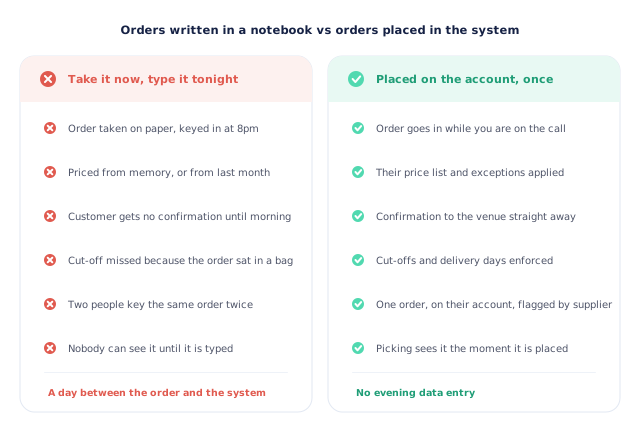
The order was taken at 11am. It reaches the system at 8pm.

Orders written on paper on the road, keyed in that night

Priced from memory, and the memory is a month out of date

Two people key the same phoned-in order twice

The cut-off passes while the order is still in someone’s bag
Four Steps, and the Order Is Real
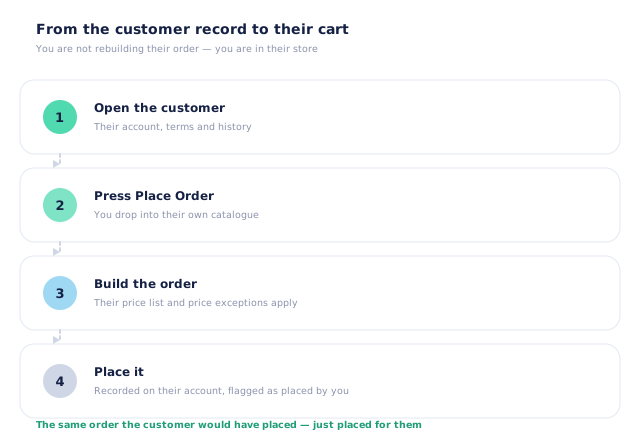
Open the customer
Their account carries their terms, their delivery days and their history — so you are looking at the whole relationship before you start, not just a name.
Press Place Order
You drop straight into that customer’s own catalogue: the products they are allowed to see, laid out the way they see them.
Build the order at their prices
Their price list applies, and any price you agreed with them individually overrides it. A product they have no price for cannot be added at all.
Place it
The order is recorded against their account, subject to their delivery days and cut-offs, and flagged as placed by your team. Picking sees it immediately.
Free trial · Cancel anytime
You are not rebuilding their order — you are in their store
Ordering on behalf of a customer in Open Pantry is not a stripped-back internal form. Pressing Place Order puts you inside the same ordering experience that customer uses, with the catalogue they can see and the layout they know. That matters when you are on the phone with a chef: you are both looking at the same thing, so “the 5kg box, not the 3kg” resolves in one sentence rather than three.
- Start from the customer record or straight from the customer list
- Their catalogue, filtered by what you have made visible to them
- Delivery days, delivery window and cut-offs applied as normal
- The finished order sits on their account, not in a side system
Their pricing, applied — never your list price
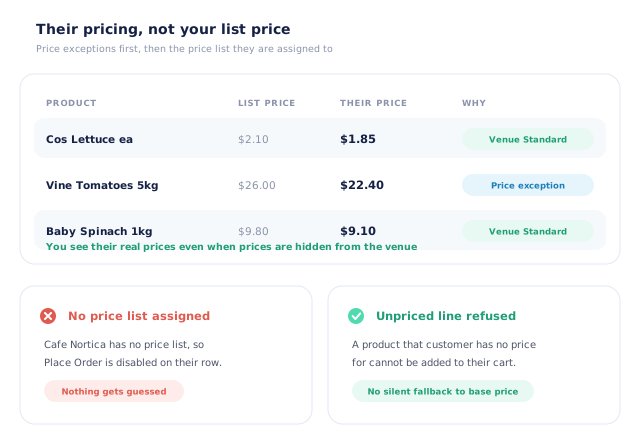
The fastest way to lose money on a phoned-in order is to price it from the wrong list. Open Pantry does not leave that to the person taking the order. The customer’s assigned price list applies, and any price you agreed with that customer individually overrides it. If a customer has no price for a product, it cannot be added to their order at all rather than quietly falling back to a base price — and a customer with no price list assigned cannot be ordered for until one is.
- Per-customer price exceptions applied first, then their price list
- No silent fallback to a base or list price
- A customer with no price list cannot be ordered for at all
- You see their real prices even when prices are hidden from the venue
A seat each, and ordering is its own permission
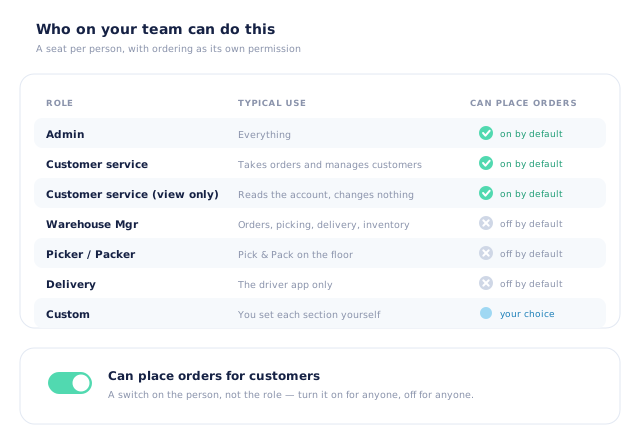
Everyone who works on your customers gets their own login, so “who did this?” has an answer. Roles set the shape of the job — admin, customer service, warehouse manager, picker, packer, delivery, or a custom role you define section by section — and ordering on behalf of a customer is a separate switch on top. It is on by default for the roles that talk to customers and off for the roles that do not, and you can flip it for any individual either way. The permission is enforced on the server, not just hidden in the interface.
- Real roles: admin, customer service, warehouse manager, picker, packer, delivery, custom
- “Can place orders for customers” is a per-person switch, not a role you have to adopt
- Custom roles set each area to hidden, view or edit
- Enforced server-side, so hiding a button is not the only protection
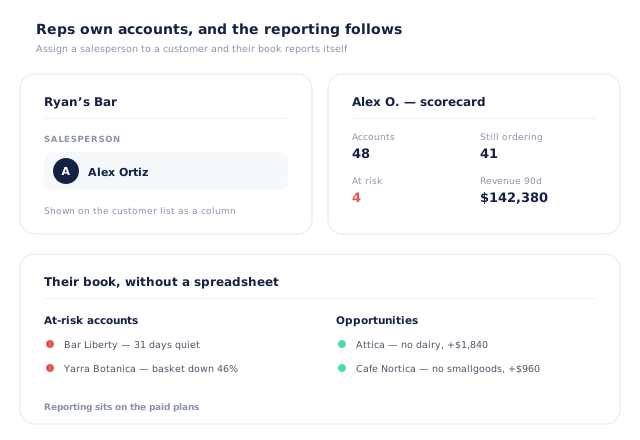
Reps own accounts, and the reporting follows the ownership
Assign a salesperson to a customer and that account becomes part of their book. From there the sales team reports do the work a rep spreadsheet used to: how many accounts they hold, how many are still ordering, how many have gone quiet and what that is worth, plus the cross-sell gaps in their own patch with a dollar value on each. It turns “how is your territory going?” into a screen rather than a conversation.
- A salesperson assigned per customer, shown on the customer list
- Per-rep scorecards: accounts held, still ordering, at risk, revenue
- At-risk accounts and opportunities listed under each rep
- Sales team reporting sits on the paid plans
- More product lines purchased
- 24%
- Your always-on branded store and app put your full range in front of customers, so baskets grow.
- Less order-processing cost
- 95%
- AI order capture and auto-invoicing remove the manual keying between order and books.
- Fewer picking errors
- 80%
- Tablet pick & pack with FEFO lot and expiry tracking catches shorts and wrong items before they ship.
Real gains suppliers report after moving ordering, fulfilment and invoicing onto Open Pantry.
The Order Lands in the Same Place as Every Other Order

Trusted by M&J Chickens
- $175m+
- Annual turnover
M&J Chickens use Open Pantry to move ordering out of calls and messages and into one digital workflow — giving customers a smooth ordering experience and giving the team fewer errors and less admin.
“With Open Pantry, we launched our own fully branded ordering app — it’s helped us protect our customer base, move to digital ordering, and deliver a much better experience to our venues.”

A phoned-in order typed up at the end of the day has already cost you the day.
The order taken by phone or in person is usually your most valuable one — it is the customer who still wants a person. What it should not be is your least reliable one. Written down and keyed in later, it misses the cut-off, gets priced from an old list, occasionally gets entered twice, and is invisible to the warehouse until the evening. Placing it on the customer’s own account while you are still talking to them removes all four problems at once, and the customer gets their confirmation before you have hung up.
Questions Suppliers Ask About Ordering for Customers
Can my team place an order for a customer?+
Whose prices are used?+
What if the customer has no price list yet?+
Can we tell later that we placed the order rather than the customer?+
Can a rep do this from a phone?+
Who on my team is allowed to order for customers?+
What roles can I give my team?+
Can I assign a rep to particular customers?+
Does the customer see the order the same way?+
Which plan includes this?+
Works Even Better With
Take the Order Once, in the System.
Join 600+ Australian suppliers running their ordering, fulfilment and invoicing on Open Pantry.
Setup done for you · Cancel anytime · Your data stays yours