
Supplier Credit Requests: Claim Every Short, Swap and Price Difference
A supplier credit request asks a supplier to credit you for something you were billed for but didn’t get as ordered — a short delivery, a substitution or a price above your agreed price. Restaurant AI Manager compares what you ordered, what the kitchen received and what the supplier invoiced, drafts the credit request against the invoice, and keeps it on an open-credits list until it’s settled. A person always reviews the draft and presses Send.
- Shorts, substitutions and price differences found by three-way matching
- Credit requests drafted against the invoice — you press Send
- Open credits listed by supplier, with how long each has been outstanding
- Statements checked, so a promised credit doesn’t quietly disappear
Built on Open Pantry ordering — free, and used by 5,000+ venues
Recommended by:




Shorts get written on the docket. Credits never get chased.
The driver’s gone before anyone has counted the fish
A short gets noted on the docket and never makes it to an email
A substitution arrives at a different price and gets paid anyway
The invoice price is above the price list and nobody checks it line by line
A credit promised on the phone never shows up on the statement
Writing the claim up with the invoice lines takes longer than the credit is worth
From a short at the door to a credit on the statement
Count it at the door
The delivery is checked off on a phone against the order, and a short or a swap is marked with a one-tap reason. That count is the kitchen’s record of what really arrived.
Match the invoice
Forward the invoice email, snap a photo, or upload a PDF, CSV or spreadsheet, and the AI reads the lines. Each line is compared three ways — ordered, received, invoiced — and against your price list.
Review the drafted request
The shorts, substitutions and price differences on that invoice become a drafted credit request against that invoice, waiting for you. You check it and press Send; suppliers not on Open Pantry get it by email.
Track it until it’s settled
Sent requests sit on the open-credits list with the date asked and the days outstanding, and supplier statements are checked against what you’re still owed.
No sign-up — a demo restaurant group with a guide that shows you around
Three numbers on every line
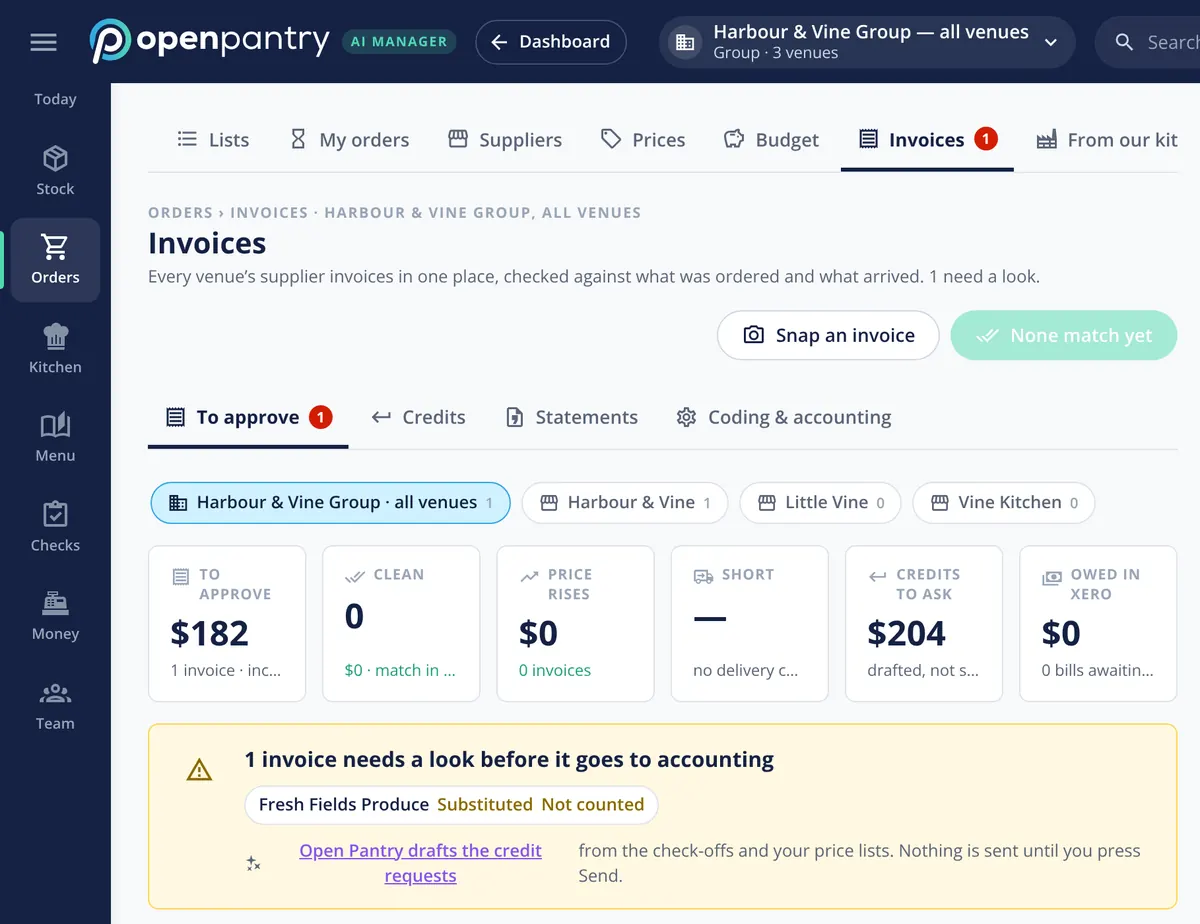
Most systems copy the invoice into “received” and lose the one comparison that matters. Here every venue’s invoices sit in one place, checked against what was ordered and what the kitchen counted. Clean invoices are counted separately from the ones with price rises, shorts and credits to ask for, and an invoice with a problem — a substitution, a delivery nobody counted — is held for a look before it goes to accounting.
- Ordered, received and invoiced compared line by line
- Invoices checked against your price list as well as the delivery
- Problem invoices held back from accounting until they’re resolved
A drafted request, never a sent one
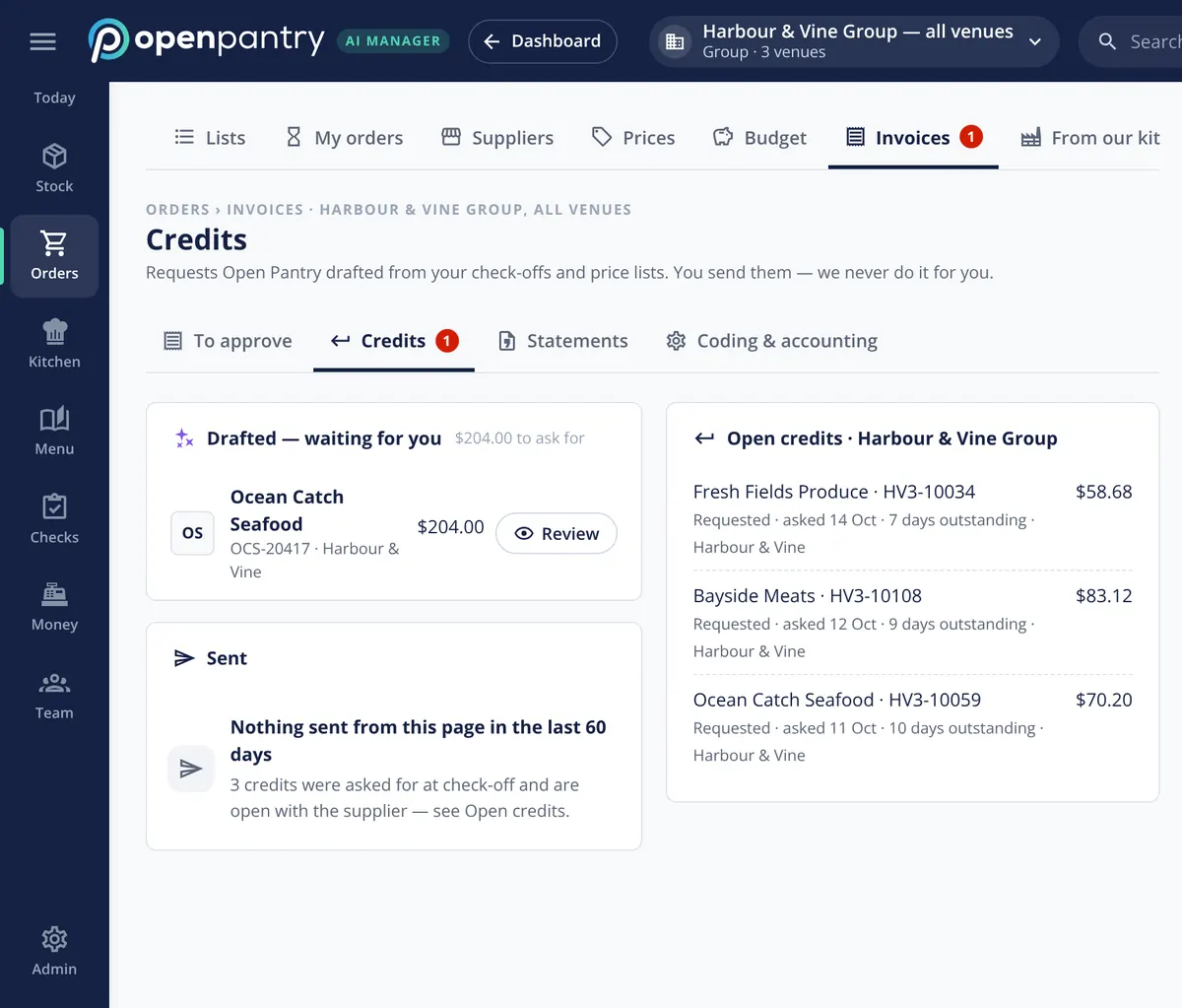
The credit request is written for you: the supplier, the invoice number, the lines that were short, swapped or overcharged, and the amount. It waits on the Credits page with the total to ask for, and nothing reaches the supplier until someone reviews it and presses Send. The screen says it plainly — you send them, we never do it for you.
- Supplier, invoice, lines and amount filled in
- A PDF of the request for the supplier
- Sent only when a person presses Send
Open credits, statements and the books
Every credit you’ve asked for stays on the open-credits list — by supplier, with the amount, the date asked and how many days it’s been outstanding — until it’s settled. Credits, returns and supplier statements are reconciled, so a credit that never arrives shows up before you pay the statement. Approved bills go to Xero or QuickBooks Online as drafts, coded to the right account and venue, with approval limits so a manager signs off up to a set amount and finance above it.
- Open credits by supplier, with days outstanding
- Statements reconciled against credits and returns
- Bills sent to accounting as drafts, coded by account and venue
Where the credit requests come from
Built by the team venues already order with
“Open Pantry has created exactly what the restaurant industry needs. Something very easy to use that doesn’t require any upkeep. Their menu costing feature is fantastic and simple enough that any chef or bar manager can use it. I think restaurants that are serious about growing their profit & managing their costs need to consider Open Pantry.”
Chefs Love Open Pantry

Thank you OPEN PANTRY, we used to have to use 6 apps to get access to ordering from our suppliers, the fact we can do it all in one has saved an incredible amount of time & effort! We love you!

We’ve been using Open Pantry for a few months now and it’s been an absolute lifesaver. We’re short staffed so being able to place all of our orders with all of our suppliers in the one spot is a massive help.

So glad this service exists. Has made it so easy for my manager & chefs to order & all payments are settled in one go. The recurring orders & pantry lists are amazing time savers!!
Why not just note the short on the docket and sort it out later?
Because later rarely comes. A short written on a docket depends on someone remembering it, finding the invoice, writing the email and then checking the statement weeks afterwards — and each step is a chance for it to drop. When the claim is already drafted from the count and the price list, against the invoice, sending it takes one look, and the open-credits list keeps it in front of you until the supplier settles it.
Open Pantry for restaurants in Singapore
Singapore restaurants, cafés and pubs use Open Pantry to order from all their suppliers in one place and keep food costs in view.
- Plans priced in
- SGD — see Singapore pricing
- Accounting sync
- Xero and QuickBooks Online
- Supplier directory
- 150+ Singapore wholesale food & beverage suppliers
Can restaurants in Singapore use Open Pantry?
Yes. Restaurants, cafés and pubs in Singapore use Open Pantry to order from all their suppliers in one place, track what they buy and keep food costs in view. Paid plans are priced in SGD.
Is ordering on Open Pantry free for restaurants?
Yes. The ordering package is free, with unlimited suppliers and orders. Paid plans add menu costing, inventory and reporting, and are priced in SGD.
Supplier credit requests — questions chefs and owners ask
How do I claim a credit from a supplier for a short delivery?+
What is three-way invoice matching for a restaurant kitchen?+
Does Open Pantry send credit requests to my suppliers automatically?+
Do my suppliers need to be on Open Pantry to get credit requests?+
Can I claim a credit when the invoice price is higher than agreed?+
How do we keep track of credits our suppliers still owe us?+
What happens to the supplier invoice in Xero while a credit is outstanding?+
Can I try supplier credit requests in a demo before signing up?+
Works even better with
Delivery Check-off
Counting the delivery at the back door, line by line.
Explore →Supplier Invoice Scanning
Invoices in by email, photo or upload, read line by line.
Explore →Purchase Approvals
Rules, budgets and one queue before an order goes out.
Explore →Food Cost Variance
Why GP moved, split into price rises, waste, yield and count error.
Explore →Review a drafted credit request in a demo kitchen
Open the demo as the head chef of Harbour & Vine and see the credits waiting to be sent — no sign-up.
SG$183.20/month per venue billed yearly (save 20%) · or SG$229 month to month, no contract · plus tax