
Restaurant Stock Control: Counts on a Phone, Stock That Keeps Itself Up to Date
Restaurant stock control means knowing what is on the shelf, what it is worth and where the rest went. In Restaurant AI Manager, deliveries checked off at the door add stock to the right storage area, POS sales take it off through your recipes, and the team counts on a phone in shelf order — cartons, inners, singles and open bottles on one line, with barcode scanning and no signal needed. The count is reviewed in dollars before it is posted.
- Count cartons, inners, singles and open bottles on one line
- Phone camera, Bluetooth and handheld barcode scanners
- Finish a count in the cool room with no signal
- Variance reviewed in dollars, with recounts, before it posts
Built on Open Pantry ordering — free, and used by 5,000+ venues
Recommended by:




The count takes all Sunday, and nobody trusts it on Monday
Counting a carton and four loose bottles means two lines and a calculator
The cool room has no signal, so counts are written on paper and typed in later
A 4 that should have been 40 goes straight into the food cost
Stock on hand is only right on the day of the count
Nobody knows which venue the missing case went to
Use-by dates live on masking tape, not in the system
From the delivery door to a count you can post
Deliveries add stock
When a delivery is checked off at the door, the quantities actually received go into stock, in the storage area each item usually lives in — not what was ordered and not what was invoiced.
Sales take it off
POS sales are matched to your recipes and the ingredients come off stock as dishes sell. Waste, staff meals and transfers to another venue are logged on a phone and come off too, at cost.
The team counts on a phone
Counts run in shelf order, area by area, with several people counting different areas at once. Each line takes any mix of cartons, inners and singles, open bottles by the tenth, and a barcode scan to find the item.
You review it in dollars, then post
The count freezes at a point in time. Big gaps are shown in dollars, odd numbers are flagged while counting ("four times what we expected — recount?"), and you can send a line back for a recount before approving and posting.
No sign-up — a demo restaurant group with a guide that shows you around
One line for a carton, an inner and three singles
Each item has a pack ladder — carton, inner, single and the measure it is used in — so a counter types what they see and the system does the arithmetic. Open bottles are counted by the tenth. The same pack ladder decides how deliveries are received and how dishes use the stock, so a carton received is a carton counted.
- Cartons, inners and singles counted together
- Open bottles by the tenth
- Per-supplier pack differences handled on the item
Scan it, say it, or count with no signal
Counters can find an item with the phone camera, a Bluetooth scanner or a handheld scanner, or by scanning the QR shelf labels Restaurant AI Manager prints for each storage area. Voice counting takes several items in one breath. A count can be finished with no signal in the cool room and is sent when the phone is back online, without being counted twice.
- Phone camera, Bluetooth and handheld scanners
- Printable count sheets and QR shelf labels
- Offline counts that sync once, safely
A count you can check before it changes your numbers
While someone counts, the app flags lines that look wrong — a figure several times what was expected, a carton entered as a single, a high-value line missed. After the freeze point the variance is shown in dollars, the reviewer can ask for a recount, and only an approved count is posted. Blind counts hide the expected figure from the counter, and an owner can switch on count controls for a second person to check.
- Live checks while counting
- Variance in dollars, recount requests and approval
- Blind counts, and a second checker when you want one
Stock that moves between venues at cost
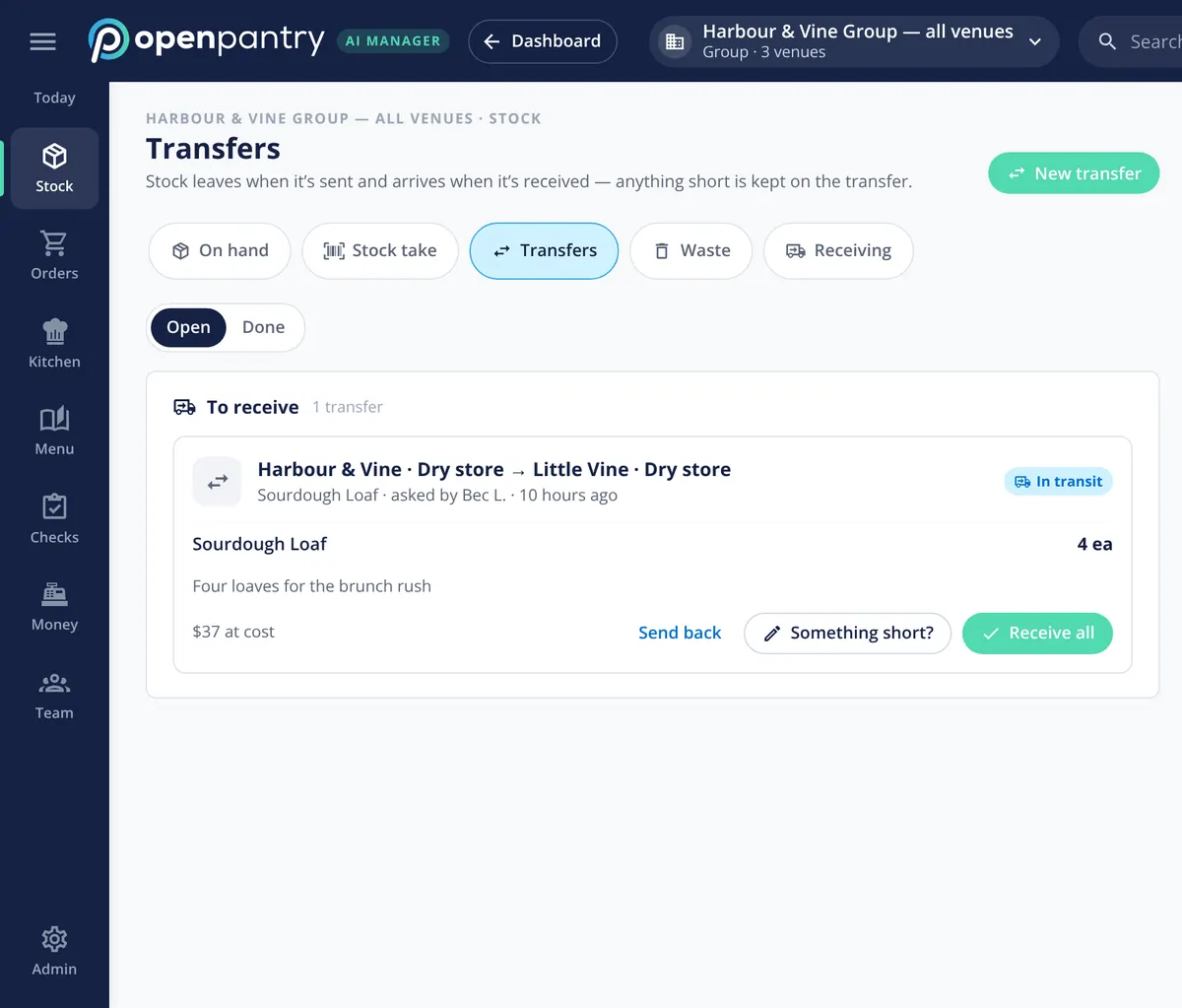
Transfers between venues and storage areas are requested, sent and received, with the cost carried across and anything short recorded on arrival. Moving stock between your own storage areas always works; transfers between venues come on for groups with two or more venues. For a group with several kitchens or function rooms, an owner can switch on Stock by area to land deliveries in each item’s usual area and see cost by area.
- Request, send and receive, with the cost carried
- Something short? Recorded on the transfer
- Optional Stock by area for multi-kitchen venues
What stock control is built from
Built by the team venues already order with
Chefs Love Open Pantry

Thank you OPEN PANTRY, we used to have to use 6 apps to get access to ordering from our suppliers, the fact we can do it all in one has saved an incredible amount of time & effort! We love you!

We’ve been using Open Pantry for a few months now and it’s been an absolute lifesaver. We’re short staffed so being able to place all of our orders with all of our suppliers in the one spot is a massive help.

So glad this service exists. Has made it so easy for my manager & chefs to order & all payments are settled in one go. The recurring orders & pantry lists are amazing time savers!!
Why not keep counting on a spreadsheet?
Because a spreadsheet only knows what was on the shelf on the day you counted it. Everything between counts — what arrived, what sold, what was binned, what went to the other venue — is a guess until the next count, and the count itself has no check on a slipped decimal. When deliveries and sales keep stock moving and the count is reviewed in dollars before it posts, the number on Monday morning is one you can order from.
Restaurant stock control — questions chefs ask
How do I count cartons, inners and single bottles at the same time?+
Can my team do a stocktake on their phones in the cool room with no signal?+
Which barcode scanners work with Restaurant AI Manager stocktakes?+
Does stock go up when a delivery arrives and down when a dish sells?+
How does it stop a wrong number going into the stocktake?+
Can several people count different storage areas at once?+
Can I move stock between venues in the group?+
Can I see the stock count screens before I sign up?+
Works even better with
Food Cost Variance
What the count says you used, against what you sold.
Explore →Ordering & Suppliers
Orders drafted from the stock you have and the sales you expect.
Explore →Multi-Venue Management
Every venue’s stock and transfers side by side.
Explore →Delivery Check-off
The check at the door that puts stock on the shelf.
Explore →Count a demo cool room on your phone
Sign in as the head chef of Harbour & Vine and run a stock count — no sign-up.
Kč 2,232/month per venue billed yearly (save 20%) · or Kč 2,790 month to month, no contract · plus tax