
Restaurant Ordering and Supplier Management: Order What You Need From the Suppliers You Have
Restaurant AI Manager works out what each venue needs from its sales forecast, bookings, functions and stock on hand, rounds it to the supplier’s packs and delivery days, and drafts one order per supplier for a person to check and send. Orders go to the suppliers you already use — live to suppliers on Open Pantry, by email to everyone else. Every invoice is then checked against what was ordered and what arrived, and supplier tenders show what you would save at your own volumes.
- Orders drafted from forecast use, minus on hand and on order
- Rounded to packs, cut-off times and delivery days
- Your own suppliers, live or by email — nothing sent until you press Send
- Tenders priced on your last 12 months of usage
Built on Open Pantry ordering — free, and used by 5,000+ venues
Recommended by:




Every order is a guess made at 10pm
The order is built from memory and the bottom of the cool room
A wedding on Saturday never makes it onto Thursday’s order
Five suppliers, five cut-off times, five ways of sending an order
Prices creep up a few cents at a time and nobody notices
Short deliveries are paid for in full because the invoice is filed, not checked
Nobody has asked another supplier for a price in three years
From what you will sell to what you pay
It works out what you need
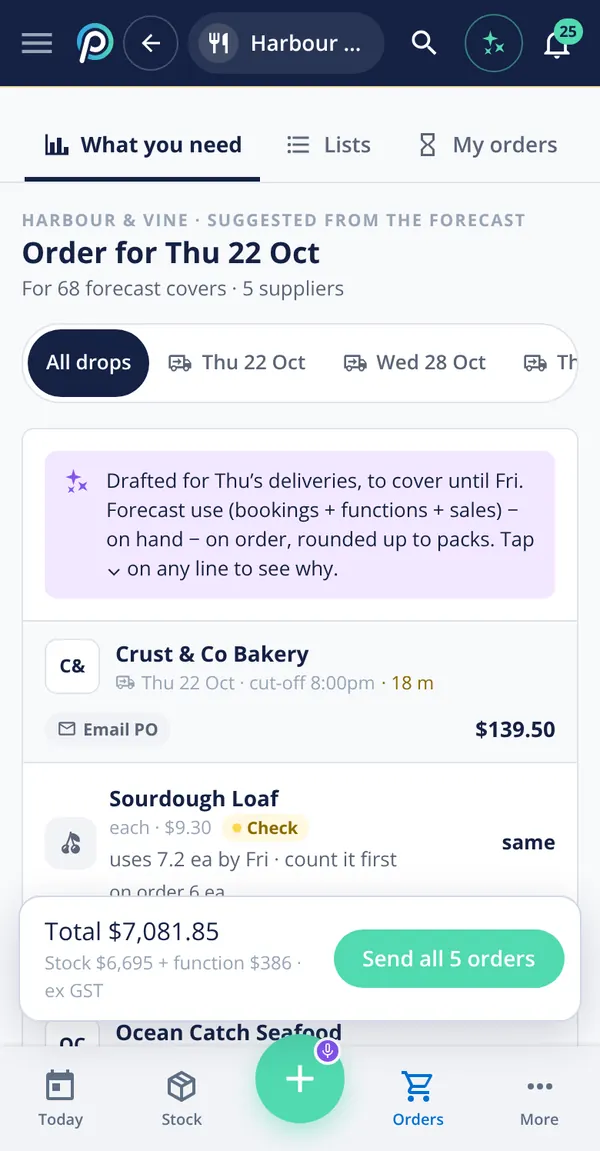
Forecast use for each day comes from your sales history, bookings and functions. Stock on hand and what is already on order are taken off, and the rest is rounded up to the supplier’s pack sizes. Tap any line to see why it is there.
It drafts one order per supplier
Lines are grouped by supplier and delivery day, with each supplier’s cut-off time shown. You change what you like — by tapping, from a saved list or by saying it — and nothing goes anywhere until a person presses Send.
It goes to your supplier the way they take it
Suppliers already on Open Pantry receive the order live. Everyone else gets a clear email purchase order, and you can see exactly what they will receive. If approvals are on, the order waits for your purchaser first.
It checks what comes back
The delivery is checked off at the door and the invoice is matched against what was ordered and what arrived. Shorts, substitutions and price differences become credit requests, drafted for you to send.
No sign-up — a demo restaurant group with a guide that shows you around
An order that shows its working
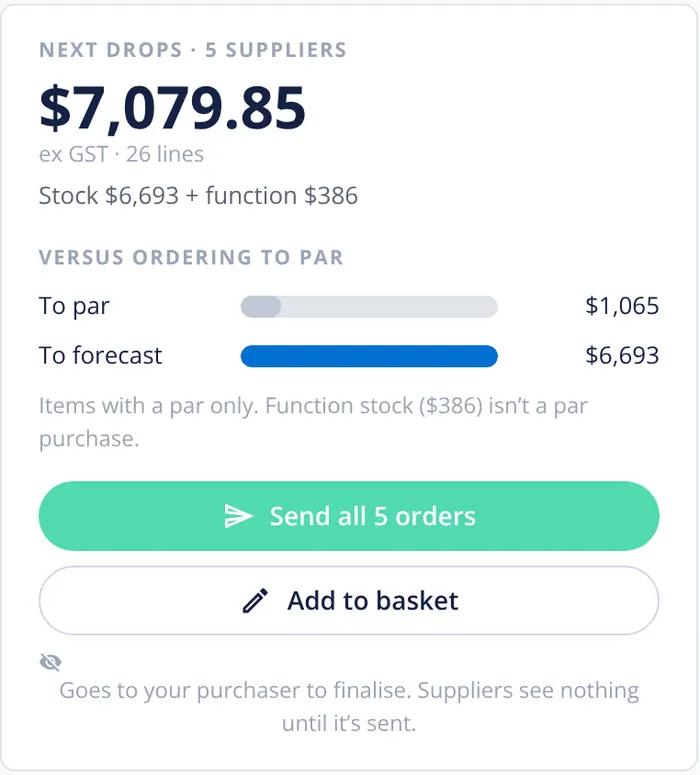
Each suggested line says what it is based on: forecast use from bookings, functions and sales, what is on hand, what is already on order and the pack size it was rounded to. Function stock is shown separately from day-to-day stock, and the total is compared with simply ordering back to par. Orders can be sent in one go, or added to the basket and edited first.
- Forecast, on hand and on order on every line
- Function stock shown separately
- Compared with ordering back to par
Every invoice checked against the delivery
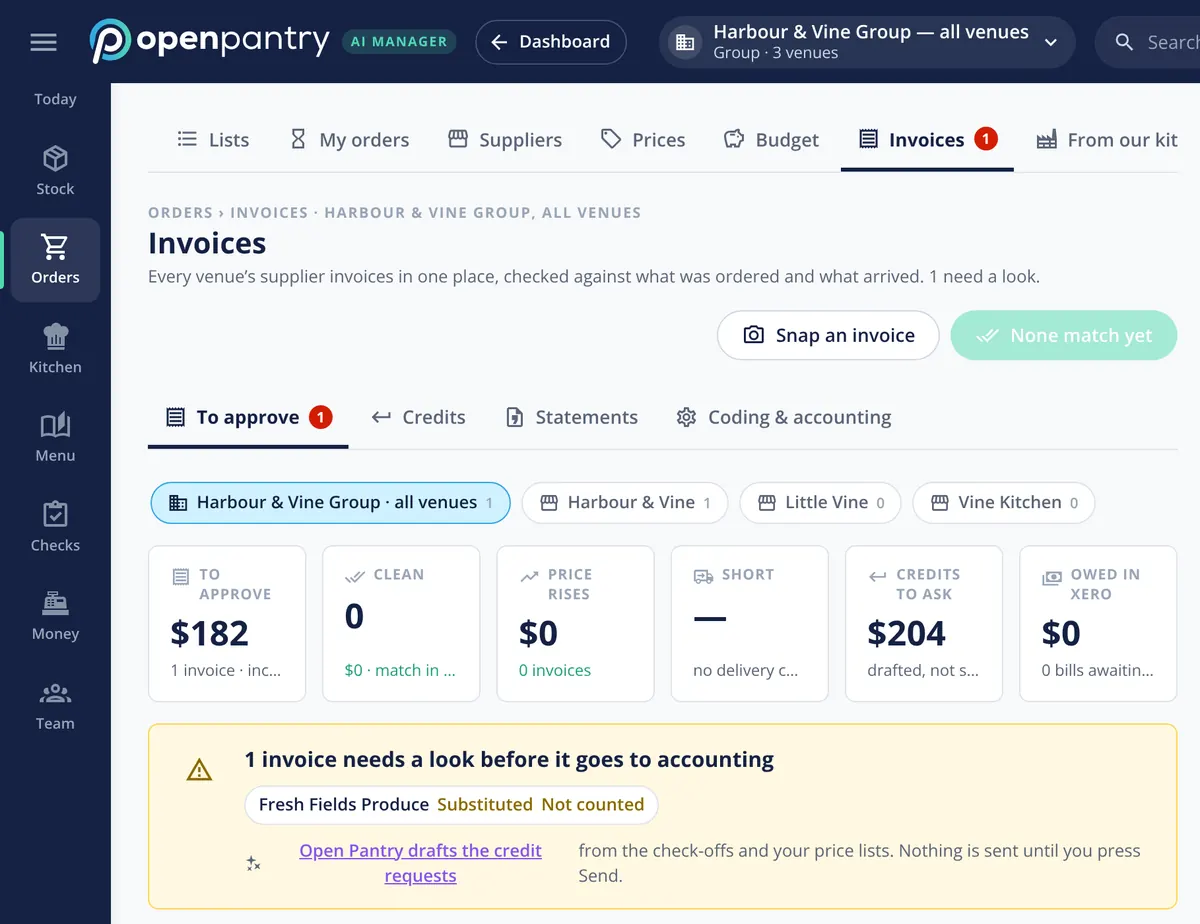
Supplier invoices are photographed, uploaded or forwarded to the venue’s own address, then matched to the order and to what was checked off at the door. An invoice that does not match is held with the reason — substituted, short, not counted — before it goes to your accounting. Credit requests are drafted from the check-offs and your price lists, and nothing is sent until you press Send.
- Order, delivery and invoice matched three ways
- Held with a reason before it reaches your books
- Credit requests drafted, sent only by a person
Ask another supplier for a price, at your volumes
Compare supplier prices builds a tender from what each venue actually bought over the last 12 months — items, volumes and delivery days. Invite suppliers on Open Pantry or anyone else by link, compare their quotes like for like per kilo, litre or each, and award the whole tender or split it by category or venue. The winning prices become contract prices. An owner can switch on repeat rounds every 3, 6 or 12 months, an AI read of quote files that a person confirms, and an estimate of what switching would take.
- Volumes from your own 12 months of buying
- Like-for-like price per kilo, litre or each
- Award whole or split; contract prices loaded
Price rises seen before they cost you
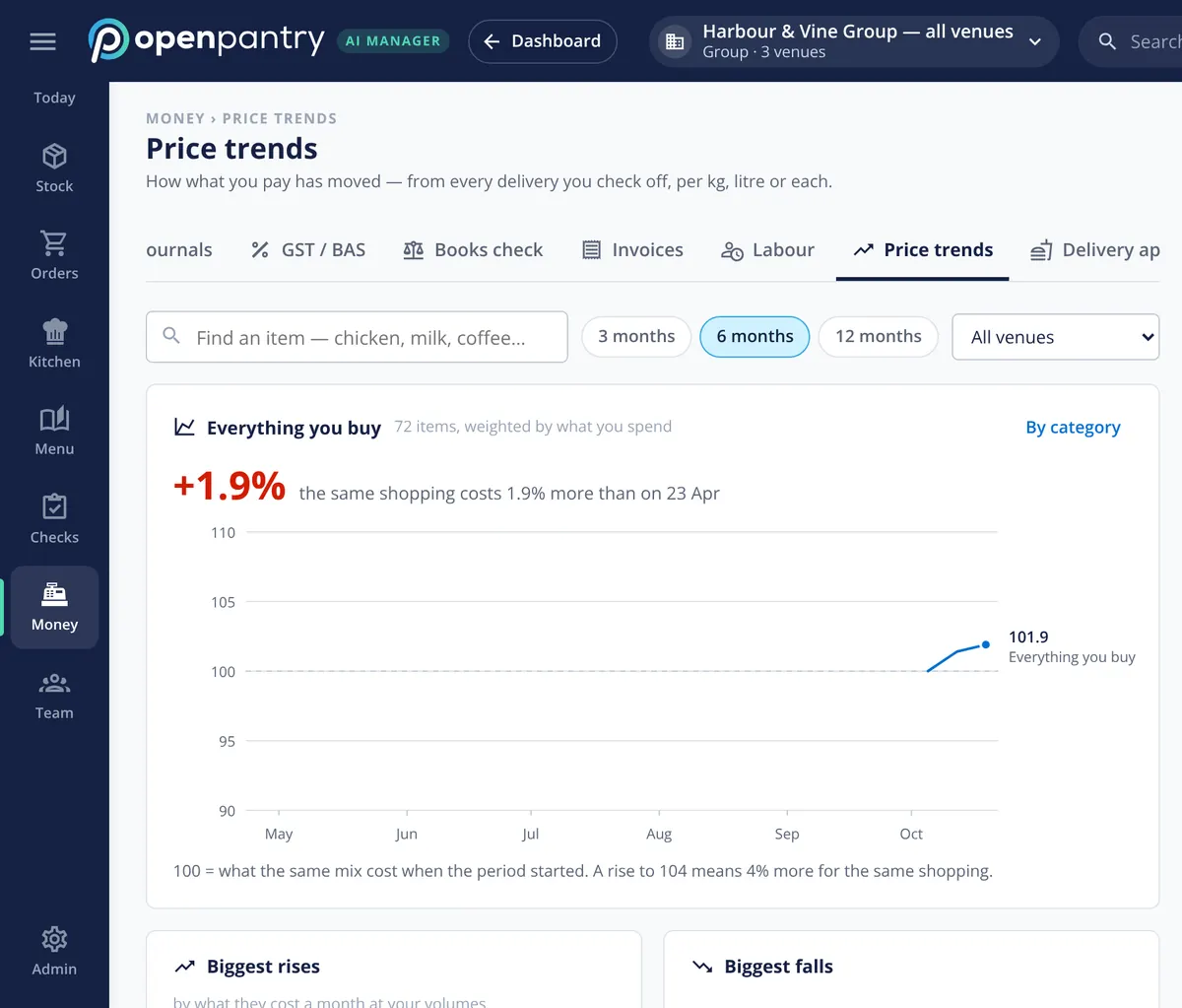
Price trends show what you pay for everything you buy, from every delivery you check off, and who put prices up. Owners can switch on more: price-rise alerts on the items you use most, with what each rise costs a week; supplier price changes that wait for approval, with their effect on dish GP shown first; agreed contract prices checked on every order and invoice, with the difference claimed; and a scorecard for each supplier — full, on time, cold and billed right.
- Price trends from real deliveries
- Price changes and their GP effect, before they land
- Contract prices and supplier scorecards
How orders reach your suppliers
Built by the team venues already order with
Chefs Love Open Pantry

Thank you OPEN PANTRY, we used to have to use 6 apps to get access to ordering from our suppliers, the fact we can do it all in one has saved an incredible amount of time & effort! We love you!

We’ve been using Open Pantry for a few months now and it’s been an absolute lifesaver. We’re short staffed so being able to place all of our orders with all of our suppliers in the one spot is a massive help.

So glad this service exists. Has made it so easy for my manager & chefs to order & all payments are settled in one go. The recurring orders & pantry lists are amazing time savers!!
Why not just order back to par?
Because par is the same number on a quiet Tuesday and the Saturday of a 120-guest wedding. Ordering to par means carrying stock for your busiest day all week, and still running short when a function lands. An order built from what you are actually going to sell — and checked against the invoice when it arrives — is the difference between stock on the shelf and money in the bank.
Restaurant ordering and suppliers — questions owners ask
How does Restaurant AI Manager work out what my restaurant needs to order?+
Can I keep ordering from my own suppliers and my own prices?+
Does the AI send orders to suppliers by itself?+
Can I text orders to suppliers who don’t use email?+
How does a supplier tender work in Restaurant AI Manager?+
Will I know when a supplier puts a price up?+
What happens when a delivery is short or the invoice price is wrong?+
Can I see the ordering screens before I sign up?+
Works even better with
Purchase Approvals & Budgets
Spend rules, weekly budgets and a purchaser queue.
Explore →Supplier Credit Requests
Shorts and price differences drafted as credit requests.
Explore →Demand Forecasting
The forecast every suggested order starts from.
Explore →Restaurant Stock Control
The stock on hand every order subtracts.
Explore →See tomorrow’s orders drafted for a demo group
Sign in as the owner of Harbour & Vine and send a suggested order — no sign-up.
Kč 2,232/month per venue billed yearly (save 20%) · or Kč 2,790 month to month, no contract · plus tax