
Restaurant End of Day Reconciliation: Every Close Checked Before It Reaches the Books
Restaurant end of day reconciliation means checking the night’s takings — the till count, card settlement, tips and the POS Z-report — against what the venue sold, explaining any difference, and getting the day into the books. In Restaurant AI Manager the manager closes the day with a reason for any difference, and the owner reviews every venue’s close on one screen the next morning before the daily sales journal goes to Xero or QuickBooks Online as a draft.
- Till count with float, card settlement and tips, signed off by the manager
- A till difference needs a reason before the day can go through
- Every venue’s close on one screen the next morning
- Daily sales journals go to your accounting software as drafts, never posted on their own
Built on Open Pantry ordering — free, and used by 5,000+ venues
Recommended by:




The till was out last night. Nobody knows why.
The close is a paper sheet in the office that nobody reads until the bookkeeper asks
A till short by €14 turns into a mystery three weeks later
Card settlement and the till are checked in two different places, if at all
The Z-report goes missing and the day’s sales are typed in by hand
Every venue closes a different way, so the group total is never quite right
Daily takings reach the accounts late, in a lump, with no notes
From the last table to a draft journal
The manager closes the day
Count the till against the float, enter the card settlement and tips, give a reason for any difference, and sign it off. The day’s sales come in from your POS.
Anything unexplained is held
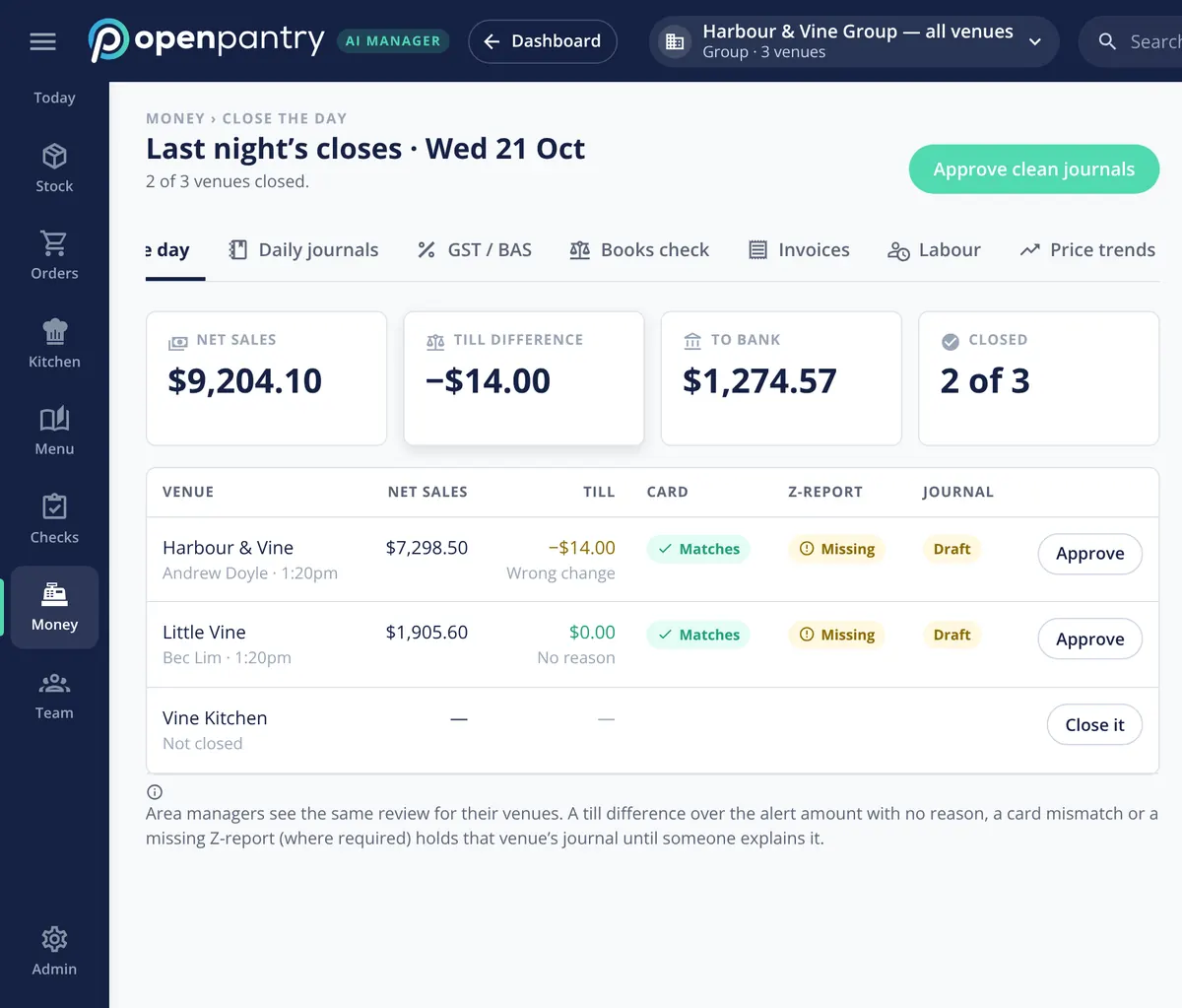
A till difference over your alert amount with no reason, a card settlement that does not match, or a missing Z-report where you require one holds that venue’s journal until someone explains it.
The owner reviews every venue next morning
Last night’s closes sit on one screen: net sales, till difference and the amount to bank for the group, then each venue line by line. Clean closes are approved together; the rest get a look.
The day goes to the books as a draft
Each approved close becomes a daily sales journal in Xero or QuickBooks Online, as a draft for your bookkeeper to check and post.
No sign-up — a demo restaurant group with a guide that shows you around
Till, cards and tips in one close
The close follows the order a manager already works in at the end of the night. Count the till against the float, check the card settlement, record tips, and if the till is out, give the reason — “wrong change” is a perfectly good one. The manager signs it off, and the close is recorded against their name and the time.
- Till count against the float
- Card settlement and tips recorded
- A reason for any difference, and a sign-off
Held until someone explains it
A close with a gap does not slide quietly into the accounts. If the till difference is over the alert amount you set and has no reason, if the card settlement does not match, or if a required Z-report is missing, that venue’s journal is held until someone explains it. Clean closes can be approved together with one button, and area managers see the same review for their own venues.
- Your own alert amount for till differences
- Card mismatches and missing Z-reports flagged
- “Approve clean journals” for the closes with nothing to explain
Yesterday at the top of today
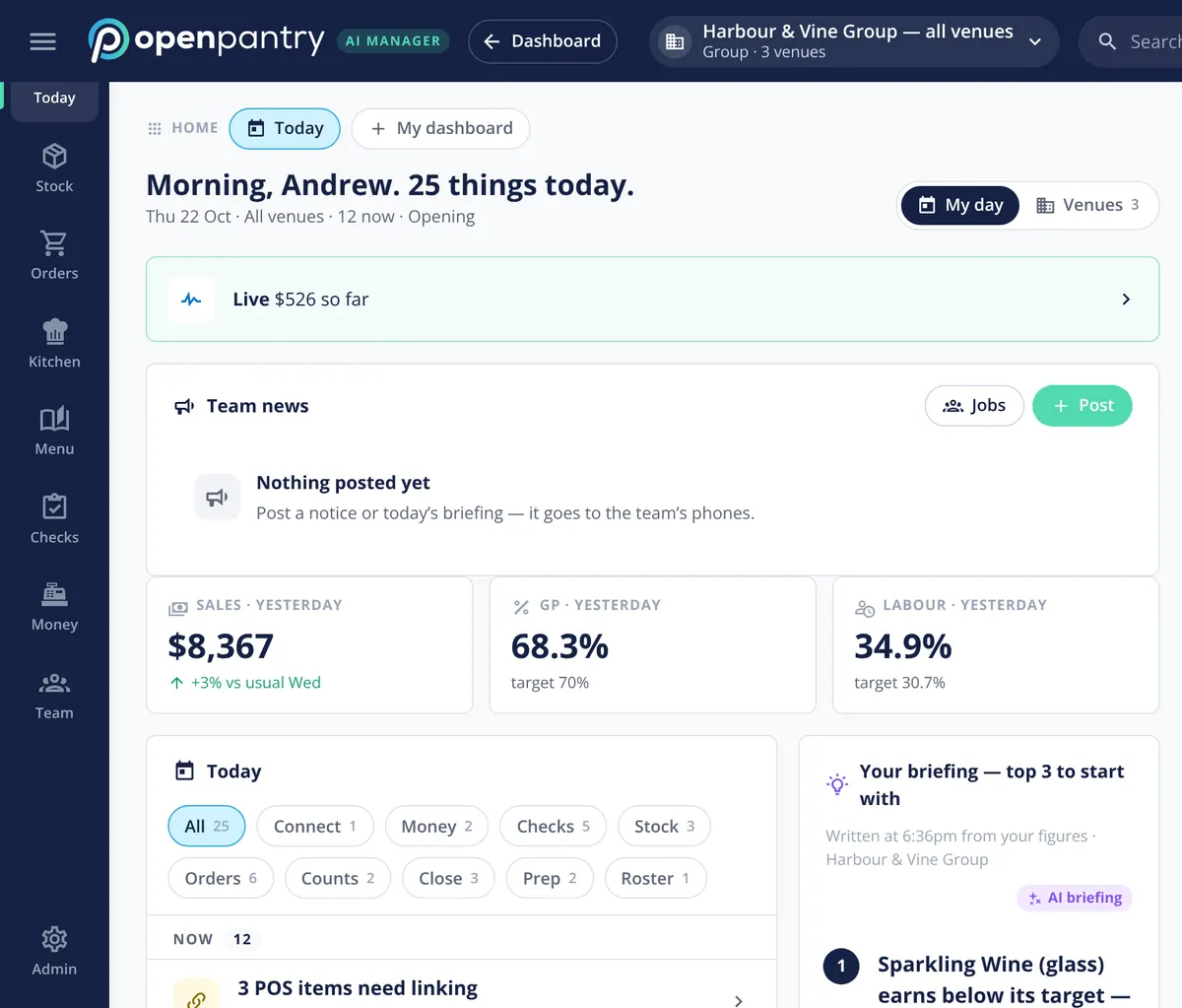
The next morning, yesterday’s sales, GP and labour sit at the top of the Today screen against your targets, and any close still open is on the day’s task list with everything else that needs doing.
- Yesterday’s sales against a usual day
- GP and labour against target
- Unfinished closes on the day’s list
Takings and supplier bills, both as drafts
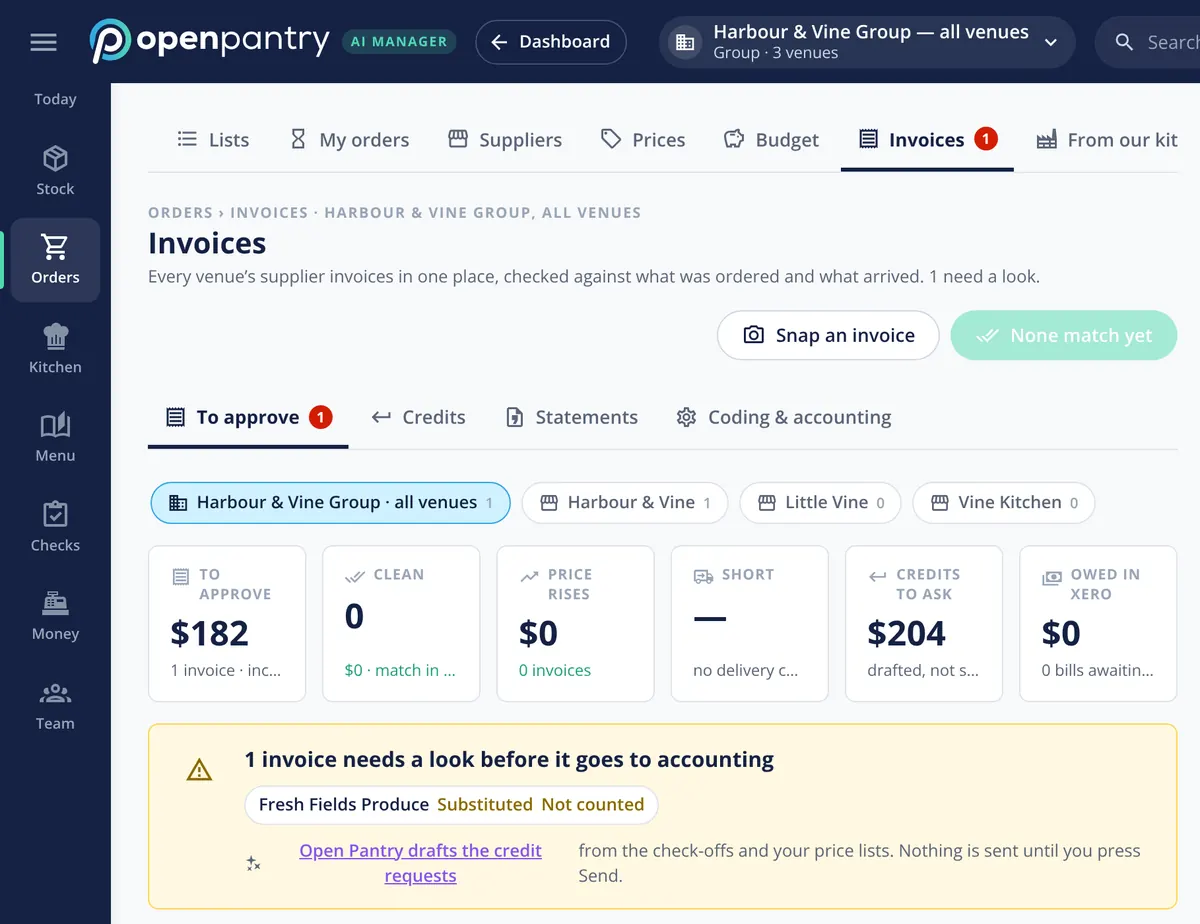
The other half of the books is what you bought. Supplier invoices are checked against what was ordered and what arrived, coded to your accounts and venue, and go across as draft bills — the same rule as the daily sales journals. There is also a bookkeeper role that sees the closes and the bills without the rest of the venue.
- Daily sales journals and supplier bills sent as drafts
- A bookkeeper role with access to the money, not the kitchen
What the close connects to
Built by the team venues already order with
“Open Pantry has created exactly what the restaurant industry needs. Something very easy to use that doesn’t require any upkeep. Their menu costing feature is fantastic and simple enough that any chef or bar manager can use it. I think restaurants that are serious about growing their profit & managing their costs need to consider Open Pantry.”
Chefs Love Open Pantry

Thank you OPEN PANTRY, we used to have to use 6 apps to get access to ordering from our suppliers, the fact we can do it all in one has saved an incredible amount of time & effort! We love you!

We’ve been using Open Pantry for a few months now and it’s been an absolute lifesaver. We’re short staffed so being able to place all of our orders with all of our suppliers in the one spot is a massive help.

So glad this service exists. Has made it so easy for my manager & chefs to order & all payments are settled in one go. The recurring orders & pantry lists are amazing time savers!!
Why not keep doing the close on a paper sheet?
Because a paper close only tells you a number, not what to do about it. Nobody checks it against the card settlement, nobody asks why the till was out while the shift is still fresh in mind, and the bookkeeper retypes it weeks later. A close recorded in the same place as your sales and supplier bills asks for the reason on the night, holds anything unexplained, and hands your accountant a draft rather than a pile of sheets.
Open Pantry for restaurants in Ireland
Irish restaurants, cafés and pubs use Open Pantry to order from all their suppliers in one place and keep food costs in view.
- Plans priced in
- EUR — see Ireland pricing
- Accounting sync
- Xero and QuickBooks Online
- Supplier directory
- 230+ Irish wholesale food & beverage suppliers
Can restaurants in Ireland use Open Pantry?
Yes. Restaurants, cafés and pubs in Ireland use Open Pantry to order from all their suppliers in one place, track what they buy and keep food costs in view. Paid plans are priced in EUR.
Is ordering on Open Pantry free for restaurants?
Yes. The ordering package is free, with unlimited suppliers and orders. Paid plans add menu costing, inventory and reporting, and are priced in EUR.
End of day reconciliation — questions operators ask
What should a restaurant end of day reconciliation actually include?+
How do I reconcile the till float and card settlement every night?+
What happens if the till is short and nobody gives a reason?+
Does the daily sales journal post straight into Xero or QuickBooks?+
Can my bookkeeper check the daily closes without seeing everything else?+
Which POS systems work with the end of day close?+
How does an owner check every venue’s close the next morning?+
Works even better with
POS Sales Integration
How the day’s sales come in from your POS.
Explore →Supplier Invoice Scanning
Supplier bills read, checked and sent to accounting as drafts.
Explore →Food Cost Variance
Why GP moved, split into price rises, waste, yield and count error.
Explore →Multi-Venue Management
Every venue side by side, with one briefing per venue.
Explore →Review last night’s closes for a demo restaurant group
Sign in as the owner of Harbour & Vine and approve the clean closes — no sign-up.
Per venue, per month · No contract · Cancel anytime