
Claude and ChatGPT: Run Your Wholesale Business in Conversation
Open Pantry connects to Claude and ChatGPT, so a food wholesaler can ask their AI assistant about the business and get answers from their own live data. Ask for the morning rundown, who has gone quiet, what is making money or who owes you. Ask it to draft a customer’s usual order, receive stock, set a customer price or raise a purchase order, and it shows you the change and waits for your yes.
- More than 170 Open Pantry actions across orders, customers, pricing, stock, purchasing, credits and reports
- Reads run straight away; anything that changes data asks you to confirm first
- Access limited to what your API key allows, and pausing the key cuts it off within a minute
★★★★★ Trusted by 600+ suppliers
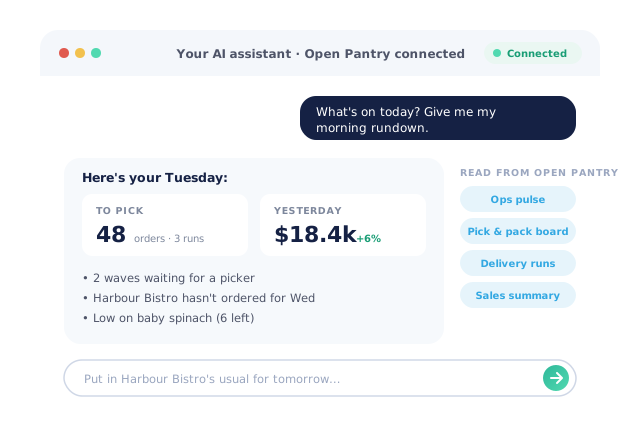



The Answers Are in Your System. Getting Them Out Takes Too Long

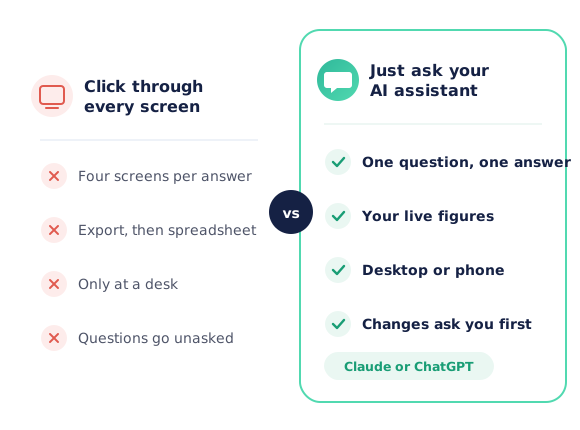
A simple question means four screens, an export and a spreadsheet

Customers drift away because nobody had time to check who stopped ordering

Margins on each line are a month-end discovery, not a daily check

The owner is on the road and the figures live on the office computer
How the Claude and ChatGPT Connector Works
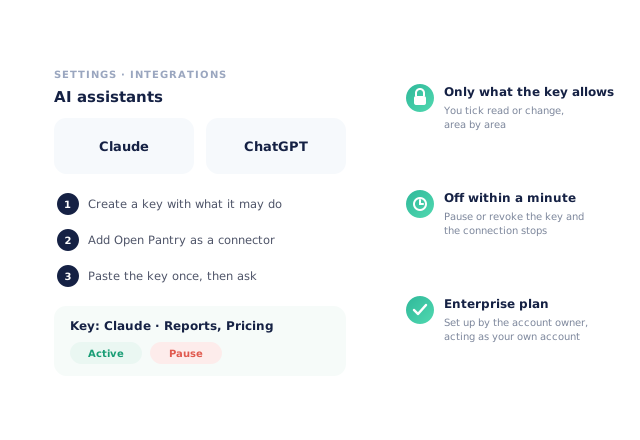
Create a key in Open Pantry
Settings → Integrations → AI assistants. Choose what the assistant may read and what it may change, area by area. The key is shown once.
Add Open Pantry to your assistant
In Claude or ChatGPT, add Open Pantry as a connector and paste the key on the Open Pantry sign-in page. Claude’s desktop and phone apps pick it up from the same account.
Ask in plain English
Questions about orders, customers, stock, sales, margins and invoices are answered from your live Open Pantry data.
Confirm any change
When you ask it to do something, it shows exactly what will change and waits. Nothing is written until you say yes.
Free trial · Cancel anytime
Answers from your own live figures
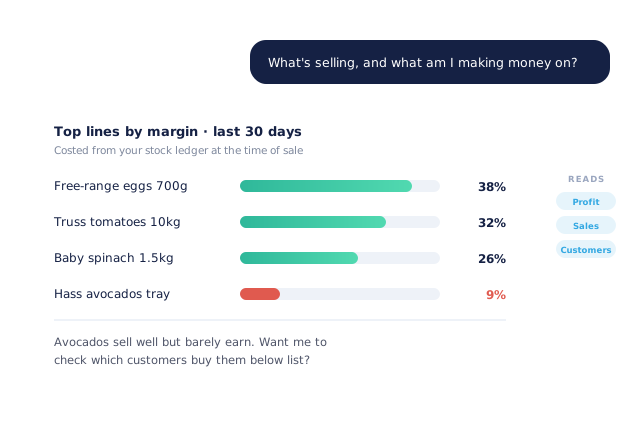
Ask what is selling and what is making money, how last month compared, which customers have gone quiet, what a venue usually orders on a Friday, which invoices are overdue or what you are out of. Product margins are costed from your stock ledger at the time of sale, and sales figures match your Open Pantry reports.
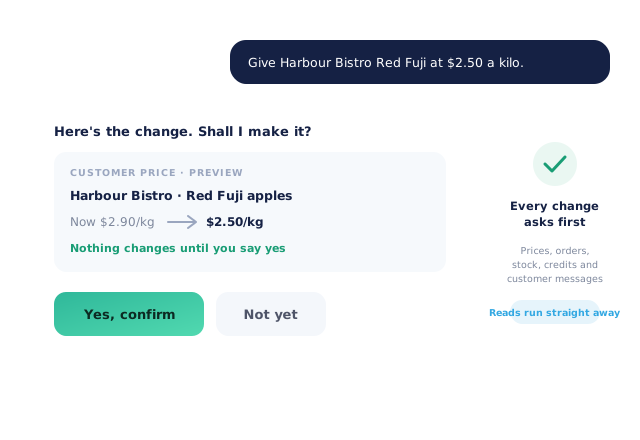
It asks before it changes anything
Customer prices, orders, stock, credits, promotions and messages to customers are all changes, so the assistant previews each one and waits for your confirmation. The riskiest actions need an explicit confirm step inside Open Pantry as well. Reading never changes anything.
The jobs you would otherwise do in five screens
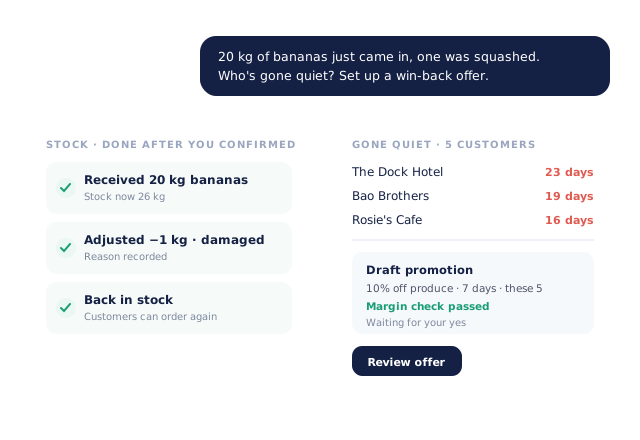
Draft a customer’s usual order for tomorrow. Add two boxes and move delivery to Friday. Receive a delivery and write off what arrived damaged. Raise a credit for bruised stock. Pull the overdue chase list. Find lapsed customers and draft a win-back promotion with a margin check. Work out what to reorder and raise the purchase order.
- Drafts are created the same way the app creates them
- Every change comes back with a plain summary and a link into Open Pantry
Your key, your rules
The connection uses an Open Pantry API key that you create, with the areas it may read and change ticked by you. It acts as your own account and only sees your data. Pause or revoke the key and every connector built on it stops within a minute.
- More product lines purchased
- 24%
- Spot lapsed customers and stopped lines in a sentence, and win the sales back.
- Less order-processing cost
- 95%
- Orders, credits and purchase orders drafted in conversation, not keyed in by hand.
- Fewer picking errors
- 80%
- Everything the assistant drafts flows into the same digital pick and pack.
Real gains suppliers report after moving ordering, fulfilment and invoicing onto Open Pantry.
Works With the Assistants Your Team Already Uses
Trusted by M&J Chickens
- $175m+
- Annual turnover
M&J Chickens use Open Pantry to move ordering out of calls and messages and into one digital workflow — giving customers a smooth ordering experience and giving the team fewer errors and less admin.
“Moving to a digital process has transformed our ordering process which is now faster through our own mobile apps.”

Why not just export a report?
An export answers the question you planned to ask, at a desk, after a few minutes of filtering. Most questions never get asked because the clicking isn’t worth it. With the connector you ask the way you would ask a colleague, from your laptop or phone, and get an answer from live data in seconds. When the answer needs action, the assistant drafts it and you confirm.
Open Pantry for food suppliers in Canada
Canadian food and beverage wholesalers use Open Pantry to take orders from restaurants, cafés and venues online, with every order flowing to picking, invoicing and accounting.
- Plans priced in
- CAD — see Canada pricing
- Accounting sync
- QuickBooks Online and Xero
- Supplier directory
- 980+ Canadian wholesale food & beverage suppliers
Can Canadian food suppliers use Open Pantry?
Yes. Wholesalers and distributors in Canada use Open Pantry to take orders from restaurants, cafés and venues through their own branded ordering app and online store. Plans are priced in CAD, and orders and invoices sync with QuickBooks Online and Xero.
Is there a free plan for suppliers in Canada?
Yes. The free plan lets you list products and receive unlimited orders. Paid plans add accounting, inventory and delivery tools, come with a free trial and are priced in CAD.
Questions Suppliers Ask About the Claude and ChatGPT Connector
What does the Open Pantry AI assistant connector do?+
Which plan do I need?+
Do I need a Claude or ChatGPT subscription?+
Can the assistant change my data without asking?+
What can I ask it?+
What can it do for me?+
How do I set it up?+
How do I turn it off?+
Can it see other suppliers’ data?+
Is my data used to train AI models?+
Does it work on my phone?+
Works Even Better With
Analytics & Reporting
The reports behind the answers: revenue, customers, products, lapsed accounts and trends.
Explore →AI Order Capture
Email, SMS, WhatsApp and photo orders read automatically and turned into real orders.
Explore →Inventory Intelligence
Stocktakes, shrinkage alerts and smart reordering the assistant can draw on.
Explore →Ask Your Business a Question Today
Join 600+ Australian suppliers running their ordering, fulfilment and invoicing on Open Pantry.
Enterprise plan · Every change asks first · Your data stays yours