
Carcass Breakdown: Every Cut Costed, Every Kilo Accounted For
Open Pantry’s carcass breakdown lets a meat wholesaler scan the carcass tickets, weigh each cut as it comes off the bench, and split the carcass cost across the cuts by relative sales value, by weight or by your own shares. Every cut enters stock at a real cost, yields are compared with your template, and every carton can be traced back to the body it came from.
- Scan carcass tickets — body number, weight and kill date read for you
- Cost split by sales value, weight or manual share, adding back to the cent
- Yields, cutting tests and carcass trace from the same run
★★★★★ Trusted by 600+ suppliers
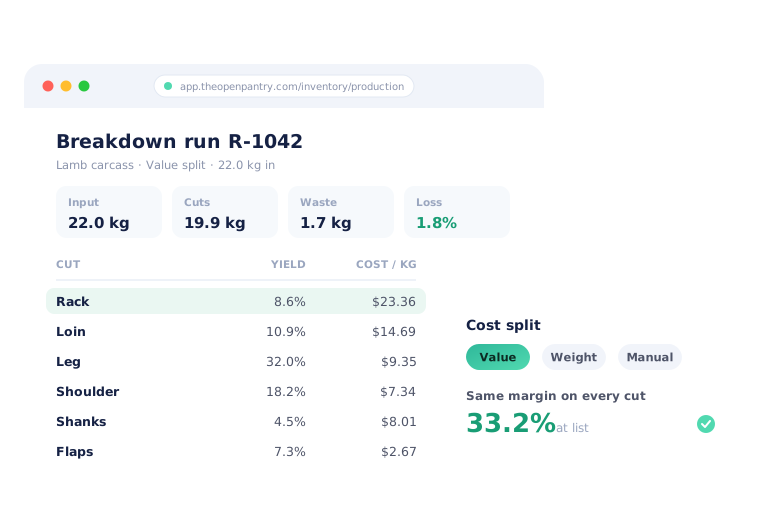



The boning room decides your margin — and nobody can see it

Every cut costed at the same guessed $/kg, so the prime cuts look less profitable than they are

Yields written on a clipboard and typed into a spreadsheet days later — if at all

Nobody can say how many carcasses to break down to cover next week’s orders

A customer complaint about a carton, and no way to say which body it came from
How Carcass Breakdown Works
Scan the carcasses in
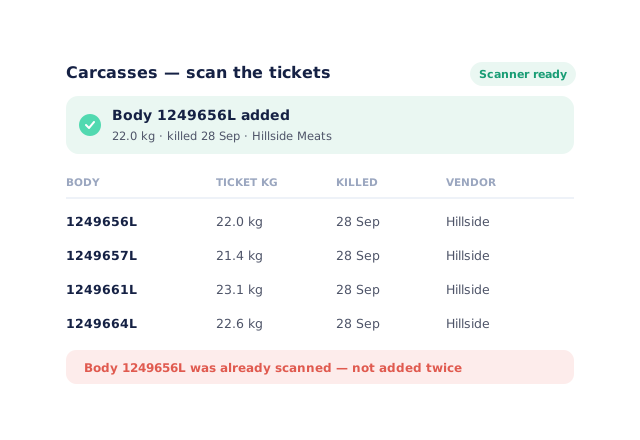
Scan each carcass ticket. Body number, ticket weight and kill date are read from the GS1 label, and the same body can’t be used twice.
Weigh each cut off the bench
Capture cuts and waste on a connected scale and print a GS1 carton label for each carton as you go.
Choose how cost is split
Relative sales value by default, or by weight, or your own shares. By-products come off the carcass cost at their net realisable value first.
Complete the run
Each cut enters stock as a lot at its allocated cost, and the yields, planning and trace update themselves.
Free trial · Cancel anytime
Scan the tickets, not a clipboard
The breakdown run reads each carcass ticket — body number, weight and kill date — through the same GS1 scanning used across the warehouse. A carton label, a bad check digit or a body already used in another run is stopped with a plain message, so the run starts from the right carcasses.
- Handheld scanner or typed ticket
- Vendor and kill date carried onto the cuts
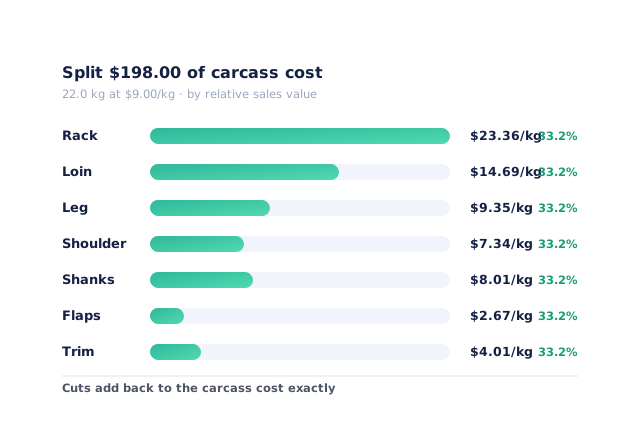
A cost split that reflects what each cut sells for
By relative sales value, each cut carries its share of the carcass cost in proportion to what it sells for — so every cut makes the same margin at list price, and a rack is no longer costed like trim. Switch to weight or manual shares with one tap; the cuts always add back to the carcass cost exactly.
- Value, weight or manual — stored on the run
- By-products at net realisable value
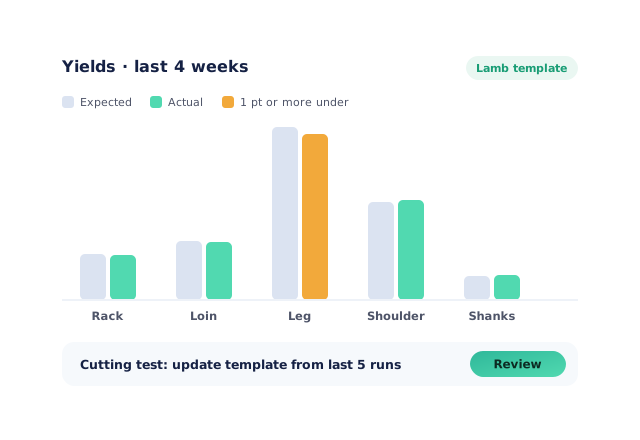
Yields you can act on
The yields report compares actual cut yields with your template, by operator, vendor, species and weight band, and shows the dollar impact each week. When the bench consistently beats or misses the template, a cutting test updates it from your last 3, 5 or 10 runs — with a history of every change.
Plan the breakdown, trace the carton
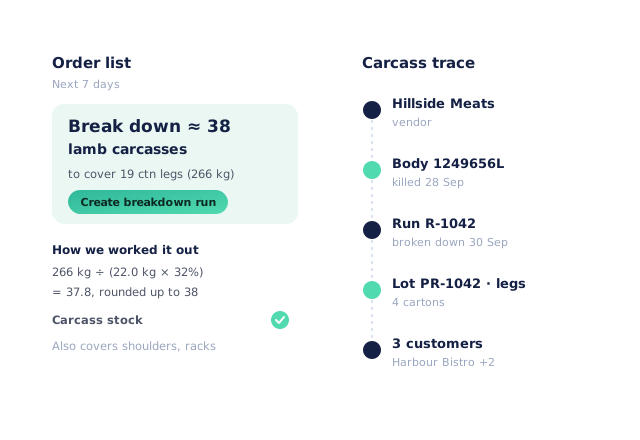
The order list works out how many carcasses to break down to cover the cuts you’ve sold, using your average carcass weight and expected yield. And any carton can be traced back to its run, its bodies and the vendor — or forward from a body to the customers who received its cuts.
- “Break down ≈ 38 carcasses” suggestions
- Body ↔ run ↔ carton ↔ customer trace
- More product lines purchased
- 24%
- Your always-on branded store and app put your full range in front of customers, so baskets grow.
- Less order-processing cost
- 95%
- AI order capture and auto-invoicing remove the manual keying between order and books.
- Fewer picking errors
- 80%
- Tablet pick & pack with FEFO lot and expiry tracking catches shorts and wrong items before they ship.
Real gains suppliers report after moving ordering, fulfilment and invoicing onto Open Pantry.
Breakdown Costs Flow Through Everything
Trusted by M&J Chickens
- $175m+
- Annual turnover
M&J Chickens use Open Pantry to move ordering out of calls and messages and into one digital workflow — giving customers a smooth ordering experience and giving the team fewer errors and less admin.
“Moving to a digital process has transformed our ordering process which is now faster through our own mobile apps.”

Why not keep the yield spreadsheet?
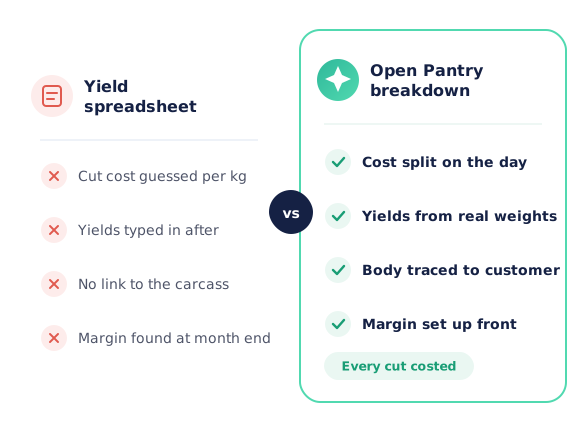
A spreadsheet can hold your yields, but it can’t weigh the cuts, split the cost on the day, or tell you which body a carton came from. It is filled in after the fact, so the margin you see is the margin you hoped for. Breakdown in Open Pantry costs every cut from the real weights at the moment the run completes, and keeps the trace.
Open Pantry for food suppliers in Canada
Canadian food and beverage wholesalers use Open Pantry to take orders from restaurants, cafés and venues online, with every order flowing to picking, invoicing and accounting.
- Plans priced in
- CAD — see Canada pricing
- Accounting sync
- QuickBooks Online and Xero
- Supplier directory
- 980+ Canadian wholesale food & beverage suppliers
Can Canadian food suppliers use Open Pantry?
Yes. Wholesalers and distributors in Canada use Open Pantry to take orders from restaurants, cafés and venues through their own branded ordering app and online store. Plans are priced in CAD, and orders and invoices sync with QuickBooks Online and Xero.
Is there a free plan for suppliers in Canada?
Yes. The free plan lets you list products and receive unlimited orders. Paid plans add accounting, inventory and delivery tools, come with a free trial and are priced in CAD.
Questions Meat Wholesalers Ask About Carcass Breakdown
What is carcass breakdown costing?+
How does the relative sales value split work?+
Can I split by weight or set my own shares instead?+
How are by-products like bones handled?+
What does the yields report show?+
How do cutting tests update my template?+
Can it tell me how many carcasses to break down?+
Can I trace a carton back to the carcass?+
Does it print carton labels?+
Does breakdown costing post journals to Xero or MYOB?+
Which plan includes carcass breakdown?+
Works Even Better With
Know What Every Cut Really Costs.
Join 600+ Australian suppliers running their ordering, fulfilment and invoicing on Open Pantry.
Setup done for you · Cancel anytime · Your data stays yours