
POS Sales Integration: Stop Retyping Yesterday’s Takings
Open Pantry connects to your POS, whichever one you use. The day’s sales come in on their own, matched to the recipe each sale belongs to, which is what lets a night of service turn straight into cost of goods, food-cost percentage and profit against the previous period. Nobody retypes the takings, and nothing is ever written back to your POS. Waste is logged in Open Pantry rather than imported from the till.
- Connects to your POS, whichever one you use
- The day’s sales come in matched to your recipes
- One-way — nothing is ever written back to your till
- Feeds dish costing, profit reporting and waste analysis
★★★★★ Trusted by 5,000+ venues
Recommended by:




The takings are in the till. The costing is somewhere else.
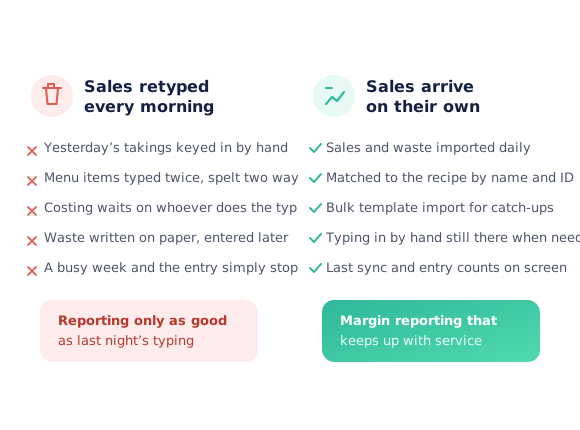
Yesterday’s sales are retyped into a second system each morning
The same dish is entered two ways and reports split in half
Margin reporting waits on whoever does the typing
One busy week and the sales entry quietly stops for a month
Waste is written on paper at 11pm and entered days later, or not at all
Nobody trusts a food-cost figure built on partial data
From the till to a costed margin
Connect your POS
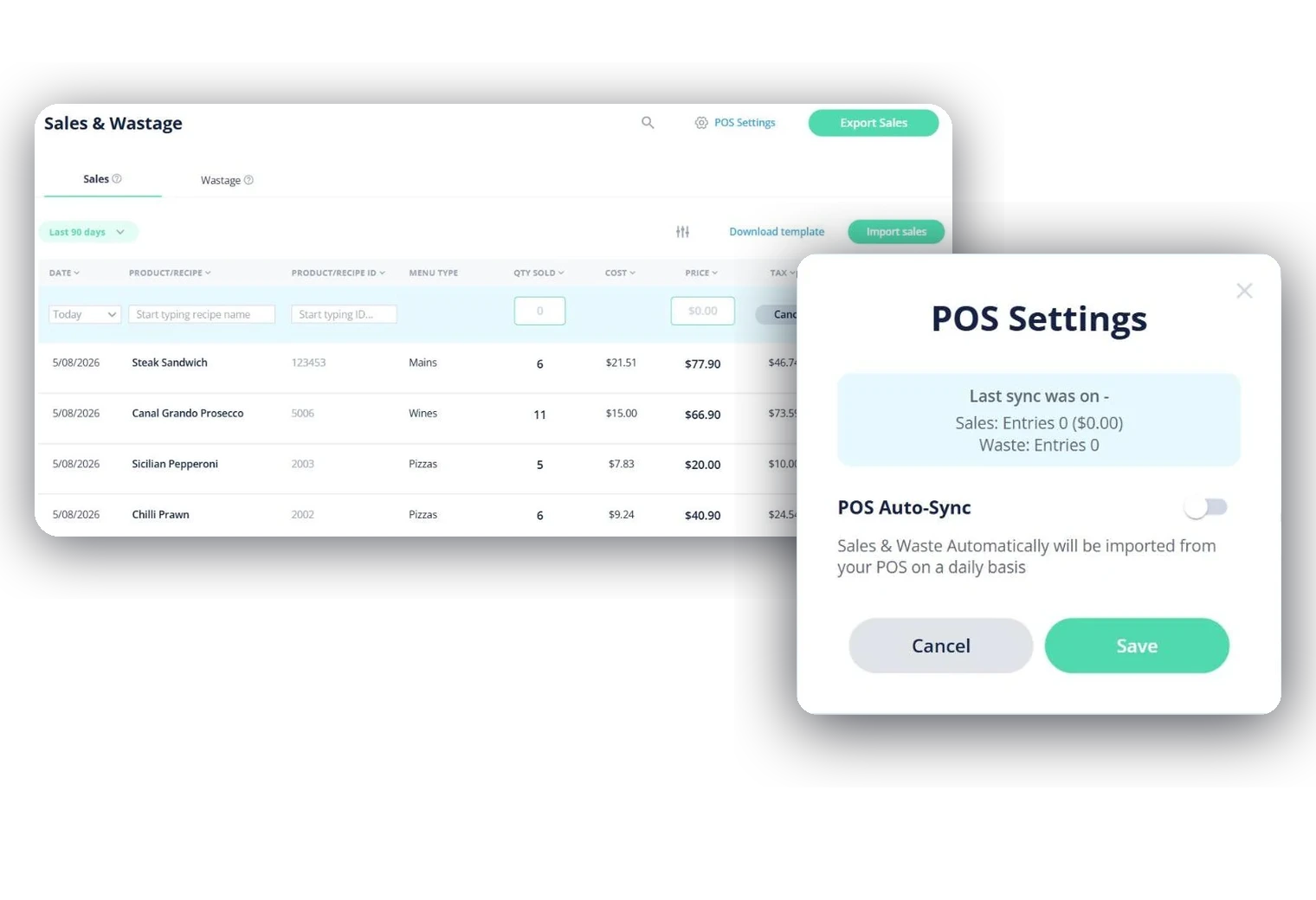
Whichever POS the venue uses, we set the connection up for you. From then on POS Settings carries a single POS Auto-Sync toggle, with the last sync time and the entry count beside it.
Sales arrive against your recipes
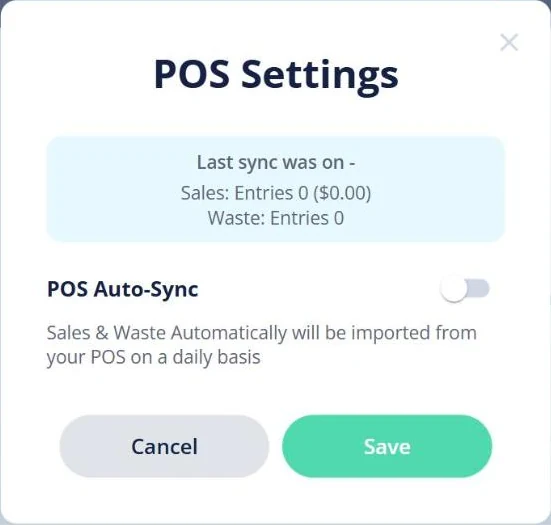
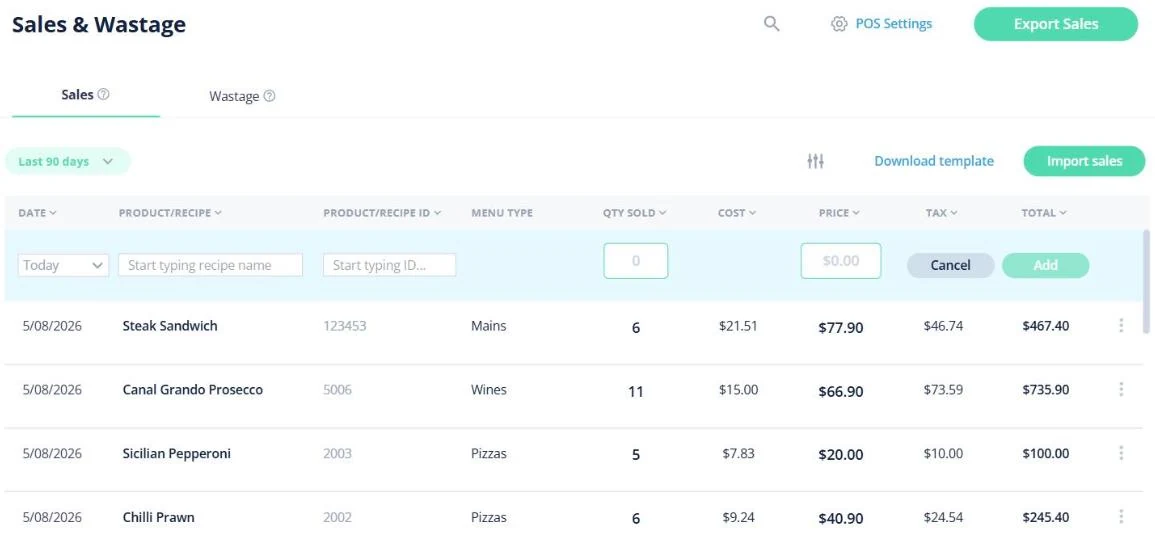
Each sale lands with its date, product or recipe, its ID, menu type, quantity sold, cost, price, tax and total — already in the shape costing needs, which is what lets it attach to the dish it came from.
Waste is logged beside them
Waste does not come from the till. Each write-off is logged in Open Pantry as it happens, with the item, the quantity, the reason and who reported it, so it sits next to the sales in the same reports.
Then it turns into margin
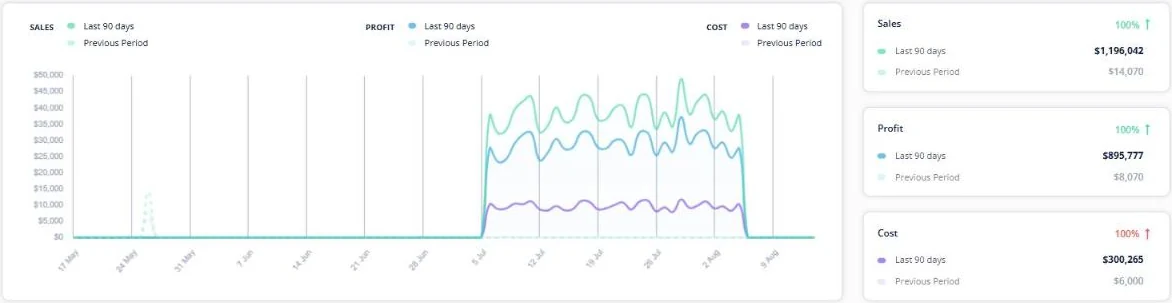
Once sales are in, the reports show sales, profit and cost against the previous period with a cost-of-goods percentage per menu category, and dish-level costing has the revenue half of the picture it needs.
See how Open Pantry works for venues
Connects to your POS, whichever one you use
POS integration is deliberately a small screen. We connect the venue’s POS and switch POS Auto-Sync on, and from then on the day’s sales come in on their own. Above the toggle sits the state you actually need — when the last sync ran, how many sales entries it brought and what they were worth — so if a sync has not happened the panel says so rather than leaving you to guess.
- Works with every POS
- Last sync date, sales entry count and value on screen
- Nothing to babysit, and nothing written back to the till
Sales land in the shape costing needs
A sale is not just a total. Each line carries the date, the product or recipe, the product or recipe ID, the menu type, quantity sold, cost, price, tax and total — so a night of service arrives already split by menu and already attached to the dishes it came from. Menu-type totals run across the footer, and the whole table exports.
- Date, recipe, recipe ID, menu type, quantity, cost, price, tax, total
- Totals per menu type across the period
- Filterable by period and exportable
Waste is logged here, with its reason
Waste does not come from the till — it is logged in Open Pantry as it happens, which is the only moment anyone remembers why. Each write-off keeps the date, the product or recipe and its ID, the quantity, the reason it was written off and who reported it. That detail is the whole reason the waste report is worth reading: it splits the cost by reason, by menu, by item and by employee instead of showing one unexplained number. A till total could never carry the reason, which is the part that changes what you do next.
- Write-offs logged in Open Pantry, not pulled from the till
- Reason and reporter kept on every write-off
- Feeds waste by reason, menu, item and employee

What it is actually for: current margins
Getting sales in is the plumbing, not the point. With them in, sales, profit and cost report against the equivalent previous period, the menu breakdown carries a cost-of-goods percentage per category, and there are views down to menu item and individual product. Dish costing already knows what you paid your suppliers; sales are what turn that into a margin.
- Sales, profit and cost against the previous period
- COGS percentage by menu category, item and product
- Completes the picture dish costing starts
Fits how the venue already works
Venues that stopped double-entering
Venues Love Open Pantry

Thank you OPEN PANTRY, we used to have to use 6 apps to get access to ordering from our suppliers, the fact we can do it all in one has saved an incredible amount of time & effort! We love you!

We’ve been using Open Pantry for a few months now and it’s been an absolute lifesaver. We’re short staffed so being able to place all of our orders with all of our suppliers in the one spot is a massive help.

So glad this service exists. Has made it so easy for my manager & chefs to order & all payments are settled in one go. The recurring orders & pantry lists are amazing time savers!!
Why not just type the sales in each morning?
Plenty of venues do, and it works right up until the week it does not. Manual sales entry is the first job dropped when service gets busy, and a month of missing sales does not produce a gap in the reporting — it produces a food-cost percentage that looks fine and is wrong. Bringing sales in straight from your POS instead costs nobody an hour, keeps the dish names consistent, and means the margin you look at on Tuesday is built on Monday night.
POS sales integration — questions venues ask
What does POS sales integration actually do?+
Which POS systems do you work with?+
How often does it sync?+
Does Open Pantry send anything back to my POS?+
Do I need to change my POS?+
How do sales get matched to the right dish?+
Is waste imported from the POS as well as sales?+
What can I see once sales are in?+
Is POS integration included with ordering?+
Works even better with
Get the takings in without typing them
Sales and waste tracking is part of Menu Profit Manager.
Free to order · Paid plans include a free trial · Cancel anytime