
Meat Wholesale Software: Bill the Weight You Actually Cut
Open Pantry is ordering software for meat wholesalers. Flag a product as catch weight and your picker weighs each carton as it is packed — the invoice then bills that weight, not the quantity the venue happened to order. The same cut can be sold by the kilo, the piece or the carton, and nobody re-types a kilogram between the dock and the books.
- Catch-weight lines weighed at pack and billed at the weighed figure
- Sell the same cut by kilo, piece or carton — priced and picked correctly
- Invoices raised from the weigh sheet, straight into your accounting system
★★★★★ Trusted by 600+ suppliers
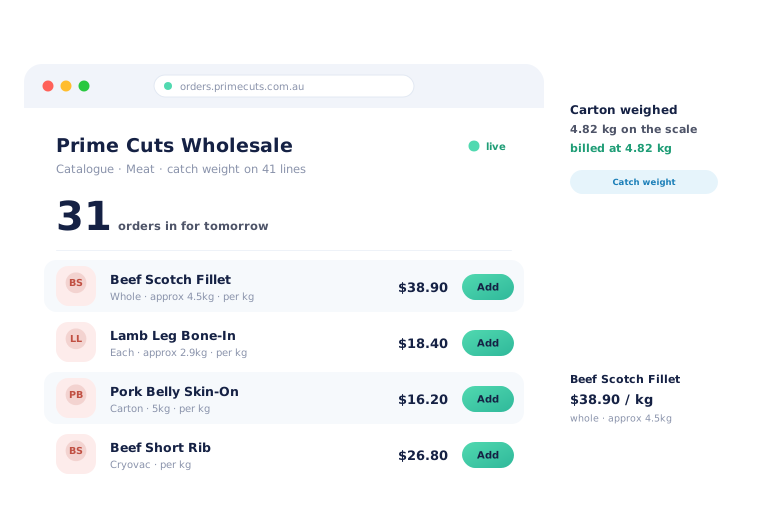



The weight is written on the carton. Then what?

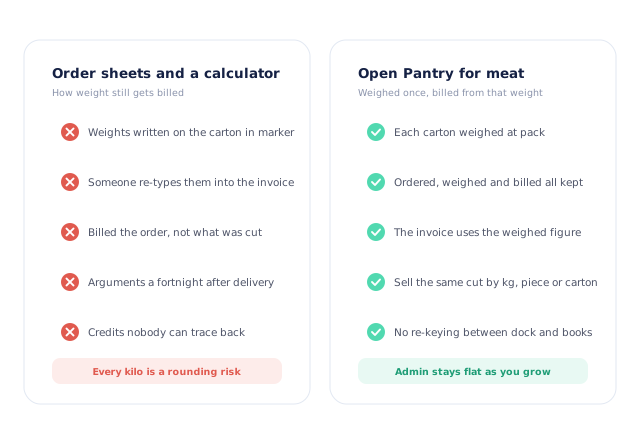
Weights scrawled on cartons and re-typed into an invoice later

Billed for what was ordered, not for what was actually cut

Weight arguments a fortnight after the delivery, with no record to check

Credits raised to end the argument rather than because they are right
Ordered, Weighed, Billed — Once Each
Flag the lines that sell by weight
Catch weight is set per product, so the cuts you sell by the kilo behave differently from the cartons of mince you sell as a unit. Nothing else in your catalogue changes.
Venues order in whatever they buy in
A kilo figure, a number of pieces or a carton — the pack they order in is the pack that appears on the pick slip, priced correctly for that account.
Your packer weighs it
Each carton is weighed as it goes into the order — the number typed in, or read straight off a connected scale if you use one. That becomes the delivered total for the line.
The invoice uses that weight
The invoice bills the weighed figure, over or under what was ordered, and syncs to Xero, MYOB, QuickBooks or Sage without anyone entering it a second time.
Free trial · Cancel anytime
Ordered, weighed and billed are three different numbers
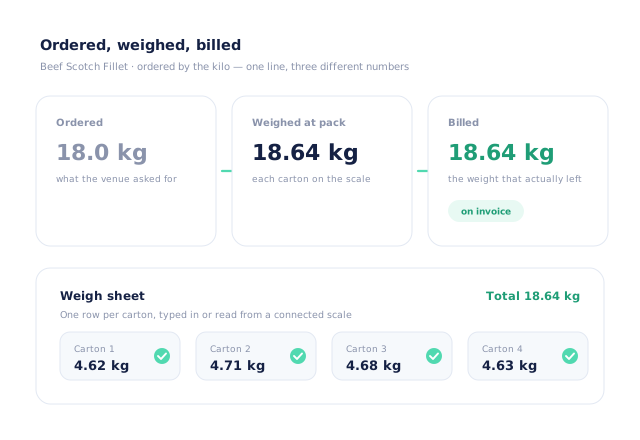
A venue orders 18 kilos of scotch fillet. Four cartons come off the band at 4.62, 4.71, 4.68 and 4.63 — 18.64 kilos. Open Pantry keeps all three figures against the same line: what was asked for, what was weighed, and what was billed. The invoice uses the weighed figure, whether that is over or under the order.
- One row per carton on the weigh sheet, with who weighed it and when
- Typed in, or read straight from a connected scale if you use one
- The line is billed over or under the ordered amount, honestly either way
- Set per product — the rest of your catalogue is untouched
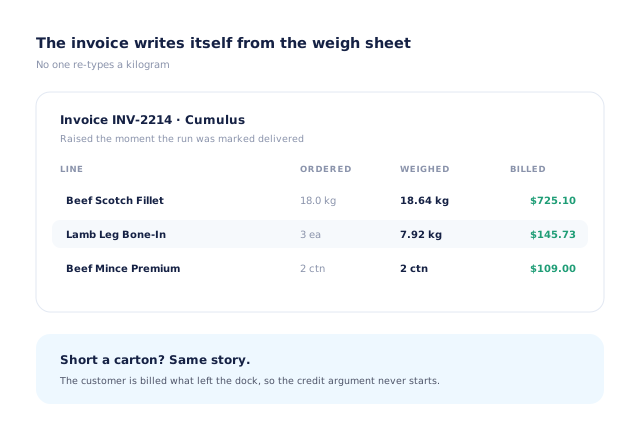
The invoice writes itself from the weigh sheet
The gap between the warehouse and the office is where meat businesses lose money — a weight misread, a carton not counted, a credit issued to end an argument. When the invoice is generated from the same weigh sheet the packer filled in, that gap closes. Nobody re-keys a kilogram, and the number on the invoice can always be traced back to a carton.
- Invoice raised as the run goes out, from the weights captured at pack
- Every kilogram traceable to the carton it came from
- Shorts handled the same way — bill what left the dock
- Straight into Xero, MYOB AccountRight, QuickBooks Online or Sage
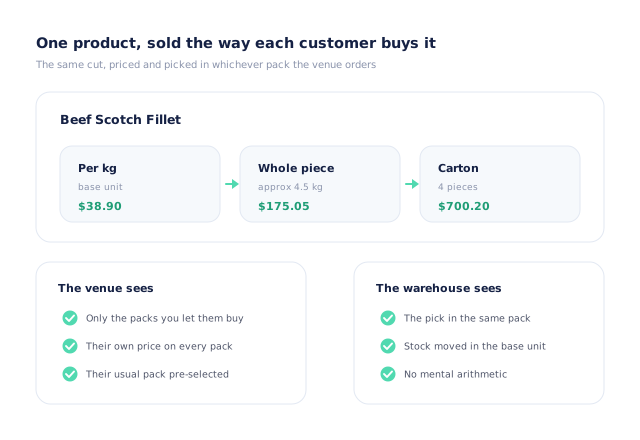
One product, sold the way each customer buys it
A restaurant wants three pieces, a pub wants a carton, a caterer orders by the kilo. They are all the same product in your catalogue. Open Pantry holds the pack ladder — kilo, piece, carton — converts between them automatically, and shows each customer only the packs you let them buy, at their price.
- A pack ladder from base unit up to carton and pallet
- Automatic conversion, so stock moves in your base unit
- Each account sees the packs and prices you set for them
- The pick slip shows the pack the customer actually ordered
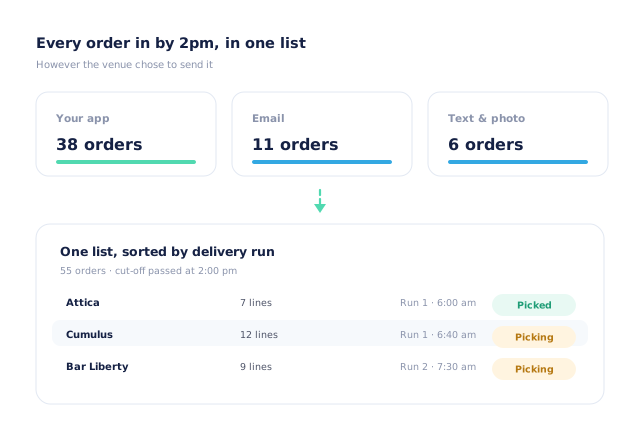
Every order in by cut-off, in one list
Meat orders arrive right up to the cut-off, across a phone, an inbox and whatever the rep wrote down. In Open Pantry they land in one list, sorted by delivery run rather than arrival time, and the cut-off closes the day — so what is in front of the boners in the morning is the whole job, not the part that made it onto the sheet.
- Your branded app and online store, plus email and text orders
- One list, sorted by delivery run
- Cut-off times you can vary by day and by customer
- Shorts flagged at pack rather than at the door
- More product lines purchased
- 24%
- Your always-on branded store and app put your full range in front of customers, so baskets grow.
- Less order-processing cost
- 95%
- AI order capture and auto-invoicing remove the manual keying between order and books.
- Fewer picking errors
- 80%
- Tablet pick & pack with FEFO lot and expiry tracking catches shorts and wrong items before they ship.
Real gains suppliers report after moving ordering, fulfilment and invoicing onto Open Pantry.
Sits On Top of the Accounting You Already Run
Trusted by M&J Chickens
- $175m+
- Annual turnover
M&J Chickens are a protein wholesaler running the same problem set — weight-based lines, early runs and venues that order right up to the cut-off. Open Pantry moved their ordering out of calls and messages into one digital workflow.
“With Open Pantry, we launched our own fully branded ordering app — it’s helped us protect our customer base, move to digital ordering, and deliver a much better experience to our venues.”

A spreadsheet cannot weigh a carton.
Most meat wholesalers already have a system for weights: a marker, a carton and someone in the office typing them up later. It works, in the sense that invoices go out — but every kilogram passes through a human twice, the customer is billed for the order rather than the cut, and when a weight is disputed there is nothing to check. Capturing the weight where the weighing already happens costs the packer nothing and removes the whole argument.
Questions Meat Wholesalers Ask
What is catch weight?+
Does Open Pantry handle catch weight?+
Where does the weight actually get entered?+
Do I need a connected scale?+
What if the weight comes in under what was ordered?+
Can I sell the same cut by the kilo and by the carton?+
Can different customers be on different prices?+
Do lot numbers and use-by dates get tracked?+
Does it connect to my accounting system?+
How long does it take to get going?+
Works Even Better With
Weigh It Once. Bill It Right.
Join 600+ Australian suppliers running their ordering, fulfilment and invoicing on Open Pantry.
Setup done for you · Cancel anytime · Your data stays yours