
Multi-Location Inventory: Every Site, Every Bin, One Stock Figure
Open Pantry’s multi-location inventory tracks your stock by site and by bin, follows each carton and pallet as its own unit, and moves stock between warehouses with transfers you can see in transit. It is the same stock ledger your orders, picking and invoices already use, so the number a customer sees is the number on the shelf.
- Sites, bins and printed bin labels, with stock shown by location
- Cartons and pallets tracked as units, with SSCC pallet labels and a full trace
- Transfers between sites, stock held for an order, and a limit on overselling
★★★★★ Trusted by 600+ suppliers



More Sites Shouldn’t Mean More Spreadsheets

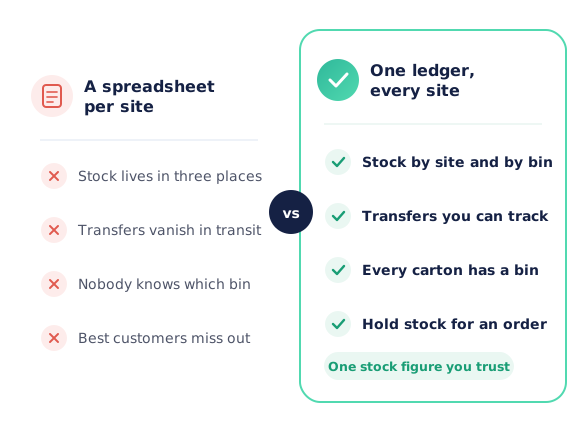
Each warehouse keeps its own spreadsheet, and none of them agree with the system

Stock sent to the other site disappears until someone remembers to receive it

Pickers search the chiller because nobody recorded which bin the carton went in

Your best customer’s order is short because the oldest cartons went to someone else
How Multi-Location Inventory Works
Set up your sites and bins
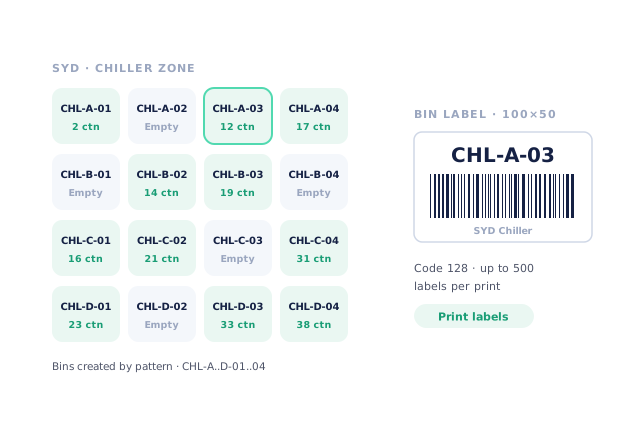
Add each warehouse with a site code, then create bins one at a time or by pattern (CHL-A-01 to CHL-D-04) and print Code 128 bin labels.
Receive stock into a bin
Scan cartons in against the purchase order and scan the bin they land in. Each carton or pallet becomes a unit with its weight, dates, lot and location.
Move and transfer by scan
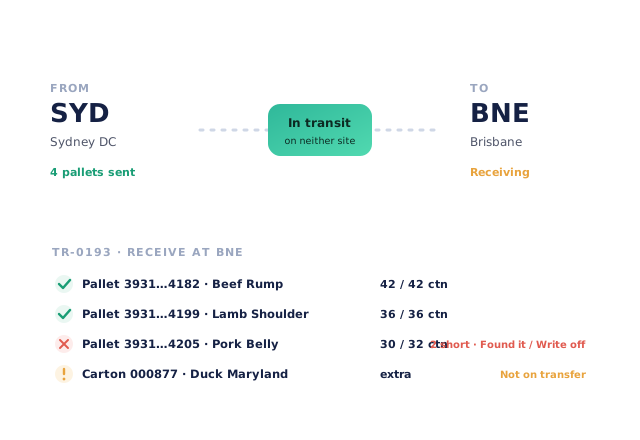
Put away, move between bins or send a transfer to another site. Transferred stock shows as in transit until the other site scans it off the truck.
Sell from the right stock
Orders see what is really available — on hand less what is reserved. Hold the oldest cartons for an order, and let customers order up to a limit you set.
Free trial · Cancel anytime
Sites and bins, labelled and counted
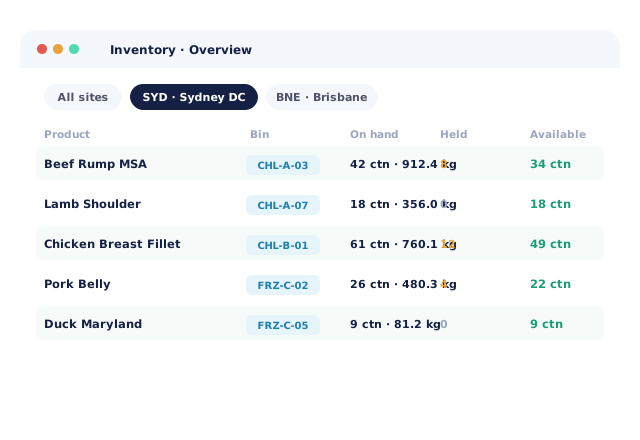
Give every warehouse a site code and every shelf a bin. Create bins singly or by pattern with a dry run first, print Code 128 bin labels (up to 500 per print) and see stock by bin on the inventory overview. Pickers get the bin and a walk order on their screen; stocktakes can be scoped to a zone or bin range.
- Products carry a default bin
- Count and weight shown together: “42 ctn · 912.4 kg”
Cartons and pallets, tracked as units
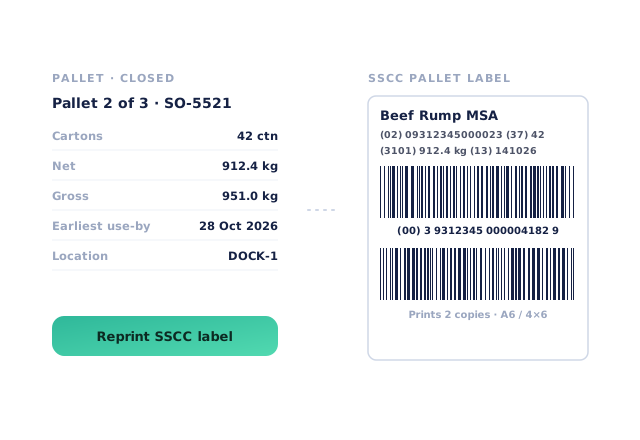
Switch on carton tracking and every carton or carcass becomes a unit with its serial, weight, dates, lot, bin and life story. Build a pallet for an order or for stock, close it and print a two-copy SSCC pallet label. Trace any carton, lot or pallet to where it came from and which customers it went to.
- Load out refuses a pallet that belongs on another truck
- A nightly check flags cartons that don’t match the stock figure
Transfers between warehouses you can actually follow
Send stock from one site to another and it leaves the first site straight away and shows as in transit — on neither site — until the receiving team scans it off. Short cartons show red and extras show amber, so differences are dealt with on the day, not at the next stocktake.
Hold stock, fill with equivalents, cap overselling
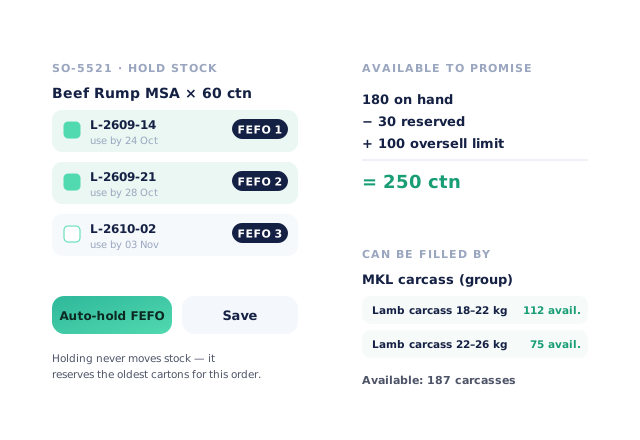
Hold specific pallets or lots for an order — or let Auto-hold pick the oldest use-by first. Group equivalent products so “lamb carcass” can be filled from any member that fits. And choose to keep selling up to a limit beyond what’s on hand, with forward-sold lines flagged on the order.
- Available to promise = on hand − reserved + your limit
- Held stock is never moved, only reserved
- More product lines purchased
- 24%
- Your always-on branded store and app put your full range in front of customers, so baskets grow.
- Less order-processing cost
- 95%
- AI order capture and auto-invoicing remove the manual keying between order and books.
- Fewer picking errors
- 80%
- Tablet pick & pack with FEFO lot and expiry tracking catches shorts and wrong items before they ship.
Real gains suppliers report after moving ordering, fulfilment and invoicing onto Open Pantry.
One Stock Ledger Behind Orders, Picking and Invoices
Trusted by M&J Chickens
- $175m+
- Annual turnover
M&J Chickens use Open Pantry to move ordering out of calls and messages and into one digital workflow — giving customers a smooth ordering experience and giving the team fewer errors and less admin.
“Moving to a digital process has transformed our ordering process which is now faster through our own mobile apps.”

Why not a separate warehouse system?
A standalone warehouse system means a second stock figure, an integration to keep alive and a team that has to check both. Open Pantry keeps sites, bins, cartons and pallets in the same ledger your orders, picking and invoices already use — so there is one number, and it moves when the stock moves.
Open Pantry for food suppliers in New Zealand
New Zealand food and beverage wholesalers use Open Pantry to take orders from restaurants, cafés and venues online, with every order flowing to picking, invoicing and accounting.
- Plans priced in
- NZD — see NZ pricing
- Accounting sync
- Xero, MYOB and QuickBooks Online
- Supplier directory
- 2,000+ New Zealand wholesale food & beverage suppliers
Can New Zealand food suppliers use Open Pantry?
Yes. Wholesalers and distributors in New Zealand use Open Pantry to take orders from restaurants, cafés and venues through their own branded ordering app and online store. Plans are priced in NZD, and orders and invoices sync with Xero, MYOB and QuickBooks Online.
Is there a free plan for suppliers in New Zealand?
Yes. The free plan lets you list products and receive unlimited orders. Paid plans add accounting, inventory and delivery tools, come with a free trial and are priced in NZD.
Questions Suppliers Ask About Multi-Location Inventory
Can Open Pantry track stock across more than one warehouse?+
How do bin locations work?+
What does tracking cartons and pallets as units mean?+
What happens to stock while it is being transferred?+
Can I hold stock for a particular customer’s order?+
Can an order be filled with an equivalent product?+
Can customers order more than I have on hand?+
Do I need scanners to use multiple sites and bins?+
Does multi-location stock sync with my accounting software?+
Which plan includes multi-location inventory?+
Works Even Better With
Warehouse Barcode Scanning
Receive, put away, count and load out by scanning the labels already on your stock.
Explore →Lot Tracking, Expiry & FEFO
Lots and use-by dates on every receipt, with first-expired-first-out picking.
Explore →Inventory Intelligence
Stocktakes, shrinkage alerts and smart reordering across your stock.
Explore →One Stock Figure for Every Site. Start This Week.
Join 600+ Australian suppliers running their ordering, fulfilment and invoicing on Open Pantry.
Setup done for you · Cancel anytime · Your data stays yours