
Online Credit Applications: From Trade Account Form to Customer in One Step
Open Pantry gives every wholesale supplier an online trade account application. New customers apply from a link, a QR code or your ordering portal, their ABN is checked as they type, and every director signs on their own phone. You review it in one place, and approving it creates the customer with their credit limit, payment terms and price list already set.
- A share link, QR code and portal button — no more PDF forms to chase
- ABN checked, directors sign on their phone, save and finish later
- Approve once: customer created, terms and price list set, invite sent
★★★★★ Trusted by 600+ suppliers
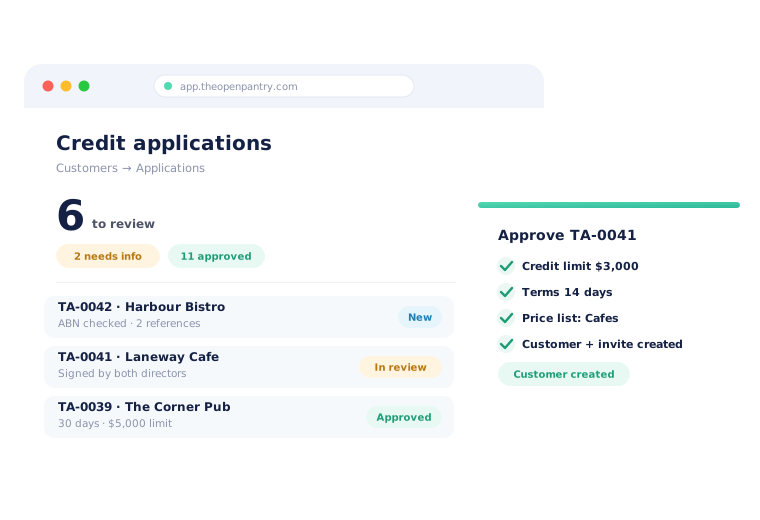



Opening a trade account shouldn’t take a week of emails

A PDF form printed, scanned, emailed back — then typed into your system by hand

Half-completed forms, missing pages and an ABN nobody checked

Chasing a second director for a signature while the venue wants its first delivery

Credit limit, terms and price list set up separately, and sometimes not at all
Switch It On, Share the Link, Approve
Set up your application
Choose the sections you need — trading details, bank details, two or three references — your own terms and conditions or our template, whether directors guarantee, and the payment terms you offer.
Share it
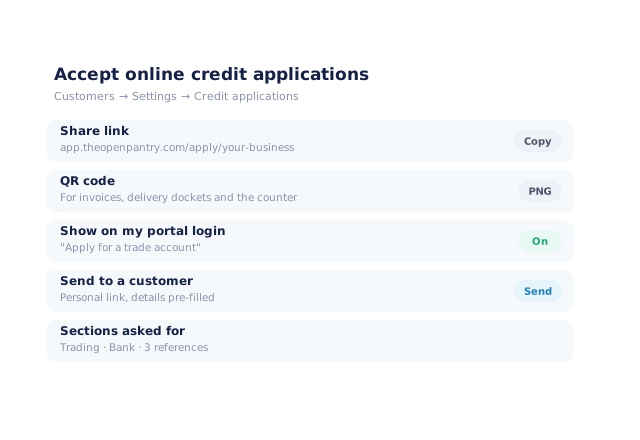
Use the share link, print the QR code on invoices and dockets, show an "Apply for a trade account" button on your portal login, or send a personal link to a specific customer.
The customer applies on their phone
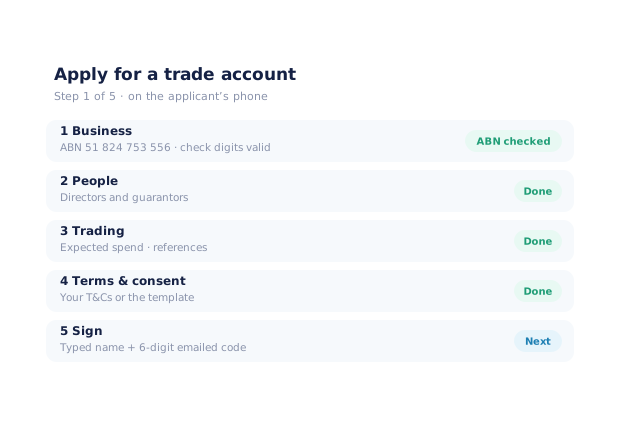
Five short steps. The ABN is checked as they type, every director signs with a code sent to their email, and they can save and finish later.
Review and approve
Check references and notes in one place, then approve. Open Pantry creates the customer with the limit, terms, delivery run and price list you chose, and sends their invite.
Free trial · Cancel anytime
Your application, shared however your customers find you
Switch on online credit applications and you get a share link and a downloadable QR code. Put the QR on invoices, delivery dockets or the counter, or let your portal login show an "Apply for a trade account" button. For a venue your rep has just met, send a personal link with their business name and contact already filled in, then watch it move from sent to signed.
- Share link and QR code (PNG) for print
- "Apply for a trade account" button on your branded portal login
- Send to a customer from My Account, with their details pre-filled
- Track every invite: sent, started, waiting for signatures, ready to review
Five steps on a phone, with the ABN checked as they type
Applicants move through business, people, trading, terms and signing. The ABN is validated with the check-digit rule and looked up on the Australian Business Register, so typos are caught before you see them. Each director signs by typing their name and entering a six-digit code emailed to them — a co-director can sign on their own phone from their own link.
- ABN check-digit validation and Australian Business Register lookup
- Directors, guarantors and two or three trade references
- Signed with a typed name and an emailed code; co-directors sign separately
- Save and finish later, and a signed PDF copy emailed to the applicant
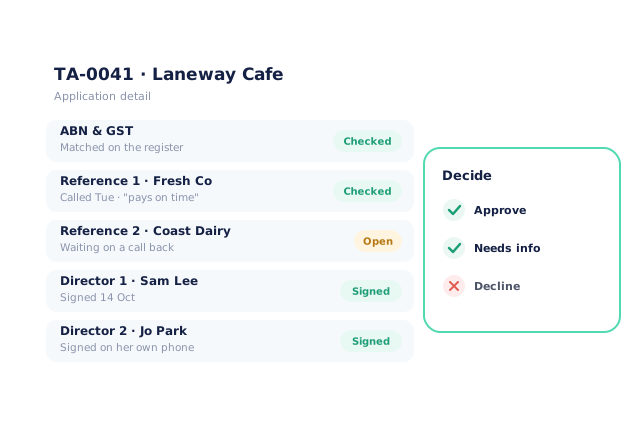
One review queue, with references and notes in the application
Applications land in Customers → Applications, sorted into New, In review, Needs info, Approved and Declined. Open one and you see the ABN result, references with your call notes, each director’s signature and an activity log. Need something else? "Needs info" emails a link straight back into the same application. Sensitive personal details stay masked unless the reviewer has permission to see them.
- Tabs for New, In review, Needs info, Approved and Declined
- Reference call notes and a "Checked" tick per reference
- "Needs info" sends the applicant back into the same application
- Reviewer permission controls who sees date of birth and licence details
Approve, and the customer is ready to order
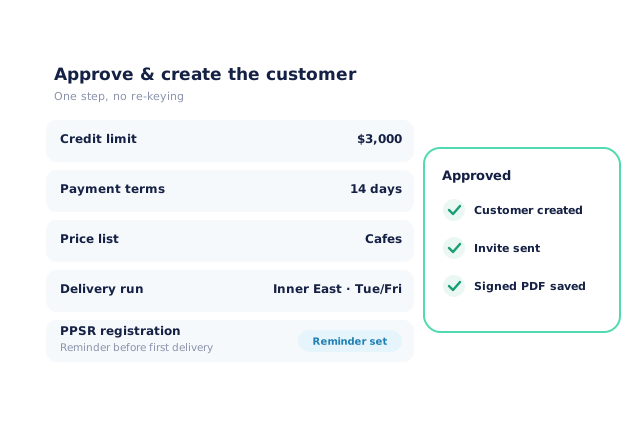
Approving is where the time is saved. Set the credit limit, payment terms, freight rule, delivery run, price list and rep in the approval itself, and Open Pantry creates the customer and sends their invite — the same way a customer import does, so nothing is typed twice. A PPSR card then records your registration and reminds you before the first delivery and before it expires.
- Credit limit and terms (7, 14, 30 days or end of month) set on approval
- Price list, delivery run, freight rule and rep assigned in the same step
- Customer created and invited automatically
- PPSR registration recorded with reminders before first delivery and expiry
- More product lines purchased
- 24%
- Your always-on branded store and app put your full range in front of customers, so baskets grow.
- Less order-processing cost
- 95%
- AI order capture and auto-invoicing remove the manual keying between order and books.
- Fewer picking errors
- 80%
- Tablet pick & pack with FEFO lot and expiry tracking catches shorts and wrong items before they ship.
Real gains suppliers report after moving ordering, fulfilment and invoicing onto Open Pantry.
New Customers Flow Straight Into the Rest of Open Pantry
Trusted by M&J Chickens
- $175m+
- Annual turnover
M&J Chickens use Open Pantry to move ordering out of calls and messages and into one digital workflow — giving customers a smooth ordering experience and giving the team fewer errors and less admin.
“With Open Pantry, we launched our own fully branded ordering app — it’s helped us protect our customer base, move to digital ordering, and deliver a much better experience to our venues.”

Why not keep the PDF form?
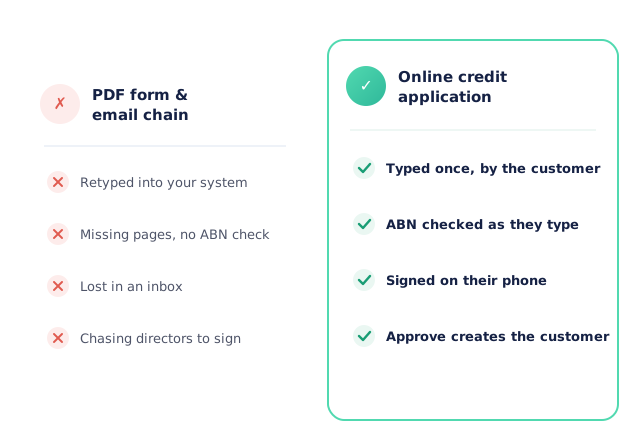
Because the form is only the start of the work. A PDF still has to be printed, signed, scanned, checked and then typed into your system — and the customer still needs a credit limit, terms and a price list set up separately. An online application captures the details once, checks the ABN as it goes, collects every signature on the signer’s own phone, and turns approval into a ready-to-order customer.
Open Pantry for food suppliers in the United States
US food and beverage wholesalers use Open Pantry to take orders from restaurants, cafés and venues online, with every order flowing to picking, invoicing and accounting.
- Plans priced in
- USD — see US pricing
- Accounting sync
- QuickBooks Online and Xero
- Supplier directory
- 2,100+ US wholesale food & beverage suppliers
Can US food suppliers use Open Pantry?
Yes. Wholesalers and distributors in the United States use Open Pantry to take orders from restaurants, cafés and venues through their own branded ordering app and online store. Plans are priced in USD, and orders and invoices sync with QuickBooks Online and Xero.
Is there a free plan for suppliers in the United States?
Yes. The free plan lets you list products and receive unlimited orders. Paid plans add accounting, inventory and delivery tools, come with a free trial and are priced in USD.
Questions Suppliers Ask About Online Credit Applications
What is an online credit application in Open Pantry?+
How do customers get to the application?+
Is the ABN checked?+
How do directors sign?+
Can I use my own terms and conditions?+
What can I ask for on the form?+
What happens when I approve an application?+
What if an application is missing something?+
Does it help with PPSR?+
Who on my team can see the applications?+
Which plan includes online credit applications?+
Works Even Better With
Customer Pricing & Promotions
The price list you set on approval applies from the customer’s first order.
Explore →Branded Ordering App
Show "Apply for a trade account" on your own branded portal login.
Explore →Auto-Invoicing & Payments
The terms you approve flow into every invoice and its due date.
Explore →Open New Trade Accounts in Minutes, Not Days.
Join 600+ Australian suppliers running their ordering, fulfilment and invoicing on Open Pantry.
Setup done for you · Cancel anytime · Your data stays yours