
Online Catalogue for Wholesalers: Let New Venues Browse Your Range and Ask for Prices
Every paid Open Pantry plan gives a wholesale supplier a public online catalogue. Anyone with your link or QR code can browse your products without an account, build a list of what they buy and send it to you as a price request. The request lands in your quotes, already filled in, so you price it, send it, and the venue becomes a customer when they accept.
- One link and QR code for your whole range — no account needed to browse
- You choose: hide prices, or show the price list you pick
- Requests arrive as quotes with the venue’s list and phone number
★★★★★ Trusted by 600+ suppliers
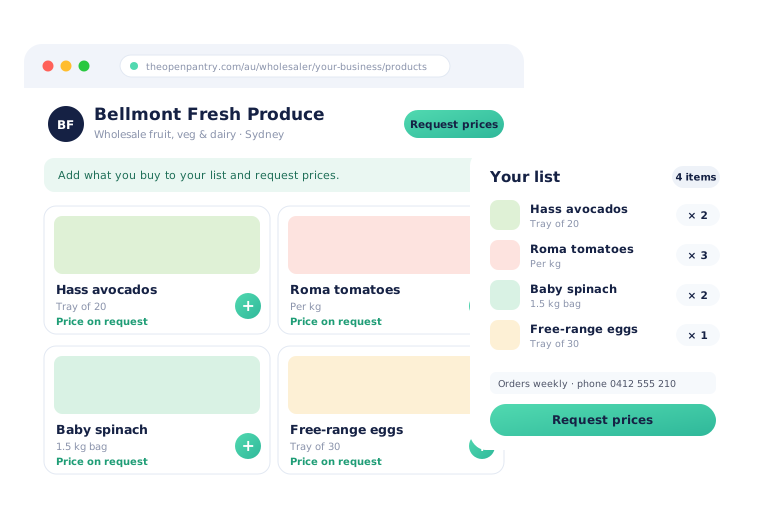



A new venue can’t see what you sell until they already have an account

Reps emailing PDF price lists and spreadsheets that are out of date within the week

Account requests that arrive with a name and nothing else — no list, no volumes, nothing to price

Chefs comparing suppliers at 10pm with no way to look through your range

Putting prices on a website and worrying which customers, and competitors, will read them
Switch It On, Share the Link, Price the Requests
Switch on your catalogue
In Settings › Public catalogue, choose whether prices are hidden or shown, which products appear and the message at the top of the page. Your products, photos and pack sizes are already there.
Share your link
Copy the link, download the QR code for invoices, dockets and the van, paste the "Browse our products" button into your website, or show the link on your own login page.
The venue builds a list
They browse by category or search, add what they buy with quantities, and send it with their business name, phone number and how often they order. No account and no ABN needed.
Price it and win the customer
The request opens in your normal quote editor with their list already on it. Send the quote; when the venue accepts, their account is created with those prices saved.
Free trial · Cancel anytime
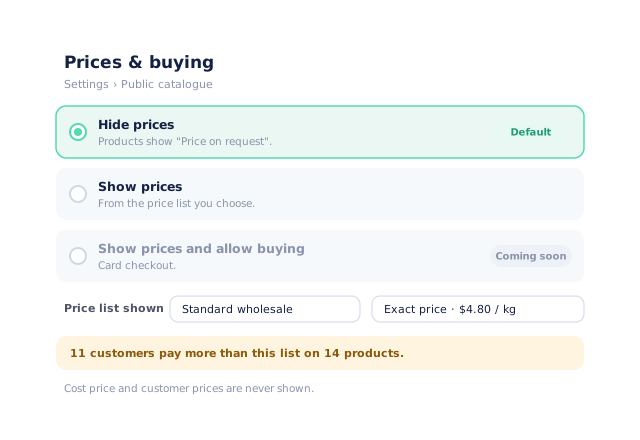
You decide what the public sees — prices hidden by default
Your catalogue starts with prices hidden: every product shows "Price on request" and visitors send you their list. If you would rather show prices, pick one of your price lists and choose exact or "from" prices. Before you save, Open Pantry tells you how many customers pay more than that list, so nobody finds a better price in public than the one they are on. Your cost price and each customer’s own prices are never shown.
- Hide prices (the default) or show one price list you choose
- Exact prices or "from" prices
- A warning when existing customers pay more than the public list
- If the chosen price list is deleted, prices go back to hidden
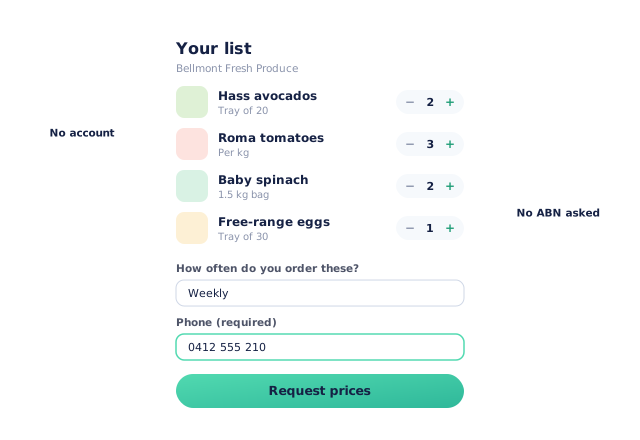
Venues build a list of what they buy, not just a contact form
A bare "please open an account" email gives you nothing to work with. Here the venue browses your range by category, adds products and quantities to a list, and sends it with their business name, contact, phone number, delivery address and how often they order. A phone number is always required so you can call them back; an ABN is never asked for. If you take online credit applications, the venue can go straight on to yours.
- Browse by category or search — photos, descriptions and pack sizes always shown
- Product codes and stock levels are never shown
- Phone number required, no ABN, optional note such as delivery times
- Optional "Apply for a trading account" link to your credit application
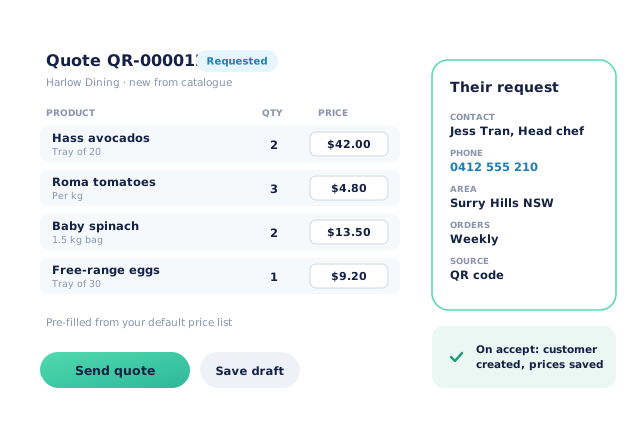
Every request becomes a quote you can price in a minute
Requests appear in Products › Quotes with the status Requested, and you get an email the moment one arrives. Open it and you are in the normal quote editor, with the venue’s list pre-filled from your default price list and their details in a side panel. Adjust prices or margins, then send. The venue opens their quote from the email, and can accept it or ask for changes. Accepting creates their customer account, sets their price list and saves the quoted prices as their special prices.
- Email to you for every new request, with a reminder if it sits for two days
- The same quote editor you already use: price or margin, lock, add products
- The venue can accept or request changes from their quote link
- On accept: customer created and invited, quoted prices saved as special prices
One link for your reps, your website and Google
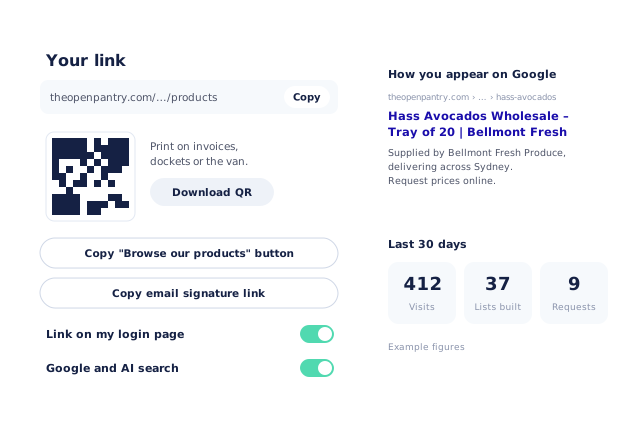
Your catalogue has one address you can use everywhere. Download the QR code as an image for invoices, delivery dockets and market stalls, copy a ready-made button for your own website, add a line to your email signature, and show "Browse our products" on your branded login page. Each product also has its own page that Google and AI assistants can read, named with your business and the product — and you can switch search off if you would rather share the link privately. A 30-day summary shows visits, lists built and requests.
- Share link, QR code (PNG), website button and email signature line
- "Browse our products" on your own login page
- A page per product that Google and AI search can read — or switch search off
- Visits, lists built, requests and most-viewed products for the last 30 days
- More product lines purchased
- 24%
- Your always-on branded store and app put your full range in front of customers, so baskets grow.
- Less order-processing cost
- 95%
- AI order capture and auto-invoicing remove the manual keying between order and books.
- Fewer picking errors
- 80%
- Tablet pick & pack with FEFO lot and expiry tracking catches shorts and wrong items before they ship.
Real gains suppliers report after moving ordering, fulfilment and invoicing onto Open Pantry.
New Customers Flow Straight Into the Rest of Open Pantry
Trusted by M&J Chickens
- $175m+
- Annual turnover
M&J Chickens use Open Pantry to move ordering out of calls and messages and into one digital workflow — giving customers a smooth ordering experience and giving the team fewer errors and less admin.
“With Open Pantry, we launched our own fully branded ordering app — it’s helped us protect our customer base, move to digital ordering, and deliver a much better experience to our venues.”

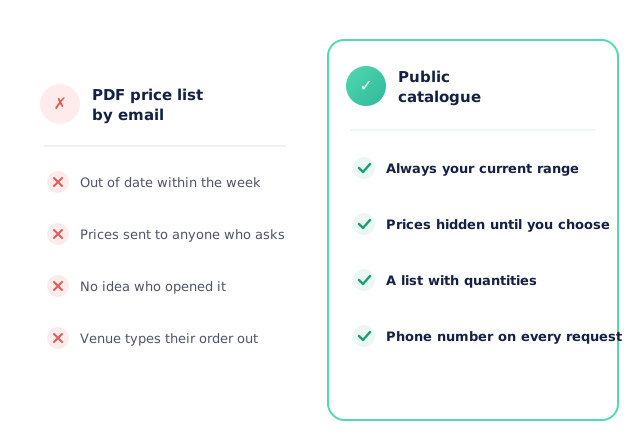
Why not just email a PDF price list?
Because a PDF is out of date the day after you send it, and it tells you nothing back. You cannot see who opened it, and the venue still has to type out what they want in an email. An online catalogue always shows your current range, lets you keep prices hidden until you know who is asking, and turns the venue’s interest into a list with quantities and a phone number — already sitting in a quote you can send.
Open Pantry for food suppliers in Canada
Canadian food and beverage wholesalers use Open Pantry to take orders from restaurants, cafés and venues online, with every order flowing to picking, invoicing and accounting.
- Plans priced in
- CAD — see Canada pricing
- Accounting sync
- QuickBooks Online and Xero
- Supplier directory
- 980+ Canadian wholesale food & beverage suppliers
Can Canadian food suppliers use Open Pantry?
Yes. Wholesalers and distributors in Canada use Open Pantry to take orders from restaurants, cafés and venues through their own branded ordering app and online store. Plans are priced in CAD, and orders and invoices sync with QuickBooks Online and Xero.
Is there a free plan for suppliers in Canada?
Yes. The free plan lets you list products and receive unlimited orders. Paid plans add accounting, inventory and delivery tools, come with a free trial and are priced in CAD.
Questions Suppliers Ask About the Public Catalogue
What is the public catalogue in Open Pantry?+
Can people see my wholesale prices without an account?+
Which of my products appear in the public catalogue?+
What do visitors see about each product?+
What happens when a venue sends a price request?+
What details does the venue have to give me?+
How does the venue become a customer after I send a quote?+
Can a venue apply for credit terms from my catalogue?+
How do I share my public catalogue with new venues?+
Will my products show up on Google and in AI search?+
Can visitors buy online and pay by card from the catalogue?+
Which Open Pantry plan includes the public catalogue?+
Works Even Better With
Product Visibility
Decide which products every customer can see — the same rule decides what the public sees.
Explore →Online Credit Applications
Let a venue that wants to pay on account apply straight from your catalogue.
Explore →Branded Ordering App
Once they accept, new customers order from your own branded store and app.
Explore →Put Your Range in Front of New Venues Today.
Join 600+ Australian suppliers running their ordering, fulfilment and invoicing on Open Pantry.
Setup done for you · Cancel anytime · Your data stays yours