
Accounts Receivable for Food Wholesalers: Know Who Owes You and Get Paid Sooner
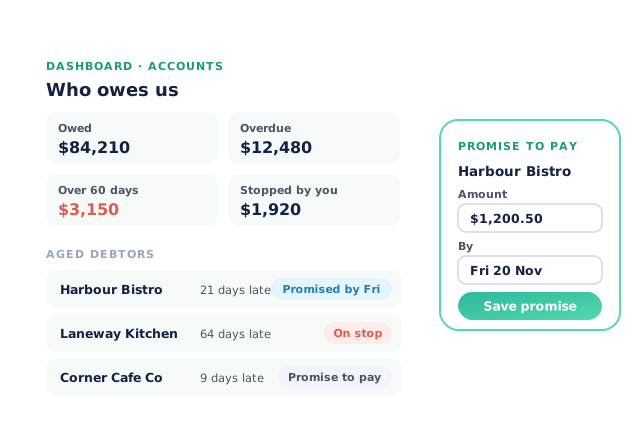
Open Pantry gives your accounts team one screen called Who owes us: what is owed, what is overdue, what is over 60 days and who is on stop, with an aged debtors list underneath. Record a customer’s promise to pay, stop or lift their credit in one tap, let overdue reminders go out on the days you choose, and put a pay-now link on every invoice so customers can pay by card the moment it lands.
- Aged debtors, live every morning, from the same invoices you sent
- Promises to pay recorded on the account, with broken ones flagged
- Overdue reminders and pay-now links that chase for you
★★★★★ Trusted by 600+ suppliers


Why Wholesalers Wait Too Long to Get Paid

The ageing report is a spreadsheet someone rebuilds from the accounting system each week

“We’ll pay Friday” is said on the phone and nobody writes it down

A customer 60 days late keeps ordering because the stop never reached the order desk

Reminder emails get typed by hand, so they go out late or not at all
How Accounts Receivable Works in Open Pantry
Open Who owes us
Your Accounts dashboard shows what is owed, overdue, over 60 days and on stop, with the invoices that need attention first.
Work the aged debtors list
Each customer shows how late they are. Record a promise to pay, or stop their credit until they pay.
Let reminders go out for you
Pick the days overdue invoices are chased. Customers get one email a day listing everything that’s due.
Make paying easy
A pay-now link and a scan-to-pay code on the invoice let customers pay by card, and the invoice is marked paid.
Free trial · Cancel anytime
One screen for the accounts team
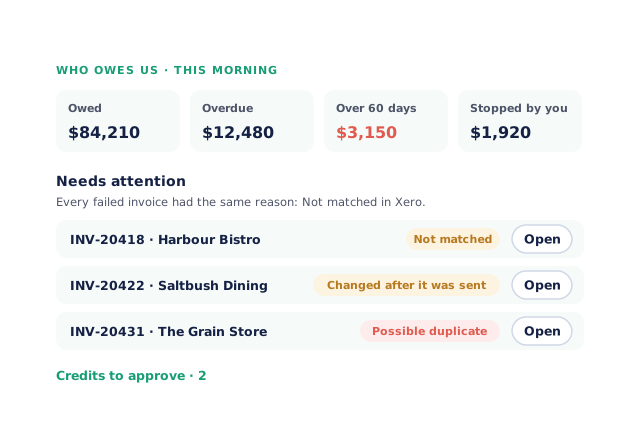
Who owes us opens with four totals: Owed, Overdue, Over 60 days and Stopped by you. Tap a total to filter the list to just those customers. Underneath, Needs attention lists invoices that didn’t reach your accounting system, with the reason said once when they all share it, and Credits to approve shows credits your team has raised. On a phone, the totals sit in the first screen and the Accounts bottom bar goes straight to Accounting, Customers, Orders and Reporting.
- Owed, Overdue, Over 60 days and Stopped by you
- Failed invoices and credits waiting, in one place
Promises to pay, kept on the account
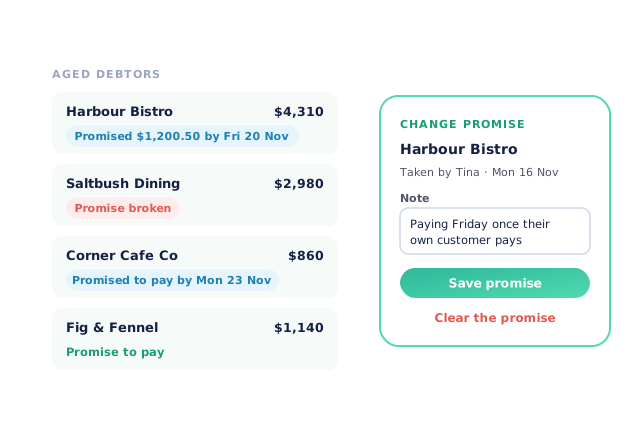
When a customer says they’ll pay, click Promise to pay on their row and record the day, the amount if they gave one, and a note. The row shows a chip such as “Promised $1,200.50 by Fri 20 Nov”, with who took the promise and when. If the day passes and they haven’t paid, the row says Promise broken and moves to the top. A promise is a note for your team: it sends nothing to the customer and doesn’t change their credit.
- One promise per customer, changed or cleared any time
- Broken promises rise to the top
Stop credit, and lift it, in one tap
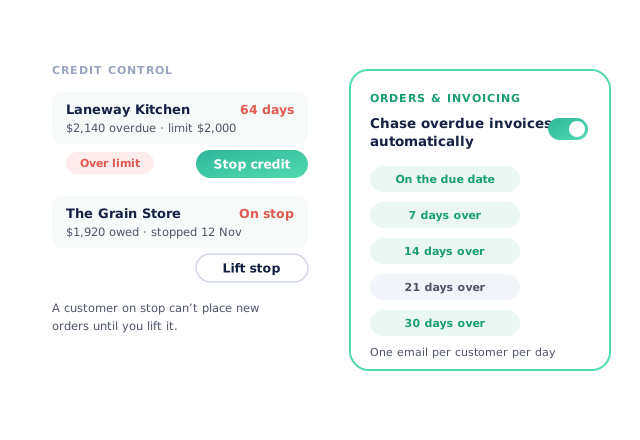
Customers over their limit are flagged on the list. Stop credit puts the customer on stop, which pauses their ordering, and Lift stop takes it off again — the same switch as Stop orders on the customer’s payment terms. Customer service and your reps see that a customer is on stop, so nobody takes an order by phone that the accounts team has paused.
- Over-limit customers flagged
- Stop and lift without opening the customer
Reminders and pay-now links that chase for you
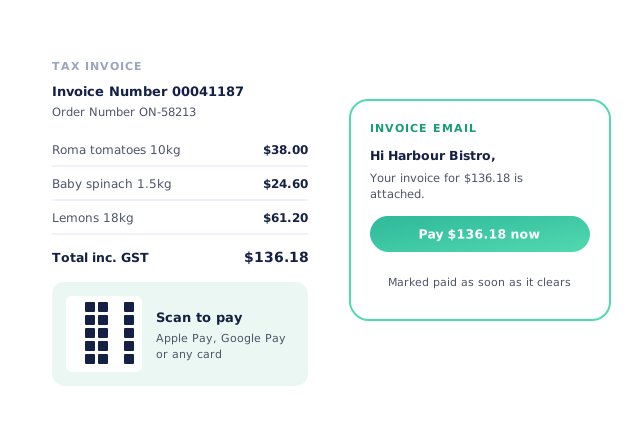
Turn on Chase overdue invoices automatically and choose the steps: on the due date, then 7, 14, 21 or 30 days over. Each customer on invoice terms gets one email a day listing every invoice that’s due; card customers are retried on their card instead. With your Stripe account connected, a Pay now button goes in the invoice email and a scan-to-pay code on the PDF. If your accounting system numbers your invoices, its number shows on the invoice so the customer pays against the reference you reconcile to.
- Reminder days you choose
- Card payment straight from the invoice
- More product lines purchased
- 24%
- Your always-on branded store and app put your full range in front of customers, so baskets grow.
- Less order-processing cost
- 95%
- AI order capture and auto-invoicing remove the manual keying between order and books.
- Fewer picking errors
- 80%
- Tablet pick & pack with FEFO lot and expiry tracking catches shorts and wrong items before they ship.
Real gains suppliers report after moving ordering, fulfilment and invoicing onto Open Pantry.
Receivables That Match Your Books
Trusted by M&J Chickens
- $175m+
- Annual turnover
M&J Chickens use Open Pantry to move ordering out of calls and messages and into one digital workflow — giving customers a smooth ordering experience and giving the team fewer errors and less admin.
“Moving to a digital process has transformed our ordering process which is now faster through our own mobile apps.”

Why not keep chasing from a spreadsheet?
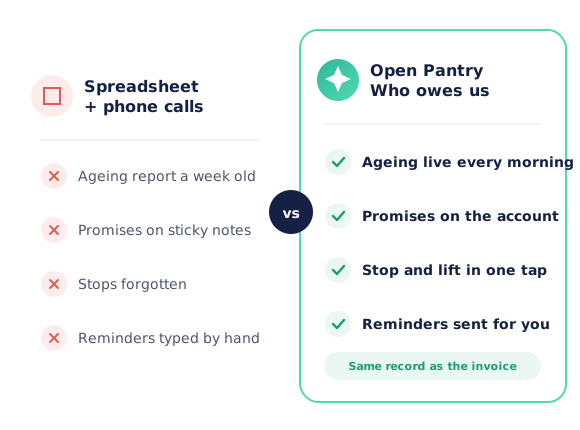
A spreadsheet ageing report is out of date the moment it’s saved, and promises, stops and reminders live in someone’s inbox or memory. In Open Pantry the aged debtors list is built from the invoices you actually sent, a promise sits on the customer’s account where the whole team can see it, and a stop reaches the order desk the moment you set it.
Open Pantry for food suppliers in Ireland
Irish food and beverage wholesalers use Open Pantry to take orders from restaurants, cafés and venues online, with every order flowing to picking, invoicing and accounting.
- Plans priced in
- EUR — see Ireland pricing
- Accounting sync
- Xero, Sage and QuickBooks Online
- Supplier directory
- 230+ Irish wholesale food & beverage suppliers
Can Irish food suppliers use Open Pantry?
Yes. Wholesalers and distributors in Ireland use Open Pantry to take orders from restaurants, cafés and venues through their own branded ordering app and online store. Plans are priced in EUR, and orders and invoices sync with Xero, Sage and QuickBooks Online.
Is there a free plan for suppliers in Ireland?
Yes. The free plan lets you list products and receive unlimited orders. Paid plans add accounting, inventory and delivery tools, come with a free trial and are priced in EUR.
Questions Suppliers Ask About Accounts Receivable
Where do I see which customers owe me money?+
How do I record a customer’s promise to pay?+
What happens when a promise to pay is broken?+
Does recording a promise send anything to my customer?+
How do I stop a customer from ordering until they pay?+
Can Open Pantry send overdue invoice reminders automatically?+
What about customers who pay by card?+
Can customers pay an invoice straight from the email?+
Will the invoice number match my accounting system?+
Who on my team can see and use this?+
Works Even Better With
Auto-Invoicing & Payments
Invoices raised from the delivered order, sent automatically and synced to your books.
Explore →Online Credit Applications
New customers apply for an account online, with references and a signed agreement.
Explore →Accounting Sync
Customers, invoices and payments kept in step with Xero, MYOB, QuickBooks and more.
Explore →Know Who Owes You Before the Coffee’s Cold.
Join 600+ Australian suppliers running their ordering, fulfilment and invoicing on Open Pantry.
Setup done for you · Cancel anytime · Your data stays yours