
Team Roles and Permissions: Everyone Sees What Their Job Needs
Open Pantry gives each person in a wholesale business their own login and a role — Warehouse manager, Picker, Packer, Driver, Customer service, Sales rep, Accounts, Admin or a custom mix. Each role opens on its own dashboard, prices can be hidden from floor staff, an owner or admin can see a teammate’s screen to help them, and change history records who changed a price, a product or a customer, and when.
- Ready-made roles, or set each section yourself
- Prices and financials hidden from floor staff by default
- Change history on every paid plan
★★★★★ Trusted by 600+ suppliers



What Goes Wrong With One Shared Login

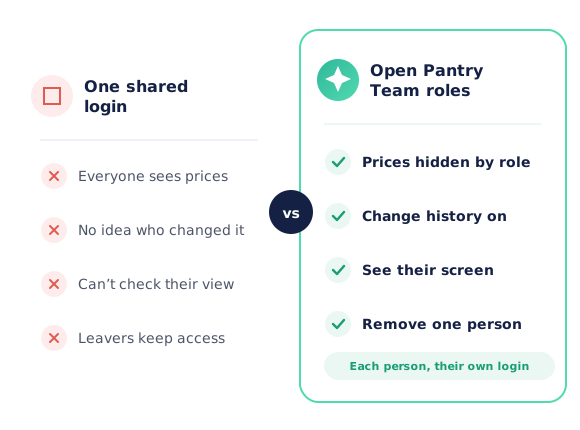
Pickers and drivers can see every customer’s prices and your margins

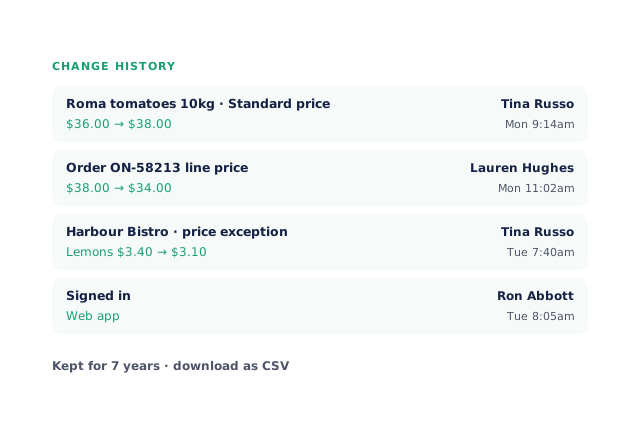
A price changed overnight and nobody can say who changed it

A new starter rings to say “it doesn’t look like that on mine” and you can’t see what they see

Everyone lands on the same screen and hunts for the one thing they do every day
How Team Roles Work
Invite each person
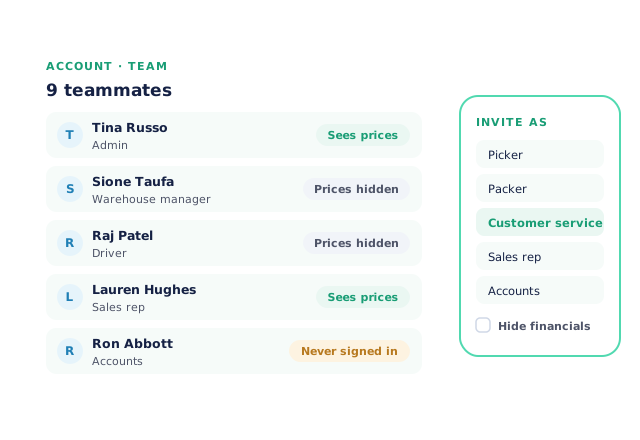
From Account › Team, invite a teammate and choose their role. Floor roles start with financials hidden.
Fine-tune if you need to
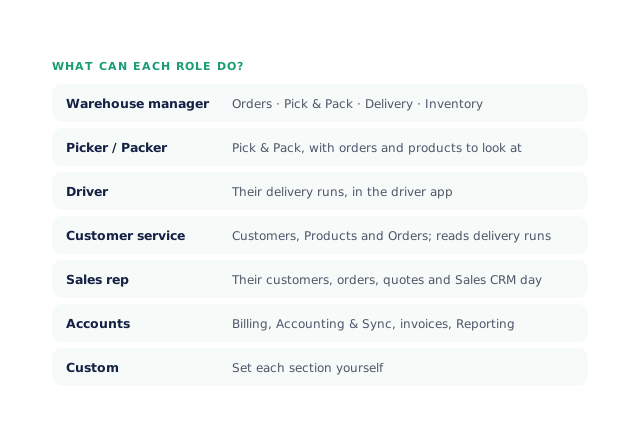
What can each role do? lists every role in plain words. Edit permissions changes one person, or use Custom.
They open on their own dashboard
Warehouse, customer service, accounts and reps each get a home screen and phone menu built for their day.
See and track what happens
See their screen to help someone, and open History on a product, customer or order to see who changed what.
Free trial · Cancel anytime
Roles written in plain words
Warehouse managers run orders, Pick & Pack, delivery and inventory. Pickers and packers get Pick & Pack. Drivers get only their runs, in the driver app. Customer service handles customers, products and orders, with a view-only version for people who just need to look. Sales reps work their own customers, orders and quotes, and Accounts get billing, accounting sync, invoices and reporting. Admins can do everything, and Custom lets you set each section yourself. New invites start on the narrowest everyday role, so nobody gets wide access by accident.
- Ready-made roles plus Custom
- Edit one person’s permissions any time
A dashboard for each job
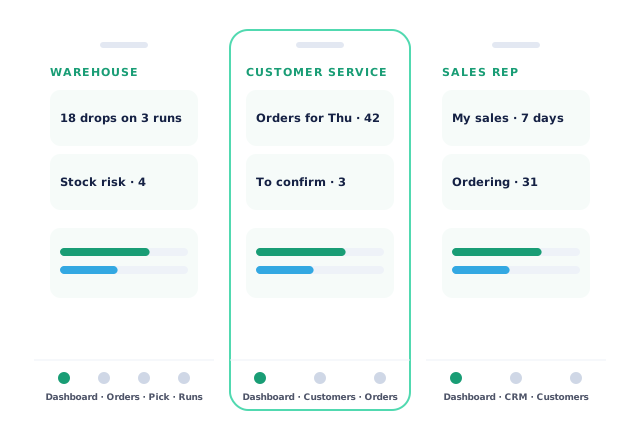
Warehouse managers open on today’s drops by run and the stock at risk. Customer service opens on a search box and today at a glance: orders for the next delivery day, orders to confirm, deliveries done and their credits waiting. Accounts open on Who owes us, and reps on their own sales for the last 7 and 28 days. On a phone, each role has its own bottom menu with the four or five places it uses most. Floor roles start with prices and financials hidden, and the team list shows who sees prices and who has never signed in.
- Home screen and phone menu per role
- Prices hidden from floor staff by default
See their screen
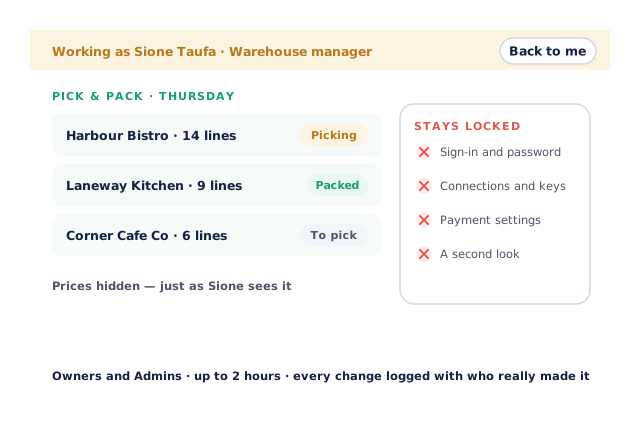
When a teammate is stuck, the owner or an admin can open Open Pantry as them — from the Team list, a picker’s column in Pick & Pack, or a driver’s run — and see exactly what they see, with their permissions. A bar across the top says who you’re working as, and Back to me returns you. Sign-in, password, connection and payment settings stay locked, it lasts up to two hours, and every change made is logged with who really made it.
- See a picker’s or driver’s screen as they do
- Locked settings and a full log
Change history on every paid plan
Open History on a product, customer, purchase order or teammate to see who changed what, when, and what it changed from and to — including price lists, customer prices and the price on an order line. Sign-ins are recorded too. Owners and admins can download the history as a CSV, and it’s kept for seven years. It’s on for every paid plan, with nothing to switch on.
- Who, when, from and to
- Order-line prices and sign-ins recorded
- More product lines purchased
- 24%
- Your always-on branded store and app put your full range in front of customers, so baskets grow.
- Less order-processing cost
- 95%
- AI order capture and auto-invoicing remove the manual keying between order and books.
- Fewer picking errors
- 80%
- Tablet pick & pack with FEFO lot and expiry tracking catches shorts and wrong items before they ship.
Real gains suppliers report after moving ordering, fulfilment and invoicing onto Open Pantry.
One Account, the Whole Team
Trusted by M&J Chickens
- $175m+
- Annual turnover
M&J Chickens use Open Pantry to move ordering out of calls and messages and into one digital workflow — giving customers a smooth ordering experience and giving the team fewer errors and less admin.
“Moving to a digital process has transformed our ordering process which is now faster through our own mobile apps.”

Why not share one login?
A shared login shows everyone everything, including prices and margins, and leaves no record of who did what. When someone leaves, everyone has to learn a new password. With a login per person, each role sees what its job needs, every change is recorded against a name, and removing one person removes only them.
Open Pantry for food suppliers in New Zealand
New Zealand food and beverage wholesalers use Open Pantry to take orders from restaurants, cafés and venues online, with every order flowing to picking, invoicing and accounting.
- Plans priced in
- NZD — see NZ pricing
- Accounting sync
- Xero, MYOB, QuickBooks Online and Sage
- Supplier directory
- 2,000+ New Zealand wholesale food & beverage suppliers
Can New Zealand food suppliers use Open Pantry?
Yes. Wholesalers and distributors in New Zealand use Open Pantry to take orders from restaurants, cafés and venues through their own branded ordering app and online store. Plans are priced in NZD, and orders and invoices sync with Xero, MYOB, QuickBooks Online and Sage.
Is there a free plan for suppliers in New Zealand?
Yes. The free plan lets you list products and receive unlimited orders. Paid plans add accounting, inventory and delivery tools, come with a free trial and are priced in NZD.
Questions Suppliers Ask About Team Roles and Permissions
What roles can I give my team in Open Pantry?+
Can I hide prices from warehouse staff and drivers?+
Does each role get its own dashboard?+
Can I see what a teammate sees?+
Can I make changes while seeing a teammate’s screen?+
Can I see who changed a price?+
Which plans include change history?+
Can a sales rep see only their own customers?+
Can I see if a teammate has never logged in?+
Works Even Better With
Give Every Person on Your Team the Right Screen.
Join 600+ Australian suppliers running their ordering, fulfilment and invoicing on Open Pantry.
Setup done for you · Cancel anytime · Your data stays yours