
Voice Ordering: Your Customers Say It, You Get a Real Order
Voice ordering lets a chef order from you by speaking. They hold the mic in your Open Pantry shop and say the order the way they would on the phone. Open Pantry matches each item to your products at their prices, asks about anything it isn’t sure of, and puts the confirmed lines in their normal cart. You receive an ordinary order marked By voice, with nothing to retype.
- Hold to talk on a phone or computer, with an “Is this right?” check before anything is added
- Unsure items ask “Which one did you mean?” or “How many?”; items you don’t sell become a note
- One setting turns it on; orders arrive through the normal cart, checks and checkout
★★★★★ Trusted by 600+ suppliers
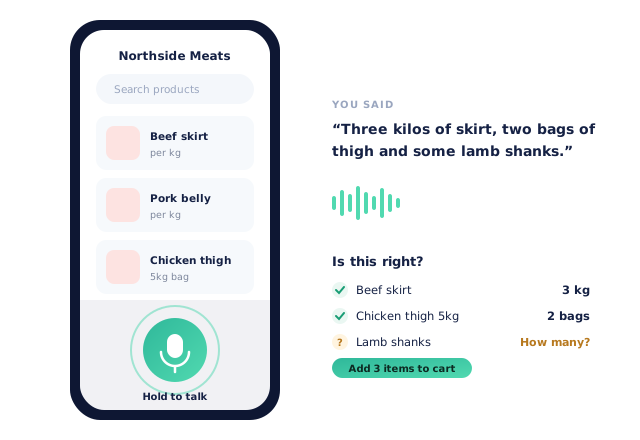



Chefs Order Out Loud. Someone Has to Type It

Orders arrive as late-night voicemails and rushed phone calls from a noisy kitchen

Your team listens back and retypes every line, guessing at what was said

Busy chefs put off ordering because scrolling a catalogue with wet hands is slow

“Some lamb” turns into the wrong cut, a credit and an unhappy customer
How Voice Ordering Works
Switch it on for your customers
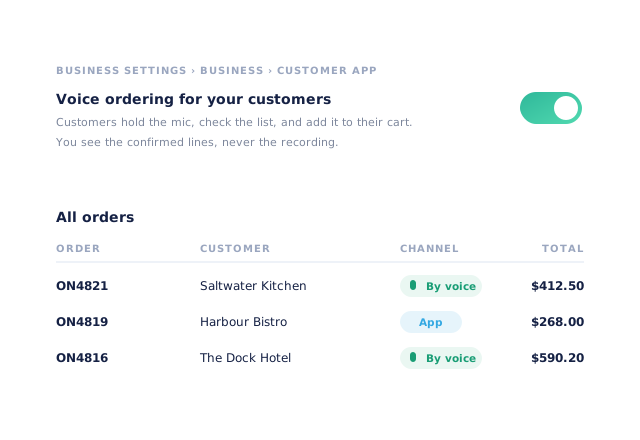
Business settings › Business › Customer app › Voice ordering for your customers. A green mic appears in their shop.
The chef holds the mic and talks
“Three kilos of skirt, two bags of thigh and some lamb shanks.” On a computer they can also click to start and click to stop.
They check each line
Every line shows what they said and the product it matched. Unsure lines ask which product or how many before they can be added.
It becomes a normal order
Confirmed lines go into their cart and through the usual checkout. You see the order tagged By voice.
Free trial · Cancel anytime
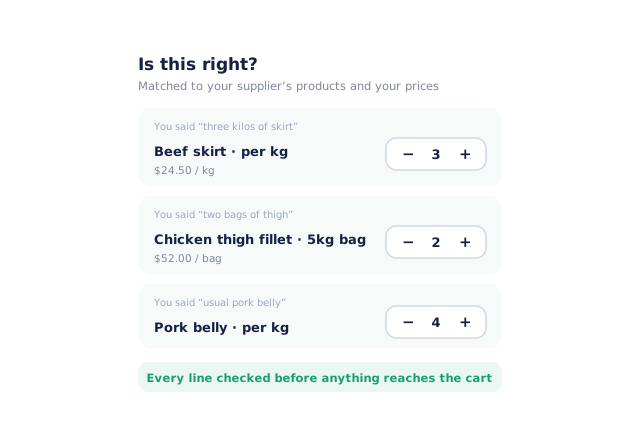
Every line checked before it reaches the cart
The “Is this right?” sheet shows each line with the words that produced it and the product it matched from your range, at the customer’s own prices. Matched lines have a quantity stepper, so a quick tap fixes anything before it is added.
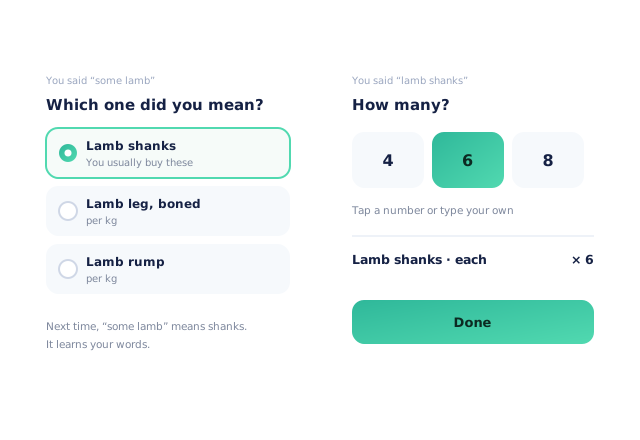
It asks instead of guessing
When a word could mean more than one product, the sheet asks “Which one did you mean?”. When the amount isn’t clear, it asks “How many?”. Once a customer has picked, it learns their words for next time.
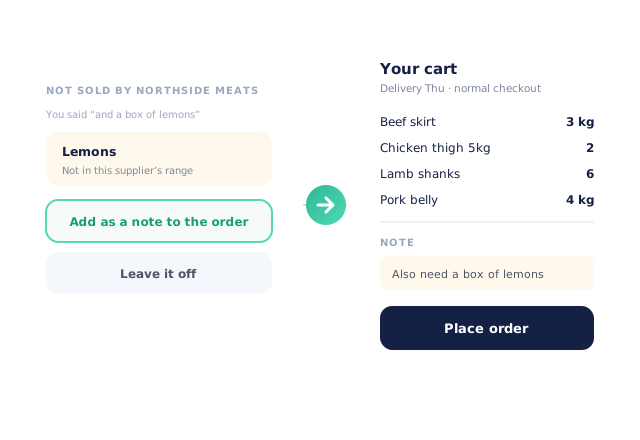
Things you don’t sell become a note
If the chef mentions something outside your range, they can add it as a note on the order or leave it off. “Add items to cart” puts the confirmed lines in their normal cart, with the note attached, and opens it for checkout.
- Same cart, minimums and cut-offs as any order
- Quantities add to what is already in the cart
One switch, and orders you can trust
Turn voice ordering on in your Customer app settings. Voice orders show By voice in the Channel column of All Orders, so you can see how customers are ordering. You see the confirmed lines and any note, never the recording or the words.
- More product lines purchased
- 24%
- Making ordering easier in your own shop keeps customers ordering more of your range.
- Less order-processing cost
- 95%
- Spoken orders arrive as finished digital orders instead of voicemails to retype.
- Fewer picking errors
- 80%
- Lines the chef has checked flow straight into digital pick and pack.
Real gains suppliers report after moving ordering, fulfilment and invoicing onto Open Pantry.
Voice Orders Flow Everywhere Automatically

Trusted by M&J Chickens
- $175m+
- Annual turnover
M&J Chickens use Open Pantry to move ordering out of calls and messages and into one digital workflow — giving customers a smooth ordering experience and giving the team fewer errors and less admin.
“Moving to a digital process has transformed our ordering process which is now faster through our own mobile apps.”

Why not just take phone orders?
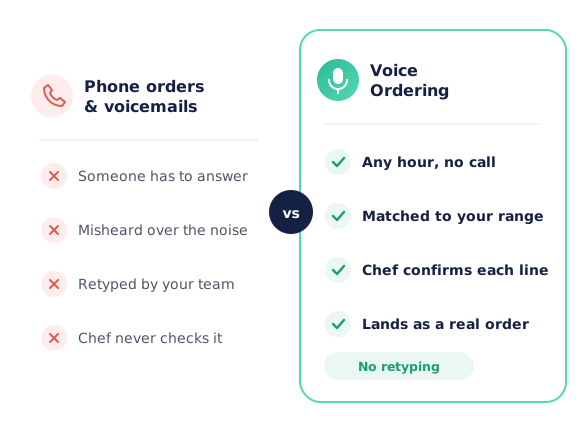
A phone order needs someone free to answer, gets misheard over a busy kitchen, and still has to be typed in afterwards. The chef never sees what was written down until the delivery arrives. With voice ordering the chef talks when it suits them, checks every matched line on their own screen, and you receive an order that is already in the system.
Open Pantry for food suppliers in Singapore
Singapore food and beverage wholesalers use Open Pantry to take orders from restaurants, cafés and venues online, with every order flowing to picking, invoicing and accounting.
- Plans priced in
- SGD — see Singapore pricing
- Accounting sync
- Xero and QuickBooks Online
- Supplier directory
- 150+ Singapore wholesale food & beverage suppliers
Can Singapore food suppliers use Open Pantry?
Yes. Wholesalers and distributors in Singapore use Open Pantry to take orders from restaurants, cafés and venues through their own branded ordering app and online store. Plans are priced in SGD, and orders and invoices sync with Xero and QuickBooks Online.
Is there a free plan for suppliers in Singapore?
Yes. The free plan lets you list products and receive unlimited orders. Paid plans add accounting, inventory and delivery tools, come with a free trial and are priced in SGD.
Questions Suppliers Ask About Voice Ordering
What is Open Pantry voice ordering?+
Which plans include it?+
How do I turn it on?+
Which of my customers will see the mic?+
What if it mishears something?+
Can I hear or read what my customer said?+
What happens to items I don’t sell?+
Do voice orders skip my minimums or cut-offs?+
Does it get better over time?+
Is there a limit on how much customers can use it?+
Works Even Better With
Branded Ordering App
Your own wholesale ordering app and online store, carrying your brand and your catalogue.
Explore →AI Order Capture
Email, SMS, WhatsApp, photo and voicemail orders turned into digital orders automatically.
Explore →Digital Pick & Pack
Voice orders land in tablet picking like every other order, with shorts and subs handled.
Explore →Let Your Customers Order Out Loud
Join 600+ Australian suppliers running their ordering, fulfilment and invoicing on Open Pantry.
Setup done for you · Cancel anytime · Your data stays yours