
Warehouse Barcode Scanning: Every Carton Scanned, Nothing Retyped
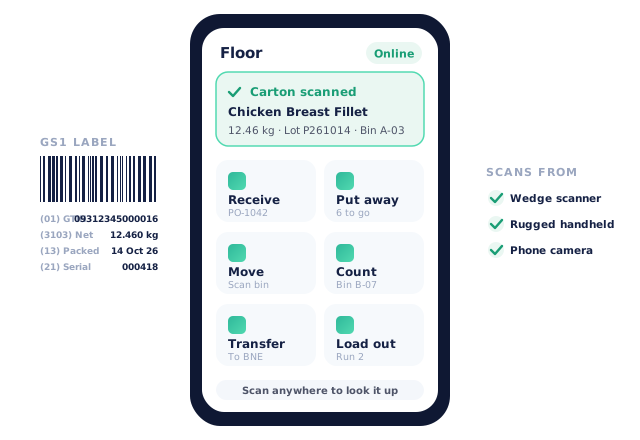
Open Pantry’s warehouse scanning reads the GS1 labels already on your cartons, carcasses, pallets and bins, and uses them to receive, put away, move, count, pick and load out stock. The handheld Floor app runs on a phone, a ring or wedge scanner, or a rugged handheld, so weights, batches, dates and serials go in from the label instead of from someone’s handwriting.
- One scanner layer reads carton, carcass, SSCC pallet and bin labels — bad labels are blocked, not guessed
- The Floor app covers receiving, put away, moves, bin counts, transfers and load out
- Scan-only mode with supervisor approval, and every scan logged against the person who made it
★★★★★ Trusted by 600+ suppliers



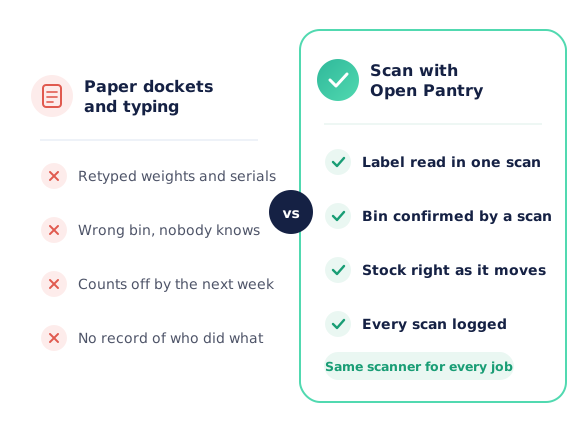
Paper Dockets Are Where Stock Goes Missing

Weights, batches and use-by dates copied off cartons by hand, then typed in again at the office

Stock put “somewhere in the chiller” — and found again only when a picker goes looking

Counts that disagree with the system by Friday, with no record of who moved what

The wrong carton on the wrong truck, discovered by the customer at the back door
How Warehouse Scanning Works
Switch on the warehouse features you need
In Inventory → Settings, turn on scanning, bins, cartons and pallets, or scan-only — each one separately. Test your scanner on the printable test sheet.
Scan labels as stock arrives
Floor → Receive: pick the purchase order and scan each carton. Weight, batch, pack date and serial come straight off the GS1 label.
Scan every move after that
Put away to a bin, move stock, count a bin, send a transfer or load a truck — each step is one scan of the item and one scan of where it went.
Review what didn’t land
Scan activity shows codes nobody has taught yet, mis-picks caught before dispatch and overrides by person, ready to fix in one click.
Free trial · Cancel anytime
One scanner for every label in the building
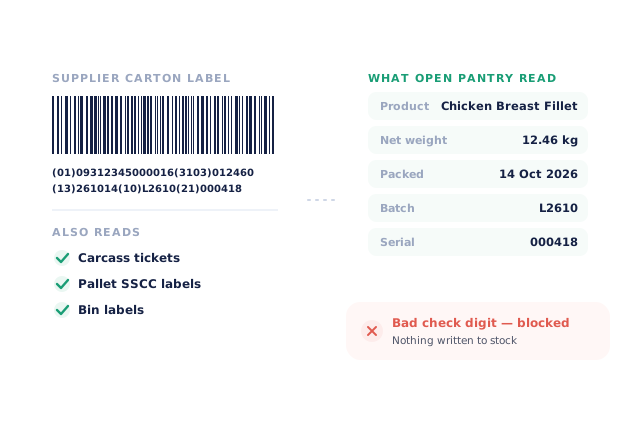
A single GS1 scan engine reads supplier carton labels, carcass tickets, SSCC pallet labels and your own bin labels — the same engine on the picker, the Floor app and the office screens. Bad check digits, impossible dates, a missing separator or a missing weight are blocked before anything is written to stock.
- Reads GTIN, net weight, pack and use-by dates, batch and serial
- Unknown barcodes go to a teach sheet, not a dead end
The Floor app: receive, put away, count, load out
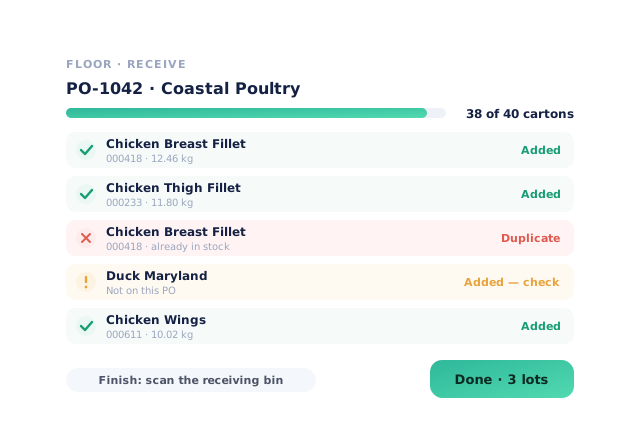
A full-screen handheld app for the floor. Receive against a purchase order by scanning cartons — duplicates and serials already in stock show red, products not on the order show amber. Then put away to a scanned bin, move stock, count a bin, send or receive a transfer, build a pallet or load a delivery run.
- Drafts are kept on the device if the connection drops
- Load out refuses a pallet that belongs on another truck
Scan-only mode, with a supervisor when a label fails
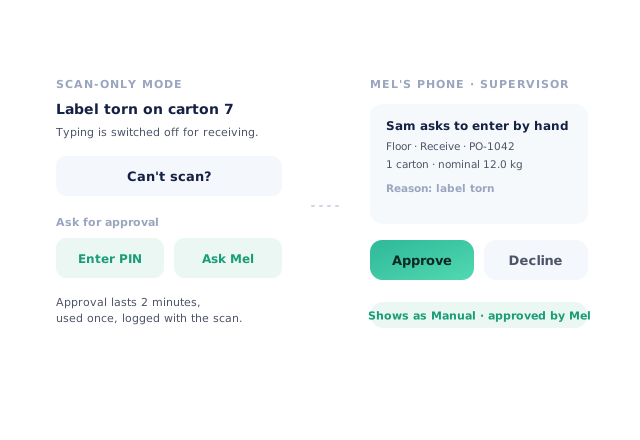
Turn on scan-only for receiving, put away, picking, transfers, counts or load out and the typing boxes disappear. When a label is torn, “Can’t scan?” asks a supervisor — a PIN on the same device, or a request to their own phone. Approvals last two minutes, work once, and are logged with the scan.
Scan activity shows what the floor is missing
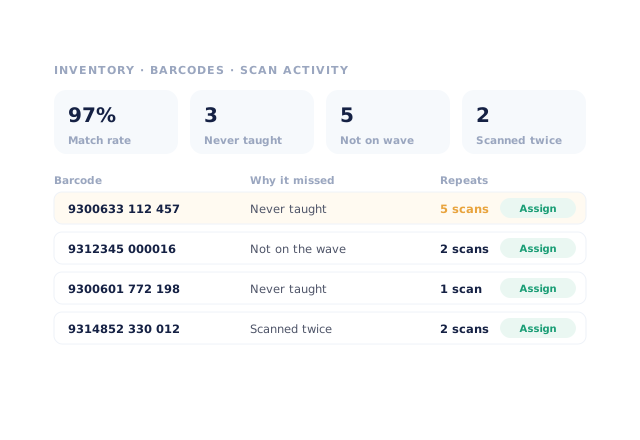
Every scan is logged. The Scan activity view groups the ones that didn’t land by barcode — never taught, not on the wave, scanned twice — with the repeat count, so a shelf the catalogue has never covered stands out. Assign the code to a product once and the next scan works.
- Match rate and camera-versus-scanner share at a glance
- Overrides by person, with CSV export
- More product lines purchased
- 24%
- Your always-on branded store and app put your full range in front of customers, so baskets grow.
- Less order-processing cost
- 95%
- AI order capture and auto-invoicing remove the manual keying between order and books.
- Fewer picking errors
- 80%
- Tablet pick & pack with FEFO lot and expiry tracking catches shorts and wrong items before they ship.
Real gains suppliers report after moving ordering, fulfilment and invoicing onto Open Pantry.
Scans Flow Straight Into Stock, Picking and Invoices
Trusted by M&J Chickens
- $175m+
- Annual turnover
M&J Chickens use Open Pantry to move ordering out of calls and messages and into one digital workflow — giving customers a smooth ordering experience and giving the team fewer errors and less admin.
“Moving to a digital process has transformed our ordering process which is now faster through our own mobile apps.”

Why not keep the clipboard?
A clipboard costs nothing until a weight is copied wrong, a carton is put in the wrong bin, or a count drifts and nobody can say why. Industry studies put manual data entry at 100–400 errors per 10,000 entries versus 1–4 for scanned capture. Scanning the label that is already on the carton takes a second and leaves a record of who did it.
Open Pantry for food suppliers in Singapore
Singapore food and beverage wholesalers use Open Pantry to take orders from restaurants, cafés and venues online, with every order flowing to picking, invoicing and accounting.
- Plans priced in
- SGD — see Singapore pricing
- Accounting sync
- Xero and QuickBooks Online
- Supplier directory
- 150+ Singapore wholesale food & beverage suppliers
Can Singapore food suppliers use Open Pantry?
Yes. Wholesalers and distributors in Singapore use Open Pantry to take orders from restaurants, cafés and venues through their own branded ordering app and online store. Plans are priced in SGD, and orders and invoices sync with Xero and QuickBooks Online.
Is there a free plan for suppliers in Singapore?
Yes. The free plan lets you list products and receive unlimited orders. Paid plans add accounting, inventory and delivery tools, come with a free trial and are priced in SGD.
Questions Suppliers Ask About Warehouse Scanning
What can I scan with Open Pantry?+
Do I need special scanning hardware?+
What jobs does the Floor app cover?+
What happens when a label won’t scan?+
Does scanning work during picking too?+
What if the warehouse loses Wi-Fi?+
Can I see who scanned what?+
Do I have to use bins and pallets to use scanning?+
Can other systems send scanned cartons into Open Pantry?+
Which plan includes warehouse scanning?+
Works Even Better With
Multi-Site & Bin Inventory
Stock by site and by bin, cartons and pallets as units, transfers between sites.
Explore →Digital Pick & Pack
Tablet picking with scan-to-pick, walk order by bin and pack checks.
Explore →Catch Weight, Scales & Labels
Weights from a connected scale or the supplier label, and carton labels printed on capture.
Explore →Put the Clipboard Down. Start Scanning This Week.
Join 600+ Australian suppliers running their ordering, fulfilment and invoicing on Open Pantry.
Setup done for you · Cancel anytime · Your data stays yours