
Customer Rebates: Reward Your Best Accounts Without the Spreadsheet
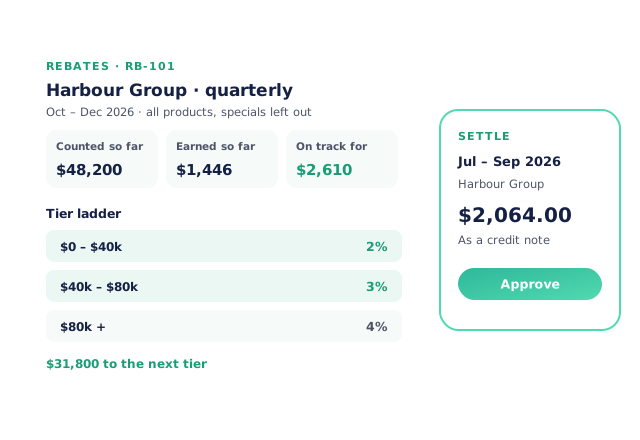
Open Pantry lets a wholesaler set up rebate agreements with a customer, a customer group or a head office — tiered, a flat percentage, or an amount per kilo or per item — and counts them from the orders already in the system. Each agreement shows what’s counted so far, what’s been earned and the distance to the next tier. When a period closes, you approve the payout and it becomes a credit note that goes to your accounting system.
- Tiered, flat-percentage, per-kilo or per-item agreements
- Live progress, with every left-out dollar explained
- Approved payouts as credit notes, synced to your books
★★★★★ Trusted by 600+ suppliers



Why Rebates Turn Into Arguments

Sales are exported into a rebate spreadsheet every quarter and checked by hand

Specials and promotions get counted towards a rebate they were never meant to earn

The customer asks how close they are to the next tier and nobody can say

The payout is keyed into the accounts as a credit, often weeks late
How Rebates Work in Open Pantry
Turn on Rebates
Switch it on in More tools and answer two questions: how money goes back, and what counts.
Set up an agreement
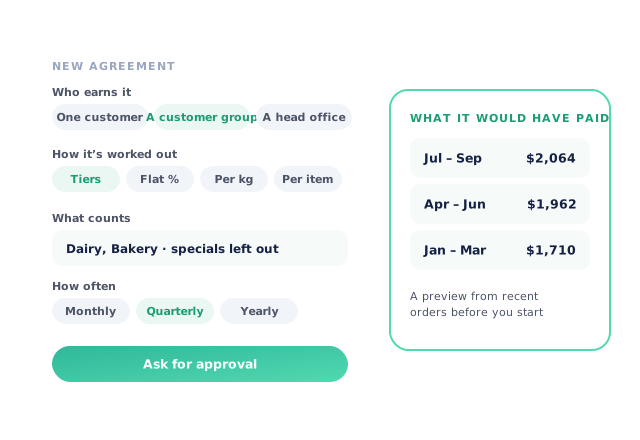
Choose who earns it, how it’s worked out, which products count and how often it pays. Preview what it would have paid.
Watch the progress
Every order counts as it’s placed. See what’s earned, what it’s on track for and how far the next tier is.
Approve the payout
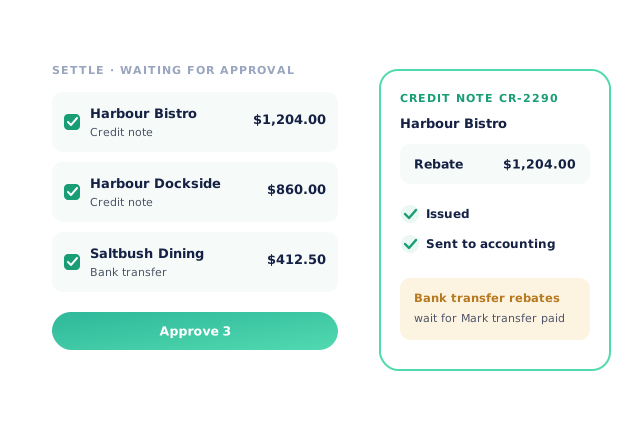
Closed periods wait in Settle. Approving creates a credit note per customer and sends it to accounting.
Free trial · Cancel anytime
Agreements that match the deal you made
A rebate can be for one customer, a customer group where each member earns on its own spend, or a head office (Enterprise). Work it out with tiers — on the whole amount or only above a threshold — a flat percentage, or an amount per kilo or per item. Count all products or just chosen categories, with specials and promotions left out by default, and pay monthly, quarterly or yearly from 1 July. Before you start, a preview shows what the terms would have paid on recent orders, and an agreement can start up to two years back when you’re moving a deal across from a spreadsheet.
- Customer, group or head office
- Tiers, flat %, per kilo or per item
Every dollar explained
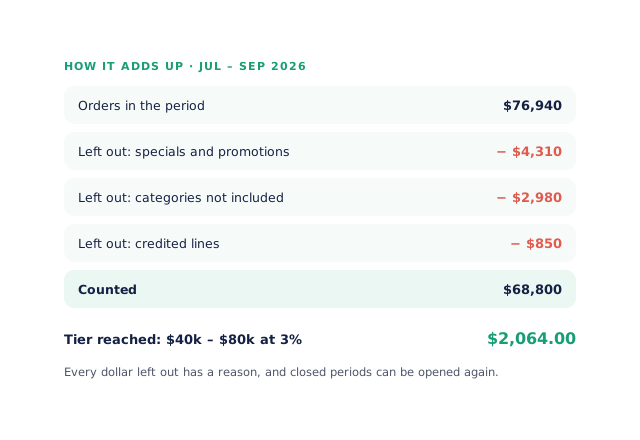
Progress shows what’s been counted so far, what’s been earned, what the period is on track for and how far the customer is from the next tier. How it adds up lists the orders in the period and gives every dollar that was left out a reason, so when a customer asks why their rebate is what it is, the answer is on the screen. Pick any past period to see the same figures the payout used.
- Counted, earned and on track for
- A reason for every exclusion
Payouts as credit notes
When a period closes, it waits in Settle for approval. Approving creates one ordinary credit note per customer, issues it and sends it to your accounting system once, so it’s reconciled like any other credit. Rebates paid by bank transfer wait for you to press Mark transfer paid. A period can only be paid once.
- Nothing is paid without approval
- One credit note per customer per period
Know what each deal costs you
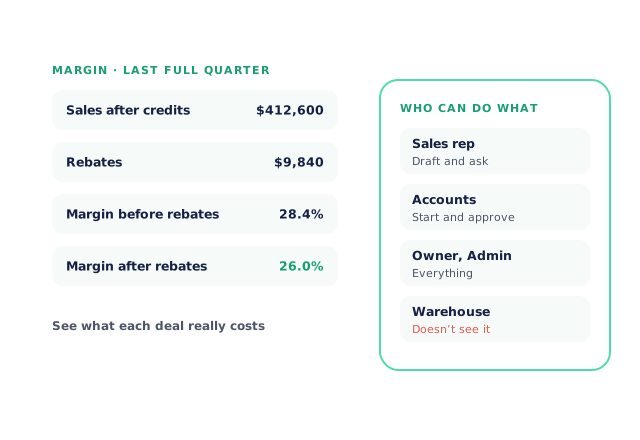
The Margin tab shows the last complete quarter’s sales after credits, the rebates paid, and your margin before and after rebates. Reps can draft an agreement and ask for approval; the owner, admins and your accounts team start, end and approve them. Warehouse and other floor roles, and anyone with financials hidden, don’t see Rebates at all.
- Margin before and after rebates
- Reps draft, accounts approve
- More product lines purchased
- 24%
- Your always-on branded store and app put your full range in front of customers, so baskets grow.
- Less order-processing cost
- 95%
- AI order capture and auto-invoicing remove the manual keying between order and books.
- Fewer picking errors
- 80%
- Tablet pick & pack with FEFO lot and expiry tracking catches shorts and wrong items before they ship.
Real gains suppliers report after moving ordering, fulfilment and invoicing onto Open Pantry.
Rebates Paid Through Your Books
Trusted by M&J Chickens
- $175m+
- Annual turnover
M&J Chickens use Open Pantry to move ordering out of calls and messages and into one digital workflow — giving customers a smooth ordering experience and giving the team fewer errors and less admin.
“Moving to a digital process has transformed our ordering process which is now faster through our own mobile apps.”

Why not keep running rebates in a spreadsheet?
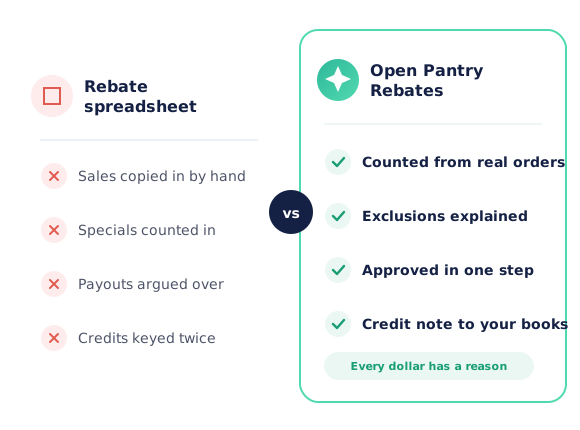
A rebate spreadsheet only knows the sales someone exported into it, and the rules for what counts live in one person’s head. In Open Pantry the agreement is counted from the orders themselves, specials and excluded categories are left out with a reason, and the approved payout becomes a credit note in the same books as the invoices it rewards.
Open Pantry for food suppliers in the United States
US food and beverage wholesalers use Open Pantry to take orders from restaurants, cafés and venues online, with every order flowing to picking, invoicing and accounting.
- Plans priced in
- USD — see US pricing
- Accounting sync
- QuickBooks Online and Xero
- Supplier directory
- 2,100+ US wholesale food & beverage suppliers
Can US food suppliers use Open Pantry?
Yes. Wholesalers and distributors in the United States use Open Pantry to take orders from restaurants, cafés and venues through their own branded ordering app and online store. Plans are priced in USD, and orders and invoices sync with QuickBooks Online and Xero.
Is there a free plan for suppliers in the United States?
Yes. The free plan lets you list products and receive unlimited orders. Paid plans add accounting, inventory and delivery tools, come with a free trial and are priced in USD.
Questions Suppliers Ask About Customer Rebates
What kinds of rebate agreements can I set up?+
Can a rebate cover a group of venues?+
Are specials and promotions counted towards a rebate?+
Can my customer see how close they are to the next tier?+
How is a rebate paid out?+
Is anything paid automatically?+
Can I move an existing rebate deal across from a spreadsheet?+
What happens if I change an agreement part-way through?+
Who on my team can create and approve rebates?+
Which plan includes rebates?+
Works Even Better With
Reward Your Best Customers, Without the Quarter-End Scramble.
Join 600+ Australian suppliers running their ordering, fulfilment and invoicing on Open Pantry.
Setup done for you · Cancel anytime · Your data stays yours