
Catalogue Imports: A Whole Product List in an Afternoon
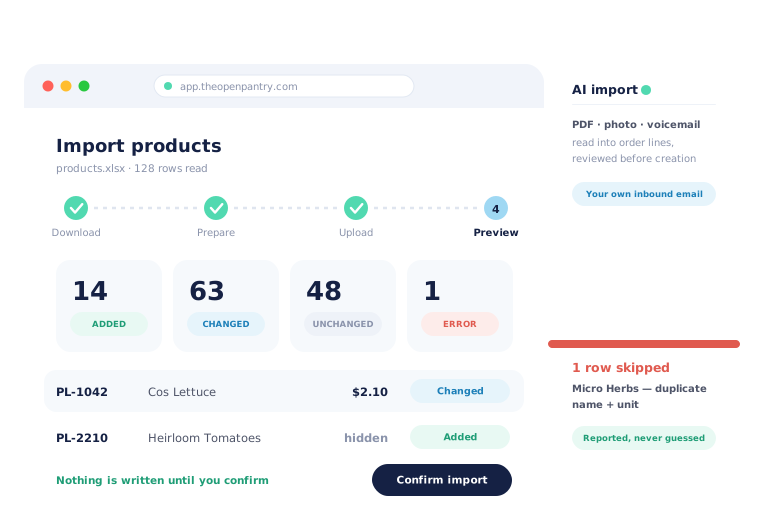
Open Pantry loads your catalogue from a spreadsheet rather than making someone type it. Download your current product list, edit it in Excel, upload it back, and you get a preview first — how many products will be added, how many changed, how many left alone, how many archived, and every row that has a problem, listed with the reason. Nothing is written until you confirm.
- Download, edit, upload — one fixed template, so there is nothing to map
- A preview of added, changed, unchanged, archived and error rows before anything saves
- Re-upload the same sheet later to reprice the whole catalogue at once
★★★★★ Trusted by 600+ suppliers



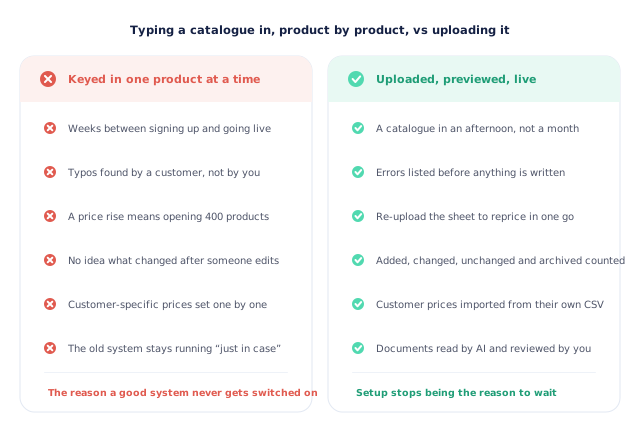
The catalogue is the reason the new system never gets switched on.

Four hundred products typed in by hand, one screen at a time

A price rise means opening every product individually

Typos found by a customer rather than by you

The old system stays running for months, just in case
Four Steps, and It Is Your Catalogue
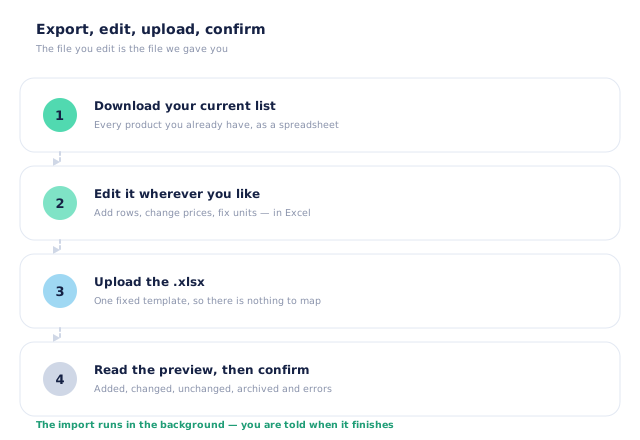
Download your current list
Start from what you already have in Open Pantry rather than a blank template. On day one that download is the template; after that it is your live catalogue.
Edit it in Excel
Add rows, change prices, fix units, set categories and storage areas. It is a normal spreadsheet, so whoever knows the products can do it without learning any software.
Upload it back
One fixed template means there is no column-mapping step to get wrong. Upload the file and Open Pantry reads every row against your existing products.
Read the preview, then confirm
You see exactly what will happen — added, changed, unchanged, archived, and every problem row with its reason — before anything is written. Confirm and the import runs in the background.
Free trial · Cancel anytime
The file you edit is the file we gave you
Most import tools start with a blank template and a mapping screen, which is where catalogue migrations go to die. Open Pantry starts by exporting what you already have. On day one that is the template; from then on it is your live catalogue, so an update is always “download, change the cells that changed, upload”. There is no column mapping because there is nothing to map — the columns are the ones you were given.
- Export your current catalogue as the starting point
- A fixed template, so there is no mapping step to get wrong
- Edited in Excel by whoever knows the products
- The import runs in the background and tells you when it is done
Matched on the code, never merged on a guess
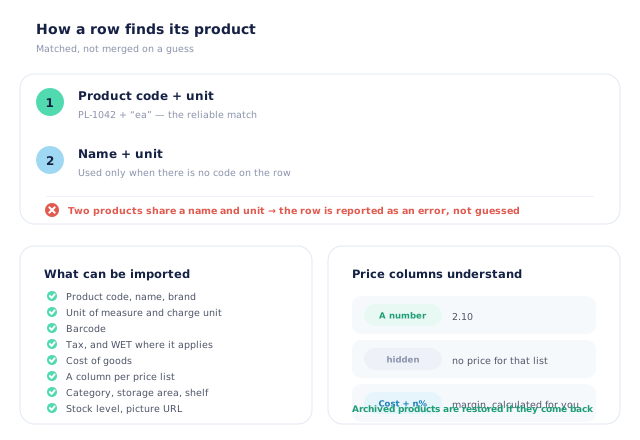
The dangerous part of a catalogue import is not creating products — it is quietly overwriting the wrong one. Open Pantry matches a row to an existing product on your product code plus its unit, and only falls back to name plus unit when the row carries no code. If two of your products share a name and a unit, the row is reported as an error rather than being applied to whichever one came first. Products you had archived come back if they reappear in the sheet, so a returning seasonal line keeps its history.
- Product code plus unit is the primary match
- Name plus unit only where there is no code
- Ambiguous rows reported as errors, never guessed at
- Archived products restored rather than duplicated
Prices, price lists and per-customer prices all come in the same way
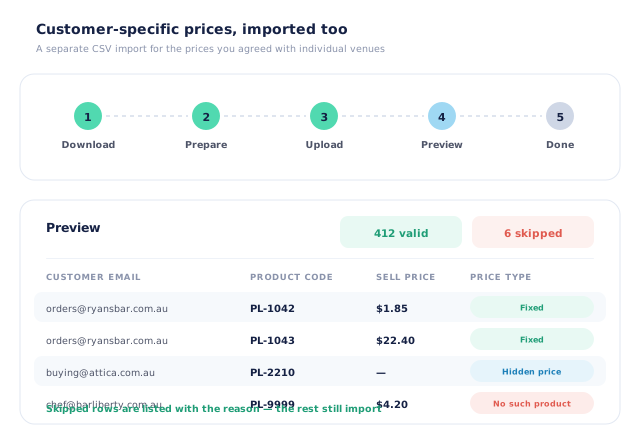
The spreadsheet carries a column for every price list you run, so one upload can reprice your whole catalogue across every tier at once. Each cell takes a number, the word hidden if that list should not see a price, or a margin written as cost plus a percentage, which Open Pantry calculates for you. Customer-specific prices — the ones you agreed with individual venues — have their own separate CSV import, with its own preview that lists every row it had to skip and why.
- One column per price list, so all tiers reprice together
- A cell can be a price, “hidden”, or cost plus a percentage
- Cost of goods imported alongside sell prices
- Per-customer prices imported from their own CSV, with a preview
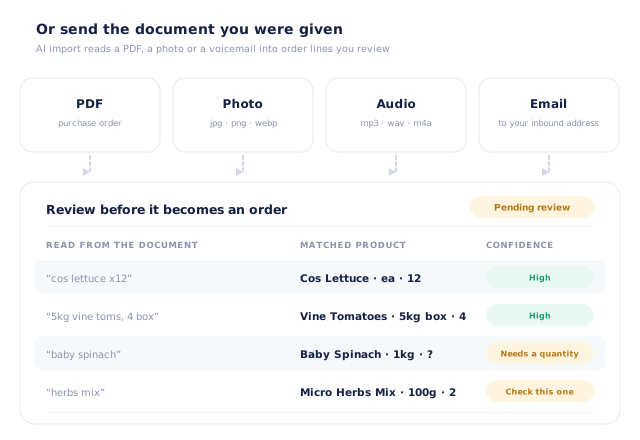
Or send the document you were given, and let AI read it
Not everything arrives as a spreadsheet. AI import takes a PDF purchase order, a photo of a handwritten sheet, a voice message or an email and turns it into order lines you review before anything is created — the raw text it read on one side, the product it matched on the other, and a flag on anything it is unsure about. Every supplier gets their own inbound email address, so a customer emailing an order attachment is enough to start it. Lines are reviewed by default; you can also set a confidence threshold above which clean documents process themselves.
- PDFs, photos, audio messages and emails, read into structured lines
- Your own inbound email address, so an emailed order just works
- Reviewed by default, with optional auto-processing above a threshold you set
- Metered per document and drawn from a prepaid balance — see pricing
- More product lines purchased
- 24%
- Your always-on branded store and app put your full range in front of customers, so baskets grow.
- Less order-processing cost
- 95%
- AI order capture and auto-invoicing remove the manual keying between order and books.
- Fewer picking errors
- 80%
- Tablet pick & pack with FEFO lot and expiry tracking catches shorts and wrong items before they ship.
Real gains suppliers report after moving ordering, fulfilment and invoicing onto Open Pantry.
The Catalogue Your Ledger Will Recognise
Trusted by M&J Chickens
- $175m+
- Annual turnover
M&J Chickens use Open Pantry to move ordering out of calls and messages and into one digital workflow — giving customers a smooth ordering experience and giving the team fewer errors and less admin.
“With Open Pantry, we launched our own fully branded ordering app — it’s helped us protect our customer base, move to digital ordering, and deliver a much better experience to our venues.”

An import with no preview is just a fast way to break your catalogue.
Plenty of systems will accept a spreadsheet. The question is what happens next. Without a preview you find out what the file did by browsing your own catalogue afterwards, and by then a mistyped unit has been applied to two hundred products and a duplicate name has silently overwritten the wrong line. Showing you the counts and the error rows before anything is written turns an import from a leap into a decision — and it is why a supplier will happily re-upload the sheet every time prices move, rather than doing it once and never again.
Questions Suppliers Ask About Catalogue Imports
What file format does the product import take?+
Do I have to map my columns to your fields?+
Does an import create new products or update existing ones?+
How does it know which product a row belongs to?+
What can I import?+
Can I update all my prices at once?+
Can I schedule a price change for a future date?+
Can I import the special prices I have agreed with individual customers?+
What is AI import, and how is it different?+
What does AI import cost?+
Is my catalogue import something I have to do myself?+
Your Catalogue, Loaded and Live.
Join 600+ Australian suppliers running their ordering, fulfilment and invoicing on Open Pantry.
Setup done for you · Cancel anytime · Your data stays yours