
Catalogue Management: One Product Record the Whole Business Reads
In Open Pantry a product is not a line on a price list — it is the record your customers order from, your pickers walk to, your invoices are raised from and your margin is measured against. Its unit and pack sizes, category, image, tax treatment, storage area, cost of goods and every price list it appears on all live together, so those four jobs can never disagree.
- Unit of measure, charge unit and a pack ladder priced off the base unit
- Category for your customers, storage area and shelf for your pickers
- Tax treatment, cost of goods and every price list on the same record
★★★★★ Trusted by 600+ suppliers
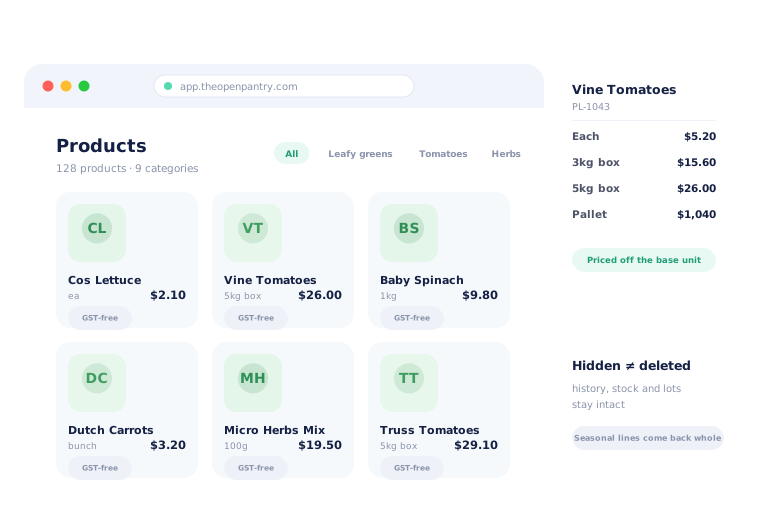



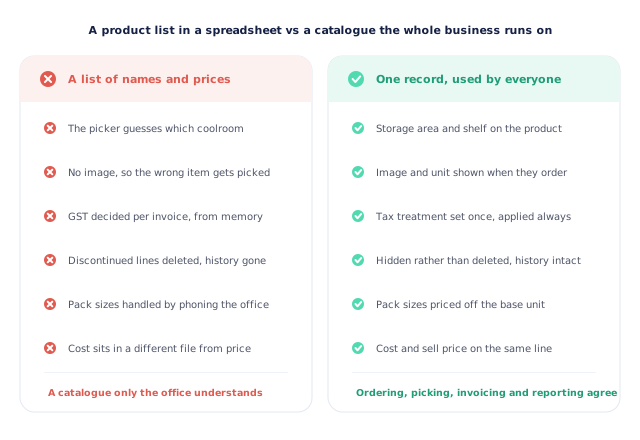
A catalogue that is really just a list of names and prices.

The picker guesses which coolroom a line lives in

No image, so the wrong item goes in the box

GST decided invoice by invoice, from memory

Discontinued lines deleted, and their history with them
Set the Record Up Once
Describe the product properly
Code, name, brand, image, unit of measure and charge unit, barcode and tax treatment. This is what the customer sees when they order and what your invoice will carry.
Say how it is sold
Add the pack sizes you actually sell — each, tray, carton, pallet. They price off the base unit, so a carton can never accidentally cost less than the units inside it.
Say where it lives
A category so customers can find it, and a storage area and shelf so pickers can. The same record serves both audiences without either of them seeing the other’s field.
Price it, on every list it appears on
Cost of goods on the same line as the sell price, and a price for each list you run — set directly, calculated from a margin, or hidden.
Free trial · Cancel anytime
Everything about the product, on the product
Wholesale goes wrong at the seams between systems: the ordering catalogue says one thing, the pick slip another, the invoice a third. Open Pantry closes those seams by having one record. Its code and name are what the customer orders. Its unit and charge unit are what gets picked and billed. Its tax treatment decides GST on the invoice. Its cost of goods is what margin reporting measures against. Change it once and every one of those follows.
- Code, name, brand, image and barcode
- Unit of measure and charge unit — what is sold and what is billed
- Tax treatment, including WET where you sell alcohol
- Cost of goods sitting on the same line as the sell price
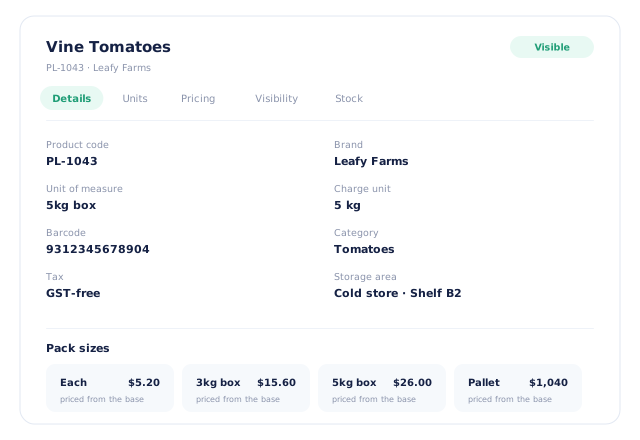
Pack sizes that stay in a sensible relationship
Most food products are sold more than one way, and the classic wholesale error is a carton priced below the units inside it because two people edited two screens on two different days. Open Pantry derives pack prices from the base unit, so the ladder holds automatically: change the base and every pack size moves with it. The customer still orders in the unit they think in — a box, a tray, an each — and the pick slip and invoice both use the same one.
- Sell the same product by each, tray, carton or pallet
- Pack prices derived from the base unit, so the ladder cannot invert
- The customer orders in their unit; picking and billing agree
- Charge unit recorded separately from the unit of sale
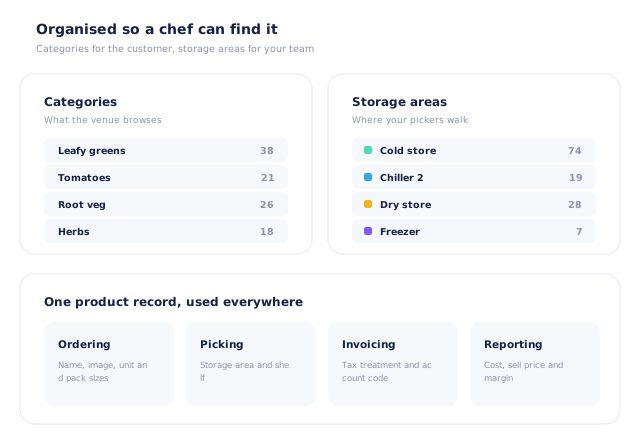
Organised twice — once for your customers, once for your team
A catalogue has two audiences with completely different needs. Your customers want categories that match how a kitchen buys: leafy greens, tomatoes, herbs. Your pickers want to know which coolroom and which shelf, so a run is walked once rather than three times. Open Pantry carries both on the same product, and each audience only ever sees their own. Storage areas are yours to name and colour — cold store, chiller 2, dry store — and they carry through to the pick slip and the stocktake.
- Categories drive how customers browse and how revenue is reported
- Storage area and shelf drive picking and stocktakes
- Areas named and colour-coded by you
- Neither audience sees the other’s organisation
Changing a catalogue without breaking its history
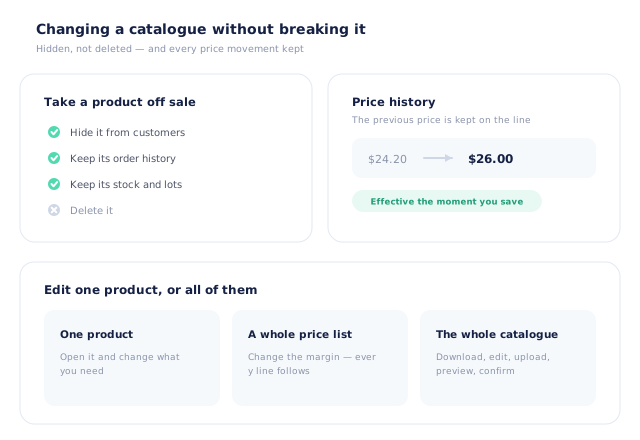
The two things that break a catalogue over time are deleting products and repricing them badly. Open Pantry hides products rather than destroying them, so a line taken off sale keeps its order history, its stock and its place on old invoices — and a seasonal product that comes back comes back whole. Prices take effect the moment you save them, the previous price is kept on the line, and you can make a change on one product, across a whole price list, or by re-uploading the catalogue as a spreadsheet with a preview first.
- Hidden rather than deleted — history, stock and invoices intact
- The previous price kept on the line when you change it
- Edit one product, a whole price list, or the whole catalogue at once
- A spreadsheet re-upload shows added, changed and error rows before it writes
- More product lines purchased
- 24%
- Your always-on branded store and app put your full range in front of customers, so baskets grow.
- Less order-processing cost
- 95%
- AI order capture and auto-invoicing remove the manual keying between order and books.
- Fewer picking errors
- 80%
- Tablet pick & pack with FEFO lot and expiry tracking catches shorts and wrong items before they ship.
Real gains suppliers report after moving ordering, fulfilment and invoicing onto Open Pantry.
The Catalogue Your Invoices Are Coded From
Trusted by M&J Chickens
- $175m+
- Annual turnover
M&J Chickens use Open Pantry to move ordering out of calls and messages and into one digital workflow — giving customers a smooth ordering experience and giving the team fewer errors and less admin.
“With Open Pantry, we launched our own fully branded ordering app — it’s helped us protect our customer base, move to digital ordering, and deliver a much better experience to our venues.”

A catalogue only the office understands is a catalogue that costs you at the dock.
When the product record is a name and a price, everything else becomes tribal knowledge — which coolroom, whether it is GST-free, whether the box is six or twelve. That knowledge works right up until the person who has it is on leave, and then it shows up as a mis-picked line, a wrong tax code and a credit note. Putting the storage area, the unit ladder, the tax treatment and the cost on the same record as the name means the catalogue tells the whole business what it needs, rather than one person telling four people every day.
Questions Suppliers Ask About Catalogue Management
What does a product record hold?+
Can I sell the same product in different pack sizes?+
How do customers find things in a big catalogue?+
What is a storage area for?+
What happens if I stop selling something?+
Can I control which customers see which products?+
How do I change prices across the catalogue?+
Is there a price history?+
Does the catalogue handle GST correctly for food?+
Which plan includes catalogue management?+
One Record. Ordering, Picking, Invoicing and Margin All Agree.
Join 600+ Australian suppliers running their ordering, fulfilment and invoicing on Open Pantry.
Setup done for you · Cancel anytime · Your data stays yours