
Order Status Tracking: Your Customer Can See Where the Order Is
Every order in Open Pantry carries two statuses at once. Your team sees the detail — confirmed, picked, packing, packed, dispatched, delivered, invoiced — written by the work as it happens rather than typed in by someone. Your customer sees the plain version: order received, being prepared, on its way, delivered. And when something genuinely changes, such as a short line or a moved delivery date, they are told rather than left to find out.
- A detailed internal ladder and a plain customer-facing one, always in step
- Emails for real changes: shorts, substitutions, date changes, cancellations, invoices
- Push notifications for delivery events — on the way, ETA changed, next in line
★★★★★ Trusted by 600+ suppliers
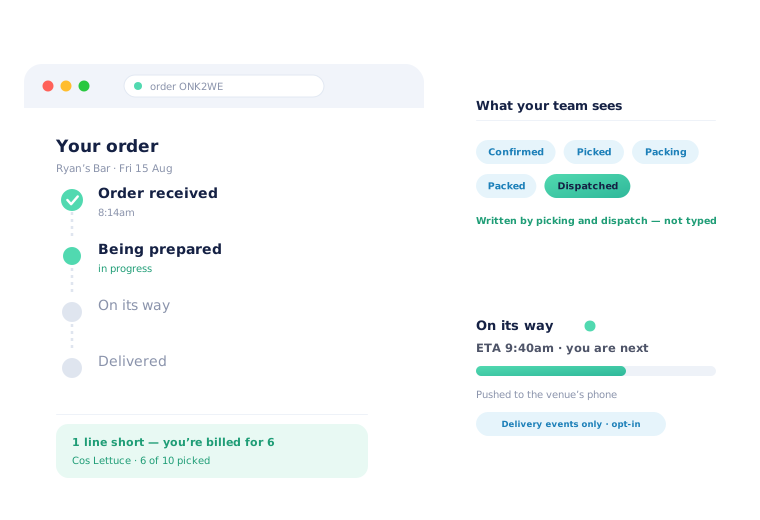



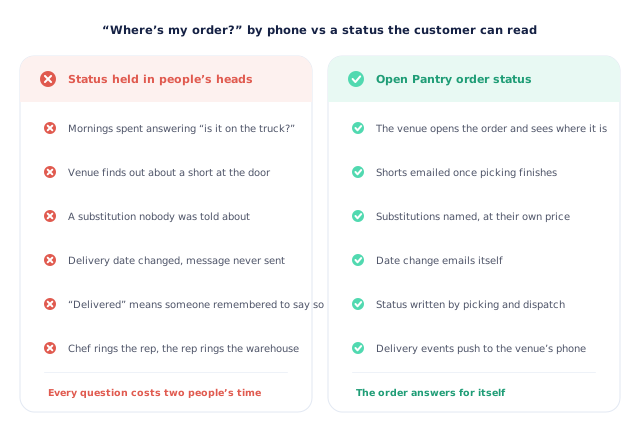
“Where’s my order?” is a phone call that costs two people’s morning.

The only person who knows where the order is, is on the truck

A venue finds out about a short line when the box is opened

A delivery date moves and the message never gets sent

Notify customers of every step and they turn notifications off
The Order Answers for Itself
Status is written by the work
Picking, packing and dispatch each move the order along as they happen on the tablet and in the run. Nobody has to remember to update a spreadsheet, so the status is right at three in the afternoon as well as at nine in the morning.
The customer sees the plain version
Your customer does not need to know the difference between picking and packing — they need to know whether to worry. Fulfilment states collapse into “being prepared”, and the delivery track speaks in the language of the day.
Real changes send a message
A short line, a substituted product, a moved delivery date, a cancellation, an invoice: each of these emails the customer. Routine progress does not, which is exactly why the ones that do get read.
Delivery events push to the phone
On the day, venues that have switched push on get told when the order is on its way, when the ETA moves and when they are next in line — the three moments a kitchen actually plans around.
Free trial · Cancel anytime
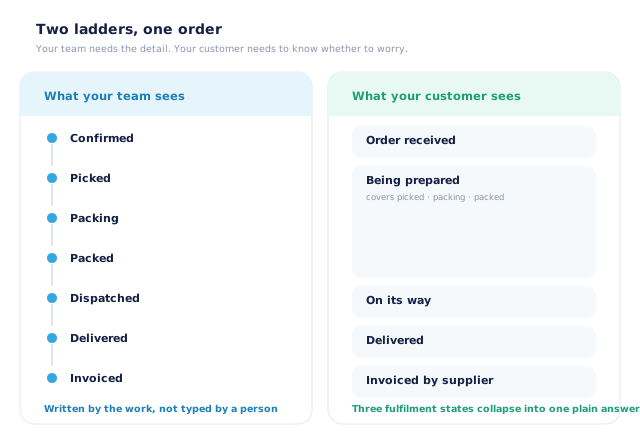
Two ladders, one order — because you and your customer need different detail
Your warehouse needs to know whether an order is picked, being packed or packed, because those are three different jobs and three different people. Your customer needs one answer: is it coming. Open Pantry keeps both. The internal ladder runs confirmed, picked, packing, packed, dispatched, delivered, invoiced; the customer-facing one collapses the three fulfilment states into “being prepared” and shows the rest in plain English. They cannot drift apart, because they are the same record read two ways.
- Internal: confirmed, picked, packing, packed, dispatched, delivered, invoiced
- Customer: order received, being prepared, on its way, delivered
- Written by picking and dispatch, not maintained by hand
- The same underlying order, so the two views can never disagree
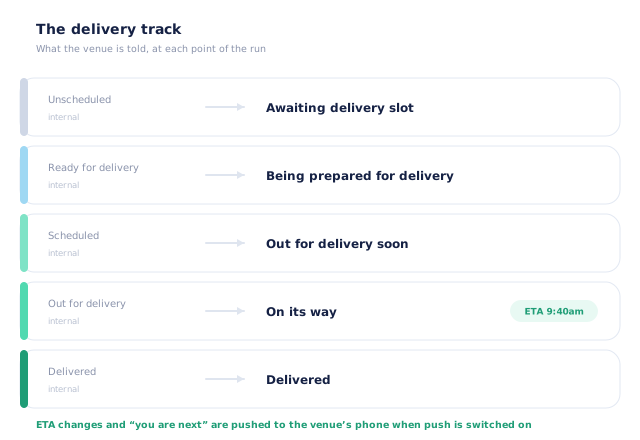
The delivery track, in the words a kitchen uses
Once an order reaches delivery it picks up its own sequence, and each step is phrased for the person waiting on it. An order with no slot yet is awaiting a delivery slot. One that is ready but not loaded is being prepared for delivery. Scheduled onto a run, it is out for delivery soon. On the truck, it is on its way — and that is where the live ETA appears. Then delivered. Nobody has to translate a warehouse state into a promise.
- Awaiting delivery slot → being prepared for delivery → out for delivery soon
- On its way, with the live ETA from the run
- Delivered, recorded against the order itself
- The same wording in the app, the store and the emails
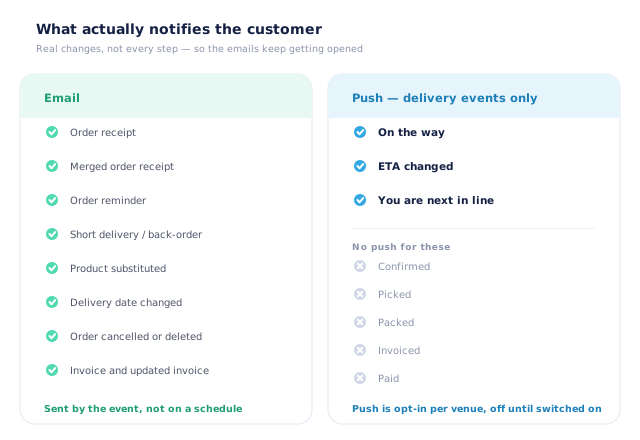
What actually notifies — and, just as importantly, what does not
Notification fatigue is a real risk: tell a chef about every state change and they will mute you before the second delivery. Open Pantry emails customers for the events that change what they will receive or what they will pay — the order receipt, a short delivery or back-order, a substituted product, a moved delivery date, a cancellation, the invoice. Push notifications are narrower still and deliberately so: they cover delivery events only, and they are off until a venue switches them on.
- Emails: receipt, shorts and back-orders, substitutions, date changes, cancellations, invoices
- Push: on the way, ETA changed, next in line
- No push for confirmed, picked, packed, invoiced or paid
- Push is opt-in per venue, so nobody is enrolled without choosing
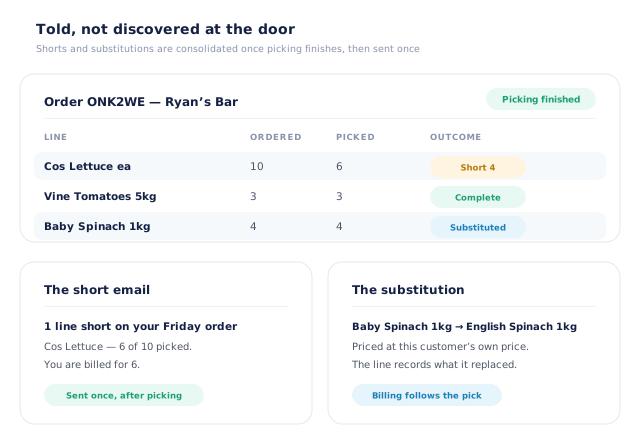
Shorts and substitutions: told once, after picking, with the numbers
The worst version of a short delivery is the one discovered at the door. Open Pantry waits until picking on an order is finished, gathers everything that came up short into one message and sends it — the line, how many were ordered, how many were picked, and the fact that the invoice will follow the pick rather than the order. Substitutions are handled the same way: the replacement is named, it is priced at that customer’s own price rather than a list price, and the line records what it replaced.
- Shorts consolidated and sent once, after picking finishes
- Ordered versus picked shown per line, so nothing is ambiguous
- Substitutions named, priced at the customer’s own price
- Billing follows what was actually picked
- More product lines purchased
- 24%
- Your always-on branded store and app put your full range in front of customers, so baskets grow.
- Less order-processing cost
- 95%
- AI order capture and auto-invoicing remove the manual keying between order and books.
- Fewer picking errors
- 80%
- Tablet pick & pack with FEFO lot and expiry tracking catches shorts and wrong items before they ship.
Real gains suppliers report after moving ordering, fulfilment and invoicing onto Open Pantry.
The Status Your Invoice and Your Ledger Agree With
Trusted by M&J Chickens
- $175m+
- Annual turnover
M&J Chickens use Open Pantry to move ordering out of calls and messages and into one digital workflow — giving customers a smooth ordering experience and giving the team fewer errors and less admin.
“With Open Pantry, we launched our own fully branded ordering app — it’s helped us protect our customer base, move to digital ordering, and deliver a much better experience to our venues.”

A status somebody has to remember to update is not a status.
Order tracking usually fails in one of two ways. Either it is maintained by hand, so it is accurate first thing and fiction by mid-morning; or it is so noisy that customers switch it off and go back to ringing. The fix is not more notifications — it is a status that is a by-product of the work, plus messages reserved for the things that genuinely change what a venue will receive. Then the order can answer for itself, the phone stops, and the two or three messages you do send are the ones people open.
Questions Suppliers Ask About Order Status Tracking
What is order status tracking for suppliers?+
What does the customer actually see?+
Who updates the status?+
What does the delivery track look like to a venue?+
Which changes email the customer?+
Do customers get pushed a notification at every step?+
How are short deliveries communicated?+
What happens when a product is substituted?+
Does the customer see whether they have been invoiced?+
Which plan includes order status tracking?+
Stop Answering “Where’s My Order?”
Join 600+ Australian suppliers running their ordering, fulfilment and invoicing on Open Pantry.
Setup done for you · Cancel anytime · Your data stays yours