
Food Production Planning: Make What Your Orders Need, Batch by Batch
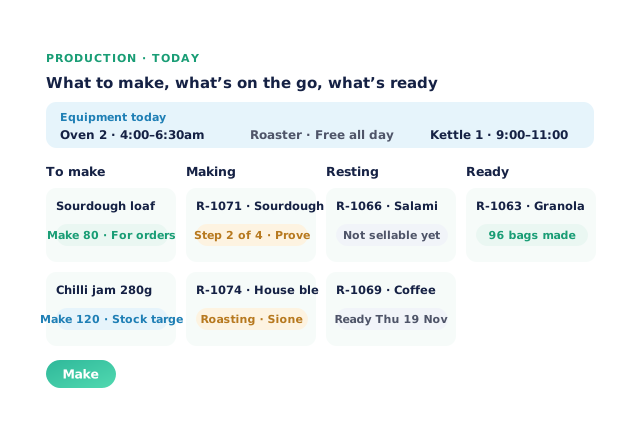
For wholesalers who make or pack what they sell — bakeries, roasters, kitchens, jam and sauce makers, smallgoods and repackers — Open Pantry plans production from the orders already in the system. Made-to-order products get runs sized to the orders, a production calendar shows each room by day, recipe steps book the oven or roaster, and a Today board tells the floor what to make, what’s on the go and what’s ready.
- Runs sized from your orders and stock targets
- A calendar by room, with equipment that can’t be double-booked
- Who made each batch, and stock and lots updated when it’s done
★★★★★ Trusted by 600+ suppliers



Where Production Planning Breaks Down

Someone tallies tomorrow’s orders by hand to work out how much to bake

A late order comes in after the batch is planned and nobody adjusts it

Two batches need the same oven at 6am and the floor finds out at 6am

An auditor asks who made a batch and what temperature it reached
How Production Planning Works
Set up your recipes
Each recipe says what goes in, what it makes, its steps, the equipment each step needs and the room it’s made in.
Let orders plan the runs
Made-to-order products get a draft run sized to the orders due, and the Today board adds products below their stock target.
Run the floor from Today
Book equipment, start each step, record what you made and who made it, and run the food safety checks.
Complete the batch
Ingredients come off stock, the product goes on with its batch and use-by, and resting products are held until they’re ready.
Free trial · Cancel anytime
Make to order
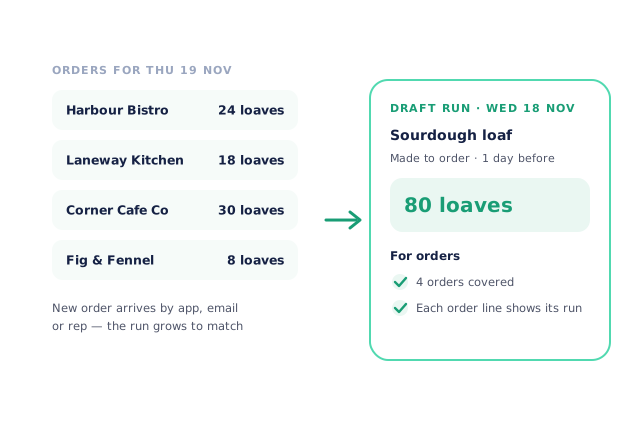
Tick Made to order on a recipe and set how many days before delivery it’s made. Orders for that product — however they arrive — go onto that day’s draft run, and the run grows or shrinks as orders change. Once a run has started it’s never resized: extra quantity goes on a new draft run, and a reduction shows as an alert for you to handle. The run’s For orders card lists every order it covers.
- Run size follows the orders
- Started runs are never changed under you
A production calendar by room
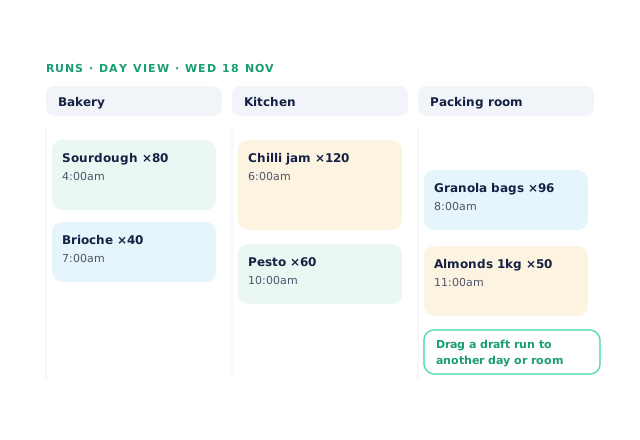
Production runs show by Day or Week. The Day view has a column for each room — your bakery, kitchen or packing room — and you drag a draft run to another day or room, or use Move on a phone or tablet. A recipe’s Made in setting picks its usual room.
- Day and Week views
- Drag runs between rooms and days
Recipe steps and equipment booking
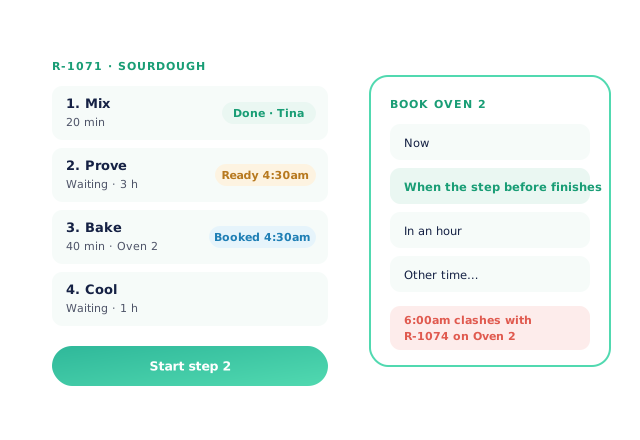
Add steps to a recipe — mix, prove, bake, cool — with the time each takes, which ones are waiting time, and the equipment they use. On the batch, the floor taps one big Start or Done button per step, with a timer and who did it. Book a step’s equipment now, when the step before finishes, in an hour or at another time; a time that clashes with another batch on the same oven or roaster is refused and names that batch. The Today board shows each piece of equipment’s bookings at the top.
- Timers for waits like proving and resting
- Double bookings refused
On the floor and into stock
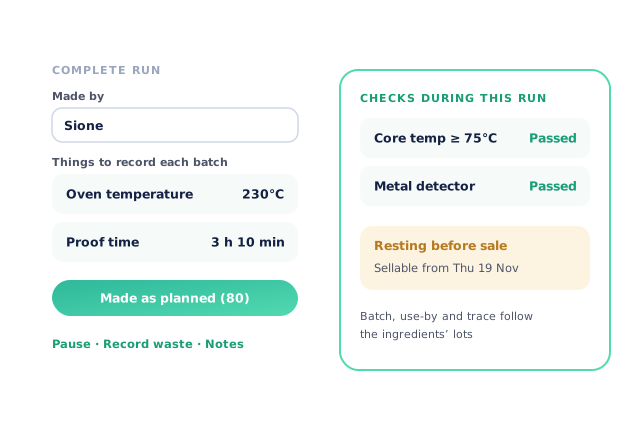
Record Made by and the things your recipe asks for each batch, such as oven temperature or proof time, or press Made as planned to fill in the planned amounts in one tap. Pause a run with a reason, record waste by weight, and run the checks during production your food safety plan needs. When the batch is complete, its ingredients come off stock and the product goes on with its batch and use-by following the ingredients’ lots. Products that need to rest — salami, coffee — are held as not sellable until their ready date.
- Made by and batch records on every run
- Resting products held until ready
- More product lines purchased
- 24%
- Your always-on branded store and app put your full range in front of customers, so baskets grow.
- Less order-processing cost
- 95%
- AI order capture and auto-invoicing remove the manual keying between order and books.
- Fewer picking errors
- 80%
- Tablet pick & pack with FEFO lot and expiry tracking catches shorts and wrong items before they ship.
Real gains suppliers report after moving ordering, fulfilment and invoicing onto Open Pantry.
Production on the Same Record as Orders and Stock
Trusted by M&J Chickens
- $175m+
- Annual turnover
M&J Chickens use Open Pantry to move ordering out of calls and messages and into one digital workflow — giving customers a smooth ordering experience and giving the team fewer errors and less admin.
“Moving to a digital process has transformed our ordering process which is now faster through our own mobile apps.”

Why not plan production on a whiteboard?
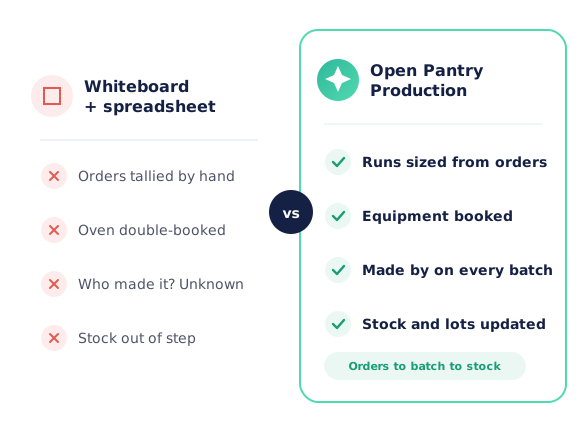
A whiteboard or spreadsheet only knows the orders someone copied onto it, and it can’t tell you the oven is already booked or who made yesterday’s batch. In Open Pantry the run is sized from the orders in the system, equipment bookings are checked as you make them, and completing a batch updates stock, lots and use-by dates the way your customers’ orders will draw on them.
Open Pantry for food suppliers in Singapore
Singapore food and beverage wholesalers use Open Pantry to take orders from restaurants, cafés and venues online, with every order flowing to picking, invoicing and accounting.
- Plans priced in
- SGD — see Singapore pricing
- Accounting sync
- Xero and QuickBooks Online
- Supplier directory
- 150+ Singapore wholesale food & beverage suppliers
Can Singapore food suppliers use Open Pantry?
Yes. Wholesalers and distributors in Singapore use Open Pantry to take orders from restaurants, cafés and venues through their own branded ordering app and online store. Plans are priced in SGD, and orders and invoices sync with Xero and QuickBooks Online.
Is there a free plan for suppliers in Singapore?
Yes. The free plan lets you list products and receive unlimited orders. Paid plans add accounting, inventory and delivery tools, come with a free trial and are priced in SGD.
Questions Food Makers Ask About Production Planning
Can Open Pantry plan production runs from my customers’ orders?+
What happens if an order changes after a run has started?+
What does the Today board show?+
Can I stop two batches being booked on the same oven?+
Can I schedule runs by room or production area?+
Can I record who made each batch and batch details like temperatures?+
Does it handle products that rest before sale, like salami or roasted coffee?+
Can I add food safety checks to production?+
Does completing a batch update stock and traceability?+
Will it tell me what ingredients and packaging I need to buy?+
Which plan includes production planning?+
Works Even Better With
Food Production, Repacking & Landed Cost
Make, pack and split runs costed from their inputs, packaging and labour.
Explore →Lot, Expiry & FEFO
Batches and use-by dates that follow every product from making to delivery.
Explore →Purchasing & Auto POs
Ingredient and packaging shortfalls carried into suggested purchase orders.
Explore →Plan Tomorrow’s Batches From Tomorrow’s Orders.
Join 600+ Australian suppliers running their ordering, fulfilment and invoicing on Open Pantry.
Setup done for you · Cancel anytime · Your data stays yours