
Trade Counter Sales: Sell to Walk-In Customers From the Same System as Your Orders
Open Pantry’s counter sale lets a wholesaler ring up a walk-in or trade counter customer on a computer, tablet or phone. Search or scan the products, press Charge, and take payment by card from a QR code or a pay link, or in cash. The sale becomes an order and a paid invoice in one go, the stock comes off, and it reaches your accounting like any other invoice — no separate till.
- Walk-in or account customers, at the right price list
- Card by QR or pay link, or cash with change worked out
- One order, one paid invoice, stock updated
★★★★★ Trusted by 600+ suppliers



Why Counter Sales Get Messy for Wholesalers

A chef walks in and someone guesses the price because the till doesn’t know their account

Counter sales are keyed into the books again at the end of the day

Stock sold over the counter never comes off, so tomorrow’s orders oversell

A trade buyer needs a proper tax invoice and the counter can only print a docket
How a Counter Sale Works
Start a counter sale
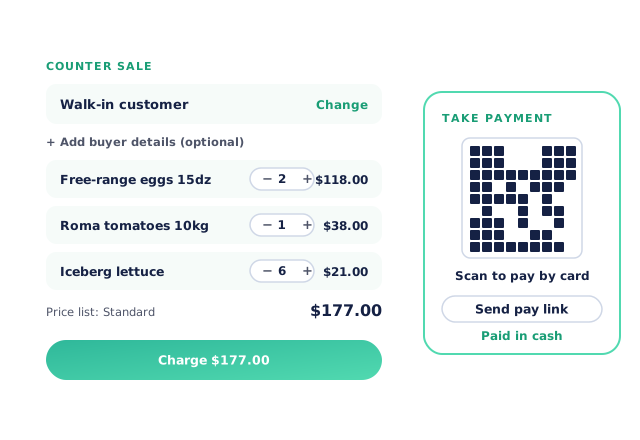
From Customers, open Counter sale. It starts as a walk-in customer, or switch to one of your account customers.
Add the products
Search or scan, set quantities, and change a price for this sale only if you need to.
Charge and take payment
The customer scans a QR code to pay by card, you send them a pay link, or you take cash.
Done in your books
The sale is an order and a paid invoice, with a receipt and invoice PDF ready to send.
Free trial · Cancel anytime
Ring up at the right price
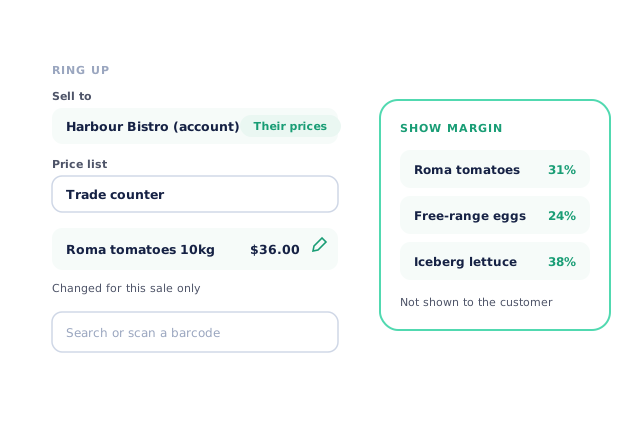
Sell to a walk-in, or switch to one of your account customers and their own price list is used. Pick the price list for walk-ins, and make one the default if you always use it at the counter. Search or scan products, change a price for this sale only with the pencil, and switch on Show margin to see your margin as you go — it isn’t shown to the customer.
- Account customers get their own prices
- Search or scan a barcode
Take payment three ways
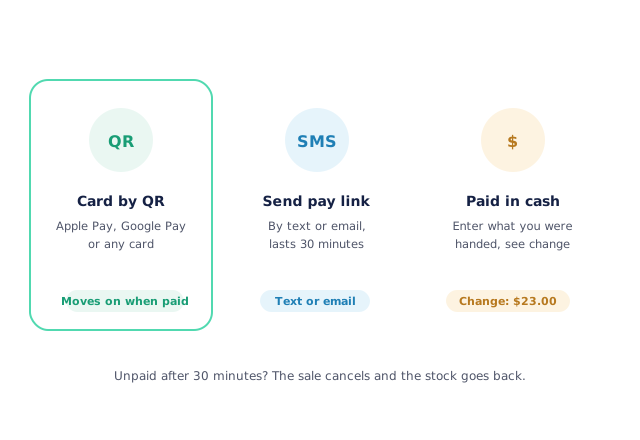
Press Charge and choose how they pay. The customer scans the QR code and pays with Apple Pay, Google Pay or any card, and the screen moves on by itself once it’s paid. Or press Send pay link to text or email it. For cash, enter what you were handed and the screen shows the change. A sale that isn’t paid within 30 minutes is cancelled and its stock goes back.
- Card by QR or pay link
- Cash with change shown
One record from counter to books
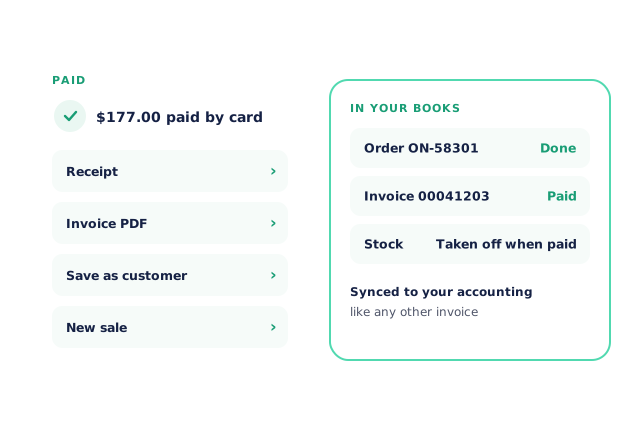
A paid counter sale becomes an order and a paid invoice in one step. Stock is held when you press Charge and taken off when the sale is paid. From the Paid screen, send the receipt, open the invoice PDF, save a walk-in buyer as a customer, or start the next sale. The invoice goes to your accounting system the same way as every other invoice.
- Order and paid invoice together
- Receipt and invoice PDF straight away
Proper invoices for trade buyers
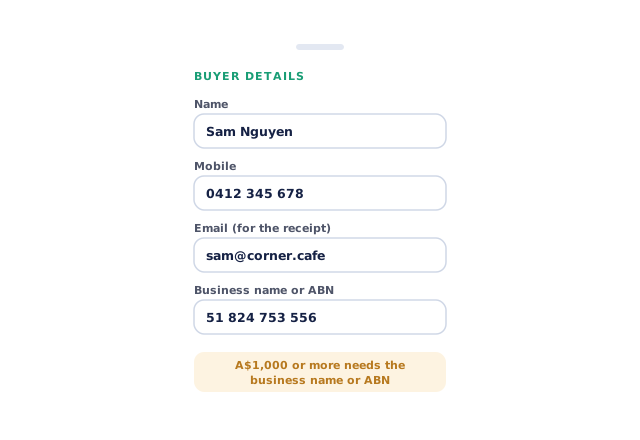
Add buyer details to a walk-in sale — name, mobile, email for the receipt, and business name or ABN — so a trade customer leaves with a tax invoice they can claim. In Australia, a walk-in sale of A$1,000 or more including GST asks for the business name or ABN, because it must appear on the tax invoice.
- Optional buyer details on a walk-in
- ABN prompt on larger Australian sales
- More product lines purchased
- 24%
- Your always-on branded store and app put your full range in front of customers, so baskets grow.
- Less order-processing cost
- 95%
- AI order capture and auto-invoicing remove the manual keying between order and books.
- Fewer picking errors
- 80%
- Tablet pick & pack with FEFO lot and expiry tracking catches shorts and wrong items before they ship.
Real gains suppliers report after moving ordering, fulfilment and invoicing onto Open Pantry.
Counter Sales in the Same Books as Every Order
Trusted by M&J Chickens
- $175m+
- Annual turnover
M&J Chickens use Open Pantry to move ordering out of calls and messages and into one digital workflow — giving customers a smooth ordering experience and giving the team fewer errors and less admin.
“Moving to a digital process has transformed our ordering process which is now faster through our own mobile apps.”

Why not keep a separate till at the counter?
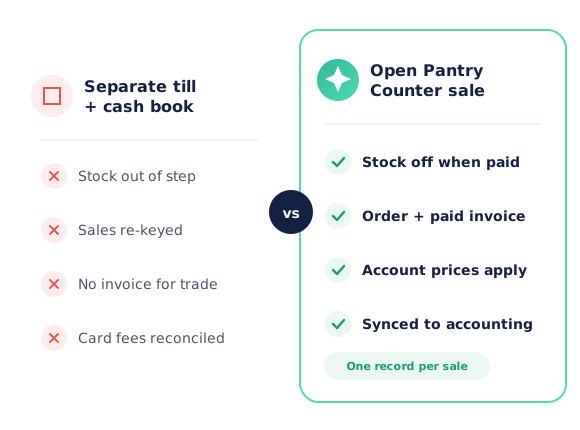
A separate point-of-sale system doesn’t know your account customers’ prices, doesn’t take stock off the same inventory your orders use, and leaves someone keying the day’s sales into the books. A counter sale in Open Pantry uses your price lists and stock, and finishes as an order and a paid invoice that syncs like any other.
Open Pantry for food suppliers in Singapore
Singapore food and beverage wholesalers use Open Pantry to take orders from restaurants, cafés and venues online, with every order flowing to picking, invoicing and accounting.
- Plans priced in
- SGD — see Singapore pricing
- Accounting sync
- Xero and QuickBooks Online
- Supplier directory
- 150+ Singapore wholesale food & beverage suppliers
Can Singapore food suppliers use Open Pantry?
Yes. Wholesalers and distributors in Singapore use Open Pantry to take orders from restaurants, cafés and venues through their own branded ordering app and online store. Plans are priced in SGD, and orders and invoices sync with Xero and QuickBooks Online.
Is there a free plan for suppliers in Singapore?
Yes. The free plan lets you list products and receive unlimited orders. Paid plans add accounting, inventory and delivery tools, come with a free trial and are priced in SGD.
Questions Suppliers Ask About Counter Sales
How do I ring up a walk-in sale in Open Pantry?+
Can I sell to one of my account customers at the counter?+
Which card payments can customers use?+
Can I take cash without Stripe?+
What happens to stock when I make a counter sale?+
Does a counter sale create an invoice?+
Can I change a price for one counter sale?+
Do I need a business name or ABN for a walk-in customer?+
Can I scan barcodes at the counter?+
How do I refund a counter sale paid by card?+
Works Even Better With
Auto-Invoicing & Payments
Every order invoiced and synced, with pay-now links on the invoices you send.
Explore →Price List Management
The price lists your counter, your reps and your customers all sell from.
Explore →Inventory Intelligence
Stock that counter sales and online orders both draw from, so nothing oversells.
Explore →Sell Over the Counter Without a Second System.
Join 600+ Australian suppliers running their ordering, fulfilment and invoicing on Open Pantry.
Setup done for you · Cancel anytime · Your data stays yours