
Products Purchased & Purchase History: What You Bought, and What It Cost You
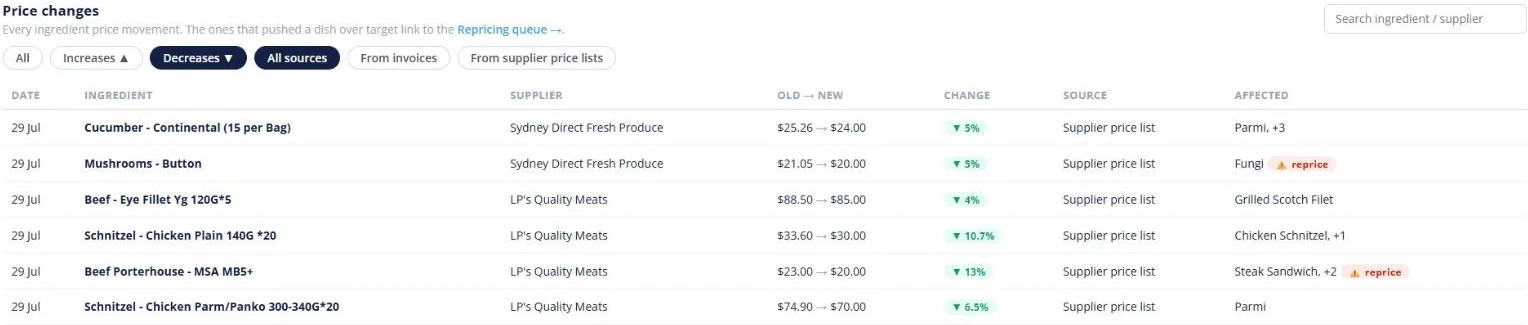
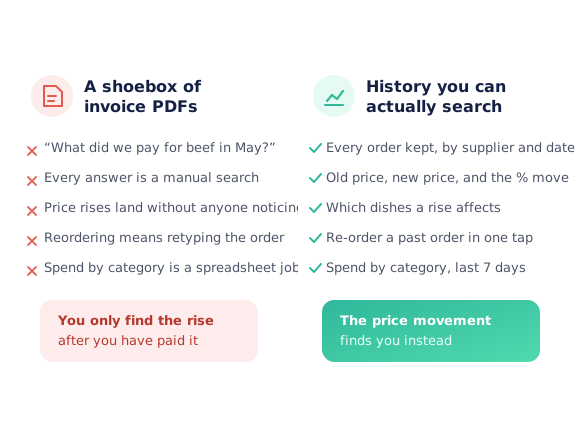
Every order the venue places stays on the record — the supplier, the date, the products, the unit price you paid and the invoice that followed. So “what did we pay for porterhouse last month?” is a search rather than an afternoon in a filing cabinet. Ingredient prices are tracked as they move, old price to new, with the dishes each change affects flagged for repricing.
- Every order kept by supplier, with the unit price you paid
- Ingredient price movements shown old price to new, with the percentage
- Re-order a past order, or save it as a reusable list
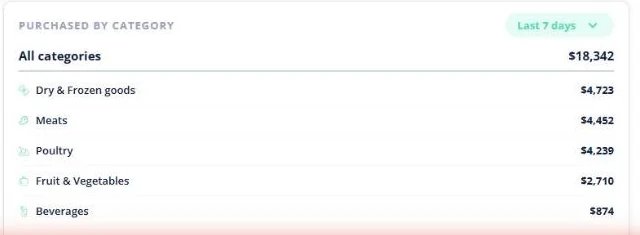
- See where the week’s spend actually went, by category
★★★★★ Trusted by 5,000+ venues across Australia
Recommended by:




The answer is in the invoices, which is the same as nowhere
Working out what you used to pay means opening old invoices one by one
A supplier’s price creeps up and nobody notices for months
The dish still sells for the same money after its main ingredient rose
Reordering something familiar means rebuilding it from memory
Nobody can say which category the week’s money went on
The person who would know is not on shift
From an order placed to a question you can actually answer
Every order stays on the record
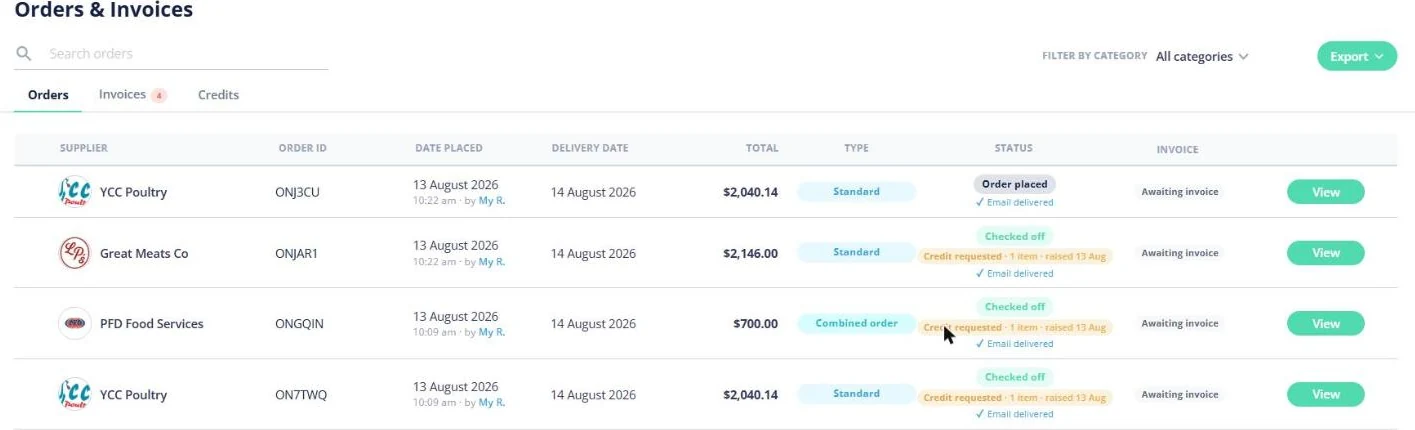
Orders, invoices and credits sit together with the supplier, the date it was placed and who placed it, the delivery date, the total and where the invoice is up to.
Open one and see the detail
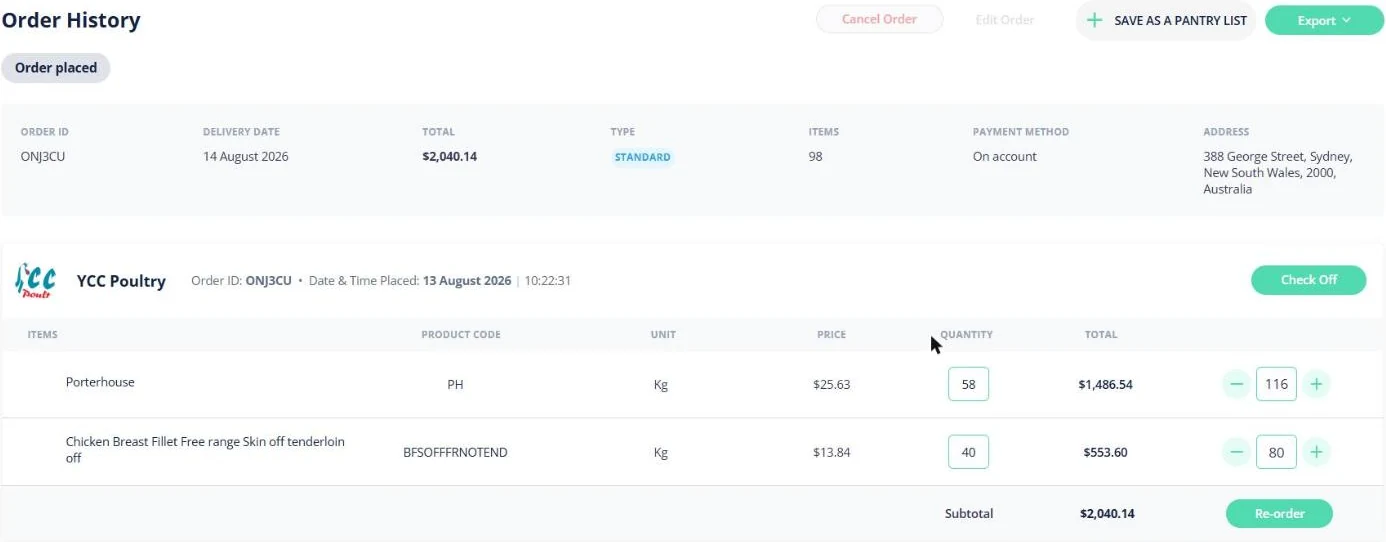
Each order keeps its lines — product code, unit, the unit price you paid, the quantity and the line total — alongside the payment method and delivery address.
Watch the prices move
When an ingredient’s price changes, it is recorded as old price to new price with the percentage move, the supplier, and whether it came from a price list or an invoice.
Act on it
Re-order a past order in one tap, save it as a pantry list to reuse, or follow a flagged price rise through to repricing the dishes it affects.
See how Open Pantry works for venues
Every order, kept where you can find it
Orders, invoices and credits are three tabs in one place. A row tells you the supplier, the order ID, when it was placed and by whom, the delivery date, the total, whether it was a standard or combined order, where it got to — placed, checked off, credit requested — and whether the invoice has arrived. Search it, filter it by category, or export the lot.
- Orders, invoices and credits in one view
- Placed-by and checked-off status on every row
- Search, filter by category and export
Re-order it, or turn it into a list
Open a past order and it is all still there: the lines with product codes, units, the unit price you paid and the quantities. From there, Re-order puts the same order back in the cart, or Save as a Pantry List turns it into a reusable list for the venue. A good order becomes the template for the next one instead of being retyped.
- Re-order a past order in one tap
- Save any order as a reusable pantry list
- Export it, or check it off against the delivery
Old price, new price, and the dishes it hits
Ingredient prices are tracked as they move. Each change shows the date, the ingredient, the supplier, the old price beside the new one, the percentage move, and where it came from — a supplier price list or an invoice. The dishes using that ingredient are listed alongside, and the ones pushed past their target margin are flagged to reprice.
- Old price to new price, with the percentage move
- Filter to increases, decreases, or by source
- Affected dishes listed, with a reprice flag

Where the money actually went
The dashboard totals what the venue purchased this week and compares it with last week, then breaks it down by category — so a jump is traceable to dry goods or meat rather than being a number nobody can explain. The purchase trend links straight through to the orders and invoices behind it, so the detail is one click from the summary.
- Purchases this week against last week
- Spend split by category over the last 7 days
- Links through to the orders behind the figures
Fits how the venue already buys
Venues that know what they paid last time
Chefs Love Open Pantry

Thank you OPEN PANTRY, we used to have to use 6 apps to get access to ordering from our suppliers, the fact we can do it all in one has saved an incredible amount of time & effort! We love you!

We’ve been using Open Pantry for a few months now and it’s been an absolute lifesaver. We’re short staffed so being able to place all of our orders with all of our suppliers in the one spot is a massive help.

So glad this service exists. Has made it so easy for my manager & chefs to order & all payments are settled in one go. The recurring orders & pantry lists are amazing time savers!!
Why not just look back through the invoices?
You can, and that is exactly the problem — it is possible, so it never gets done. A price rise on one ingredient is invisible in a single invoice; it only shows up when you put this month beside last month, which nobody has time to do by hand. Keeping the history where the ordering happens turns that comparison into something the system notices for you, and points at the dishes it has quietly made less profitable.
Open Pantry for restaurants in Australia
Australian restaurants, cafés and pubs use Open Pantry to order from all their suppliers in one place and keep food costs in view.
- Plans priced in
- AUD — see Australia pricing
- Accounting sync
- Xero, MYOB and QuickBooks Online
- Supplier directory
- 1,100+ Australian wholesale food & beverage suppliers
Can restaurants in Australia use Open Pantry?
Yes. Restaurants, cafés and pubs in Australia use Open Pantry to order from all their suppliers in one place, track what they buy and keep food costs in view. Paid plans are priced in AUD.
Is ordering on Open Pantry free for restaurants?
Yes. The ordering package is free, with unlimited suppliers and orders. Paid plans add menu costing, inventory and reporting, and are priced in AUD.
Purchase history — questions venues ask
What does Open Pantry keep in purchase history?+
Can I see what I used to pay for a product?+
How do I find out if a supplier has raised a price?+
What happens when a price rise makes a dish unprofitable?+
Can I re-order something I bought before?+
Can purchase history be exported?+
Can I see how much we spent by category?+
Can the whole team see purchase history?+
Does purchase history cost anything?+
Know what you paid, and what it just became
Order history comes with ordering — free for restaurants and venues.
Free to order · Paid plans include a free trial · Cancel anytime