
Fine Dining Restaurant Software: Precision on the Plate and on the Margin
Fine dining is the hardest kitchen to run to a number: the ingredients are expensive, the suppliers are specialists, and one carton price can be most of a plate. Open Pantry puts ordering, recipe costing, inventory, prep and reporting in one place, so every dish carries its cost per portion, its gross profit and its food-cost percentage against target — with each ingredient’s share of the plate spelled out, and its supplier’s price movement shown beside it.
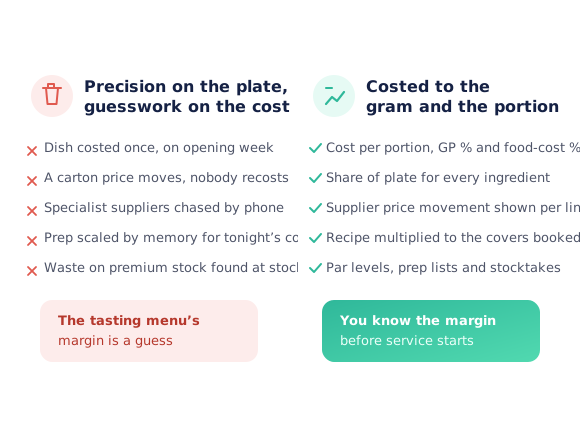
- Cost per portion, gross profit % and food-cost % on every dish
- Share of plate and supplier price movement per ingredient
- Order across specialist suppliers from one cart
- Multiply a recipe to the covers you have booked
★★★★★ Trusted by 5,000+ venues across Australia
Recommended by:




The kitchen is exact. The costing is a guess.
Dishes were costed once, on opening week, and never again
A specialist carton price moves and no dish is recosted
Five suppliers, five ordering methods, none of them a record
Prep is scaled from memory against tonight’s covers
Expensive stock is written off without anyone naming a reason
Nobody can say which dish on the menu is actually carrying it
From the specialist supplier to the costed plate
Buy from every supplier in one place
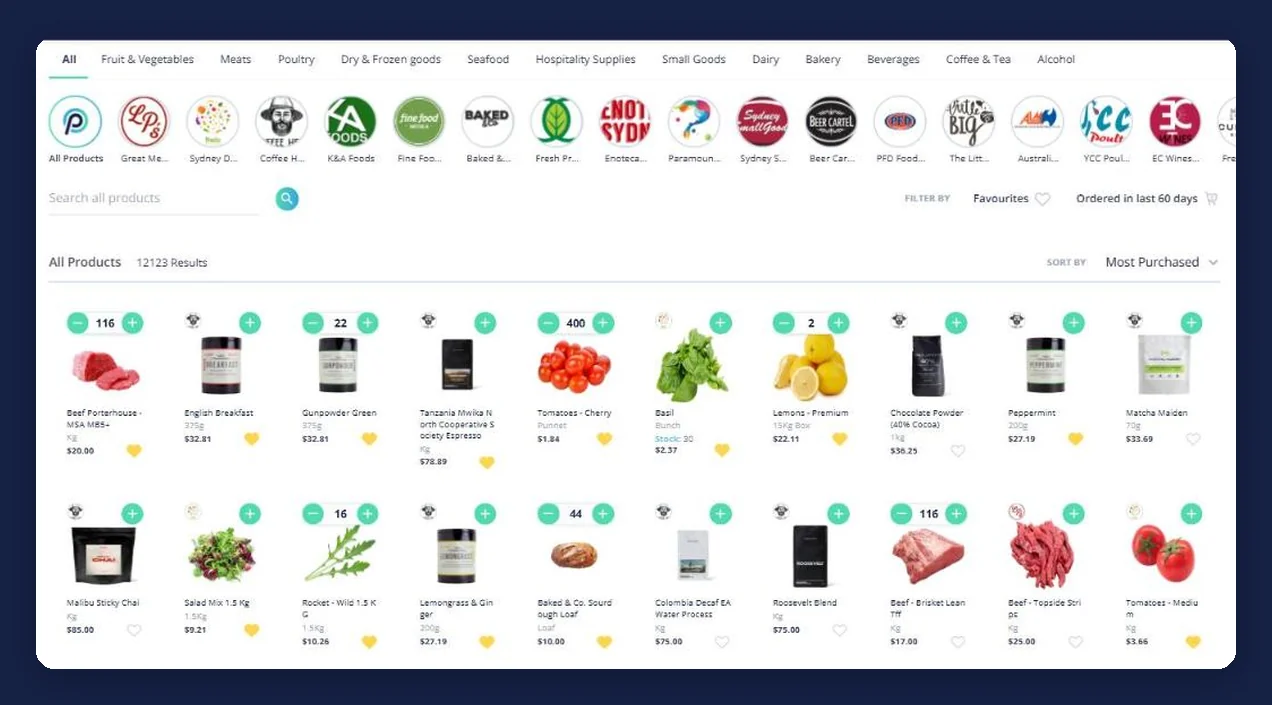
Browse by category or by supplier, build one cart across several specialists at once, and place the order. What was ordered, by whom, for what delivery date and at what price becomes a record rather than a text message.
Recipes cost themselves off those prices
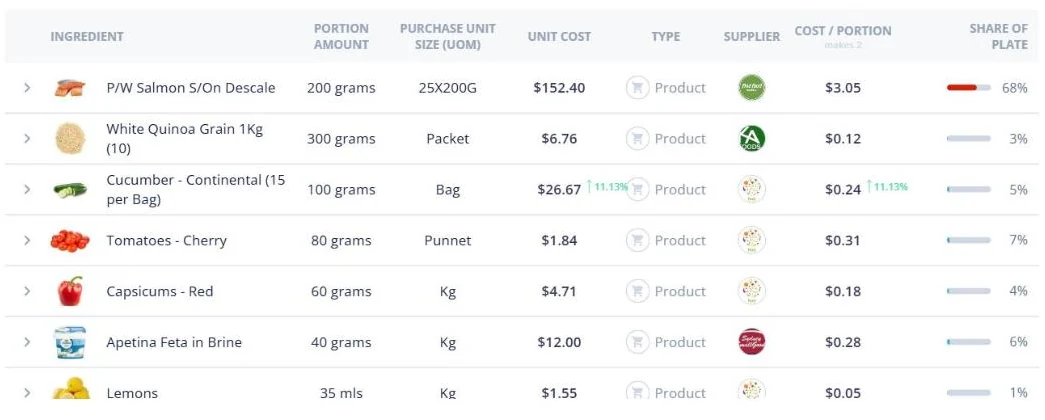
Each dish is built from the products you actually buy, so its cost per portion comes from your real prices. Sub-recipes roll up into the dishes that use them, and the ingredient table shows what each one contributes to the plate.
Scale to the covers, not to a hunch
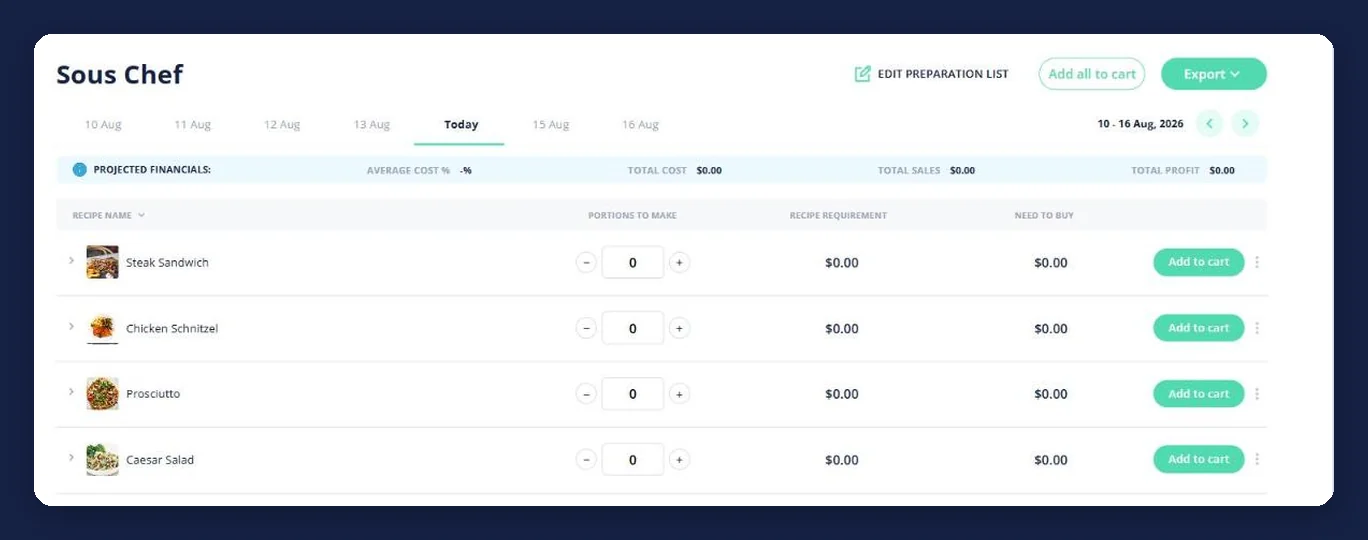
Multiply a recipe for the service you have booked, and prep lists turn portions to make into a recipe requirement and a need-to-buy figure per day, with those ingredients going straight to the cart.
Then watch the margin, not the invoice pile
Dishes pushed past their food-cost target are counted and listed for repricing, waste is logged with a reason, and sales, profit and cost report against the previous period.
See how Open Pantry works for venues
Every dish costed to the portion, against a target
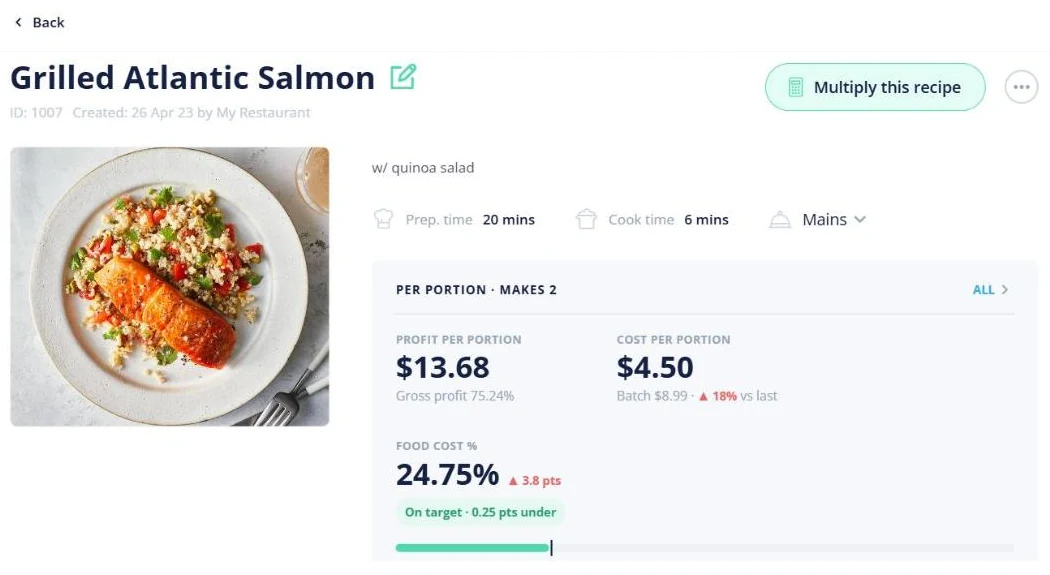
A recipe card in Open Pantry is not a document — it is a costing. It shows profit per portion and gross profit percentage, cost per portion with the batch cost beside it and how far that has moved since last time, and food-cost percentage against the target you set, with a chip saying whether the dish is on target and by how much. Prep and cook times, method, allergens and dietary tags live on the same card, so the thing the kitchen cooks from and the thing the margin is judged on are one object.
- Profit per portion and gross profit percentage
- Cost per portion and batch cost, with movement since last time
- Food-cost percentage against your target, on or over
Share of plate, ingredient by ingredient
When one line is most of the cost, an average is useless. The ingredient table breaks a dish into portion amount, purchase unit and size, unit cost, supplier, cost per portion and share of plate — so a $152.40 carton of salmon showing as 68% of the plate is visible as the thing to watch, and the garnish at 1% is visible as the thing not to. Price movement is flagged against the ingredient line itself, so you see which supplier moved before you see the dish drift.
- Cost per portion and share of plate for every ingredient
- Supplier and purchase unit size on each line
- Price movement flagged against the ingredient, not just the dish
Several specialist suppliers, one cart
A fine dining kitchen rarely buys from one place — the fish, the meat, the produce, the dairy and the cellar are usually five relationships. Browse by category or by supplier, add across all of them into a single cart, and place the order in one pass. Pantry lists keep the products you buy repeatedly, recurring orders repeat a set list every 7, 14 or 28 days, and every order stays searchable afterwards with its delivery date, who placed it and what it cost.
- One cart across several specialist suppliers
- Pantry lists for the products you buy every week
- Recurring orders every 7, 14 or 28 days
Prep planned against the covers, and stock that keeps up
Preparation lists carry a tab per day and, per recipe, the portions to make, the resulting recipe requirement and the need-to-buy figure — with those ingredients going to the cart from the same line, and a projected financials strip showing average cost percentage, total cost, sales and profit. Behind it, inventory holds a balance, par and trigger per product across your storage areas, autofills an order back to par, and stocktakes count in two units at once with opening, closing and variances.
- Portions to make, recipe requirement and need to buy, per day
- Par and trigger levels per product, with autofill to par
- Stocktakes with two units per line and variance reporting
Fits how the kitchen already works
Kitchens that run to the number
Chefs Love Open Pantry

Thank you OPEN PANTRY, we used to have to use 6 apps to get access to ordering from our suppliers, the fact we can do it all in one has saved an incredible amount of time & effort! We love you!

We’ve been using Open Pantry for a few months now and it’s been an absolute lifesaver. We’re short staffed so being able to place all of our orders with all of our suppliers in the one spot is a massive help.

So glad this service exists. Has made it so easy for my manager & chefs to order & all payments are settled in one go. The recurring orders & pantry lists are amazing time savers!!
Why not keep the costings in a spreadsheet?
Because a spreadsheet is a photograph of a price, and fine dining buys the ingredients that move most. The maths in it is usually right; what is wrong is that it was right in March. When the dish costs itself off the prices you are actually paying, a supplier increase arrives as a dish that has crossed its food-cost target this week — while changing something about it is still a small decision, rather than a discovery made at the end of the quarter about a menu you have already printed.
Open Pantry for restaurants in Australia
Australian restaurants, cafés and pubs use Open Pantry to order from all their suppliers in one place and keep food costs in view.
- Plans priced in
- AUD — see Australia pricing
- Accounting sync
- Xero, MYOB and QuickBooks Online
- Supplier directory
- 1,100+ Australian wholesale food & beverage suppliers
Can restaurants in Australia use Open Pantry?
Yes. Restaurants, cafés and pubs in Australia use Open Pantry to order from all their suppliers in one place, track what they buy and keep food costs in view. Paid plans are priced in AUD.
Is ordering on Open Pantry free for restaurants?
Yes. The ordering package is free, with unlimited suppliers and orders. Paid plans add menu costing, inventory and reporting, and are priced in AUD.
Fine dining software — questions chefs and owners ask
What does fine dining restaurant software need to do?+
How precisely can a dish be costed?+
What happens when a specialist supplier puts prices up?+
Can we order from all our suppliers in one place?+
Does it handle sub-recipes and scaling?+
How does it help with expensive stock?+
Can we see whether the menu is actually working?+
Do our suppliers have to be on Open Pantry?+
What does it cost?+
Works even better with
Reporting & Profit Insights
Dish margins, food cost against target and profit against last period.
Explore →Restaurant Inventory Management
Balance, par and trigger per product across your storage areas.
Explore →Restaurant Ordering Platform
Every specialist supplier in one cart, with the history kept.
Explore →Run the kitchen to the same standard as the plate
Ordering is free for venues. Costing, inventory and reporting are part of Menu Profit Manager.
Free to order · Paid plans include a free trial · Cancel anytime