
Recurring Orders: The Order That Does Not Need Remembering
A recurring order is your regular delivery, set once and left to repeat — every 7, 14 or 28 days, with the products and quantities already saved. The venue sees the next delivery date, what it will cost and which suppliers are on it before it arrives, and anyone can open it and change a quantity. Separately, when stock has drifted, one action tops everything back up to your par levels and drops it in the cart to review.
- Repeat every 7, 14 or 28 days from a start date you pick
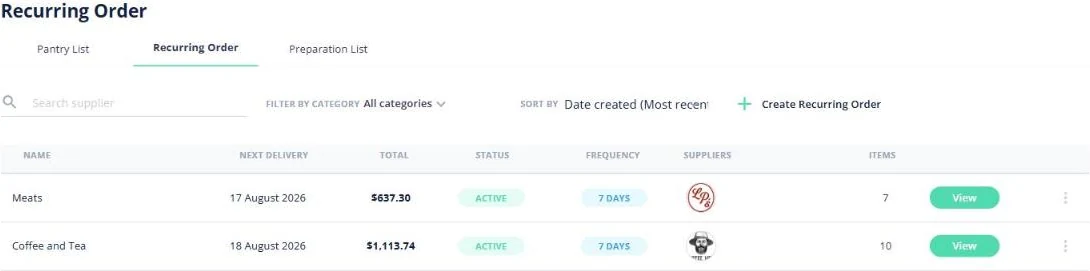
- Next delivery date, total and status on one screen
- One schedule can carry several suppliers at once
- Or replenish back to par on demand, straight into the cart
★★★★★ Trusted by 5,000+ venues across Australia
Recommended by:




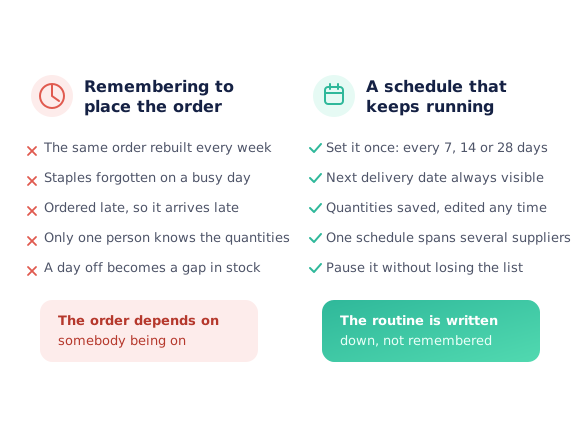
The same order, rebuilt from memory every week
The weekly order is retyped from scratch, line by line
A staple gets missed on a busy day and runs out mid-service
The order goes in late, so it lands late
Only one person actually knows the usual quantities
Someone takes a day off and a delivery simply does not happen
Nobody can say what the next delivery will cost until it arrives
Set the routine once, then keep an eye on it
Name the routine
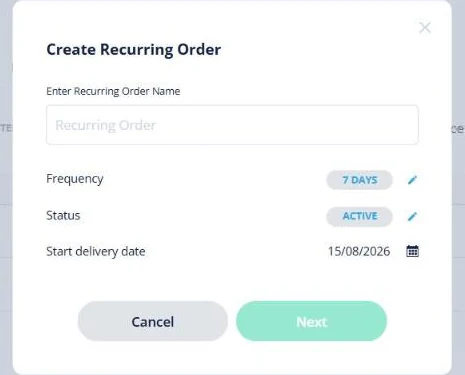
Create a recurring order the way the kitchen talks about it — Meats, Coffee and Tea, Bar Restock — and pick how often it repeats: every 7, 14 or 28 days, from a start delivery date you choose.
Put the order in it
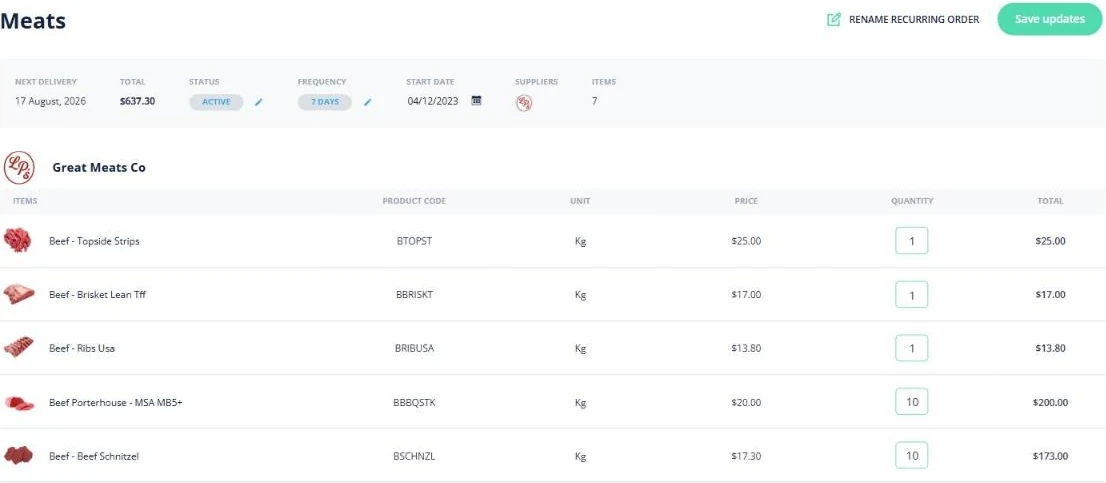
Choose the suppliers or categories it covers and set the quantity against each product. The lines are grouped by supplier with the product code, unit and price, so the routine is a real order rather than a reminder.
Watch the next one coming
The list shows the next delivery date, the total, the frequency and which suppliers are on it. You can see what is arriving and what it costs before it lands, not after.
Change it whenever you need to
Open the schedule and edit any quantity, rename it, change the frequency, or set it inactive to pause it — the list stays intact for when you switch it back on.
See how Open Pantry works for venues
Every 7, 14 or 28 days — from a date you choose
Setting one up takes a name, a frequency and a start delivery date. The frequency is a real interval — 7, 14 or 28 days — so a weekly meat order, a fortnightly dry-goods top-up and a four-weekly cleaning order can all run side by side on their own rhythms without colliding.
- Weekly, fortnightly or four-weekly intervals
- You set the first delivery date, so it lands on your delivery day
- Each schedule runs independently of the others
A real order underneath, not a reminder
Open a schedule and you get the order itself: lines grouped by supplier with the product code, unit and unit price, the quantity you set, a line total and a subtotal. Change a quantity because the function next week is bigger, hit save, and the routine carries the new number forward.
- Lines grouped by supplier, with product codes and units
- Quantities editable line by line, then saved
- Total and subtotal visible before the delivery arrives
One schedule, several suppliers
A section does not buy from one supplier, so a recurring order does not have to either. A single schedule can carry products from as many suppliers as it needs and shows their logos and the item count on the index — and each supplier still receives only their own lines.
- Several suppliers on one schedule
- Supplier logos and item count on the list
- Each supplier only ever sees their own products
When stock has drifted, top it back up to par
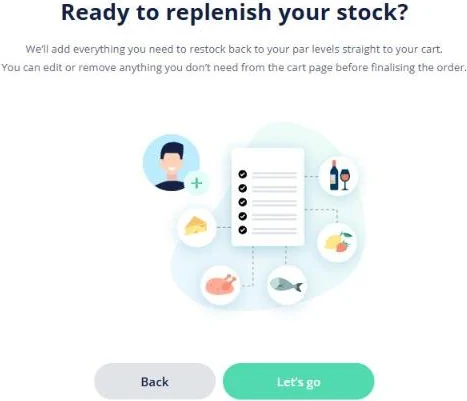
A schedule handles the predictable. For everything else there is replenish to par: one action works out what it would take to bring every product back up to the par level you set in inventory, and puts that straight into the cart. Nothing is ordered until you have looked at it — you can edit or remove any line on the cart page before you send it.
- Uses the par levels already set against your inventory
- Fills the cart, so you review before anything is sent
- Edit or remove any line before finalising the order
Fits how the venue already buys
Venues that stopped rebuilding the same order
Chefs Love Open Pantry

Thank you OPEN PANTRY, we used to have to use 6 apps to get access to ordering from our suppliers, the fact we can do it all in one has saved an incredible amount of time & effort! We love you!

We’ve been using Open Pantry for a few months now and it’s been an absolute lifesaver. We’re short staffed so being able to place all of our orders with all of our suppliers in the one spot is a massive help.

So glad this service exists. Has made it so easy for my manager & chefs to order & all payments are settled in one go. The recurring orders & pantry lists are amazing time savers!!
Why not just remember to order?
Because remembering is the part that fails first, and it fails on the busiest days. The routine order is the most predictable thing a venue buys, which makes it the least deserving of anybody’s attention every single week. Writing it down as a schedule also means it survives a day off, a new starter and a change of section — and it means the next delivery and its cost are visible to everyone, not held in one person’s head.
Open Pantry for restaurants in Australia
Australian restaurants, cafés and pubs use Open Pantry to order from all their suppliers in one place and keep food costs in view.
- Plans priced in
- AUD — see Australia pricing
- Accounting sync
- Xero, MYOB and QuickBooks Online
- Supplier directory
- 1,100+ Australian wholesale food & beverage suppliers
Can restaurants in Australia use Open Pantry?
Yes. Restaurants, cafés and pubs in Australia use Open Pantry to order from all their suppliers in one place, track what they buy and keep food costs in view. Paid plans are priced in AUD.
Is ordering on Open Pantry free for restaurants?
Yes. The ordering package is free, with unlimited suppliers and orders. Paid plans add menu costing, inventory and reporting, and are priced in AUD.
Recurring orders — questions venues ask
What is a recurring order?+
How often can a recurring order repeat?+
Can I change the quantities on a recurring order?+
How do I pause a recurring order?+
Can one recurring order cover more than one supplier?+
What is the difference between a recurring order and replenishing to par?+
Does replenishing to par place the order for me?+
How is a recurring order different from a pantry list?+
Do recurring orders cost anything?+
Works even better with
Stop retyping the order you place every week
Recurring orders come with ordering — free for restaurants and venues.
Free to order · Paid plans include a free trial · Cancel anytime