
Restaurant Procurement Software — Order Every Supplier From One Place
Restaurant procurement software is where a venue orders from every supplier it buys from, records what actually arrived, and tracks what it paid. Open Pantry does that without touching your supply relationships: you keep your own accounts, your own suppliers and the prices you negotiated, nothing is routed through a marketplace, and ordering is free.
- Every supplier on one screen — including the ones who only take email orders
- Delivery checked off at the door, and the invoice matched to it line by line
- Short or overcharged? The gap becomes a credit request your supplier can see
- Purchase history, price movements and spend by category build themselves
★★★★★ Trusted by 5,000+ venues across Australia
Recommended by:




The morning the ordering happens in four places at once
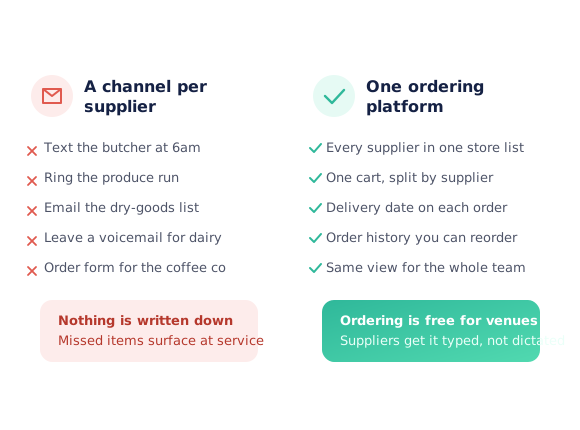
A text to the butcher, an email to dry goods, a phone order to the produce run
Nothing written down, so a missed line only shows up when the van arrives
The delivery is signed for at the door and counted properly by nobody
The invoice arrives days later and is filed without being checked against it
A price crept up three months ago and no one can say when, or by how much
Only one person knows the usual order, and they are rostered off on Tuesday
One loop, from the suppliers you already have to the price you actually paid
Connect the suppliers you already buy from
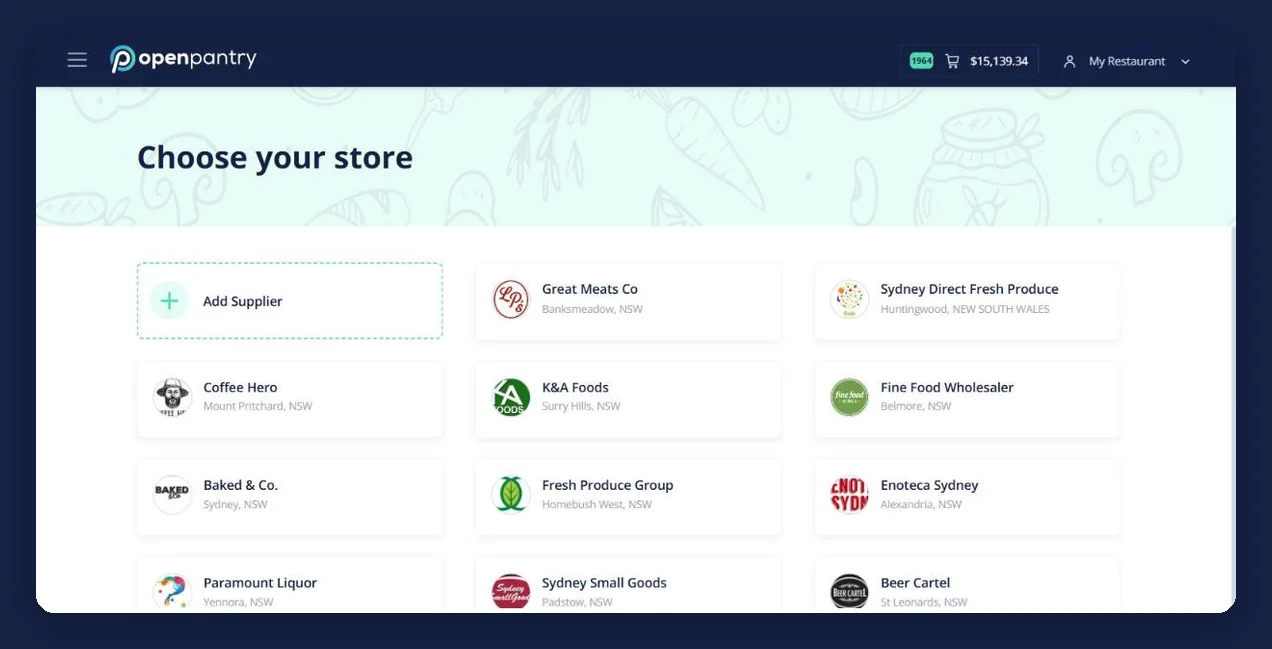
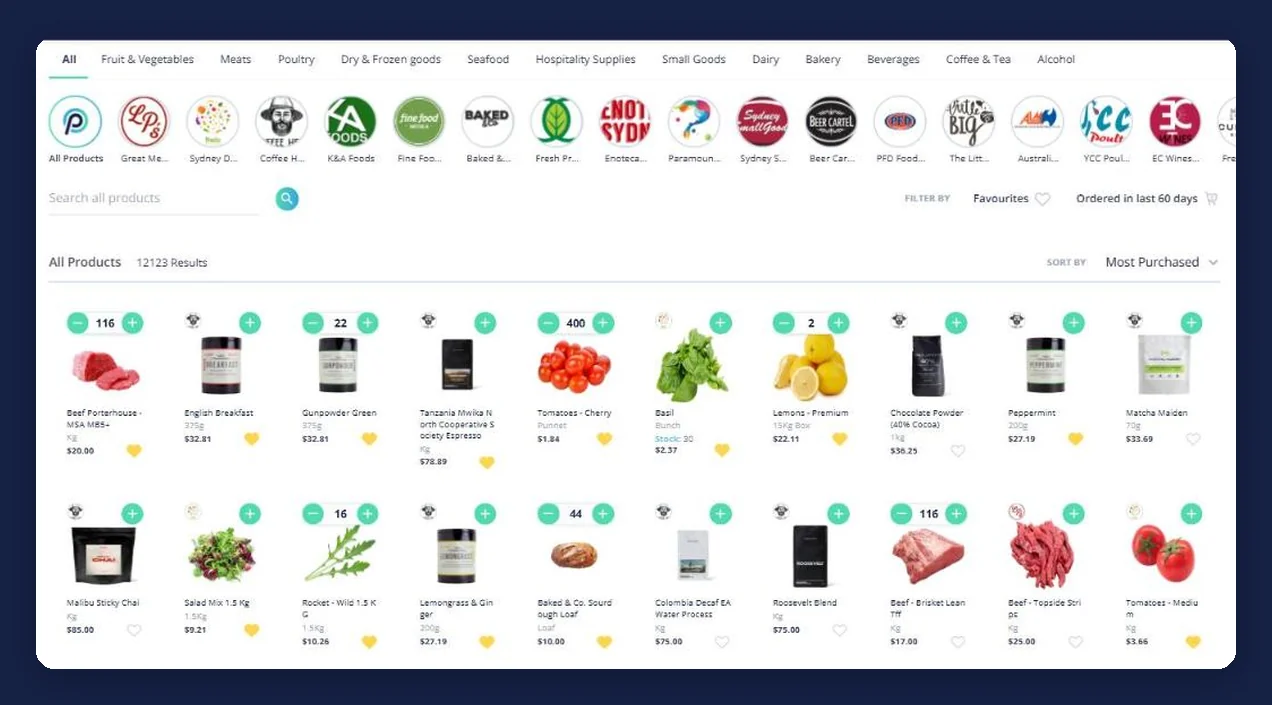
Every supplier your venue uses goes on one store list, with their catalogue and your prices. Suppliers already on Open Pantry come across as they are; you can add the rest yourself, and any supplier who accepts email orders works the same way.
Write the order down once
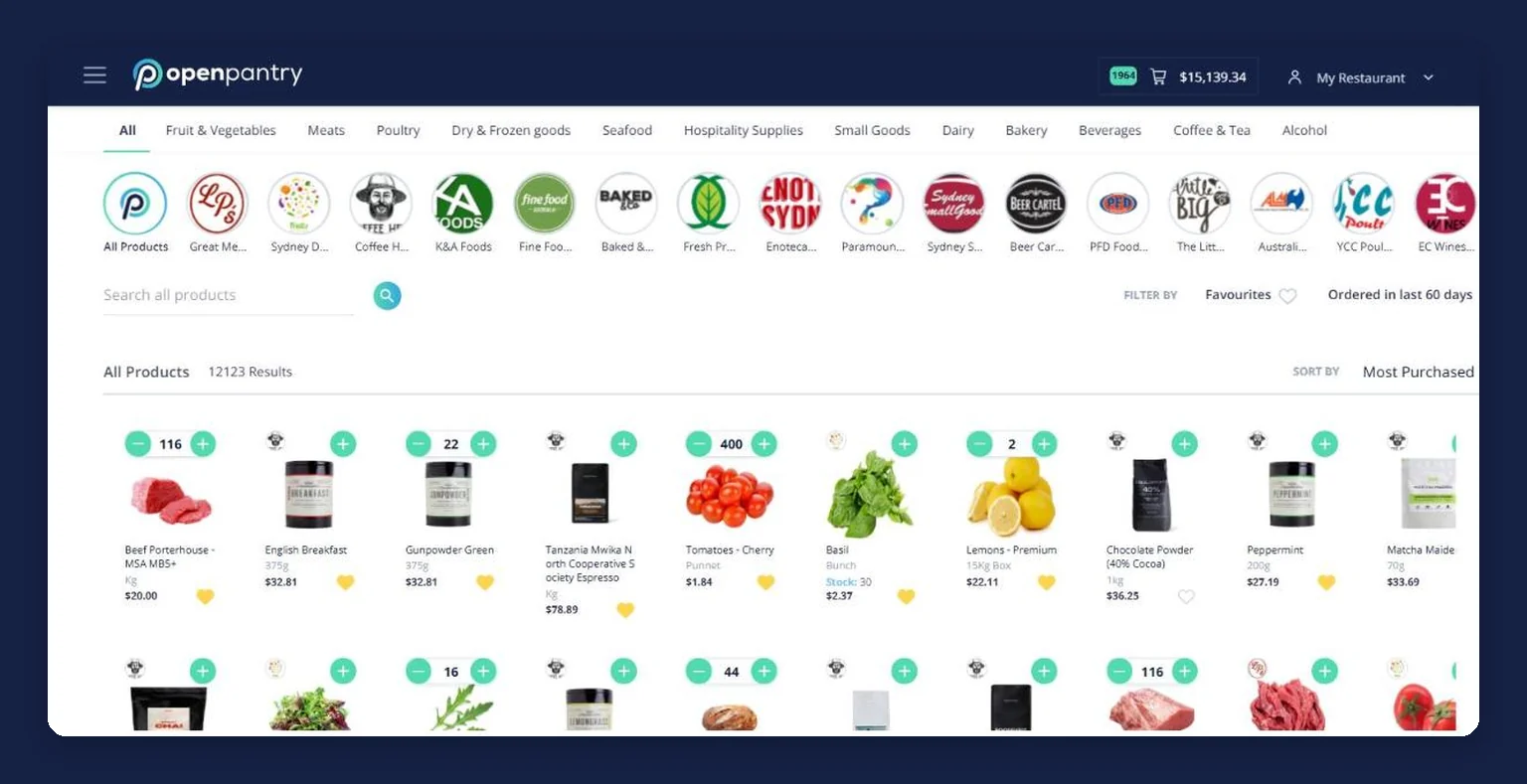
Pantry lists hold the products a section buys, across as many suppliers as it needs. Recurring orders repeat the predictable ones every 7, 14 or 28 days. Preparation lists start from the portions you are making and work out what you still need to buy.
Do the whole order round in one pass
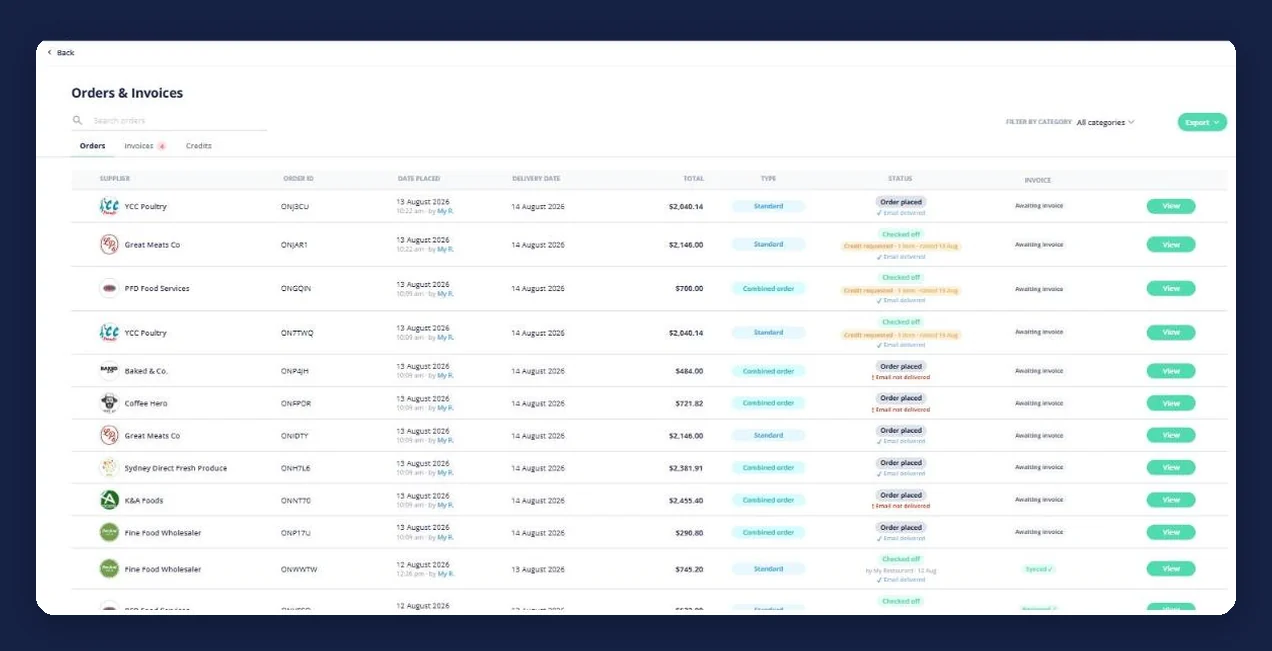
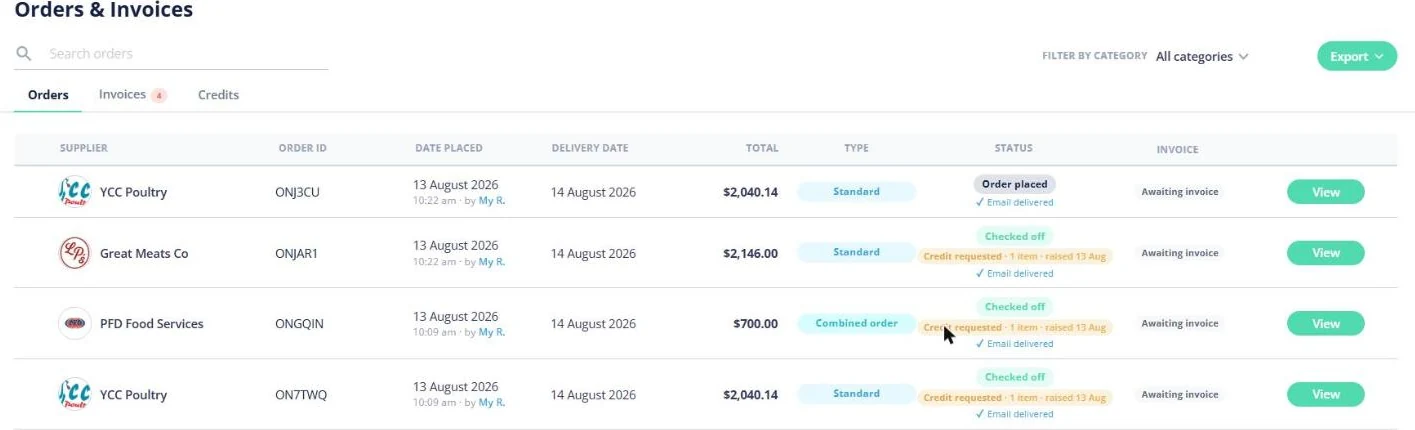
Build a single cart from every supplier at once, set the delivery date, and send. Each supplier receives their own typed order — their own lines only — and it lands in Orders & Invoices with its date, total and status.
Check it off at the door, and match the bill to it
The delivery is checked off on a phone as it is unloaded, and the invoice is checked line by line against what was actually received. A short delivery or a price jump is flagged rather than paid, and the shortfall becomes a credit request.
The record builds itself
Every order keeps the unit price you paid, every captured invoice updates your product prices, and price movements are logged old price to new. Purchase history, price trends and spend by category are a by-product of ordering, not a separate job.
See how Open Pantry works for venues
Every supplier your venue buys from, on one screen
Procurement software usually starts by asking you to change who you buy from. This one does not. Each supplier keeps their own catalogue and their own prices, your negotiated rates stay exactly as they are, and nothing is re-quoted by us — Open Pantry is not a marketplace and does not sit between the venue and the people it buys from. What changes is that the butcher, the produce run and the dry-goods account stop living in three different apps and a text thread.
- One list of every supplier, whether or not they are already on Open Pantry
- Add a supplier yourself and order from them the same way
- Any supplier who accepts email orders can be ordered from
- Your prices, their catalogue — nothing is renegotiated or re-priced by us
The routine order stops being remembered
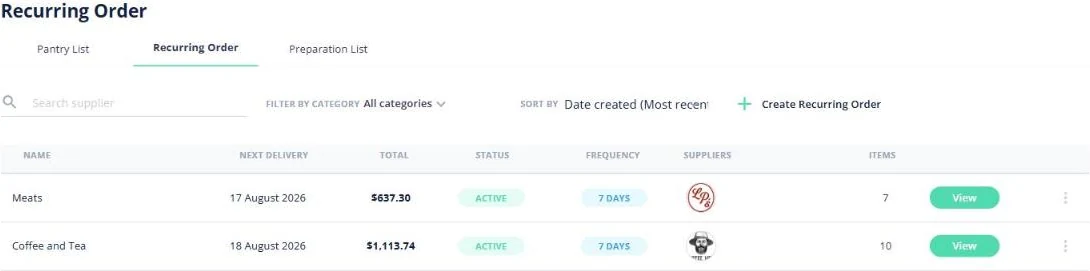
Most of what a kitchen buys is the same every week, which is exactly why it should not need anyone’s attention. A pantry list holds a section’s products across several suppliers and goes into the cart in one tap. A recurring order takes the same idea and attaches the timing — every 7, 14 or 28 days from a start date you choose, with the next delivery date, its total and the suppliers on it visible before it lands. A preparation list works the other way round: enter the portions you are making and it tells you what you still need to buy.
- Named pantry lists that span several suppliers and add to the cart in one tap
- Recurring orders every 7, 14 or 28 days, with editable quantities and a pause
- Preparation lists that turn portions into a need-to-buy and then into an order
- Replenish back to your par levels on demand — it fills the cart for you to review
Delivery check-off, and an invoice checked against it line by line
This is the part most venues do not have at all. The delivery is checked off on a phone at the door, as the crates come in, so what was received is written down while somebody is still standing next to it. The invoice is then checked line by line against that count — what you ordered, what you received and what you are being billed for are kept as three separate facts, because the gap between them is where the money is. A price jump or a short delivery is flagged before it is paid, not found in a reconciliation three weeks later.
- Check the delivery off on a phone as it is unloaded
- Ordered, received and invoiced kept apart, and compared against each other
- Short deliveries and price jumps flagged on the invoice rather than paid quietly
- Order status visible to the whole team — placed, checked off, credit requested
When the bill is wrong, the claim is already written
A short delivery or an unexpected price is normally an argument someone has to remember to have. Here the shortfall becomes a credit request the supplier can see, raised from the order it belongs to, with the line and the difference already on it. You decide what to do with a price that has moved: accept it as the new price, pay it just this once, or claim the difference back. Credits sit alongside the orders and invoices they came from, so what is outstanding is visible rather than being carried in someone’s head.
- The shortfall becomes a credit request your supplier can see
- Accept a new price, pay it once, or claim the difference
- Credits kept with the orders and invoices they belong to
- Nobody has to remember to chase it on the Monday
Invoices that build your products and prices for you
The prices in most procurement systems are the prices somebody typed in when it was set up. Here they come off the paperwork. Photograph an invoice on your phone, drag a PDF in, or forward it to your own private invoice email address; each line is read and matched to your suppliers and products — creating them when they are new — and shown to you as a side-by-side check before anything changes. Accept it and your prices update, which re-costs every recipe using that ingredient. It works for suppliers you order through Open Pantry and for the ones you do not, which is what stops the record having a hole in it.
- Photograph, upload, or email invoices to your own private address
- Lines read and matched to your suppliers and products, created when new
- A side-by-side check before any price changes
- Works for off-platform suppliers too — their invoices scan in regardless
- Bills post through to Xero, QuickBooks and MYOB rather than being keyed twice
Purchase history, price movements and where the money went
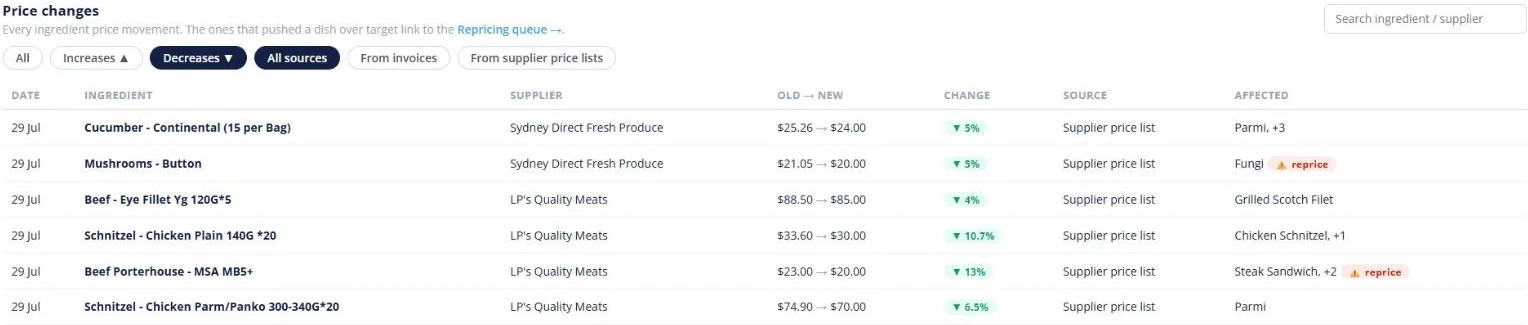
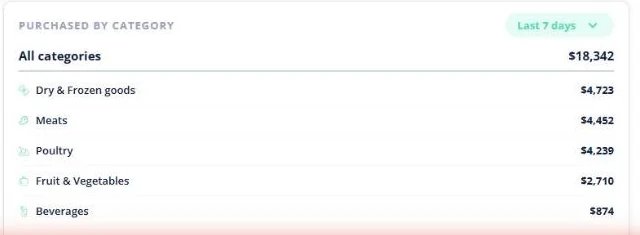
Because the ordering, the check-off and the invoices are in one place, the record is a by-product rather than a project. Every order keeps the unit price you paid. Every price change is logged old price to new with the percentage, the supplier, and whether it came from a price list or an invoice — with the dishes it affects listed beside it. The dashboard totals what the venue purchased this week against last week and splits it by category, so a jump traces to meat or dry goods instead of being a number nobody can explain.
- Every order kept by supplier with the unit price you paid
- Price movements old to new, with the percentage and the source
- Purchases this week against last week, split by category
- Orders, invoices and credits searchable, filterable and exportable
- Re-order a past order, or save it as a reusable pantry list
Who on the team can see and order what
Ordering is done by whoever is on, which is a good thing right up until it is not. Teammates in a venue are given a permission type: view-only, editing, or full admin — and a buyer can be scoped to particular product categories, so the person who orders the bar does not browse the meat account and does not see its order history either. On a paid plan you can add as many teammates as the venue needs, and the lists, orders and history belong to the venue rather than to the person who set them up.
- View-only, editing and admin permission types within a venue
- A buyer can be scoped to the product categories they actually buy
- Order history scoped the same way as the catalogue they can see
- Unlimited teammates within a venue on a paid plan
- Lists, orders and history stay with the venue when someone leaves
- Suppliers on Open Pantry
- 600+
- Wholesale suppliers across Australia already taking orders through the platform.
- Venues ordering
- 5,000+
- Restaurants, cafes, bars and pubs running their order round on Open Pantry.
- Cost to order
- $0
- Ordering through Open Pantry is free for restaurants and venues.
Paid plans add menu costing, inventory and reporting on top — ordering itself stays free.
Fits the way your venue already buys
Venues that put the whole order round in one place
Chefs Love Open Pantry

Thank you OPEN PANTRY, we used to have to use 6 apps to get access to ordering from our suppliers, the fact we can do it all in one has saved an incredible amount of time & effort! We love you!

We’ve been using Open Pantry for a few months now and it’s been an absolute lifesaver. We’re short staffed so being able to place all of our orders with all of our suppliers in the one spot is a massive help.

So glad this service exists. Has made it so easy for my manager & chefs to order & all payments are settled in one go. The recurring orders & pantry lists are amazing time savers!!
Why not keep buying the way we always have?
Because the way most venues buy is not really a system — it is four channels, a signature at the door and a stack of invoices that get paid rather than checked. Each part works. What is missing is the join: nothing compares the bill against what actually came off the van, and nothing remembers what the same carton cost in March. Putting the ordering, the check-off and the invoices in one place does not make anybody order faster; it makes the difference between what you ordered, what you received and what you were charged visible on the day, which is the only day it is worth anything.
Open Pantry for restaurants in Australia
Australian restaurants, cafés and pubs use Open Pantry to order from all their suppliers in one place and keep food costs in view.
- Plans priced in
- AUD — see Australia pricing
- Accounting sync
- Xero, MYOB and QuickBooks Online
- Supplier directory
- 1,100+ Australian wholesale food & beverage suppliers
Can restaurants in Australia use Open Pantry?
Yes. Restaurants, cafés and pubs in Australia use Open Pantry to order from all their suppliers in one place, track what they buy and keep food costs in view. Paid plans are priced in AUD.
Is ordering on Open Pantry free for restaurants?
Yes. The ordering package is free, with unlimited suppliers and orders. Paid plans add menu costing, inventory and reporting, and are priced in AUD.
Restaurant procurement software — questions venues ask
What is restaurant procurement software and what does it actually do?+
How do I order from all of my suppliers in one place?+
Do I have to change suppliers or renegotiate my prices to use it?+
Can Open Pantry compare prices across all of my suppliers?+
Can I set up purchase approvals so only certain staff can order?+
How does checking a delivery off against the invoice actually work?+
What happens if a supplier short-delivers or bills me the wrong price?+
Do all of my suppliers need to be on Open Pantry for this to work?+
How do I find out where the venue’s money actually went last month?+
How much does procurement software cost for a restaurant or venue?+
Works even better with
Restaurant Ordering Platform
Every supplier in one store list, one cart, one order round.
Explore →Products Purchased & Purchase History
Every price you have paid, and how it has moved since.
Explore →Pantry & Preparation Lists
The venue’s regular order written down, and prep that ends in an order.
Explore →Recurring Orders
The predictable order, set to repeat every 7, 14 or 28 days.
Explore →Restaurant Inventory Software
Stock, purchasing, costing and supplier ordering read from the same data.
Explore →Multi-Location Procurement
How a group runs several venues on Open Pantry, and what we do not do at group level.
Explore →Put every supplier, every delivery and every invoice in one place
Start with the suppliers you already buy from — you keep your accounts and your prices, and ordering is free for venues.
Free to order · Paid plans include a free trial · Cancel anytime