
Delivery Check-off: Pay for What Actually Came Through the Door
When a delivery arrives, the kitchen counts it against the order on a phone or tablet, and a short line raises a credit request on the spot. When the invoice lands, it is matched line by line against that count. What you ordered, what you received and what you were invoiced are kept as three separate numbers. Any gap between them is flagged, from a short or an extra to a price change or a different unit, so you can pay it or claim it.
- Count deliveries against the order on any device
- Credit requested for shorts before the bill arrives
- Ordered, received and invoiced kept separate
- Door temperature on record when your supplier logs it
★★★★★ Trusted by 5,000+ venues across Australia
Recommended by:




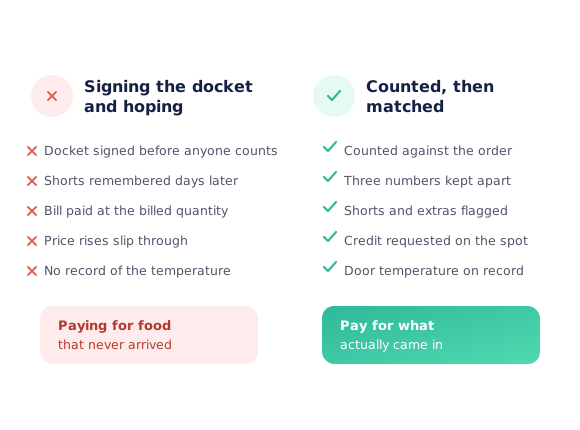
The docket gets signed before anyone counts
The driver is waiting, so the docket is signed unchecked
A short is remembered three days later, with no record
The invoice bills for the full order and gets paid in full
A price rise slips through between the quote and the bill
Nobody knows who received the delivery, or when
There is no record of the temperature at the door
Count once, and let the invoice be checked against it
Count the delivery
Open the order on a phone or tablet and count each line as it comes in. The order quantities are already there, so you only change what is different.
Flag what’s wrong
Mark a short with a reason. A credit request is raised when you finish the check-off, before the supplier has even sent the bill.
Match the invoice
When the invoice arrives, every line is compared with what you ordered and what the kitchen counted, and each gap is labelled.
Pay it or claim it
For each flagged line, accept the bill, pay it just this once, or decline and claim the difference, with a reason the supplier sees.
See how Open Pantry works for venues
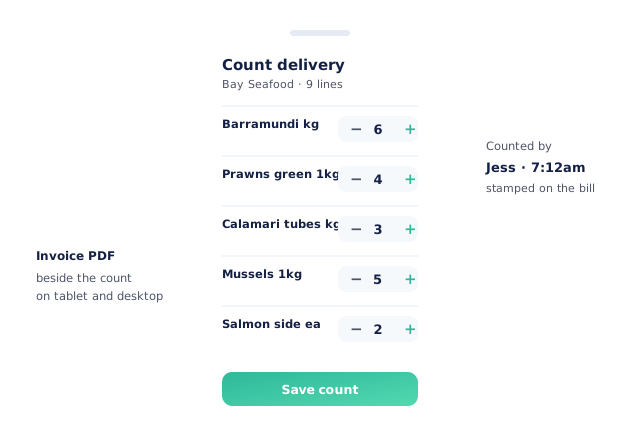
A count screen built for the back door
The count screen lists the order’s lines with quantities already filled in, so a delivery that matches is checked off in seconds. Change only what is different, pick a reason for a short, and save. The count is stamped with who did it and when. On a tablet or desktop the supplier’s invoice sits beside the count. On a phone it opens in a tab.
- Order quantities pre-filled, so you only change the differences
- Short reasons recorded against the line
- Each count stamped with the person and the time
- Invoice document beside the count on tablet and desktop
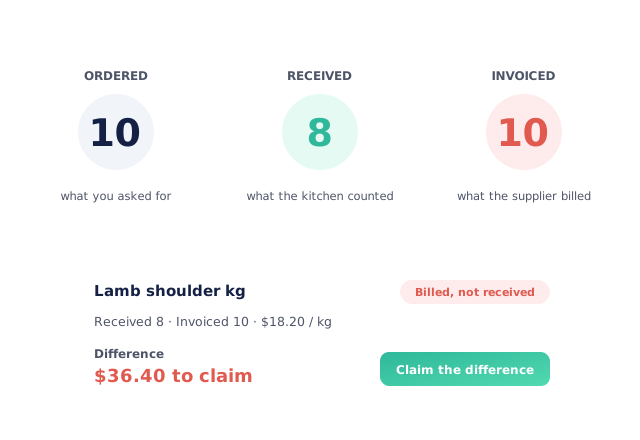
Ordered, received and invoiced are three different numbers
Most systems copy the invoice quantity into “received” and lose the one comparison that matters. Open Pantry keeps all three. Ordered is what you asked for, received is what the kitchen counted, and invoiced is what the supplier billed. When received and invoiced disagree, the line is flagged with the dollar difference, so a billed-but-not-delivered line becomes a claim instead of a payment.
- Ordered, received and invoiced held separately
- Billed-not-received lines priced as a dollar difference
- Confirm stays blocked until someone has counted
- Finance can’t overwrite the kitchen’s count unnoticed
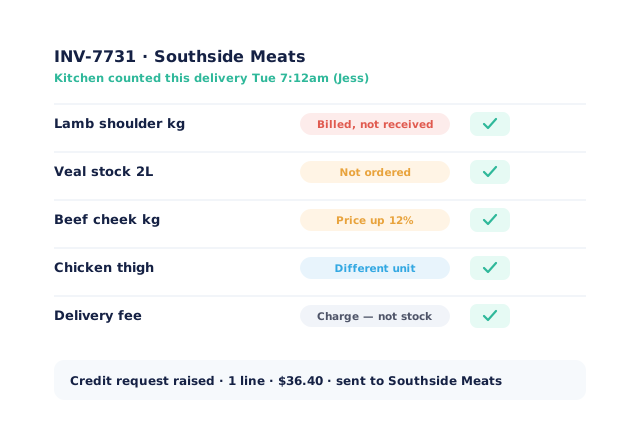
Every line that needs a decision, labelled
When the invoice is matched, each line carries the label it earned: Billed, not received; Not ordered; Price up; Check this price; Different unit; New product; or Charge — not stock for a delivery fee. Each one opens the decision it needs. Accept a price, pay it just this once, or decline and claim the difference. Shorts counted at the door roll into one credit request per delivery, topped up by anything found on the invoice.
- Short, not-ordered, price and unit differences labelled
- Accept, pay once, or claim the difference
- One credit request per delivery, topped up from the invoice
- Delivery fees treated as charges, not stock
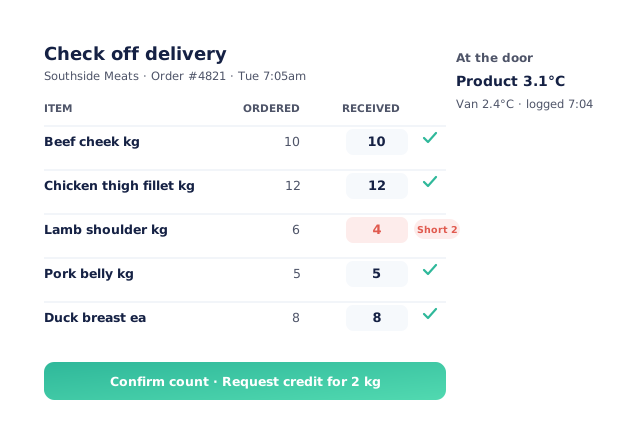
Temperature at the door, and deliveries with no order
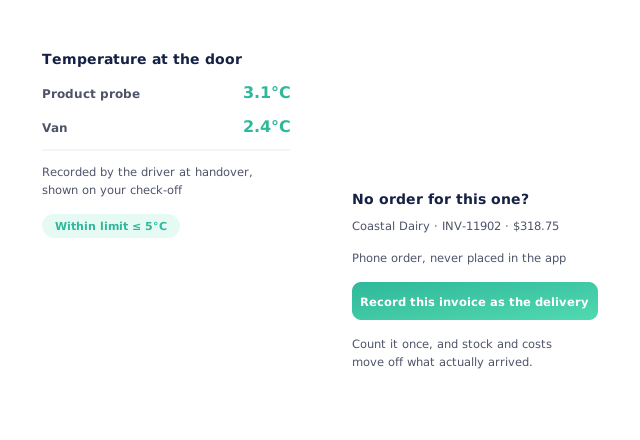
When your supplier’s driver records the product and van temperature at handover, it appears on your check-off, so the goods-in reading is on record without a clipboard. Some deliveries were never ordered in Open Pantry at all, such as a phone order or a top-up from a rep. For those, record the invoice as the delivery, count it, and stock and costs move off what actually arrived.
- Product and van temperature shown when the supplier records it
- Invoice-first deliveries recorded in one step
- Stock moves only on a counted delivery
- Phone and rep orders kept in the same history
Fits how deliveries already arrive
Venues that check before they pay
Chefs Love Open Pantry

Thank you OPEN PANTRY, we used to have to use 6 apps to get access to ordering from our suppliers, the fact we can do it all in one has saved an incredible amount of time & effort! We love you!

We’ve been using Open Pantry for a few months now and it’s been an absolute lifesaver. We’re short staffed so being able to place all of our orders with all of our suppliers in the one spot is a massive help.

So glad this service exists. Has made it so easy for my manager & chefs to order & all payments are settled in one go. The recurring orders & pantry lists are amazing time savers!!
Why not just sign the docket and check the invoice later?
Because later, nobody remembers what came in. The only reliable record of a short is the one made at the door, and an invoice checked without that record can only be checked against itself. Counting first, then matching the bill to the count, is what turns “I think we were short” into a credit with a number on it.
Open Pantry for restaurants in Australia
Australian restaurants, cafés and pubs use Open Pantry to order from all their suppliers in one place and keep food costs in view.
- Plans priced in
- AUD — see Australia pricing
- Accounting sync
- Xero, MYOB and QuickBooks Online
- Supplier directory
- 1,100+ Australian wholesale food & beverage suppliers
Can restaurants in Australia use Open Pantry?
Yes. Restaurants, cafés and pubs in Australia use Open Pantry to order from all their suppliers in one place, track what they buy and keep food costs in view. Paid plans are priced in AUD.
Is ordering on Open Pantry free for restaurants?
Yes. The ordering package is free, with unlimited suppliers and orders. Paid plans add menu costing, inventory and reporting, and are priced in AUD.
Delivery check-off — questions venues ask
What is delivery check-off?+
What is three-way matching for a restaurant?+
Can I raise a credit before the invoice arrives?+
What does Open Pantry flag on a supplier invoice?+
Why does Open Pantry make us count before confirming the invoice?+
What if a supplier’s price is higher than we expected?+
Can we record the delivery temperature?+
What about deliveries we never ordered in Open Pantry?+
Does it work on a phone?+
Which plan includes delivery check-off and invoice matching?+
Count it once, and only pay for what arrived
Delivery check-off comes with ordering. Invoice matching is part of Menu Profit Manager.
Free to order · Paid plans include a free trial · Cancel anytime