
Supplier Invoice Scanning: Your Recipe Costs, Updated by the Invoice
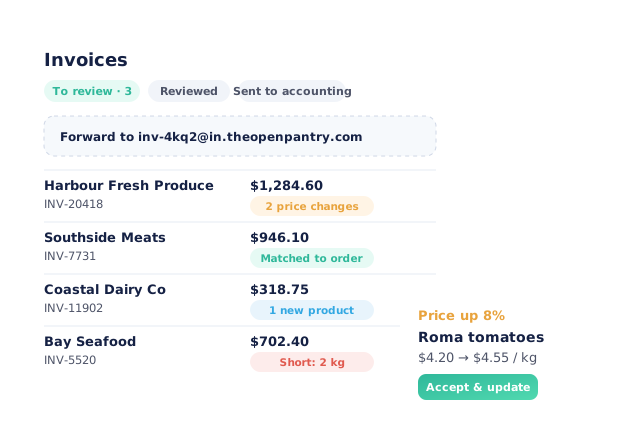
Forward supplier invoices to your venue’s own Open Pantry address, upload them, or drop hundreds in at once. Each line is read, matched to the product you already buy and checked against the price you paid last time. Accept a price change and every recipe that uses it re-costs itself, and any dish pushed over its food-cost target lands in a repricing queue with a suggested menu price.
- Email-in address, single upload or bulk upload
- Lines matched to your products, price changes flagged
- Recipes re-cost the moment you accept a new price
- Dishes over target listed with a suggested price
★★★★★ Trusted by 5,000+ venues across Australia
Recommended by:




The invoice knows your costs went up. Your menu doesn’t.
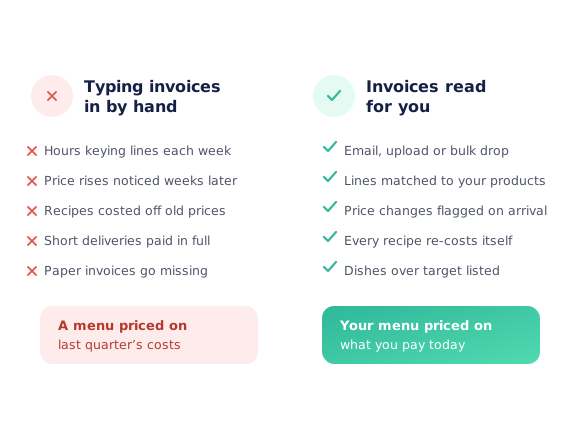
Someone keys invoice lines into a spreadsheet every week
A price rise is noticed a month later, if at all
Recipe costs sit on the prices from the last time anyone checked
Short deliveries get paid at the billed quantity
Paper invoices go missing before the bookkeeper sees them
Nobody can say which dishes a supplier’s new price list just hurt
From the supplier’s PDF to a repriced menu
Get the invoice in
Forward the supplier’s email to your venue’s invoice address, upload a PDF or a photo, or bulk upload a backlog. Nothing needs retyping.
Lines are read and matched
Each line is read and matched to the product you already buy from that supplier. Lines that need a look, like a price change, a new product or a different unit, are flagged on the review screen.
Accept what changed
Accept a new price and the ingredient updates, so every recipe that uses it re-costs. Hold money back for a short line, or add a new product in one step.
Reprice the dishes it hurt
Any dish pushed over its food-cost target goes into the repricing queue with a suggested price. Accept it or dismiss it with one click.
See how Open Pantry works for venues
Three ways in, including the backlog
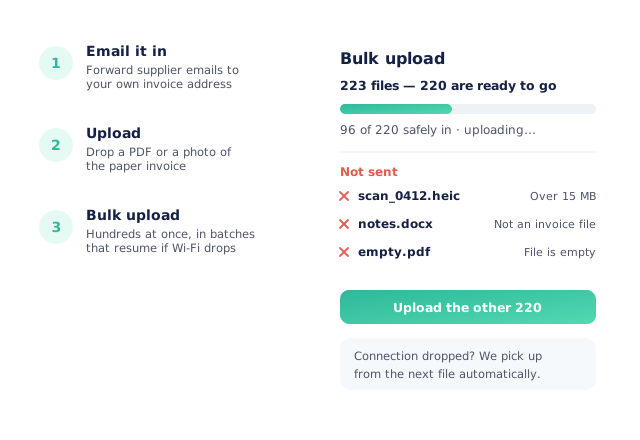
Every venue on a costing plan gets its own invoice address, so suppliers can email invoices straight in, or you can forward them. Single invoices upload as a PDF or a photo of the paper copy. For a backlog, bulk upload takes hundreds of files at once and sends them in batches. If the connection drops it pauses and picks up from the next file, and any file it can’t take is named with the reason.
- A unique email-in address for each venue
- PDF or photo upload
- Bulk upload that resumes after a dropped connection
- Refused files listed by name, with a reason and a fix
Every line matched to what you already buy
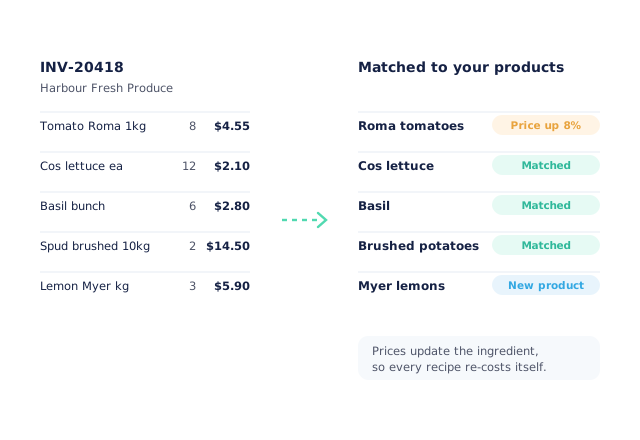
Lines are matched to your products from that supplier, so “Tomato Roma 1kg” on the invoice lands on the Roma tomatoes in your recipes. Lines that need a decision are flagged: a price up or down, a different unit, a product you have never bought. A supplier the system hasn’t seen before is never created on its own. It waits for you to confirm it, merge it with one you have, or dismiss it.
- Price changes flagged against what you paid last time
- New products added to your own supplier lists in one step
- New suppliers confirmed, merged or dismissed by you
- Supplier credit notes matched to your credit requests
A repricing queue for the dishes that went over
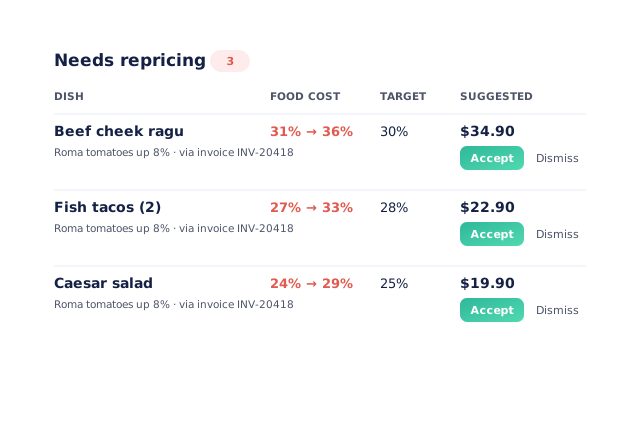
When an accepted price pushes a dish past its food-cost target, the dish joins a “Needs repricing” queue. It shows which ingredient moved, on which invoice, the dish’s cost before and after, and a suggested menu price. Accept the suggestion and the menu price updates. Dismiss it if you would rather carry the cost for now. Supplier price-list changes feed the same queue, including changes buried in a sub-recipe.
- Food cost before and after, against the dish’s target
- The ingredient and invoice that caused it
- Suggested menu price, accepted in one click
- Sub-recipe price changes carried through
Cost history, and a costed swap when a product is out
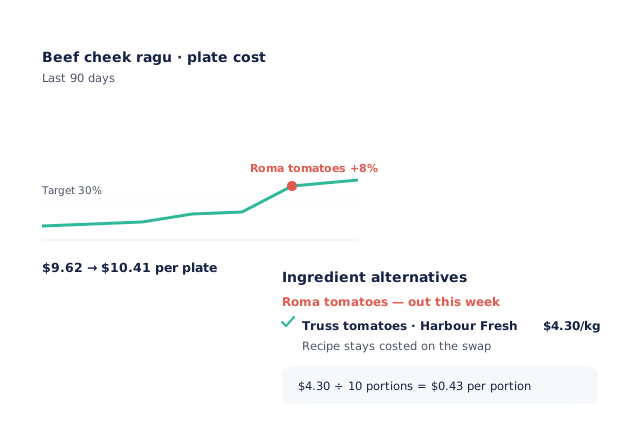
Each accepted price is recorded, so every dish has a cost-over-time chart against its target, and a feed shows every price change by supplier and direction. When a product is unavailable, an ingredient alternative keeps the recipe costed on the swap, so the margin stays real for the week you’re using it.
- Cost-over-time chart for every dish, with its target line
- One feed of every price change
- Ingredient alternatives keep recipes costed on a substitute
- Reviewed invoices sent to Xero, MYOB, QuickBooks, Sage or Zoho Books as draft bills
Fits the way invoices already arrive
Venues costing off what they actually pay
Chefs Love Open Pantry

Thank you OPEN PANTRY, we used to have to use 6 apps to get access to ordering from our suppliers, the fact we can do it all in one has saved an incredible amount of time & effort! We love you!

We’ve been using Open Pantry for a few months now and it’s been an absolute lifesaver. We’re short staffed so being able to place all of our orders with all of our suppliers in the one spot is a massive help.

So glad this service exists. Has made it so easy for my manager & chefs to order & all payments are settled in one go. The recurring orders & pantry lists are amazing time savers!!
Why not just type the invoices in?
It works until the week it doesn’t get done, and that is usually the week a supplier moves a price. Hand entry also leaves the slowest step to last: the recipe costs only change after someone reads the invoice, finds the product and updates it. Reading the invoice for you closes that gap. The price lands on the ingredient, the recipes re-cost, and the dishes that slipped are listed the same day.
Open Pantry for restaurants in Australia
Australian restaurants, cafés and pubs use Open Pantry to order from all their suppliers in one place and keep food costs in view.
- Plans priced in
- AUD — see Australia pricing
- Accounting sync
- Xero, MYOB and QuickBooks Online
- Supplier directory
- 1,100+ Australian wholesale food & beverage suppliers
Can restaurants in Australia use Open Pantry?
Yes. Restaurants, cafés and pubs in Australia use Open Pantry to order from all their suppliers in one place, track what they buy and keep food costs in view. Paid plans are priced in AUD.
Is ordering on Open Pantry free for restaurants?
Yes. The ordering package is free, with unlimited suppliers and orders. Paid plans add menu costing, inventory and reporting, and are priced in AUD.
Supplier invoice scanning — questions venues ask
How do I get supplier invoices into Open Pantry?+
What happens after an invoice is uploaded?+
Does accepting a new price update my recipe costs?+
What is the repricing queue?+
Can I upload a whole year of invoices at once?+
What if an invoice comes from a supplier I haven’t added?+
What happens if the invoice bills for more than was delivered?+
Can reviewed invoices go to my accounting software?+
What happens when a product is out and I use something else?+
Which plan includes invoice scanning?+
Let the invoice update your costs
Supplier invoice scanning is part of Menu Profit Manager.
Free to order · Paid plans include a free trial · Cancel anytime