
Restaurant Food Costing Software in Australia — Live Recipe Costing From Supplier Prices
Food costing software works out what each dish on your menu costs to put on a plate and what percentage of its selling price that is. Open Pantry does it from the supplier prices you actually pay: your recipes are built from the products you buy, so when a supplier changes a price, every dish using that ingredient re-costs itself and the food cost percentage moves with it — no spreadsheet to rebuild, no invoices to retype. It suits independent venues through to groups, and ordering is free.
- Dish costs built from your real supplier prices, not a figure typed in once
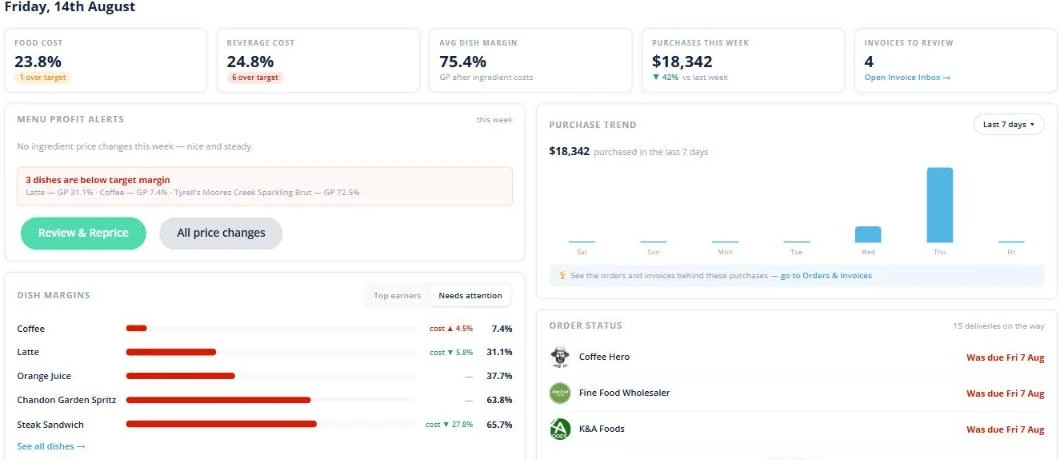
- A live food cost percentage and cost movement on every dish
- Dishes pushed past their food-cost target listed, ready to reprice
- Sub-recipes, stocktake, waste and POS sales all feed the same numbers
★★★★★ Trusted by 5,000+ venues across Australia
Recommended by:




A costed menu is accurate for about a week
The costing spreadsheet was built once and has not been touched since
Supplier prices moved and nobody re-costed the dishes that use them
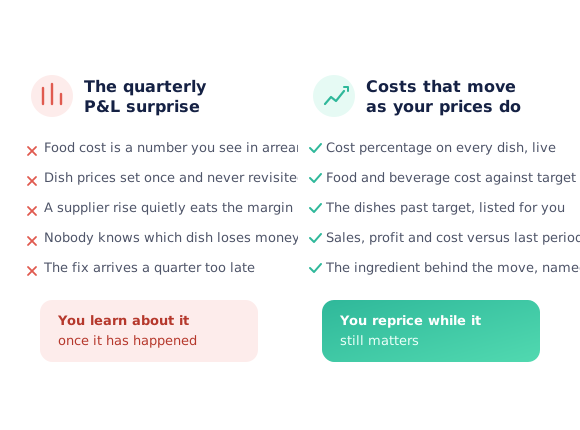
Food cost is a number that arrives with the quarterly accounts, months late
Nobody can name the ingredient behind a margin that quietly slipped
Sub-recipes — sauces, stocks, doughs — are costed by guesswork
The busiest dish is assumed to be the most profitable one
Supplier price list → recipe → menu → margin
Your supplier prices arrive
The prices come from the suppliers you already order from through Open Pantry, and from invoices you photograph, upload or email in — which build your suppliers, products and prices for you rather than being keyed in line by line.
Recipes are built from those products
A recipe holds the products you actually buy, in the quantities you use, so its cost is arithmetic on real prices. Sub-recipes — a napoli, a stock, a dough — cost themselves and roll up into every dish that uses them.
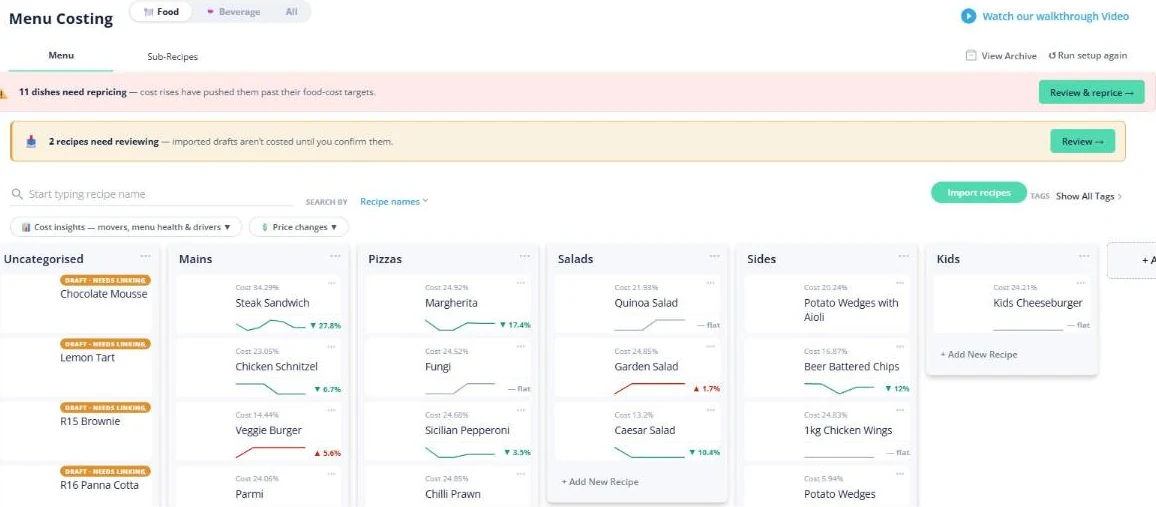
The menu carries a live cost percentage
Each dish shows what it costs today and what percentage of its selling price that is, grouped the way your menu is grouped, with food and beverage kept apart and a trend against last time.
Margin moves when your suppliers move
When an ingredient price changes, every dish using it re-costs. Dishes pushed past their food-cost target are counted in a banner that links straight into the repricing queue, so a price rise becomes a short list rather than a surprise.
See how Open Pantry works for venues
Live recipe costing, from the price list to the plate
The difference between food costing software and a costing spreadsheet is where the numbers come from. A spreadsheet holds prices somebody typed in on the day it was built; Open Pantry holds the products you buy from your suppliers, so a recipe is priced off the same list you order from. Change nothing, and the dish still re-costs when the supplier does — which is why the cost percentage on the board is what the menu costs today, not what it cost when someone last had an afternoon spare.
- Recipes built from real purchased products, in the units you buy them in
- Sub-recipes cost themselves and roll up into the dishes that use them
- Imported draft recipes are flagged, not costed, until you confirm them
When supplier prices change
Take a chicken parmigiana on a $32 menu price, built from a 220 g breast, mozzarella, a napoli sub-recipe and crumb. At $9.80/kg the breast costs $2.16 and the plate lands at about $4.80 — a food cost of 15%, comfortably inside target. The supplier then moves chicken to $11.30/kg. Nobody re-costs anything: the breast becomes $2.49, the plate $5.13, and the dish shows 16% instead of 15% with the movement marked against it. The same rise flows through every other chicken dish and every sub-recipe containing chicken, in one pass, the week it happens.
- One supplier price change re-costs every dish that uses the ingredient
- Price-spike alerts name the ingredient that moved, not just the total
- Dishes pushed past target arrive as a repricing list, with the cost movement beside each
Stocktake and inventory: what you used, not just what you bought
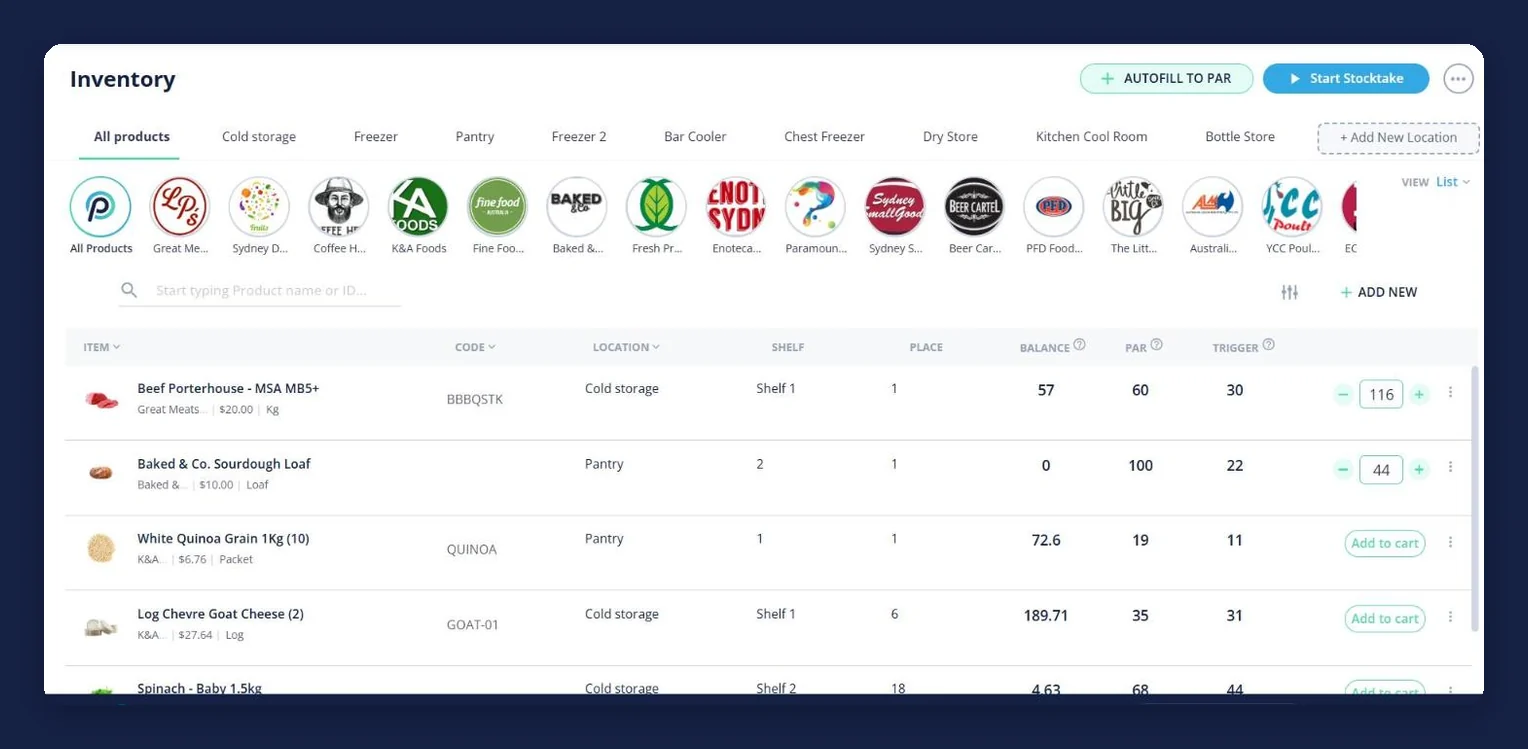
Costing a dish tells you what it should cost. Counting your stock tells you what actually left the shelf. Open Pantry keeps both on the same set of numbers: every product carries an on-hand balance, a par level and a trigger point, filed by the coolroom, freezer or store it lives in, and a stocktake is a guided count on a phone — one storage area at a time, in the unit the product comes in, with barcode scanning, and opening stock against your closing figure with the variance worked out. Finish the count and it becomes your live stock, so the ordering screen starts from a number rather than a walk-through.
- Balance, par level and trigger point per product, by storage area
- Stocktake on a phone with barcode scanning; opening, closing and variance
- The count becomes live stock and autofills an order back to par
Sales against costs: from the till, a template, or by hand
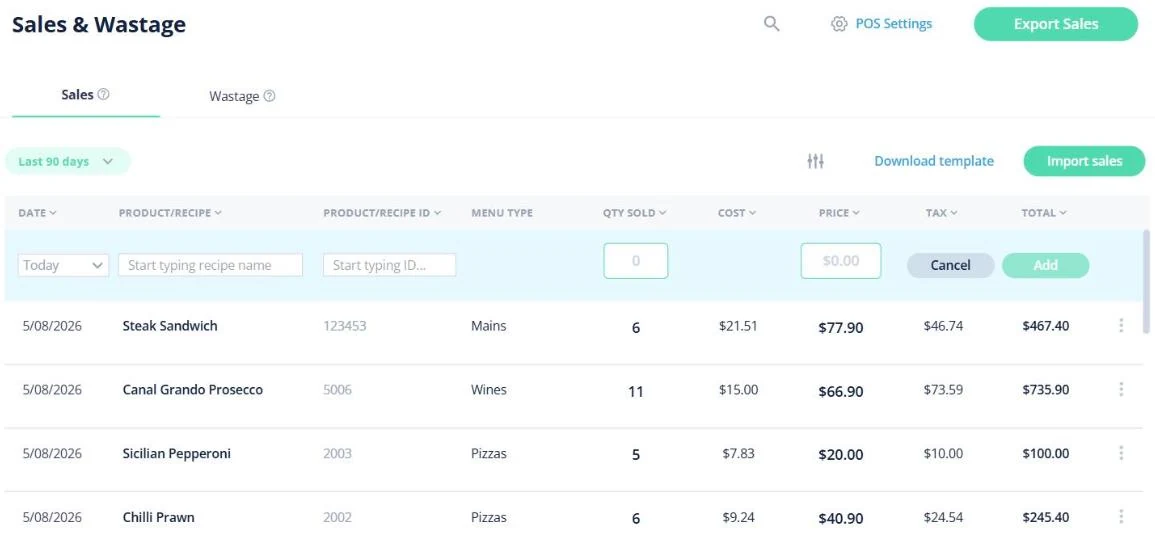
Dish costs are only half of a margin. One till connects directly — Triniteq PowerEPOS — and pulls your sales through automatically once a day, matched to the recipe each sale belongs to, which is what turns a night of service into cost of goods, food cost percentage and profit against the previous period without anyone keying it in; it is set up per venue, so talk to us. For any other till, a bulk template import or manual entry does exactly the same job. Waste is logged in Open Pantry rather than imported, keeping the reason it was written off and who reported it.
- Sales daily from a connected Triniteq PowerEPOS till, or by template or by hand
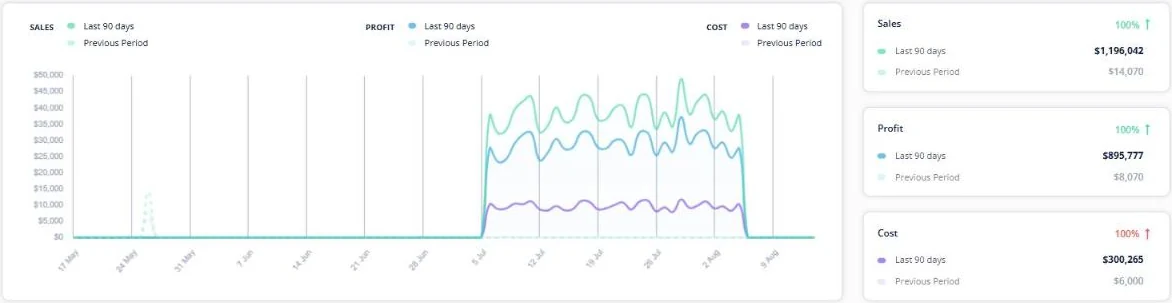
- Sales, profit and cost against the equivalent previous period
- A cost-of-goods percentage per menu category, down to menu item and product
One venue or several
Each venue keeps its own suppliers, products, recipes and price history, so its costing reflects what that kitchen actually buys — two sites on different produce suppliers do not share a wrong number between them. Within a venue you can add unlimited teammates on a paid plan, so a head chef, a sous chef and a manager work on the same live recipes and the same repricing list rather than emailing versions of a spreadsheet around. If you run several sites and want to talk through how to set them up, get in touch before you start building recipes.
- Per-venue suppliers, products, recipes and price history
- Unlimited teammates within a venue on a paid plan
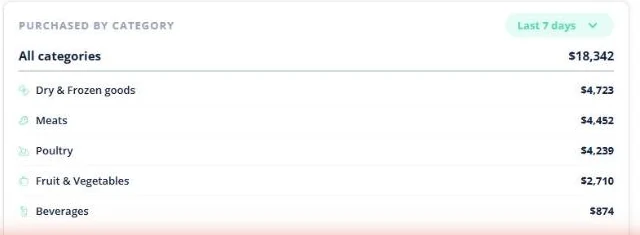
- Purchase history and spend by category, per venue
What food costing software costs
Ordering from your suppliers is free. Menu Profit Manager — recipe and menu costing, unlimited recipes, live food and beverage costs and the recipe multiplier planner — is a one-off $99 rather than a subscription. Restaurant Pro Suite adds automated inventory and stocktake, POS integration, sales, waste and variance reporting and automated ordering for $250 a month.
- Ordering from your suppliers: free for venues, always
- Menu Profit Manager: recipe and menu costing, one-off fee, no subscription
- Restaurant Pro Suite: costing plus automated inventory, stocktake, POS and reporting, monthly
- Chicken breast — supplier price
- $9.80 → $11.30
- Per kilo. The new price list lands; nobody retypes a thing.
- Chicken parmigiana — plate cost
- $4.80 → $5.13
- Every dish and sub-recipe using chicken re-costs in the same pass.
- Food cost on a $32 menu price
- 15.0% → 16.0%
- Visible the week it moves, not in the quarterly accounts.
Illustrative worked example — arithmetic on a single 220 g portion to show how a supplier price change reaches the menu. Not a customer result.
Works with what the kitchen already has
Venues costing off live supplier prices
Chefs Love Open Pantry

Thank you OPEN PANTRY, we used to have to use 6 apps to get access to ordering from our suppliers, the fact we can do it all in one has saved an incredible amount of time & effort! We love you!

We’ve been using Open Pantry for a few months now and it’s been an absolute lifesaver. We’re short staffed so being able to place all of our orders with all of our suppliers in the one spot is a massive help.

So glad this service exists. Has made it so easy for my manager & chefs to order & all payments are settled in one go. The recurring orders & pantry lists are amazing time savers!!
Why not just cost the menu in a spreadsheet?
Because a spreadsheet is a photograph of your costs on the day it was built. It cannot know that your produce supplier moved tomatoes on Tuesday, so it keeps returning a confident, wrong number — and the more sub-recipes it holds, the more places that wrong number is hiding. The work is not the arithmetic; it is finding the invoices, re-keying the prices and remembering which dishes to redo. Costing off the supplier prices you already order from removes exactly that work, and turns "our food cost is up" into a list of dishes you can look at this week.
Open Pantry for restaurants in Australia
Australian restaurants, cafés and pubs use Open Pantry to order from all their suppliers in one place and keep food costs in view.
- Plans priced in
- AUD — see Australia pricing
- Accounting sync
- Xero, MYOB and QuickBooks Online
- Supplier directory
- 1,100+ Australian wholesale food & beverage suppliers
Can restaurants in Australia use Open Pantry?
Yes. Restaurants, cafés and pubs in Australia use Open Pantry to order from all their suppliers in one place, track what they buy and keep food costs in view. Paid plans are priced in AUD.
Is ordering on Open Pantry free for restaurants?
Yes. The ordering package is free, with unlimited suppliers and orders. Paid plans add menu costing, inventory and reporting, and are priced in AUD.
Restaurant food costing — questions Australian venues ask
How do I automatically update menu costs when supplier prices change?+
What is food costing software and what does it actually do for a restaurant?+
How accurate is recipe costing if my suppliers change prices weekly?+
Do I have to enter my supplier invoices by hand to keep costs current?+
Can I see which dishes on my menu are losing money?+
Does food costing work with my stocktake and inventory counts?+
Can Open Pantry import sales from my POS so I can see real margins?+
How much does restaurant food costing software cost in Australia?+
Works even better with
Reporting & Profit Insights
The dish cost percentages, repricing list and profit reporting in full.
Explore →Restaurant Inventory Management
Balances, par levels and trigger points behind what a dish really used.
Explore →Stocktaking
Guided counts on a phone, with opening, closing and variance figures.
Explore →POS Sales Integration
Sales in daily from a connected till, or from a template — matched to the recipes they came from.
Explore →Products Purchased & Purchase History
Every price you have paid, and how it has moved since.
Explore →Compare Open Pantry
How Open Pantry lines up against the other platforms venues look at.
Explore →Cost your menu off the prices you actually pay
Menu Profit Manager builds your recipes from real supplier prices and keeps every dish costed as those prices move.
Free to order · Paid plans include a free trial · Cancel anytime