
Restaurant Allergen Management: Check Each Ingredient Once, Every Dish Knows
In Open Pantry, a venue checks the allergens of each ingredient it buys once — with a suggestion from the supplier’s spec, AI or the product’s name to confirm or change. Every recipe and dish that uses that ingredient, including through sub-recipes, then shows what it contains and what it may contain. The allergen matrix lays every dish against every allergen, and the guest allergen sheet prints in one tap, saying “Ask the kitchen” where anything is still unchecked.
- Each ingredient checked once, never asked again
- Dishes and sub-recipes fill themselves in
- A live allergen matrix and a printable guest sheet
★★★★★ Trusted by 5,000+ venues across Australia
Recommended by:




Why Allergen Lists Go Out of Date
The allergen spreadsheet was right when the menu launched, and the menu has changed since
A supplier swaps a product and nobody checks whether the new one has nuts in it
Front of house is asked about sesame and has to run to the pass to find out
A sauce used in six dishes changes, and only two of the six get updated
How Allergen Management Works
Check your ingredients
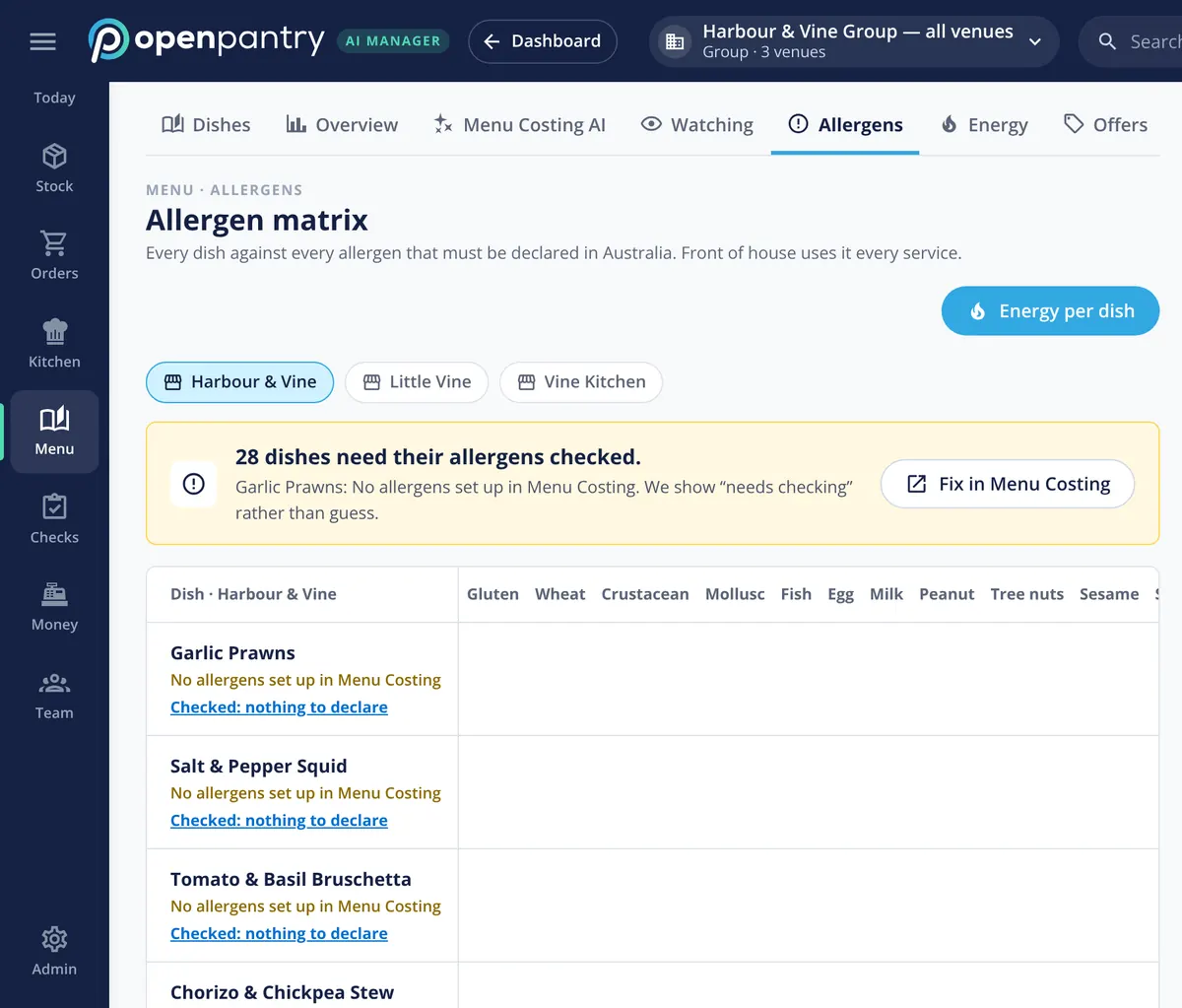
Needs you lists ingredients nobody has checked. Confirm each suggestion, change it, or say there’s none in it.
Dishes fill themselves in
Every recipe and dish works out what it contains and may contain from its ingredients and sub-recipes.
Add what the ingredients don’t show
A shared fryer or a garnish? Add it by hand to the dish — it can only add, never take away.
Print for front of house
Open the Allergens view and print the guest allergen sheet, or the recipe card with its Allergens block.
See how Open Pantry works for venues
Each ingredient, checked once
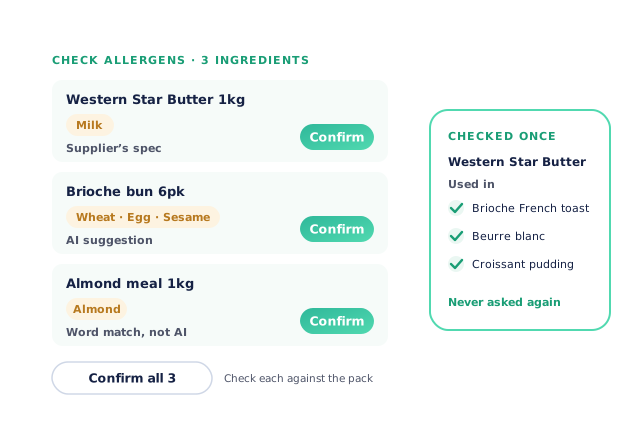
When an ingredient nobody has checked turns up in a recipe, Needs you says “Check allergens for N ingredients”. Each one comes with a suggestion — from the supplier’s spec where there is one, otherwise from AI, otherwise from a word in the product’s name, clearly marked. Confirm it, change it, or mark it as having none. Saying an ingredient has no allergens is done one at a time, because that’s the claim that lets a dish print as allergen-free. Once checked, it’s never asked again in any recipe.
- Supplier spec first, then AI, then a word match
- “None in it” confirmed one ingredient at a time
Dishes that work out their own allergens
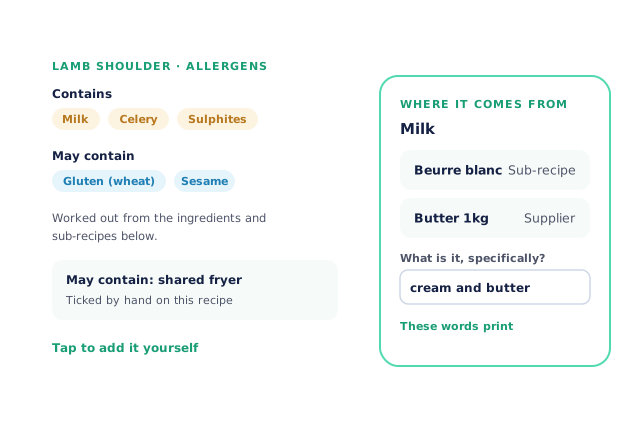
A dish shows what it contains and what it may contain, worked out from its ingredients and every sub-recipe inside it. Tap an allergen to see where it comes from — the ingredient, the supplier and the sub-recipe — and write what it is specifically, such as “cream and butter”, in words that print for guests. Add an allergen the ingredients don’t show, choosing “It contains it” or “May contain (shared equipment)”. Hand-added allergens only add; to remove one that comes from an ingredient, change the ingredient.
- Traced through sub-recipes
- Guest-friendly words that print
An allergen matrix for the whole menu
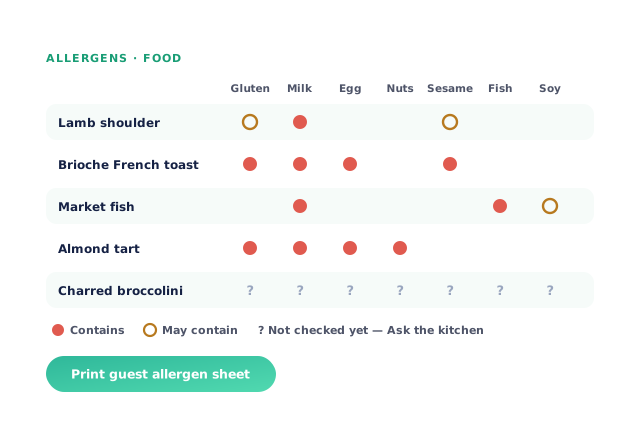
The menu board’s Allergens view lays every dish against every allergen, for food, drinks or both. A question mark means something in that dish hasn’t been checked yet, so nobody guesses. Print guest allergen sheet produces the sheet front of house uses every service, with “Ask the kitchen” against any dish that isn’t fully checked. The allergen list follows your country: Australia and New Zealand name each cereal and nut, the UK list has the 14 allergens, and the US list has the 9 major food allergens.
- Every dish against every allergen
- “Ask the kitchen” instead of a guess
On the recipe card, and from imports
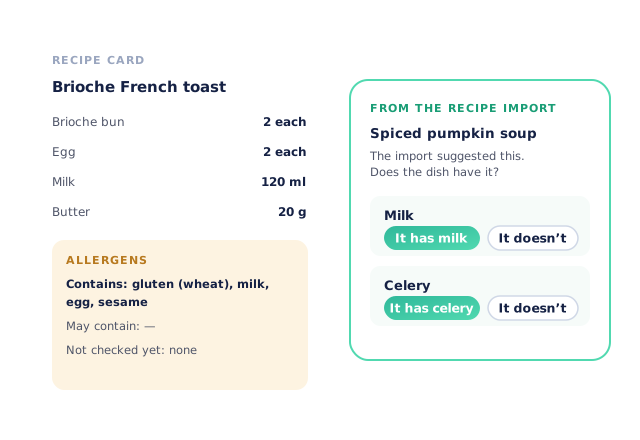
Each recipe card PDF carries an Allergens block — contains, may contain, and anything not checked yet — so the kitchen has it on the same page as the method. Recipes imported from a photo, PDF or spreadsheet bring their allergens in as suggestions to accept or turn down, never as ticks, so nothing reaches the guest sheet without someone saying yes.
- Allergens on every recipe card
- Imported allergens are suggestions, not ticks
Allergens from the products you actually buy
Venues that know what’s in every dish
Chefs Love Open Pantry

Thank you OPEN PANTRY, we used to have to use 6 apps to get access to ordering from our suppliers, the fact we can do it all in one has saved an incredible amount of time & effort! We love you!

We’ve been using Open Pantry for a few months now and it’s been an absolute lifesaver. We’re short staffed so being able to place all of our orders with all of our suppliers in the one spot is a massive help.

So glad this service exists. Has made it so easy for my manager & chefs to order & all payments are settled in one go. The recurring orders & pantry lists are amazing time savers!!
Why not keep allergens in a spreadsheet?
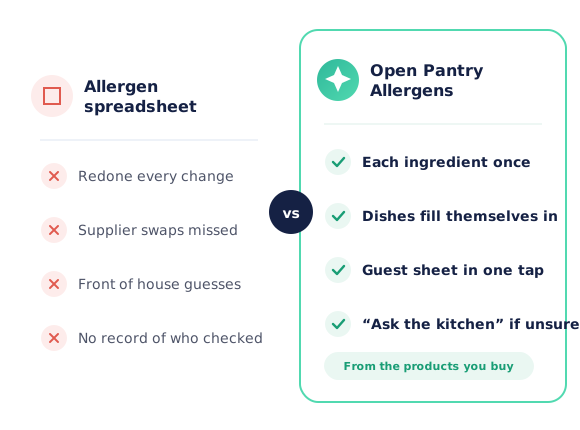
Because a spreadsheet of allergens is only as current as the last time someone redid it, and it doesn’t know that the butter, the bun or the sauce changed. When allergens are worked out from the products you actually buy and the recipes you actually cook, a change to one ingredient reaches every dish that uses it, and anything unchecked says so instead of looking safe.
Open Pantry for restaurants in Australia
Australian restaurants, cafés and pubs use Open Pantry to order from all their suppliers in one place and keep food costs in view.
- Plans priced in
- AUD — see Australia pricing
- Accounting sync
- Xero, MYOB and QuickBooks Online
- Supplier directory
- 1,100+ Australian wholesale food & beverage suppliers
Can restaurants in Australia use Open Pantry?
Yes. Restaurants, cafés and pubs in Australia use Open Pantry to order from all their suppliers in one place, track what they buy and keep food costs in view. Paid plans are priced in AUD.
Is ordering on Open Pantry free for restaurants?
Yes. The ordering package is free, with unlimited suppliers and orders. Paid plans add menu costing, inventory and reporting, and are priced in AUD.
Restaurant AI Manager
What Restaurant AI Manager adds
The AI manager on top: it watches every order, delivery, invoice, count and sale, and drafts the fix for you to approve.
Stock Control & Counts
Deliveries add stock, sales take it off, and counts on a phone take cartons, inners and singles on one line.
Demand Forecasting
Orders and prep worked out from your sales, bookings and functions, rounded to packs and batch sizes.
Ordering & Suppliers
Orders drafted from the forecast for your own suppliers, every invoice checked, and tenders at your volumes.
AI Agents
AI helpers that draft orders, credit claims and counts for a person to approve — or connect your own AI.
Restaurant Reporting
Stock, cost, purchasing and menu reports per venue and group, and the week in one email every Monday.
Group Head Office
Master recipes rolled out to venues, shared lists, regions, area managers, and roles with spend limits.
Ordering from your suppliers stays free for every venue, and Menu Profit Manager is still sold on its own.
Allergen management — questions venues ask
How does Open Pantry work out a dish’s allergens?+
Where do the allergen suggestions come from?+
Do I have to check the same ingredient for every recipe?+
What if a dish has an allergen that isn’t in its ingredients?+
What does front of house see if a dish hasn’t been fully checked?+
Can I print an allergen sheet for guests?+
Does the allergen list match my country’s rules?+
Do imported recipes bring their allergens in?+
Which plan includes allergen management?+
Know what’s in every dish, every service
Allergens come with Menu Profit Manager, built on the recipes you already cost.
Free to order · Paid plans include a free trial · Cancel anytime