
Xero Integration: Finalise the Order, the Invoice Is Already in Xero
Open Pantry connects your wholesale operation to Xero. Run products, customer pricing, picking and delivery in Open Pantry; when an order is finalised its invoice is created in Xero automatically — mapped to your own sales account code and GST treatment, matched to the contact you already have, and never typed a second time.
- Finalised orders become Xero invoices automatically — or on your say-so
- Your Xero contacts and products seeded in before go-live, so nothing duplicates
- Account codes, GST and freight mapped once to your own chart of accounts
★★★★★ Trusted by 600+ suppliers across Australia
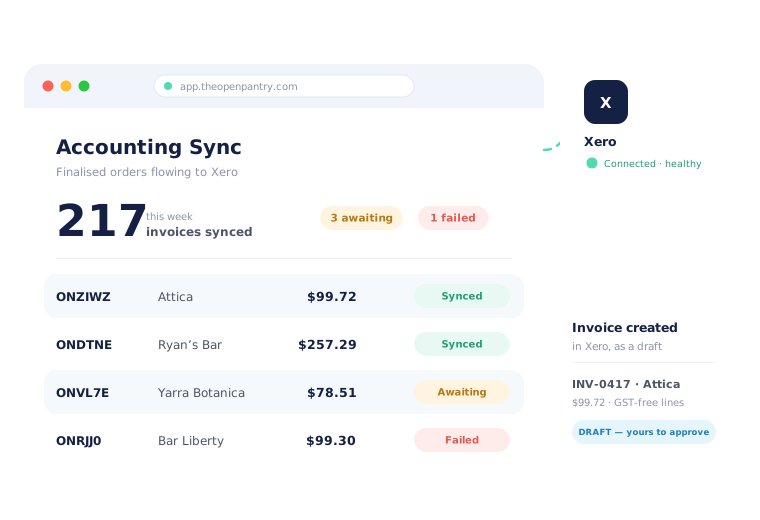



The order is already done. Why is someone typing it into Xero?

Every delivered order keyed a second time into Xero by hand

Duplicate contacts, because the export never matched what was already there

GST-free produce and taxable freight decided line by line, from memory

Nobody can say which invoices actually made it into Xero this week
Connect Xero Once, Then Let It Run
Connect your Xero organisation
Authorise Xero from Open Pantry and pick the organisation you invoice from. Read-only to start with — nothing is written to Xero at this stage.
Preflight and choose the source of truth
The onboarding wizard checks the connection, then asks the question that matters: for customers, products, pricing and stock, which system leads? Your answer governs everything that follows.
Seed your existing Xero records
Your Xero contacts and products are pulled into a staging area and matched against Open Pantry first. You review the matches before a single record is created on either side.
Invoices flow as orders finalise
From then on, finalising an order creates its invoice in Xero — as a draft by default — with the account codes, tax rates and contact already resolved. Every invoice shows you its own sync status.
Free trial · Cancel anytime
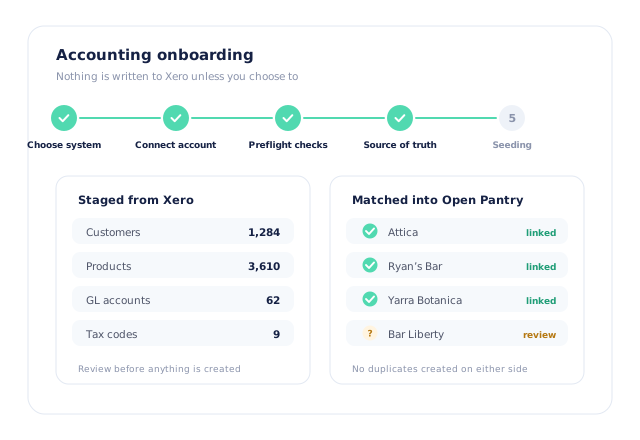
Seeded from Xero, staged before anything is written
If your customers and products already live in Xero, that is where setup starts. Open Pantry imports them into a staging area, matches them against your Open Pantry records, and shows you what it matched and what it is unsure about. Nothing is created in Xero, and nothing is overwritten in Open Pantry, until you say so.
- Xero contacts and products imported into staging, not straight into your data
- Preflight checks and an explicit source-of-truth choice before seeding runs
- Confident matches linked automatically; the rest queued for you to review
- Re-runnable later — connect first, tidy up over a week if you would rather
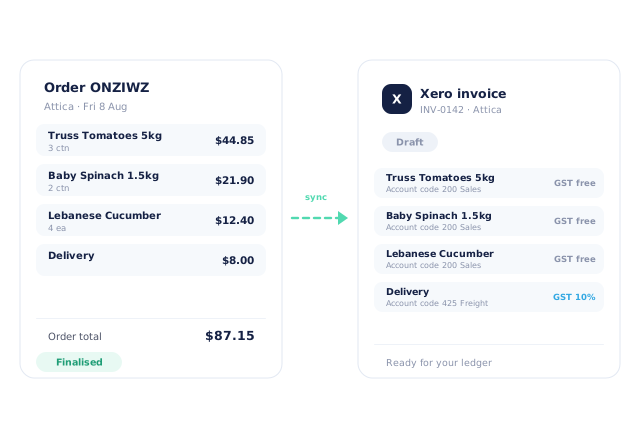
A finalised order becomes a Xero invoice, as a draft by default
Finalise an order in Open Pantry and its invoice is created in your Xero organisation — customer, line items, quantities actually picked, delivery, account codes and tax rates all carried across. It posts as a draft, so your finance team keeps its review step. If you would rather it posted approved, that is a setting, not a rebuild.
- Invoices carry the quantities that were picked, not the quantities ordered
- Draft by default so approval stays inside Xero
- "Automatically send invoices to Xero" on, or send them yourself from the order
- Payments taken in Open Pantry are recorded against the Xero invoice
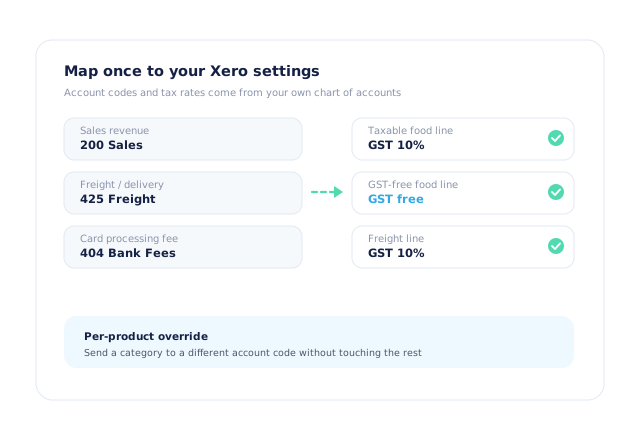
Your account codes, your GST — mapped once
Sales post to the account code you choose from your own chart of accounts, not one we picked for you, and tax follows the Xero tax rates you already use. That matters more in food than in most trades: fresh produce is GST-free, the freight line on the same invoice is not, and getting it wrong is a BAS problem months later.
- Default sales account code, or a different one per product category
- GST-free and taxable lines on the same invoice, treated correctly
- Freight and card-processing fees mapped to their own accounts
- Set at onboarding with your bookkeeper, then left alone
Matched before anything is created — and visible when it fails
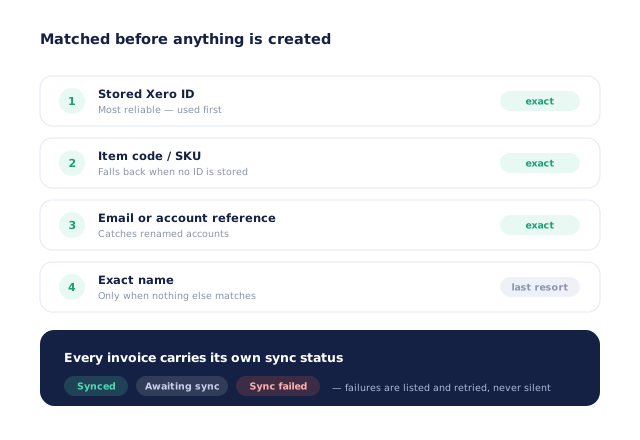
Duplicates are what turn an accounting integration into a cleanup project. Open Pantry looks for the stored Xero contact ID first, then falls back to email, phone and exact name before it will create anything new. And when a sync does fail — a rate limit, a disconnected token, an account code that was deleted — that invoice is listed as failed, not quietly dropped.
- Stored Xero contact ID preferred; email, phone and name as fallbacks
- Missing contacts created only when there is genuinely no match
- Every invoice shows Awaiting sync, Synced or Sync failed
- Failed invoices are listed together and can be retried
- More product lines purchased
- 24%
- Your always-on branded store and app put your full range in front of customers, so baskets grow.
- Less order-processing cost
- 95%
- AI order capture and auto-invoicing remove the manual keying between order and books.
- Fewer picking errors
- 80%
- Tablet pick & pack with FEFO lot and expiry tracking catches shorts and wrong items before they ship.
Real gains suppliers report after moving ordering, fulfilment and invoicing onto Open Pantry.
Xero Is One of Eleven Ledgers We Connect To
Trusted by M&J Chickens
- $175m+
- Annual turnover
M&J Chickens use Open Pantry to move ordering out of calls and messages and into one digital workflow — giving customers a smooth ordering experience and giving the team fewer errors and less admin.
“With Open Pantry, we launched our own fully branded ordering app — it’s helped us protect our customer base, move to digital ordering, and deliver a much better experience to our venues.”

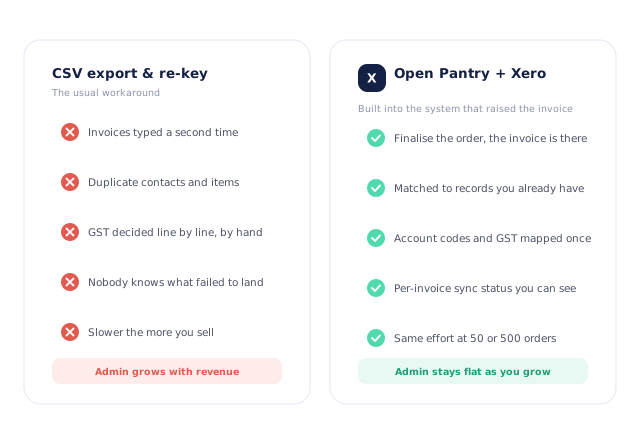
A CSV export is not an integration.
Exporting a file and importing it into Xero moves the typing around; it does not remove it. Nothing is matched, so contacts and items breed. Nothing is mapped, so GST is decided by whoever is doing the import that day. And nothing reports back, so the first sign that a week of invoices never landed is a customer asking why they have not been billed. A sync built into the system that raised the invoice knows what was picked, who it was for and which account it belongs in — and tells you when it could not deliver it.
Questions Suppliers Ask About the Xero Integration
Does Open Pantry integrate with Xero?+
Do invoices arrive in Xero as drafts or approved?+
Do invoices go across automatically, or do I send them?+
Can Open Pantry import the customers and products I already have in Xero?+
Will it create duplicate contacts in Xero?+
Which sales account code do invoices post to?+
How is GST handled on food lines?+
What happens if an invoice fails to reach Xero?+
Do payments and credits sync as well?+
Which plan includes the Xero integration?+
Works Even Better With
Connect Xero Once. Stop Re-keying Invoices.
Join 600+ Australian suppliers running their ordering, fulfilment and invoicing on Open Pantry.
Setup done for you · Cancel anytime · Your data stays yours