
Specials & Promotions: An Offer That Prices Itself and Ends on Time
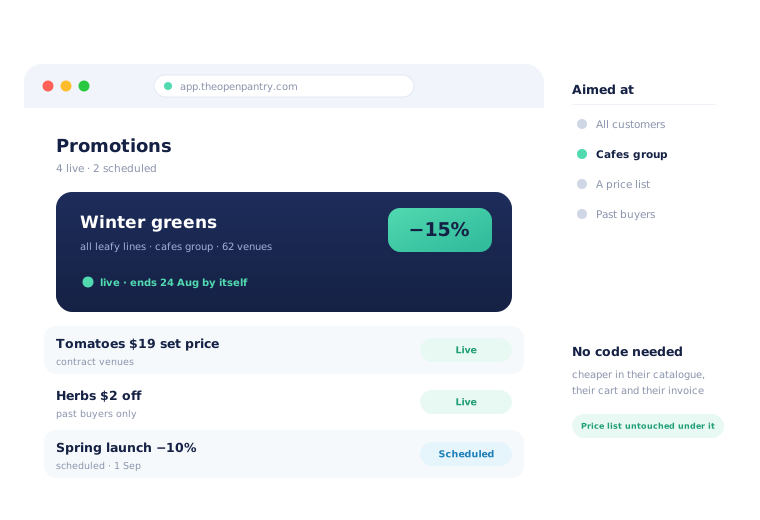
A special in Open Pantry is not an announcement — it is a price. Choose the mechanic (a percentage off, a dollar amount off, a set price, or simply featuring a line), choose who sees it and which products it covers, set the dates, and it applies itself in those customers’ catalogues, carts and invoices until it expires.
- Four mechanics: percentage off, dollar off, a set price, or feature it
- Aimed at everyone, a customer group, a price list, named venues, or past buyers
- Runs between your dates and ends itself — no code for anyone to remember
★★★★★ Trusted by 600+ suppliers across Australia



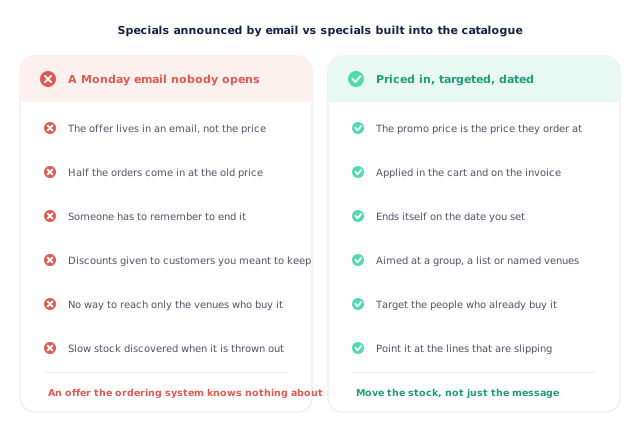
The special is in an email. The order comes in at the old price.

The offer lives in a newsletter, not in the price the customer pays

Someone has to remember to take the discount off again

Discounts handed to customers who were buying it anyway

Slow-moving stock discovered when it goes in the bin
Set It Up Once, Then Leave It Alone
Choose the mechanic
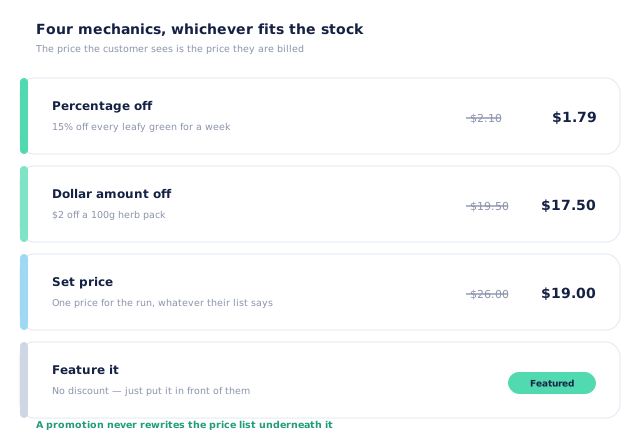
A percentage off, a fixed dollar amount off, a set price for the run, or no discount at all — just featuring the line so it appears in front of the customers you choose.
Choose who it is for
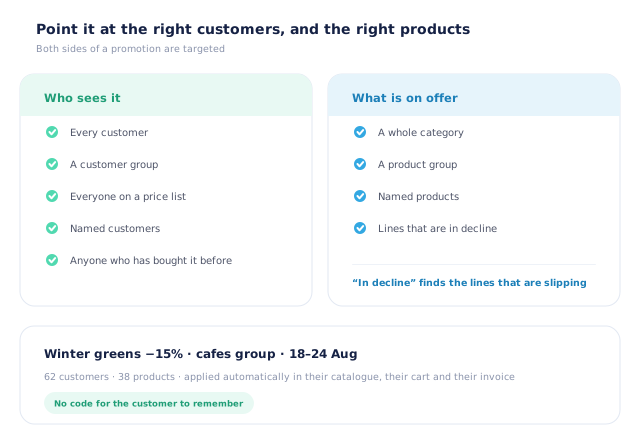
Everyone, a customer group, everyone on a particular price list, a handful of named venues, or specifically the customers who have bought that product before.
Choose what is on offer
A whole category, a product group, individual products, or the lines that are currently in decline — which is the fastest way to find what is slipping before it becomes waste.
Set the dates and schedule it
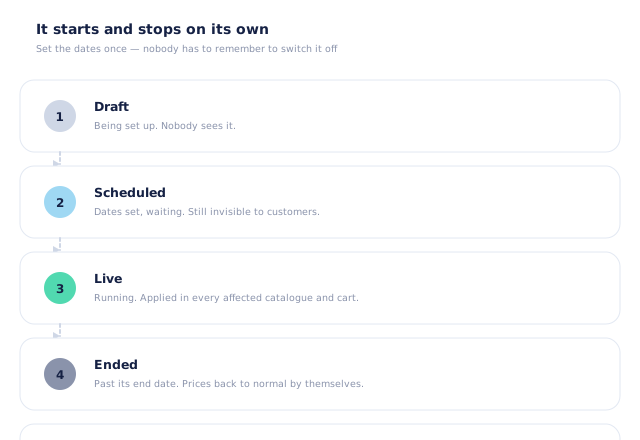
It sits scheduled and invisible until its start date, runs as a live price while it is on, and returns to normal pricing when it ends. Nobody has to switch it off.
Free trial · Cancel anytime
Four mechanics, and the offer is the actual price
The point of a promotion tool is that the customer never has to know a promotion exists. They open your catalogue, the line is cheaper, and the cheaper number is what goes into the cart and onto the invoice. Percentage off suits a category push, a dollar amount suits a single line, a set price suits a clearance run where you want one number regardless of what each customer normally pays, and featuring a line lets you push something without discounting it at all.
- Percentage off, dollar amount off, a set price, or feature with no discount
- The promo price is the price ordered at, billed at and picked against
- No code, no voucher, nothing for the customer to remember
- The price list underneath is left untouched and returns when it ends
Aim it, on both sides
A discount given to everybody is a price cut with extra steps. Both halves of a promotion are targeted in Open Pantry: who sees it, and what it covers. On the customer side that is everyone, a customer group, everyone on a price list, named venues, or — the useful one — the customers who have bought that product before, when you are trying to bring back a line rather than discover it. On the product side it is a category, a product group, named products, or the lines that are in decline.
- Audience: all, a customer group, a price list, named venues, or past buyers
- Products: a category, a product group, named products, or lines in decline
- Both sides set on the same promotion, so the aim is precise
- A group changes membership and the promotion follows
Scheduled, live, ended — it manages its own life
Every promotion moves through the same four states. Draft while you build it, invisible to everyone. Scheduled once the dates are set, still invisible. Live between the dates, applying itself everywhere it is targeted. Ended afterwards, with prices back to normal without anyone doing anything. That last transition is the one that matters commercially: a special nobody remembers to end has quietly become your new price, and you will find out at the end of the quarter.
- Draft, scheduled, live and ended — the state is explicit
- Set the start and end dates when you create it
- Live in the catalogue, the cart and the invoice at the same time
- Prices return by themselves when the run finishes
Then see whether it moved anything
A special is worth running twice only if you know what the first one did. Because a promotion is a real price on a real order rather than a message, its effect turns up in the reporting you already have: the product report shows units and revenue for the period the special ran and the margin it came at, the trends report compares that period against the one before, and the customer report shows whether the venues you aimed at actually bought. It is the difference between “we ran a special” and “that special moved 40% more units at a margin we were happy with”.
- Units, revenue and margin per product over the promotion period
- Period-on-period comparison in the trends report
- Whether the targeted customers actually ordered
- Margin visible, so a discount is a decision rather than a hope
- More product lines purchased
- 24%
- Your always-on branded store and app put your full range in front of customers, so baskets grow.
- Less order-processing cost
- 95%
- AI order capture and auto-invoicing remove the manual keying between order and books.
- Fewer picking errors
- 80%
- Tablet pick & pack with FEFO lot and expiry tracking catches shorts and wrong items before they ship.
Real gains suppliers report after moving ordering, fulfilment and invoicing onto Open Pantry.
Discounted Prices Your Invoices Already Agree With
Trusted by M&J Chickens
- $175m+
- Annual turnover
M&J Chickens use Open Pantry to move ordering out of calls and messages and into one digital workflow — giving customers a smooth ordering experience and giving the team fewer errors and less admin.
“With Open Pantry, we launched our own fully branded ordering app — it’s helped us protect our customer base, move to digital ordering, and deliver a much better experience to our venues.”

A special announced in a newsletter is a discount you pay for twice.
Email the offer and two things happen. Customers who were going to buy the product anyway get it cheaper, and customers who would have responded never open the email — so you have spent the margin and moved nothing. Worse, the order still arrives at the old price and someone has to credit the difference. A promotion that lives in the price, aimed at the venues you actually want to move, running between dates it enforces itself, costs you exactly the margin you decided to spend and no more.
Questions Suppliers Ask About Specials
What kinds of special can I run?+
Who can I target?+
Can I put a special on a whole category?+
Does the customer need a code?+
What happens when a special ends?+
Does a special overwrite my price list?+
Can I set up a special in advance?+
How do I know whether a special worked?+
How is this different from customer pricing?+
Which plan includes promotions?+
Run the Special in the Price, Not in an Email.
Join 600+ Australian suppliers running their ordering, fulfilment and invoicing on Open Pantry.
Setup done for you · Cancel anytime · Your data stays yours