
Sell the Same Product by Carton, Tray or Each
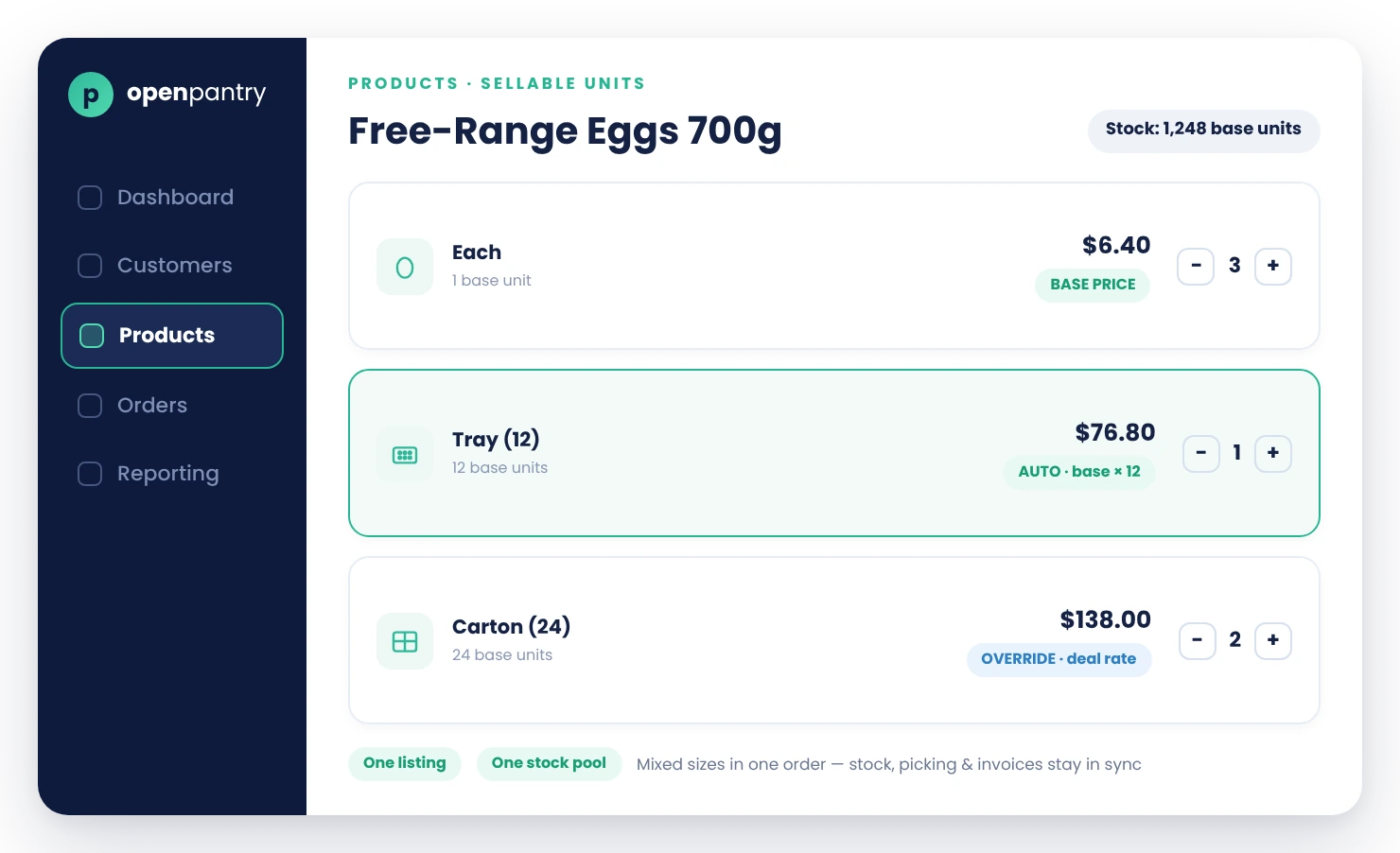
Buy-in-Units lets you sell one product in multiple pack sizes — each, tray, carton — with its own price per unit, from a single product listing. Customers pick their size with one tap, stock is tracked in base units automatically, and invoices show exactly what was ordered at the right per-pack price.
- One product, multiple sellable units — no duplicate listings
- Per-unit pricing: automatic (base × pack quantity) or your own override per size
- Stock, picking and invoicing all stay in sync across pack sizes
★★★★★ Trusted by 600+ suppliers across Australia



One Product Shouldn't Need Three Listings

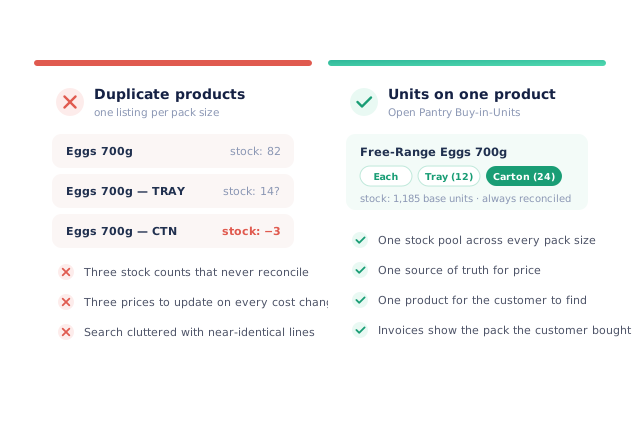
"Eggs", "Eggs — tray" and "Eggs — carton" as separate products = triple the maintenance and stock chaos

Customers order an "each" when they meant a carton — or vice versa — and the truck comes back

Carton prices drift out of line with base prices every time costs change

Stock counts that can't reconcile singles against cartons
How Selling In Units Works
Define units on the product
Each, tray of 12, carton of 24 — with the conversion factor for each pack.
Set pricing per unit
Automatic (base price × pack quantity) or a specific override price per pack size (e.g. a sharper carton rate).
Customers pick a size
Clean size chips on the product tile; they can mix sizes in one order (2 cartons + 3 each).
Everything reconciles
Stock decrements in base units across all pack sizes, pick lists show the packs, and invoices show pack size and per-pack price.
Free trial · Cancel anytime
One listing, every pack size
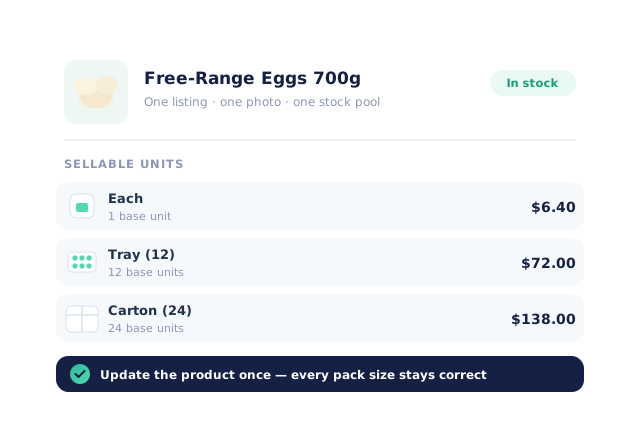
Units live on the product, not as clones of it. Update the product once — name, photo, stock — and every pack size stays correct.
Pricing that follows your rules
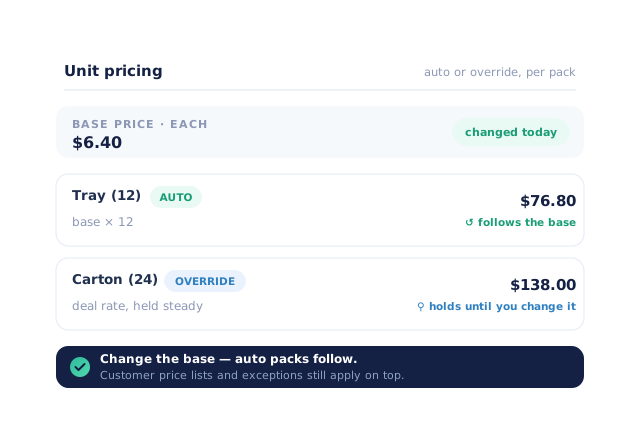
Choose per unit: auto-calculated from the base price (change the base, packs follow) or a fixed override (hold a carton deal steady while the base moves). Customer price lists and exceptions apply on top.
Stock that always adds up
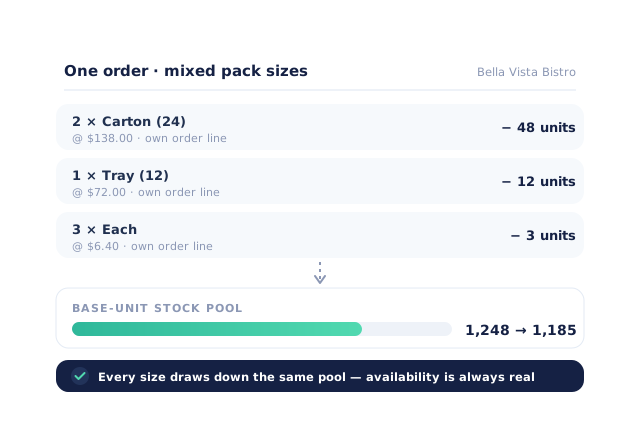
Every pack size draws down the same base stock pool (a carton of 24 decrements 24), so availability is always real whichever way customers buy.
- A venue can order 2 cartons and 3 singles of the same product in one go
- Each size is its own order line with its own price — picking and invoicing stay unambiguous
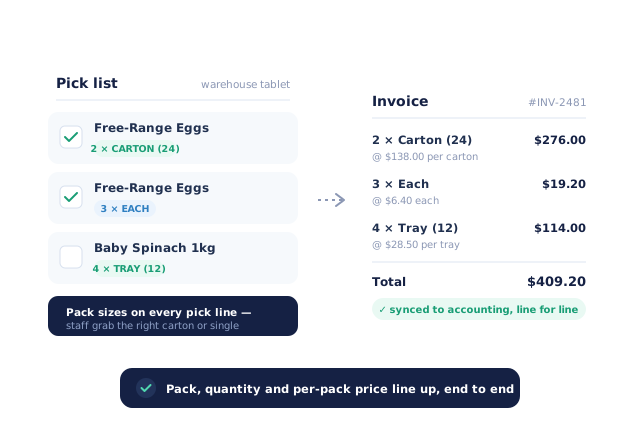
Flows through picking and invoicing
Pick lists show pack sizes so warehouse staff grab the right thing; invoices line up pack, quantity and per-pack price — and sync to your accounting system that way.
- More product lines purchased
- 24%
- Your always-on branded store and app put your full range in front of customers, so baskets grow.
- Less order-processing cost
- 95%
- AI order capture and auto-invoicing remove the manual keying between order and books.
- Fewer picking errors
- 80%
- Tablet pick & pack with FEFO lot and expiry tracking catches shorts and wrong items before they ship.
Real gains suppliers report after moving ordering, fulfilment and invoicing onto Open Pantry.
Pack Sizes Flow Through Picking And Your Books
Trusted by M&J Chickens
- $175m+
- Annual turnover
M&J Chickens use Open Pantry to move ordering out of calls and messages and into one digital workflow — giving customers a smooth ordering experience and giving the team fewer errors and less admin.
“Moving to a digital process has transformed our ordering process which is now faster through our own mobile apps.”

Why not duplicate products?
Separate "carton" products mean three stock counts that never reconcile, three prices to update on every cost change, and search results cluttered with near-identical lines. Units on a single product fix the root cause: one stock pool, one source of truth for price, one product for the customer to find.
Open Pantry for food suppliers in Australia
Australian food and beverage wholesalers use Open Pantry to take orders from restaurants, cafés and venues online, with every order flowing to picking, invoicing and accounting.
- Plans priced in
- AUD — see Australia pricing
- Accounting sync
- Xero, MYOB and QuickBooks Online
- Supplier directory
- 1,100+ Australian wholesale food & beverage suppliers
Can Australian food suppliers use Open Pantry?
Yes. Wholesalers and distributors in Australia use Open Pantry to take orders from restaurants, cafés and venues through their own branded ordering app and online store. Plans are priced in AUD, and orders and invoices sync with Xero, MYOB and QuickBooks Online.
Is there a free plan for suppliers in Australia?
Yes. The free plan lets you list products and receive unlimited orders. Paid plans add accounting, inventory and delivery tools, come with a free trial and are priced in AUD.
Questions Suppliers Ask About Selling In Units
How do I sell the same product by the carton and by the each without duplicate products?+
Can I set a different price per unit, or is the carton always units × each price?+
How is stock tracked across pack sizes?+
Can customers mix pack sizes in one order?+
What shows on the invoice?+
What’s the difference between a unit of measure and a product variant?+
If I change the base price, do carton and tray prices update automatically?+
Do customer price lists and promotions work with pack sizes?+
How do minimum order quantities work with pack sizes?+
Does pack-size pricing sync to Xero or MYOB correctly?+
What about products sold by weight, where actual weight varies?+
How long does it take to set up units on my catalogue?+
Works Even Better With
Customer Pricing & Promotions
Per-customer price lists and exceptions apply on top of your unit pricing.
Explore →Digital Pick & Pack
Pack sizes show on every pick line so warehouse staff grab the right carton or single.
Explore →Lot, Expiry & FEFO
Cartons and singles draw down the same lot pool correctly.
Explore →One Product. Every Pack Size. In Sync.
Join 600+ Australian suppliers running their ordering, fulfilment and invoicing on Open Pantry.
Setup done for you · Cancel anytime · Your data stays yours