
Catch Weight: Weigh It Once, Invoice What You Shipped
Open Pantry’s catch weight tools capture the real weight of every meat, seafood or produce line as it is picked — from a connected bench scale, the weight already on the supplier’s carton label, or a typed entry — and invoice the customer for that weight, not the ordered quantity. Each weight is checked against tolerance, logged, and can print a carton label on the spot.
- Read a bench scale straight into the picker, or scan the weight off the supplier’s GS1 label
- Tolerance checks with a reason on every override, and a weight log you can export
- Carton, product, shelf and pallet label templates, printed to PDF or a Zebra thermal printer
★★★★★ Trusted by 600+ suppliers across Australia



Every Weight Copied by Hand Is Margin at Risk

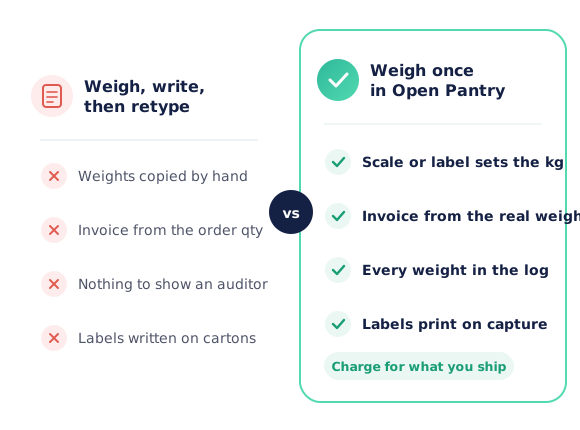
Weights written on a docket at the bench, then typed into the invoice at the office

Customers invoiced for the ordered kilos instead of what actually left the building

An overweight carton shipped without anyone noticing — or an underweight one queried at the door

Carton labels hand-written, and nothing to show an auditor when a scale was last checked
How Catch Weight Works in Open Pantry
Mark products as sold by weight
Set which products are catch weight, with an average weight and a tolerance if you want the check.
Weigh as you pick
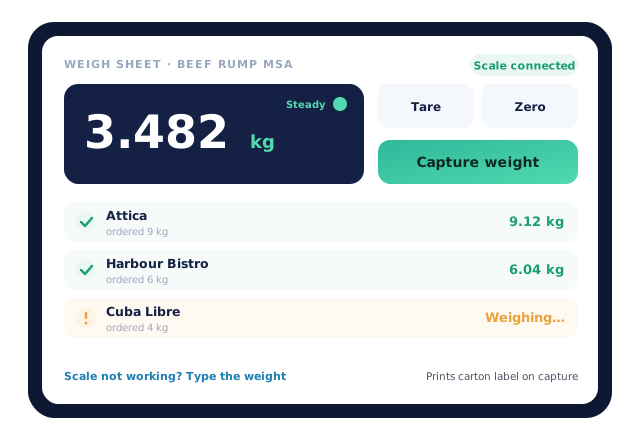
The weigh sheet steps through each customer on the card. Capture a steady reading from the scale, scan the supplier label, or type the weight.
Check and label
Weights outside tolerance are flagged before they are confirmed. A carton label can print the moment the weight is captured.
Invoice the real weight
The captured weight goes onto the invoice and the weight log, and flows to your accounting sync like any other line.
Free trial · Cancel anytime
A connected scale — or a typed weight, never a dead end
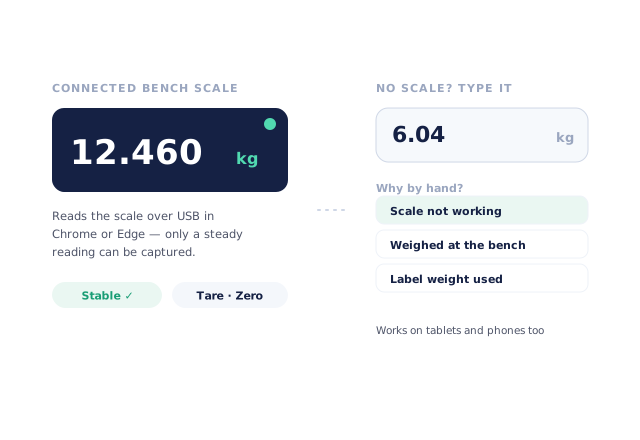
Plug a bench scale into a desktop running Chrome or Edge and the weigh sheet reads it live, with tare and zero where the scale supports them. Only a steady reading can be captured. On a tablet or phone, or when the scale is down, typing the weight is a first-class option — with a reason recorded so you can see why.
- Weight captured per customer, because each invoice needs its own
- Several scale stations supported
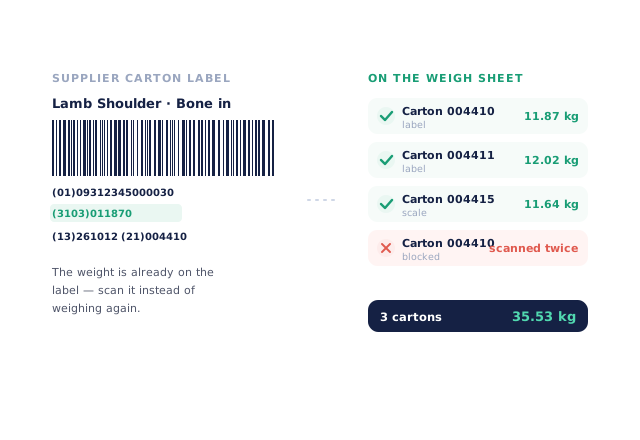
Scan the weight that’s already on the label
Supplier cartons often arrive with the net weight printed in the GS1 barcode. Scan it and the weight goes onto the weigh sheet without touching a scale. The same carton scanned twice is blocked, and an unreadable label falls back to the scale or a typed weight.
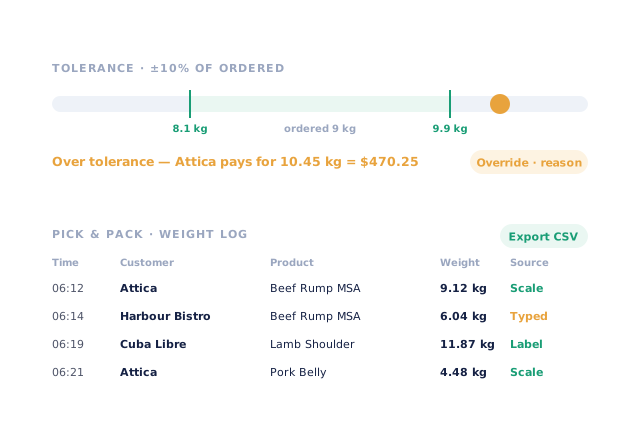
Tolerance checks and a weight log for every line
Set a tolerance per product and the weigh sheet shows whether each weight is within it — and what the customer will pay if it isn’t. Going over needs a reason. Every weight lands in the Weight log with the customer, product, source and time, ready to search or export to CSV.
- Scale, label or typed — the source is always recorded
- Edits to a captured weight are audited
Carton labels and a trade-verified scales register
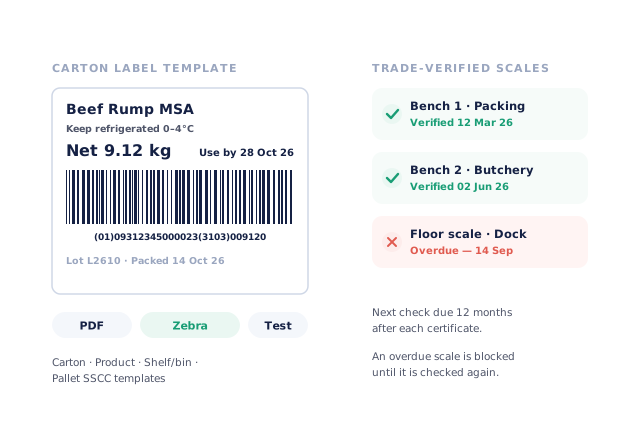
Build carton, product, shelf or bin and SSCC pallet label templates with the weight, use-by, lot, GS1 barcode and allergen details. Print to PDF on any printer, or straight to a Zebra thermal printer. Keep a register of your trade-verified scales with the next check due, and get a reminder before one runs over.
- Receive purchase orders by weight, by scanning supplier labels
- Test print from the template editor
- More product lines purchased
- 24%
- Your always-on branded store and app put your full range in front of customers, so baskets grow.
- Less order-processing cost
- 95%
- AI order capture and auto-invoicing remove the manual keying between order and books.
- Fewer picking errors
- 80%
- Tablet pick & pack with FEFO lot and expiry tracking catches shorts and wrong items before they ship.
Real gains suppliers report after moving ordering, fulfilment and invoicing onto Open Pantry.
Real Weights Flow Straight to the Invoice
Trusted by M&J Chickens
- $175m+
- Annual turnover
M&J Chickens use Open Pantry to move ordering out of calls and messages and into one digital workflow — giving customers a smooth ordering experience and giving the team fewer errors and less admin.
“Moving to a digital process has transformed our ordering process which is now faster through our own mobile apps.”

Why not weigh it and write it down?
Writing weights on a docket works until one is misread, skipped or typed into the wrong line — and then you are either giving product away or arguing over an invoice. Industry studies put manual data entry at 100–400 errors per 10,000 entries. Capturing the weight once, at the bench, means the invoice, the label and the log all carry the same number.
Open Pantry for food suppliers in Australia
Australian food and beverage wholesalers use Open Pantry to take orders from restaurants, cafés and venues online, with every order flowing to picking, invoicing and accounting.
- Plans priced in
- AUD — see Australia pricing
- Accounting sync
- Xero, MYOB and QuickBooks Online
- Supplier directory
- 1,100+ Australian wholesale food & beverage suppliers
Can Australian food suppliers use Open Pantry?
Yes. Wholesalers and distributors in Australia use Open Pantry to take orders from restaurants, cafés and venues through their own branded ordering app and online store. Plans are priced in AUD, and orders and invoices sync with Xero, MYOB and QuickBooks Online.
Is there a free plan for suppliers in Australia?
Yes. The free plan lets you list products and receive unlimited orders. Paid plans add accounting, inventory and delivery tools, come with a free trial and are priced in AUD.
Questions Suppliers Ask About Catch Weight and Scales
What is catch weight?+
Which scales work with Open Pantry?+
Can I use the weight printed on the supplier’s carton?+
How do tolerance checks work?+
Does the customer get invoiced for the actual weight?+
Can I print carton labels as I weigh?+
What label templates are included?+
What is the trade-verified scales register?+
Can I receive stock by weight?+
Is there a record of every weight?+
Which plan includes catch weight and labels?+
Works Even Better With
Digital Pick & Pack
Tablet picking with weigh sheets, scan-to-pick and pack checks.
Explore →Warehouse Barcode Scanning
One scanner for carton, pallet and bin labels across the whole warehouse.
Explore →Auto-Invoicing & Payments
Invoices built from what was actually shipped, sent the moment the delivery lands.
Explore →Charge for What You Ship. Start This Week.
Join 600+ Australian suppliers running their ordering, fulfilment and invoicing on Open Pantry.
Setup done for you · Cancel anytime · Your data stays yours