
EDI & Online Store Integrations: Every Channel Lands in One Order Queue
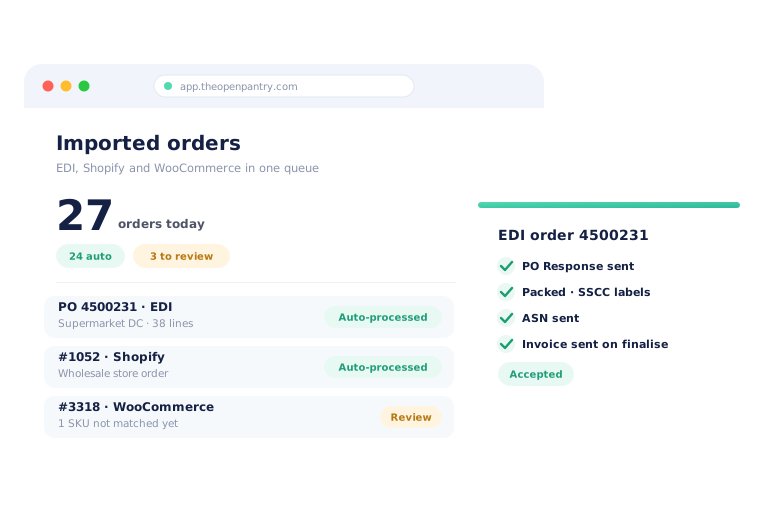
Open Pantry takes orders from supermarket EDI, Shopify and WooCommerce straight into the same order queue as the rest of your business. Purchase orders that match are processed automatically, new buyer codes and SKUs are confirmed once, and the PO response, ASN, SSCC labels and invoice go back out from the work you already do in picking and invoicing.
- Supermarket and large-buyer EDI purchase orders in, matched by buyer code
- Shopify and WooCommerce store orders imported as they are placed
- PO response, ASN with SSCC labels and invoice sent back automatically
★★★★★ Trusted by 600+ suppliers across Australia



Big buyers and online stores shouldn’t mean more re-keying

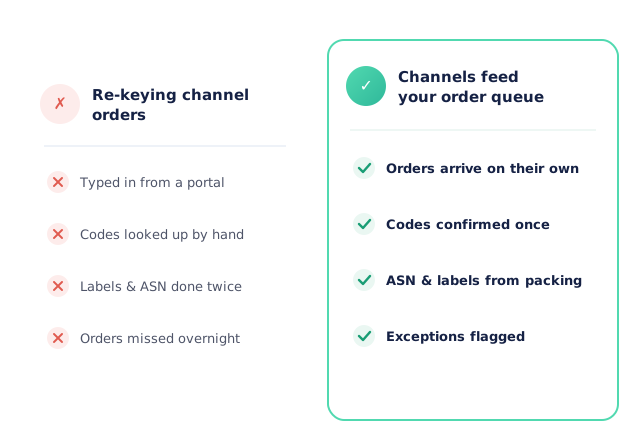
Purchase orders copied out of a retailer portal and typed in line by line

Buyer item codes looked up against your own codes every single time

Despatch advice and pallet labels prepared separately from the actual pack

Store orders checked twice, and one-off online buyers cluttering the customer list
Connect the Channel, Confirm Codes Once, Let It Run
Connect the channel
Set up an EDI trading partner, connect your Shopify store with your Shopify sign-in, or approve Open Pantry inside your WooCommerce admin. Channels can run in testing first.
Orders arrive in your queue
Purchase orders and store orders land in Imported Orders alongside your other channels, with the original document shown beside the order.
Matched orders process themselves
When every line and customer matches, the order becomes a normal Open Pantry order automatically. Anything new waits for a person to confirm once.
Documents go back out
For EDI, the PO response is sent on confirmation, the ASN and SSCC labels come from packing, and the invoice goes when the order is finalised.
Free trial · Cancel anytime
Supermarket purchase orders, matched by buyer code
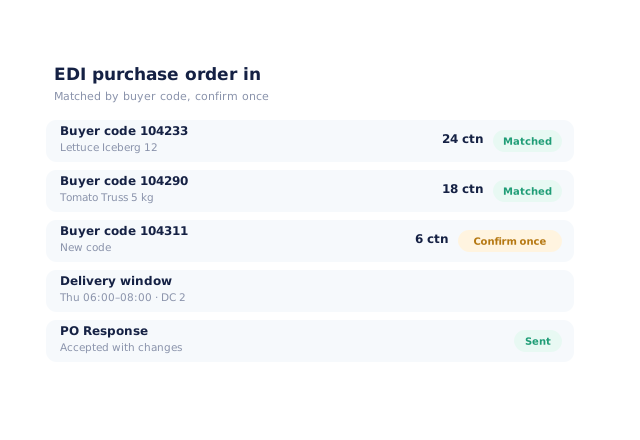
EDI purchase orders arrive with the buyer’s own item codes, quantities, delivery date and window. Open Pantry matches each buyer code to your product; the first time a new code appears, someone confirms it once and every future order with that code matches on its own. Confirm or reject the order and the PO response — accepted, accepted with changes, or rejected — goes back to the buyer.
- Purchase orders with delivery date and delivery window
- Buyer codes matched to your products and learned after one confirmation
- Fully matched orders processed automatically
- PO response sent as accepted, accepted with changes or rejected
ASN and SSCC labels straight from packing
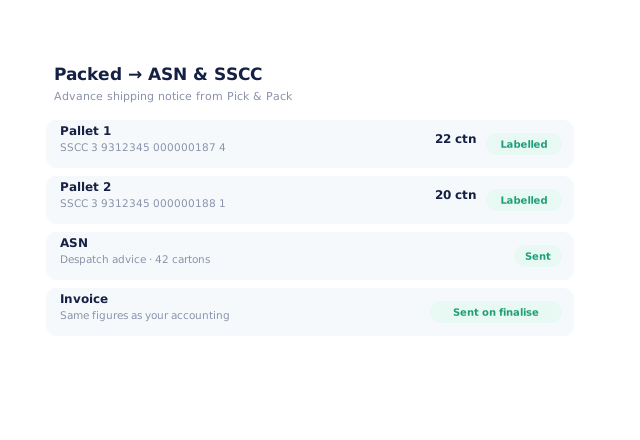
When the order is packed in Pick & Pack, each box or pallet is given an SSCC and the advance shipping notice is built from what was actually packed. When the order is finalised, the EDI invoice is built from the same figures as the invoice your accounting system receives, so the two never disagree.
- An SSCC allocated per box or pallet from your packing
- ASN (despatch advice) sent from what was really packed
- EDI invoice sent on finalise, matching your accounting invoice
- Failed sends are retried, never duplicated
Shopify and WooCommerce orders, imported as they’re placed
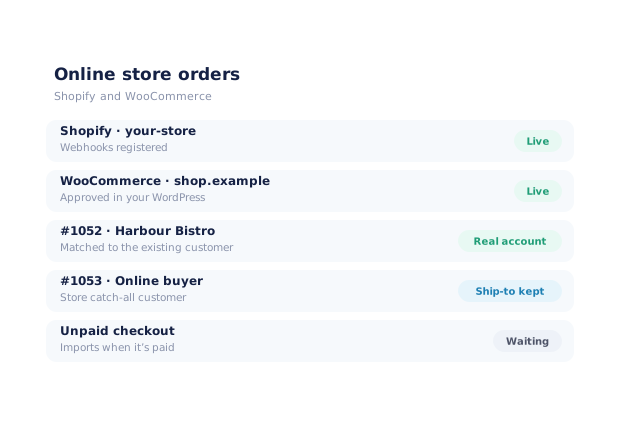
Connect a Shopify store with your Shopify sign-in, or approve Open Pantry inside your own WordPress admin for WooCommerce — no keys to copy. Orders import as they are placed. Buyers who are already your customers get their real account and pricing; everyone else lands on the store’s catch-all customer, with their own delivery address kept for routing. Unpaid checkouts wait until they are paid.
- Shopify connected by sign-in; WooCommerce approved in your WordPress admin
- Existing customers matched to their real account
- Other buyers on one catch-all customer, with their ship-to address kept
- Products matched by SKU; unpaid checkouts import once paid
One review queue for the exceptions
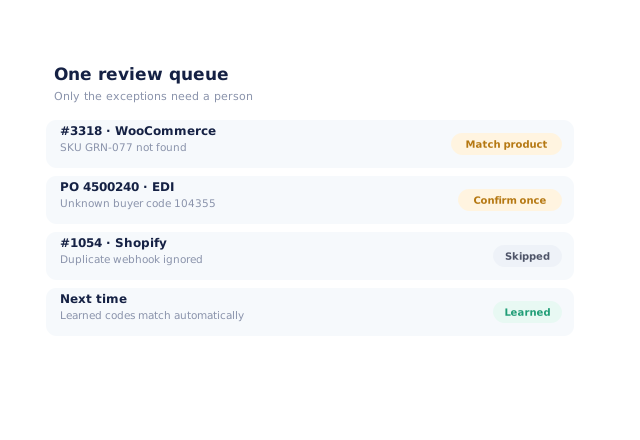
Everything that does not match — a new buyer code, an unknown SKU, a customer that needs confirming — waits in the same Imported Orders review queue your team already uses for emailed and AI-captured orders. Duplicates are ignored automatically, and every confirmation teaches the next order.
- EDI, Shopify, WooCommerce and AI-captured orders in one queue
- Only unmatched lines and customers need a person
- Duplicate purchase orders and webhooks skipped
- Confirmed codes match automatically next time
- More product lines purchased
- 24%
- Your always-on branded store and app put your full range in front of customers, so baskets grow.
- Less order-processing cost
- 95%
- AI order capture and auto-invoicing remove the manual keying between order and books.
- Fewer picking errors
- 80%
- Tablet pick & pack with FEFO lot and expiry tracking catches shorts and wrong items before they ship.
Real gains suppliers report after moving ordering, fulfilment and invoicing onto Open Pantry.
Channel Orders Flow Through to Picking, Delivery and Your Books
Trusted by M&J Chickens
- $175m+
- Annual turnover
M&J Chickens use Open Pantry to move ordering out of calls and messages and into one digital workflow — giving customers a smooth ordering experience and giving the team fewer errors and less admin.
“With Open Pantry, we launched our own fully branded ordering app — it’s helped us protect our customer base, move to digital ordering, and deliver a much better experience to our venues.”

Why not just key the orders in?
Because every keyed order is a chance to get a code, a quantity or a delivery window wrong — and big buyers notice. Re-keying also splits the work: the order is typed in one place, the despatch advice and pallet labels made in another, the invoice raised in a third. When channels feed straight into your order queue, codes are confirmed once, documents come from the pack and the invoice, and your team only touches the orders that genuinely need a decision.
Open Pantry for food suppliers in Australia
Australian food and beverage wholesalers use Open Pantry to take orders from restaurants, cafés and venues online, with every order flowing to picking, invoicing and accounting.
- Plans priced in
- AUD — see Australia pricing
- Accounting sync
- Xero, MYOB and QuickBooks Online
- Supplier directory
- 1,100+ Australian wholesale food & beverage suppliers
Can Australian food suppliers use Open Pantry?
Yes. Wholesalers and distributors in Australia use Open Pantry to take orders from restaurants, cafés and venues through their own branded ordering app and online store. Plans are priced in AUD, and orders and invoices sync with Xero, MYOB and QuickBooks Online.
Is there a free plan for suppliers in Australia?
Yes. The free plan lets you list products and receive unlimited orders. Paid plans add accounting, inventory and delivery tools, come with a free trial and are priced in AUD.
Questions Suppliers Ask About EDI and Online Store Integrations
Can Open Pantry take EDI orders from supermarkets?+
Which EDI documents does Open Pantry send back?+
How does Open Pantry connect to a trading partner?+
Do I have to map every buyer item code up front?+
How are SSCC labels created?+
Can Open Pantry import my Shopify orders?+
Does it work with WooCommerce?+
Will online buyers clutter my customer list?+
What happens to orders that don’t match?+
Which plan includes EDI, Shopify and WooCommerce?+
Every Channel, One Order Queue.
Join 600+ Australian suppliers running their ordering, fulfilment and invoicing on Open Pantry.
Setup done for you · Cancel anytime · Your data stays yours