

How to Reduce Order Errors Without Hiring More Staff

Order errors are rarely “small.” One wrong item can set off a domino effect—repicks in the warehouse, frantic calls from chefs, driver delays, invoice disputes, and credits that eat into margin. And the frustrating part? Most suppliers don’t have an “attention to detail” problem. They have a workflow problem.
This article breaks down where order errors really come from (spoiler: it’s usually manual entry and scattered channels), what they actually cost, and the practical changes suppliers can make to reduce mistakes fast—without hiring more staff.
Why Order Errors Happen in the First Place?
Suppliers don’t make mistakes because they’re careless. Mistakes happen because the workflow is fragile. Most errors occur in one of these areas:
1. Multiple Order Channels
Orders arrive through email, text, WhatsApp, voicemail, online forms and PDF menus. When staff are juggling different channels, it becomes easy to miss a message or misinterpret instructions.
2. Manual Order Entry
Every time someone retypes an order, the error rate increases. Even a single mistyped product, pack size or quantity can cause problems.
3. Inconsistent Product Naming
Chefs often use their own terms like “box of breast” or “bucket of wings.” Staff must interpret what this means, and interpretation opens the door for mistakes.
4. Out-of-date Pricing or Catalogues
If a chef orders something that’s discontinued or priced incorrectly, fulfilment becomes guesswork.
How to Transition Restaurant Customers to Digital Ordering
5. Last-minute Changes
Restaurant kitchens are chaotic. Chefs often update or adjust orders after the first message. When changes aren’t captured cleanly, the wrong version gets picked.
6. Disconnected Warehouse Processes
If the warehouse doesn’t see updates instantly, they pick from old information — which results in shortages or incorrect items.
These issues are structural, not personal. Fix the structure and error rates drop dramatically.

The True Cost of Order Errors
Order errors cost far more than the price of the product. One wrong item doesn’t just create waste — it creates extra work across your entire operation.
Suppliers lose money through:
- Incorrect stock picked (and the wasted product that follows)
- Emergency repicks that interrupt the warehouse flow
- Wasted perishables that can’t be resold
- Driver delays or redeliveries that blow out runs and fuel costs
- Customer complaints that consume time and attention
- Loss of trust that quietly reduces repeat orders over time
- Credits, chargebacks, and invoice disputes that hit margin directly
- Slower invoicing and slower payment that hurts cash flow
- Admin time spent fixing issues instead of serving customers or growing accounts
Many suppliers underestimate the impact until they run the numbers: even two small errors per day across 250 working days adds up quickly — and can easily cost tens of thousands a year once you include labour, wastage, credits, and redelivery time..
The Key to Reducing Errors: Replace Manual Steps with Controlled Digital Processes
Suppliers fix accuracy not by hiring more people, but by removing the conditions that allow mistakes.
Below are the practical steps that reduce errors immediately.
1. Centralise All Orders in One Place
When orders come from multiple channels, the chance of missing or misunderstanding something skyrockets.
What to do:
Use a system that consolidates all orders into one digital platform. Even email and text orders can be converted into structured orders using manual order transformation tools like those in Open Pantry.
Why it works:
• No lost messages
• No manual copying
• No confusion about which message is correct
One source of truth eliminates most early-stage errors.
2. Give Customers Their Own Personalised Catalogue
Many errors start because customers order the wrong product or an outdated version of it.
What to do:
Show each customer only:
• The products they’re approved to buy
• The correct pricing
• The correct pack sizes
• Their delivery days
• Their minimum order total
Open Pantry’s customer visibility and pricing engines do this automatically.
Why it works:
• Fewer wrong products ordered
• No disputes
• More accurate picking
When chefs see exactly what they’re meant to order, accuracy improves instantly.
The Supplier’s Guide to Getting Paid Faster with Automated Invoicing

3. Automate the Picking Workflow
Most fulfilment errors happen in the warehouse, especially when staff rely on printed sheets, scribbled notes or memory.
What to do:
Use digital pick lists that update automatically as orders change. Group items by:
• Delivery run
• Warehouse zone
• Category
• Customer
Pickers can mark substitutions or shortages digitally.
Why it works:
• Fewer mispicks
• No outdated picking sheets
• Clear guidance for staff
• Real-time revision for last-minute changes
Automation keeps the warehouse aligned with sales and customer service.
4. Record Substitutions and Shortages Digitally
Verbal communication is the biggest source of misunderstandings.
What to do:
Pickers and drivers should record:
• What was substituted
• Why it was substituted
• What the customer actually received
• Any notes the customer left at delivery
Systems like Open Pantry sync this to invoicing automatically.
Why it works:
• Invoices always match deliveries
• No arguments over credits
• Customers trust the supplier more
5. Automate Invoicing From Fulfilment
Manual invoice creation introduces errors and delays.
What to do:
Generate invoices automatically once proof-of-delivery is recorded.
Why it works:
• No data entry mistakes
• Faster invoicing
• Fewer disputes
• Better cash flow
When picking and delivery are accurate, invoicing becomes accurate too.
How Suppliers Can Use Data to Increase Sales Without Hiring More Reps
6. Use Weekly Reporting to Catch Recurring Issues Early
Data makes error prevention proactive, not reactive.
Smart metrics to watch:
• Top 10 customers with frequent adjustments
• Product lines with high substitution rates
• Delivery runs with repeated issues
• Items frequently ordered incorrectly
Platforms like Open Pantry provide weekly insights that highlight trends before they become problems.
What the New Workflow Looks Like in Practice
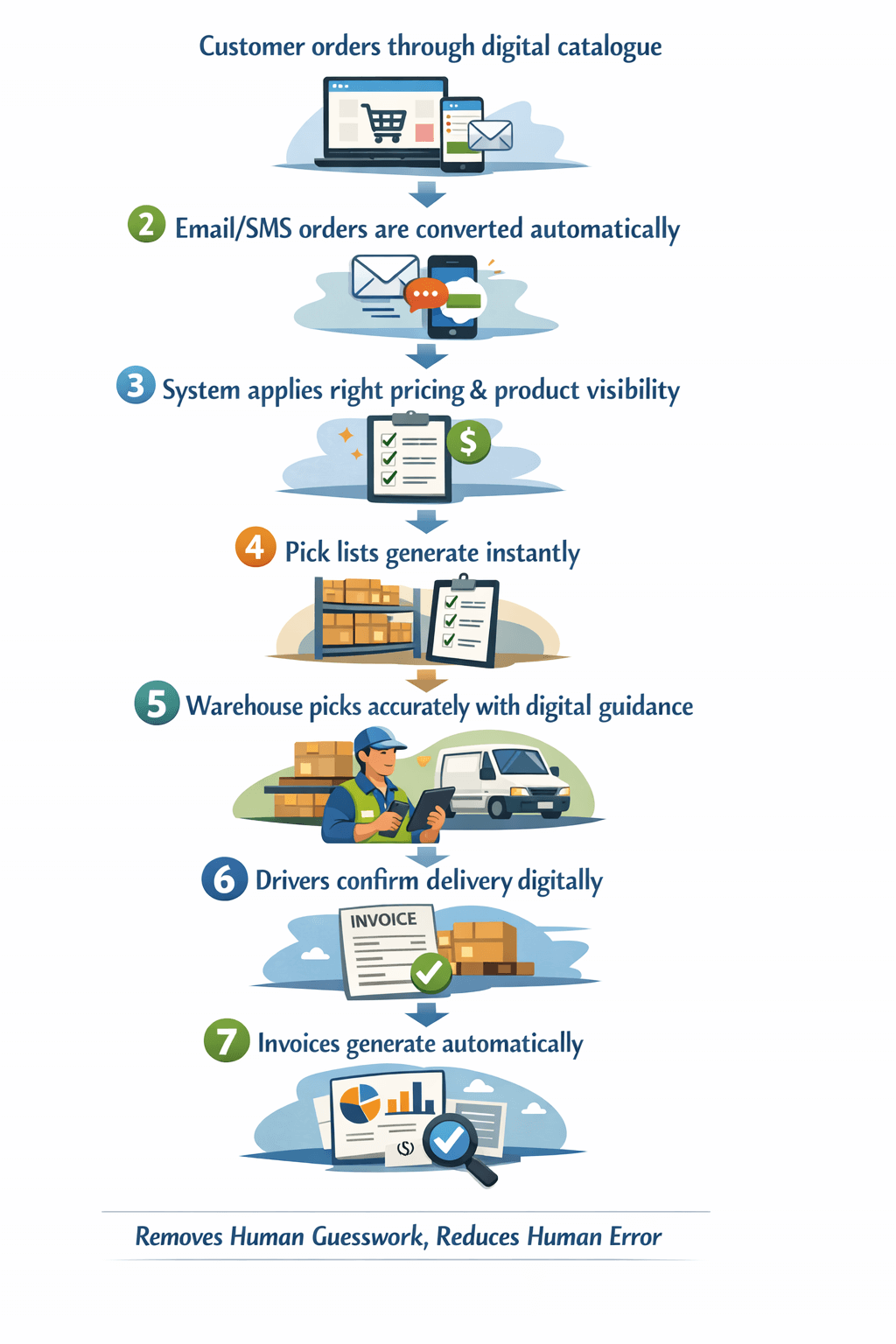
How Much is One Order Error Really Costing You?
It’s not just the wrong carton — it’s repicks, driver delays, credits, invoice disputes, and the quiet churn that follows.
Suppliers who reduce errors earn stronger loyalty, smoother operations, fewer disputes, and better margins.
You don’t need more staff — you need better systems.
Explore Open Pantry today!