


Back
Carcass breakdown, yields and cutting tests
Quick answer: With Carcass breakdown on (Warehouse features, Enterprise), you break carcasses into cuts in Inventory → Production → Breakdown. Each cut enters stock at a fair share of the carcass cost, and the Yields tab compares what you got against what you expected.
Set up a breakdown template
- Under Production → Templates, create a breakdown template: species, carcass product, weight band and shelf life.
- List the cuts with their expected yield %, plus waste and by-products. The template must add up to 100%.
- Or click Start from a published template (lamb or a beef side) and replace it with your own cutting test later.
Run a breakdown
- Click + New run → Breakdown, then scan the carcass tickets.
- Weigh each cut (a connected scale only captures a steady reading) and print carton labels.
- Record waste. Invisible loss is worked out for you and flagged if it’s high.
- Choose how to split the cost: Value (each cut carries the same margin at list price), Weight (every kg costs the same) or Manual. The table shows cost per kg and margin per cut.
- Review and click Complete run.
Yields and cutting tests
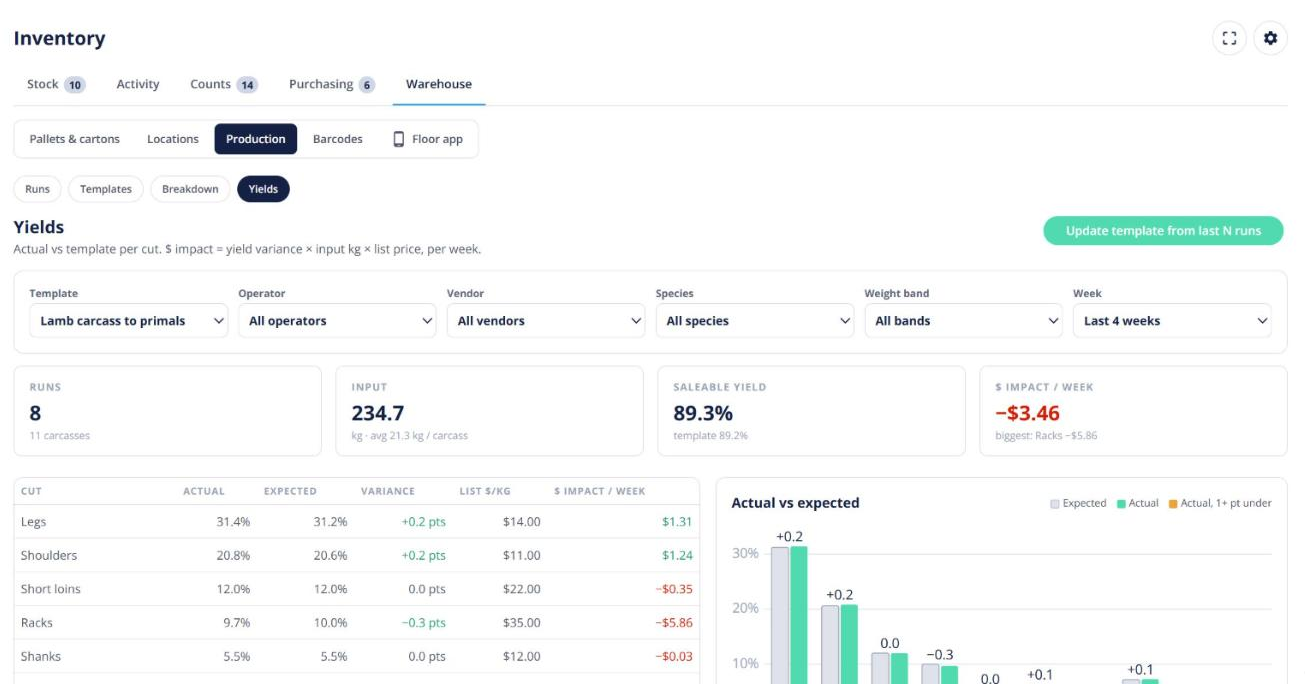
The Yields tab filters by template, operator, vendor and week, and charts actual against expected yield. To update a template from real results, open the cutting-test option, choose the last 3, 5 or 10 runs and approve.
Planning: the Order list suggests how many carcasses to break down to cover open orders. Trace follows a carcass body number through to the cuts and the customers who received them.