


Back
Catch weight: weighing items on a connected scale while picking
Quick answer: For products you sell by the unit but invoice by the kilo, mark the product Sold by weight. The picker then weighs each item, and the order is invoiced on the weight actually delivered. With Use a connected weighing scale on, the weight is read straight from a cabled scale instead of being typed.
Set it up
- On the product form, turn on Sold by weight (you can set a tolerance).
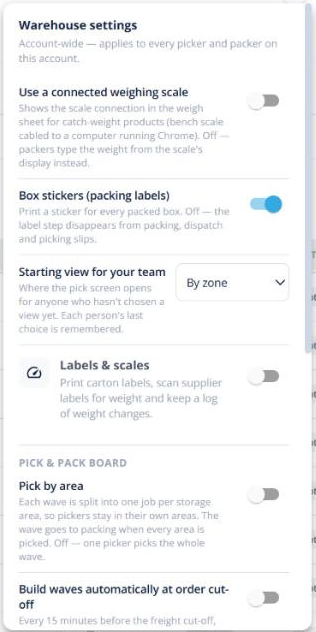
- In Pick & Pack → ⚙ Warehouse settings, turn on Use a connected weighing scale if you have a USB or serial scale.
- On the picker, open the weigh sheet on a weighed line and click Connect scale. Chrome or Edge on a computer is needed for a cabled scale.
Picking a weighed line
- The confirm circle becomes a Weigh button. Each capture adds a carton row with its kg.
- The total reads “Ordered: 12 kg · Delivered: 11.6 kg” and fills in as you weigh.
- No scale? Type the weight instead — it’s marked as typed.
The delivered weight flows to the invoice, so the customer pays for what they received.
More: label printing, a weight log and trade-verified scales are part of Labels & scales.