


Online credit applications: taking new trade accounts without the PDF form
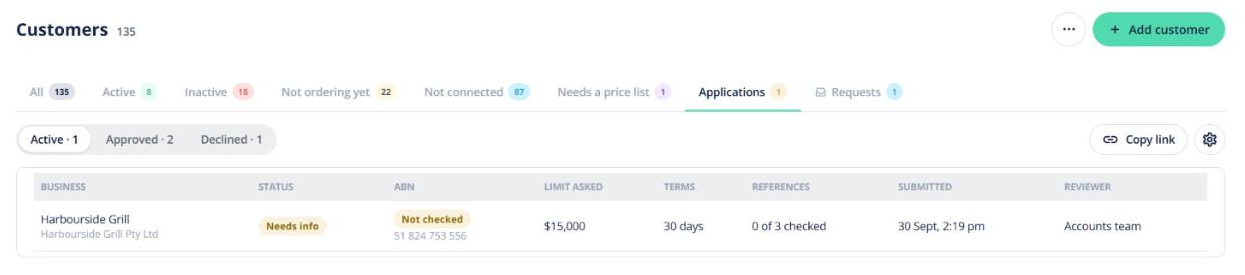
Quick answer: Switch on Accept online credit applications and you get a link and a QR code for your own trade account application. New customers fill it in on their phone and sign it. You review it in Customers → Applications, and Approve creates the customer with their credit limit, terms and price list. Available on all paid plans.
Set up your form
- Go to My Account → Credit Application, or Customers → ⚙ Settings → Credit applications.
- Turn it on and click Edit template. Choose which sections to ask for (trading details, bank, 2 or 3 references, sole-trader licence), whether directors must give a guarantee, which payment terms to offer, and whether to use Open Pantry’s template terms or upload your own PDF.
- Choose who reviews applications. Only people with the right permission see dates of birth and licence numbers.
- Copy the share link or download the QR code. You can also show it on your portal login page.
Send it to a specific customer
On My Account → Credit Application, under Send to a customer, enter the business name, contact and email, add a note if you like, and click Send application. The Sent list shows where each one is up to, with Resend and Review.
What the customer does
Five short steps on a phone: business (the ABN is checked), people, trading, terms and consent, then sign by typing their name and entering a code we email them. Other directors can sign on their own phones. They can save and finish later, and they get the signed PDF by email.
Reviewing and approving
- Open Customers → Applications (New, In review, Needs info, Approved, Declined).
- Check the ABN and GST status, references (add call notes and tick Checked) and signatures.
- Click Approve and set the credit limit, terms, freight rule, run, price list and rep. The customer is created and sent their login invite.
Use Needs info to send the applicant back into their application, or Decline. You can also keep a PPSR registration record against the customer.