


Production runs, repacking and kits
Quick answer: With Production on (Warehouse features, Enterprise), Inventory → Production lets you turn ingredients or bulk stock into finished products. Each run uses up its inputs and puts the outputs into stock at a worked-out cost: inputs plus packaging plus labour.
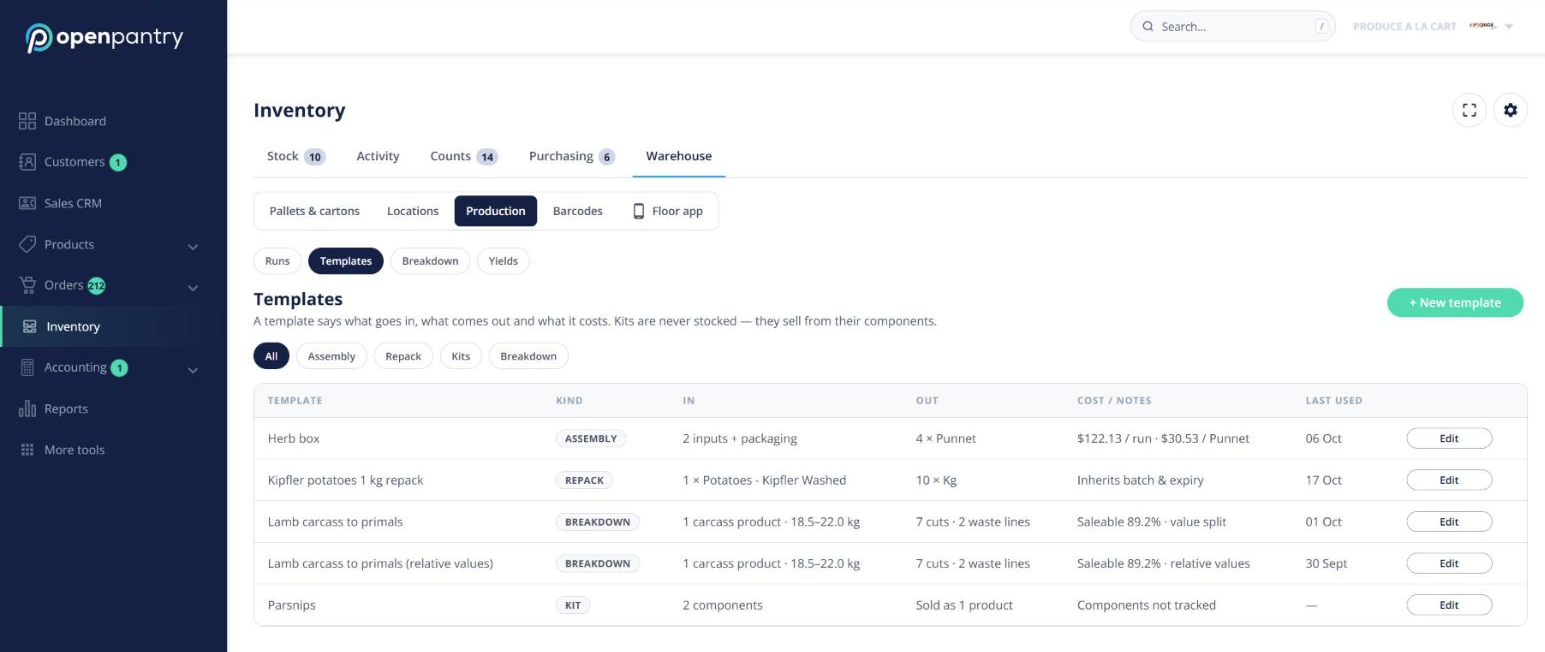
Templates
Under Production → Templates, set up an Assembly (several inputs make one product) or a Repack (a bulk product split into smaller packs). The editor shows the live cost per run.
Running a batch
- Click + New run and pick the template.
- On the run screen (built for a tablet), scan or enter what you used and how many you made, plus any give-away or loss.
- Set the batch and use-by, weigh and label outputs if needed, then click Complete.
Movement history shows these as Produced and Used in production. The Floor app has a Produce tile.
Kits
In Units & pricing, tick This is a kit and add the components. A kit’s availability is set by its scarcest component, and the picker shows the components under the kit line.
What to make
Purchase orders → Order list shows what’s needed, what’s in stock, on order and short. Click Make to create a run for the shortfall.
Note: production costs change your stock value inside Open Pantry. Journals are not posted to your accounting software.